유튜브 "개발자 유미"님 강의를 듣고 정리한 내용입니다.
세션 사용자 정보 확인
앞서 DaoAuthenticationProvider가 인증을 완료한 후, 최종적으로 반환된 UsernamePasswordAuthenticationToken가 authentication Filter에 의하여 SecurityContextHolder에 set 되었었다.
이 SecurityContextHolder로부터 세션 사용자 정보를 확인할 수 있다.
SecurityContextHolder
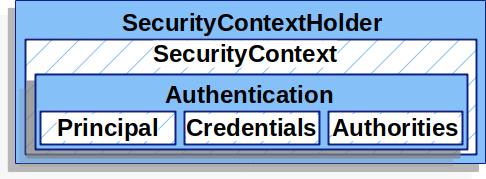
SecurityContextHolder에는 인증된 사용자의 수만큼 생성된(0개 이상) SecurityContext가 담긴다.
SecurityContext는 필터 체인 내부의 필터 간에 정보를 공유하기 위해서 존재하며, SecurityContext 내부에는 인증된 사용자의 Authentication(인증정보)가 담기게 된다.
SecurityContextHolder는 기본적으로 하나의 Thread 안에서 공유될 수 있도록 ThreadLocal로 관리된다.
Authentication
Authentication 내부에는 다음과 같은 정보들이 담긴다.
- Principal
사용자에 대한 정보. 객체 타입(주로 UserDetails 객체) - Credentials
증명(비밀번호, 토큰) - Authorities
사용자의 권한(Role) 목록
SecurityContext 얻기
인증된 사용자의 인증 정보를 얻기 위해서는 인증 정보가 담겨진 SecurityContext를 얻어야 한다.
이는 SecurityContextHolder로부터 얻을 수 있다.
@Controller
public class MainController {
    @GetMapping("/")
    public String mainP(Model model) {
        String id = SecurityContextHolder.getContext().getAuthentication().getName();
        Collection<? extends GrantedAuthority> authorities = SecurityContextHolder.getContext()
                .getAuthentication()
                .getAuthorities();
        Iterator<? extends GrantedAuthority> iter = authorities.iterator();
        GrantedAuthority auth = iter.next();
        String role = auth.getAuthority();

        model.addAttribute("id", id);
        model.addAttribute("role", role);

        return "main";
    }
}
위와 같이 SecurityContextHolder.getContext() 메서드를 사용해 SecurityContext를 얻는다. 그리고 SecurityContext로부터 getAuthentication() 메서드로 인증 정보를 가져온다.
SecurityContextHolder는 내부 메서드들이 static 타입이므로, 전역에서 접근이 가능하다.
Authentication에서 getName() 메서드로 principal의 이름을 바로 가져올 수 있다.
getAuthorities() 메서드로는 권한(Role)들을 가져올 수 있다.
세션 설정
세션 소멸 시간 설정
applications.properties(혹은 yml)로부터 세션 소멸 시간을 설정할 수 있다.
default는 1800s이다.
server:
  servlet:
    session:
timeout: 90m- m : 분 단위
- s : 초 단위
다중 로그인 설정
SecurityConfiguration에서 SecurityFilterChain을 빈으로 등록할 때, 세션과 관련된 설정을 할 수 있다.
	// 다중 로그인 설정
    http
        .sessionManagement((auth) -> auth
        .maximumSessions(1)
.maxSessionsPreventsLogin(true));- maximumSessions(정수) : 하나의 아이디에 대한 다중 로그인 허용 개수
ex) 여러 대의 기기에서 같은 아이디로 접속하는 경우 - maximumSessionPreventsLogin(불린) : 다중 로그인 개수를 초과했을 경우 처리 방법
- true : 초과 시 새로운 로그인 차단
- false : 초과 시 기존 세션 하나 삭제
세션 고정 보호
로그인 전/후로 동일한 세션 혹은 동일한 세션 아이디를 사용하는 것은 세션 고정 공격의 취약점이 된다.
세션 고정 공격
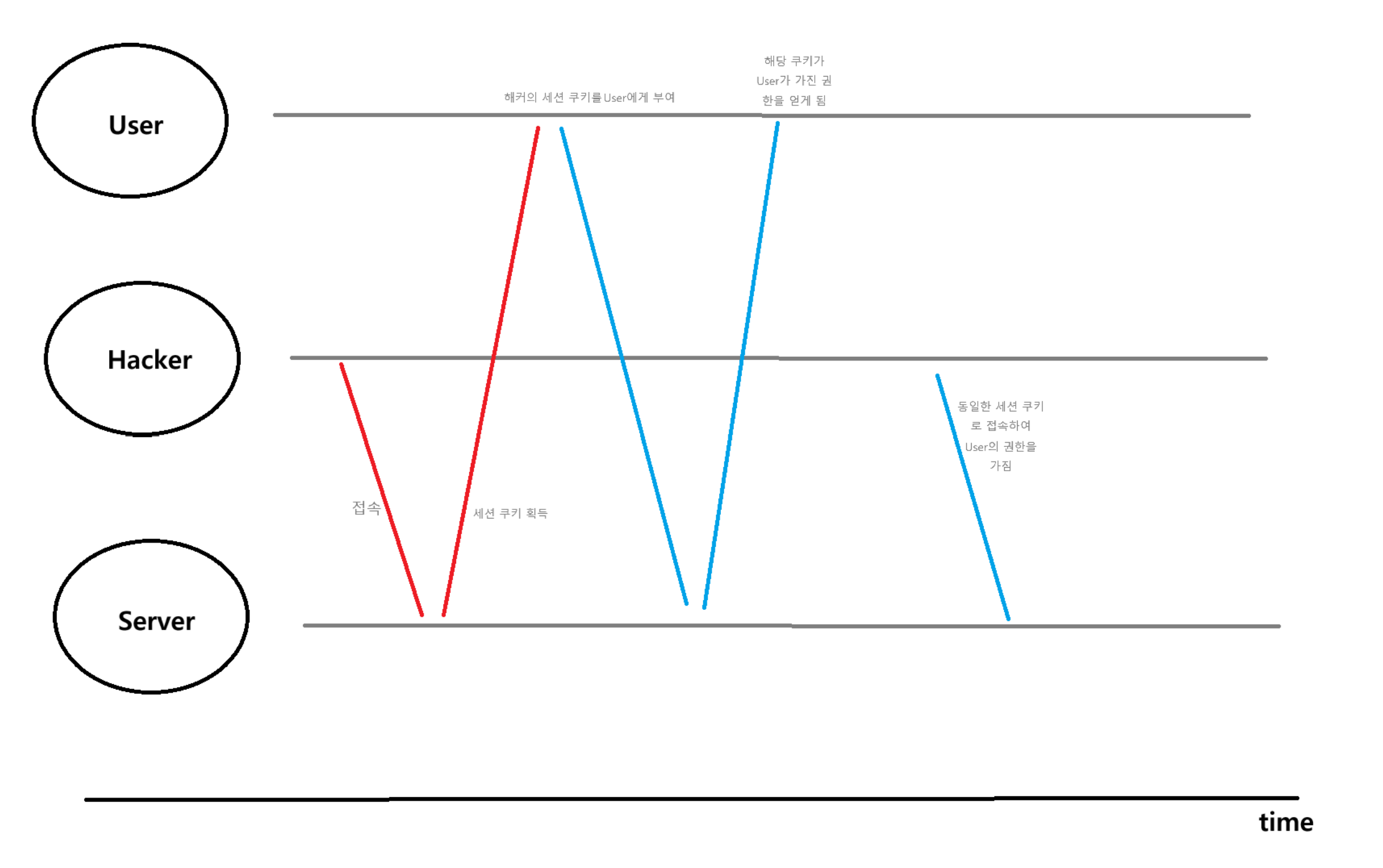
- 해커가 자신이 얻은 세션 아이디를 쿠키에 넣어 사용자에게 부여한다.
- 사용자는 해커의 세션 아이디를 쿠키로 가진 상태로 서버에 로그인 한다.(권한 획득)
- 해커는 자신의 세션 아이디로 획득한 사용자의 권한을 통해 사용자를 사칭해 악의적으로 이용한다.
로그인 시 세션을 새로 생성하거나, 동일한 세션에 대해서 id를 변경하도록 하여 세션 고정 공격으로부터 보호할 수 있다.
SecurityConfiguration에서 SecurityFilterChain을 빈으로 등록할 때, 세션과 관련된 설정을 할 수 있다.
  // 세션 고정 보호
   http
        .sessionManagement((auth)-> auth
.sessionFixation().changeSessionId());- sessionManagement().sessionFixation().none() : 로그인 시 세션 정보 변경 안함
- sessionManagement().sessionFixation().newSession() : 로그인 시 세션 새로 생성
- sessionManagement().sessionFixation().changeSessionId() : 로그인 시 동일한 세션에 대한 id 변경