html 문서에 스타일 적용하기
1) 내부 스타일 시트 (style 태그안에 작성)
2) 외부 스타일 시트 (css파일을 link 태그로 불러오기) <link href="style.css">
3) 인라인 스타일 (태그 안에 style 속성을 작성)
폰트: 구글 웹 폰트
https://fonts.google.com/?subset=korean
에서 원하는 폰트를 찾은 후, +버튼을 눌러 사용할 폰트에 추가

link 혹은 import를 복사하여
link일 경우<head></head> 사이, import일 경우 <style></style>사이에 입력
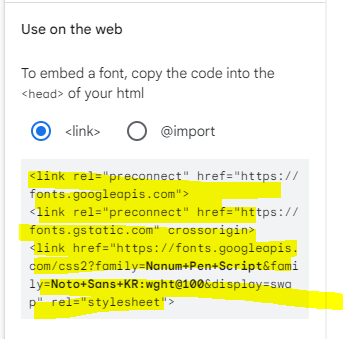
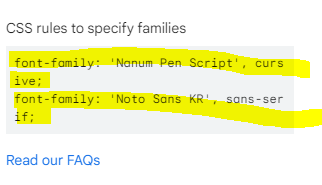
<style></style> 혹은 css에 font-family를 지정하고 싶은 곳에 CSS rules to specify families를 입력한다.
폰트: 눈누
https://noonnu.cc/
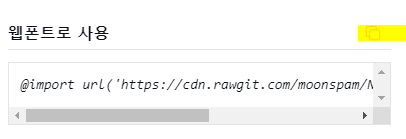
import를 복사하여 <style></style>사이에 입력 한 후
'https ://cdn.rawgit.com/moonspam/이 글자/master/nanumsquare.css'
의 이 글자를 font-family:'이 글자'로 지정해주면 적용된다.
아이콘: W3Schools
https://www.w3schools.com/icons/icons_reference.asp
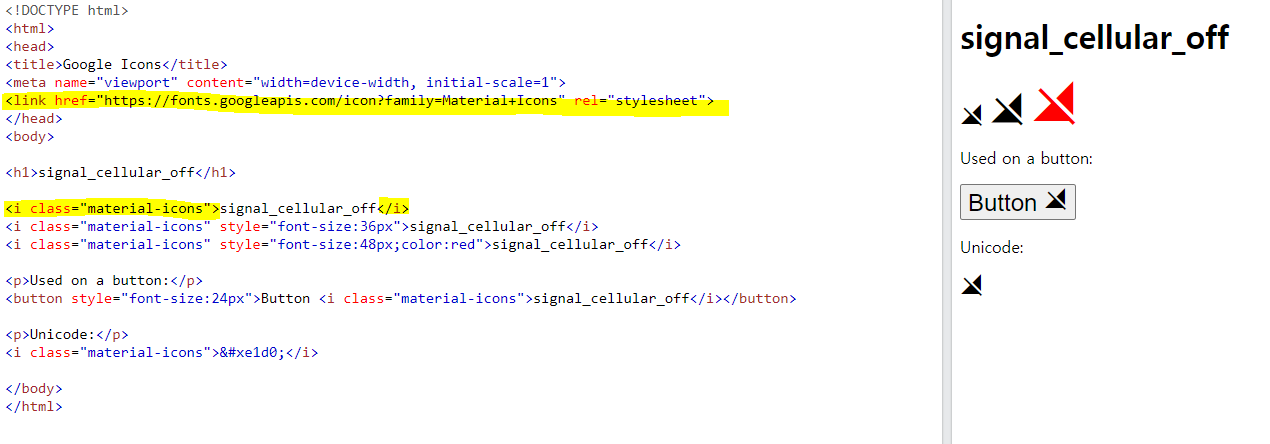
원하는 아이콘을 찾아 link를 긁어, <head></head> 사이에 입력한다.
html에 <i class=''> 글자 </i>를 입력한다.
글자처럼 취급되므로 font-size 및 color 로 사이즈 및 색상 변경이 가능하다.

sumin0gig