
docker-compose.yml 구성
version: "3"

services:
    nginxproxy:
        image: nginx:1.18.0
        ports:
            - "80:80" # 변경
        restart: always
        volumes:
            - "./nginx/nginx.conf:/etc/nginx/nginx.conf"

    nginx:
        depends_on:
            - nginxproxy
        image: nginx:1.18.0
        restart: always

    apache:
        depends_on:
            - nginxproxy
        image: httpd:2.4.46
        restart: always
nginxproxy의 nginx.conf
user nginx;
worker_processes  auto;

error_log  /var/log/nginx/error.log warn;
pid        /var/run/nginx.pid;

events {
    worker_connections 1024;
}

http {
    include       /etc/nginx/mime.types;
    default_type  application/octet-stream;
    log_format  main  '$remote_addr - $remote_user [$time_local] "$request" '
                      '$status $body_bytes_sent "$http_referer" '
                      '"$http_user_agent" "$http_x_forwarded_for"';
    access_log  /var/log/nginx/access.log  main;
    sendfile on;
    keepalive_timeout 65;

    upstream docker-nginx {
        server nginx:80;
    }

    upstream docker-apache {
        server apache:80;
    }

    server {
        listen 80;

        location /blog/ {
            proxy_pass         http://docker-nginx;
            proxy_redirect     off;
            proxy_set_header   Host $host;
            proxy_set_header   X-Real-IP $remote_addr;
            proxy_set_header   X-Forwarded-For $proxy_add_x_forwarded_for;
            proxy_set_header   X-Forwarded-Host $server_name;
        }

        location /community/ {
            proxy_pass         http://docker-apache;
            proxy_redirect     off;
            proxy_set_header   Host $host;
            proxy_set_header   X-Real-IP $remote_addr;
            proxy_set_header   X-Forwarded-For $proxy_add_x_forwarded_for;
            proxy_set_header   X-Forwarded-Host $server_name;
        }
    }

}-
"/blog/" 경로로 들어오는 요청을 처리한다. 여기서는 "docker-nginx" 업스트림 서버로 프록시한다.
-
"/community/" 경로로 들어오는 요청을 처리한다. 여기서는 "docker-apache" 업스트림 서버로 프록시한다.
nginx의 nginx.conf
cf. 먼저 해당 nginx 컨테이너 실행 쉘을 실시킨다.
docker exec -it 04_nginx_proxy_path-nginx-1 /bin/bash
user  nginx;
worker_processes  1;

error_log  /var/log/nginx/error.log warn;

pid        /var/run/nginx.pid;


events {
    worker_connections  1024;
}


http {
    include       /etc/nginx/mime.types;

    default_type  application/octet-stream;

    log_format  main  '$remote_addr - $remote_user [$time_local] "$request" '
                      '$status $body_bytes_sent "$http_referer" '
                      '"$http_user_agent" "$http_x_forwarded_for"';

    access_log  /var/log/nginx/access.log  main;

    sendfile        on;
    #tcp_nopush     on;

    keepalive_timeout  65;

    #gzip  on;

    include /etc/nginx/conf.d/*.conf
}
conf.d/default.conf
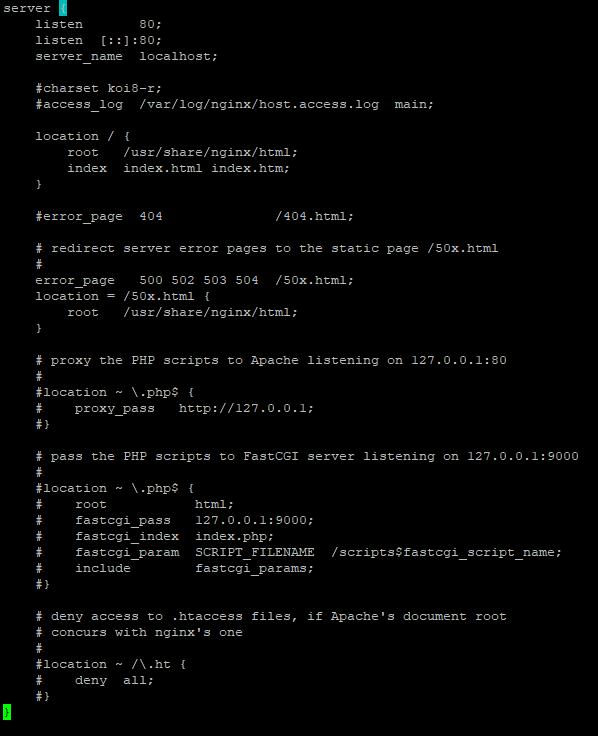
/usr/share/nginx/html/blog/test.html 작성
NGINX TEST- http:// [자신의 서버 IP 주소] /blog/test.html 접속 시 test.html 파일이 열리고 해당 문서의 내용인 NGINX TEST 문구가 나타난다.
apache의 httpd.conf
~ 생략 ~

ServerRoot "/usr/local/apache2"

~ 생략 ~
-
Apache의 루트 디렉토리가 "/usr/local/apache2"임을 확인한다.
-
해당 아파치 서버 접속 시 /usr/local/apache2/htdocs/index.html 파일이 기본으로 열리게끔 설정되어 있다.
/usr/local/apache2/htdocs/community/test.html 작성
APACHE TEST- http:// [자신의 서버 IP 주소] /community/test.html 접속 시 test.html 파일이 열리고 해당 문서의 내용인 APACHE TEST 문구가 나타난다.
해당 글은 다음 강의의 내용을 참고한 글임을 밝힙니다. 자세한 내용은 다음 강의에서 확인해볼 수 있습니다.
인프런, 잔재미 코딩, ⌜풀스택을 위한 도커와 최신 서버 기술(리눅스, nginx, AWS, HTTPS, flask 배포) [풀스택 Part3]⌟

블로그 이관했습니다.