데이터베이스와 DBMS
데이터베이스
- 여러 시스템들의 통합된 정보를 저장하여 관리 및 운영할 수 있도록하는 공용 데이터의 집합
- 데이터의 저장, 검색, 수정, 삭제를 효율적으로 진행하기 위해서 조직화되어 있음
DBMS(데이터베이스 관리 시스템)
- 예) 오라클, MS SQL 서버, MySQL 등
- 종류
- 관계형 DBMS: 키와 값들의 관계를 테이블로 표현한 데이터베이스 모델
- 객체지향 데이터베이스: 정보를 객체의 형태로 표현하는 데이터베이스 모델
- NoSQL, NewSQL DBMS: 비정형데이터를 처리하는데 적합
관계형 데이터베이스의 구조와 기본 용어
- 데이터베이스를 테이블 형태로 구성한 것이 "관계형 데이터베이스"
- 데이터들이 다수의 테이블로 구성되며, 각 테이블은 키와 값들의 관계로 표현됨
- 키는 테이블의 열에 표현되며, 테이블의 행 하나는 하나의 레코드를 표현함
- 여러 테이블 간에 공통된 이름의 열을 포함할 수 있으며, 서로 다른 테이블 간의 관계가 성립됨
- 기본 용어 정리
- 릴레이션: 하나의 개체에 관한 데이터를 2차원 테이블 구조로 저장한 것 (=테이블)
- 속성(attribute): 릴레이션의 열, 파일관리시스템에서 필드에 해당
- 튜플(tupe): 릴레이션의 행, 파일관리시스템에서 레코드에 해당
- 도메인(domain): 하나의 속성이 가질 수 있는 모든 값의 범위 또는 데이터타입
SQL과 JDBC
SQL
- 관계형 데이터베이스 관리 시스템에서 사용하는 쿼리용 언어
- 데이터베이스 스키마 생성, 자료의 검색, 관리, 수정 그리고 데이터베이스 객체 접근 관리를 위해 고안된 언어
- 데이터베이스로부터 정보를 추출/갱신하기 위한 표준 대화식 프로그래밍 언어
SQL 문법 일부 정리
- SELECT: 조회할 데이터(column) 지정
SELECT 열이름 FROM 테이블명 WHERE 조건식데이터베이스로부터 선택한 열의 정보를 가져올 수 있으며 필요에 따라 조건식을 작성해 해당 조건을 만족하는 값(레코드)만 가져올 수도 있음
*은 전체를 의미함.
- USE: 데이터베이스 선택
USE student_DB사용할 스키마(schema)를 지정할 수 있음
- WHERE: 조건 설정
WHERE stdID LIKE '23%';필요 시 AND/OR 연산자 역시 사용 가능함
+LIKE는 ~와 비슷한 패턴을 검색하라는 연산자
+%기호: 23으로 시작하고, 그 뒤에 0개 이상의 모든 문자가 오는 문자열 의미
- INSERT: 테이블에 새로운 튜플 삽입
-INTO 키워드와 함께 튜플을 삽입해줄 테이블의 이름과 속성의 이름 나열
- 속성 리스트 생략 시 테이블 정의할 때 지정한 속성의 순서대로 값이 삽입됨
- VALUES 키워드와 함께 삽입할 속성의 값을 나열
INSERT INTO student (dept, stdID, name) VALUES (?, ?, ?);-자바에서는 위처럼 작성하고 후에 값을 설정할 수 있었음
- UPDATE: 테이블에 저장되어있는 튜플의 특정 속성값을 수정
-SET 키워드 뒤에 해당 속성값을 어떻게 수정할 것인지 지정
-WHERE 절에 조건을 제시해 해당 조건을 만족하는 튜플에 대해서만 속성값을 수정
UPDATE student
SET name = '김ㅇㅇ'
WHERE no = 1;- DELETE: 테이블에 있는 튜플을 삭제
- WHERE 절에 제시한 조건을 만족하는 튜플만 삭제함
- 조건 생략 시 테이블에 존재하는 모든 튜플을 삭제
DELETE FROM student WHERE no = 5;JDBC
- 관계형 데이터베이스에 저장된 데이터를 접근 및 조작할 수 있게 하는 API
- 다양한 DBMS에 대해 일관된 API로 데이터베이스 연결, 검색, 수정, 관리 등을 할 수 있게함
CRUD
CRUD API
- CRUD 기능을 HTTP 기반의 API로 제공하는 것
- 데이터베이스에 있는 데이터를 웹 애플리케이션이나 다른 시스템에서도 쉽게 다룰 수 있게 만드는 인터페잉스
실습: MariaDB + MySQL Workbench 사용해서 진행
예외처리: try-with-resource
try(Connection conn = DriverManager.getConnection(url, user, password) ){
            System.out.println("DB 연결 성공!");

            String selectSql = "SELECT * FROM student order by no asc";
            Statement stat = conn.createStatement();
            ResultSet rs = stat.executeQuery(selectSql);
            System.out.println("========================================================");

            while (rs.next()) {
                int no = rs.getInt("no");
                String dept = rs.getString("dept");
                String stdID = rs.getString("stdID");
                String name = rs.getString("name");
                String review = rs.getString("review");

                System.out.printf("%2d %10s %10s %10s %s \n", no, dept, stdID, name, review);
            }
}- 자원을 자동으로 해제 시키는 기능이 들어있는 예외 처리 구문
- 이전에
try-catch-finally의 구문에서 finally에서 직접 자원을close()를 통해 정리해야했다면, 이 자원 정리를 자동으로 대신 처리해 주는 구문임 try(...)소괄호 안에 자원을 해제해줘야하는 구문을 작성 (단,AutoCloseable인터페이스를 구현한 자원들만 선언 가능)- 예외가 발생해도 자원의
close()는 보장됨
Maria DB 서버 사용하기
일단 맥북 기준으로 실습을 진행했다.
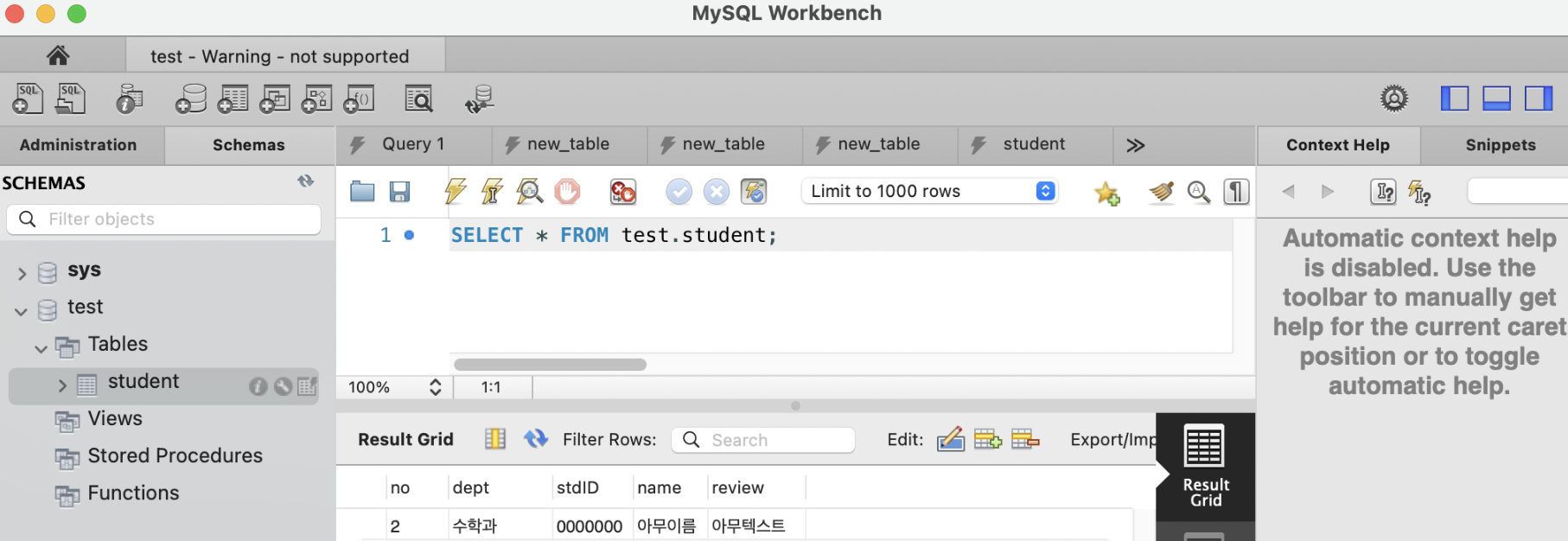
mysql.server start를 통해서 우선 서버를 실행시켜줘야했다...- MySQL Workbench에 들어가서 로컬로 접속하면 테이블을 만들고, 레코드/테이블 등을 편집할 수 있었다. (GUI)
JDBC 사용하기
- JDBC: 자바 애플리케이션이 데이터베이스에 연결하고 SQL문을 실행할 수 있도록 제공되는 표준 API
- JDBC 드라이버 로드
- 사용하려는 DB의 JDBC 드라이버 클래스를 JVM에 로드 (mysql-connector를 사용)
- DB에 연결
- DB서버의 주소, 사용자 이름, 비밀번호를 이용해서 DB 서버와 연결
- 연결 성공 시, Connection 객체가 반환됨
public static void main(String[] args) {
        String url = "jdbc:mysql://127.0.0.1:3306/test";
        String user = 사용자이름입력;
        String password = 비밀번호입력;

        //try-with-resource

        try(Connection conn = DriverManager.getConnection(url, user, password) ){
            System.out.println("DB 연결 성공!");

            String selectSql = "SELECT * FROM student order by no asc";
            Statement stat = conn.createStatement();
            ResultSet rs = stat.executeQuery(selectSql);
			...
}- SQL문 실행
- Connection 객체로부터 SQL을 실행할 수 있는
Statement또는PreparedStatement객체를 생성 Statement: 정적인 SQL문 실행에 사용
			String selectSql = "SELECT * FROM student order by no asc";
            Statement stat = conn.createStatement();
            ResultSet rs = stat.executeQuery(selectSql);
            System.out.println("========================================================");

            while (rs.next()) {
                int no = rs.getInt("no");
                String dept = rs.getString("dept");
                String stdID = rs.getString("stdID");
                String name = rs.getString("name");
                String review = rs.getString("review");

                System.out.printf("%2d %10s %10s %10s %s \n", no, dept, stdID, name, review);
            }

            String insertSql = "INSERT into student (dept, stdID, name, review) VALUES (?,?,?,?)";
            PreparedStatement pstmt = conn.prepareStatement(insertSql);

            pstmt.setString(1,"컴퓨터공학과");
            pstmt.setString(2,"2376097");
            pstmt.setString(3,"박서영");
            pstmt.setString(4,"JDBC 연결 ");
            pstmt.executeUpdate();
System.out.println("JDBC 삽입 성공");- 결과 처리
- SELECT문을 실행한 후에는
ResultSet객체에 조회된 데이터의 집합이 반환됨 next()메소드를 호출해 각 행씩 이동하며 데이터를 읽어올 수 있음
- 자원해제
- 사용한 객체를 사용한 역순으로 닫아 자원 누수를 막아줌
try-with-resources를 사용하면 자동으로 자원을 해제해줌
JAVA&DB 연결 코드 리팩토링 실습
SOLID 원칙과 팩토리 패턴 적용
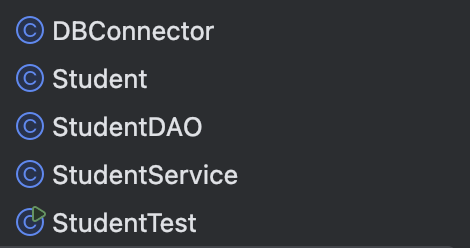
| 역할 | 클래스이름 | 설명 |
|---|---|---|
| 학생 DAO | StudentDAO | DB와 직접적으로 통신. JDBC 관련 로직 구현, CRUD 메소드 구현 |
| 모델 | Student(DTO) | 학생 테이블의 데이터를 담는 객체. 로직X, getter/setter만 존재 |
| 메인 흐름 | StudentTest | 모든 클래스 조립 및 실행 |
| DB 연결 관리 | DBConnector | DB 연결 정보 관리 및 연결 제공 |
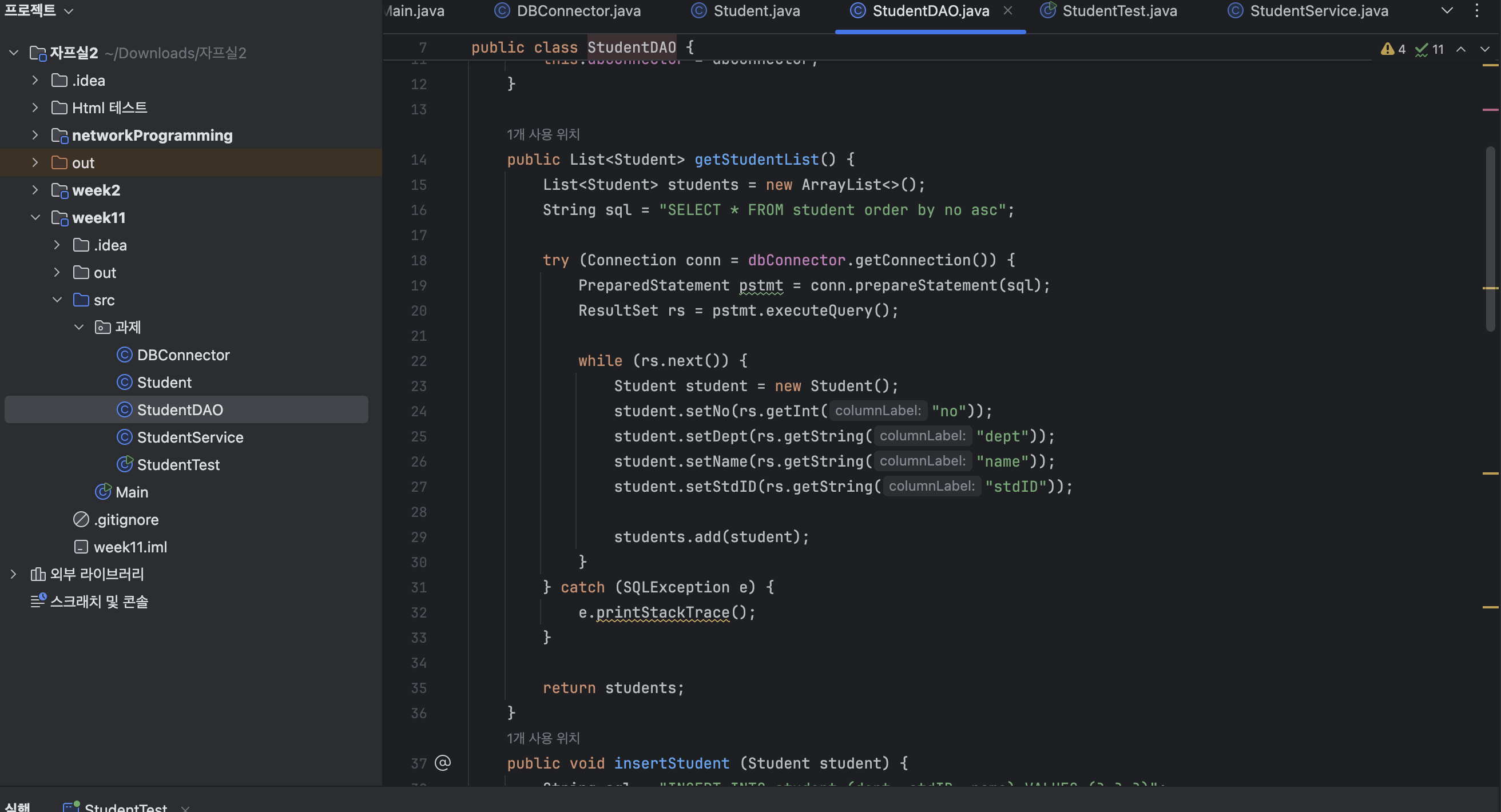
StudentDAO.java
public class StudentDAO {
    private final DBConnector dbConnector;

    public StudentDAO(DBConnector dbConnector) {
        this.dbConnector = dbConnector;
    }

    //1. 학생 목록 조회하기
    public List<Student> getStudentList() {
        List<Student> students = new ArrayList<>();
        String sql = "SELECT * FROM student order by no asc";

        try (Connection conn = dbConnector.getConnection()) {
            PreparedStatement pstmt = conn.prepareStatement(sql);
            ResultSet rs = pstmt.executeQuery();

            while (rs.next()) {
                Student student = new Student();
                student.setNo(rs.getInt("no"));
                student.setDept(rs.getString("dept"));
                student.setName(rs.getString("name"));
                student.setStdID(rs.getString("stdID"));

                students.add(student);
            }
        } catch (SQLException e) {
            e.printStackTrace();
        }

        return students;
    }
    //2. 학생 추가하기
    public void insertStudent (Student student) {
        String sql = "INSERT INTO student (dept, stdID, name) VALUES (?,?,?)";

        try (Connection conn = dbConnector.getConnection()) {
            PreparedStatement pstmt = conn.prepareStatement(sql, Statement.RETURN_GENERATED_KEYS);

            pstmt.setString(1, student.getDept());
            pstmt.setString(2, student.getStdID());
            pstmt.setString(3, student.getName());
            pstmt.executeUpdate();

            try (ResultSet generatedKeys = pstmt.getGeneratedKeys()){
                if (generatedKeys.next()) {
                    int no = generatedKeys.getInt(1);
                    student.setNo(no);
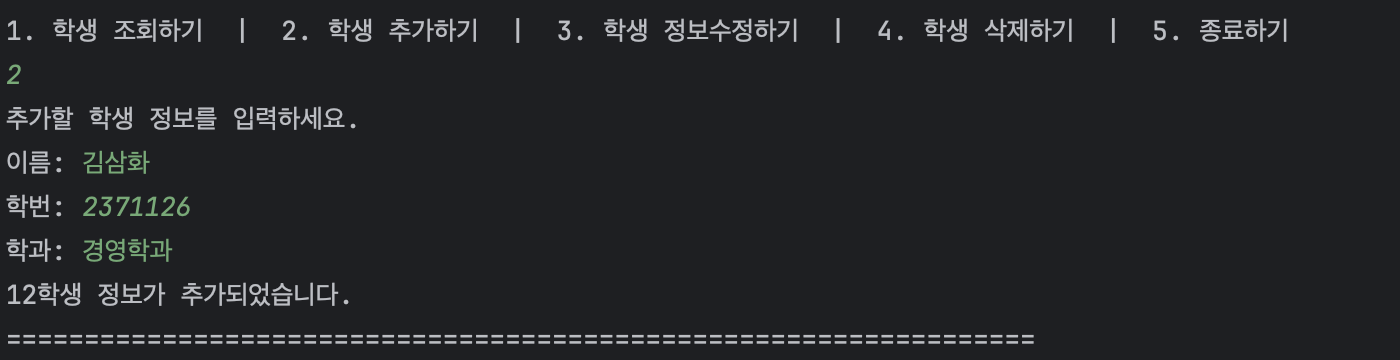
                    System.out.println(no + "학생 정보가 추가되었습니다.");
                }
            }
        }
        catch (SQLIntegrityConstraintViolationException e) {
            System.out.println("학번은 중복될 수 없습니다.");
        }
        catch (SQLException e) {
            e.printStackTrace();
        }
    }

	//3. 학생 정보 수정하기
    public void updateStudent (Student student) {
        String sql = "UPDATE student SET dept = ?, name = ?, stdID = ? WHERE no = ?";

        try (Connection conn = dbConnector.getConnection()) {
            PreparedStatement pstmt = conn.prepareStatement(sql);

            pstmt.setString(1, student.getDept());
            pstmt.setString(2, student.getName());
            pstmt.setString(3,student.getStdID());
            pstmt.setInt(4,student.getNo());

            pstmt.executeUpdate();
        } catch (SQLIntegrityConstraintViolationException e) {
            System.out.println("학번은 중복될 수 없습니다.");
        }
        catch (SQLException e) {
            e.printStackTrace();

        }
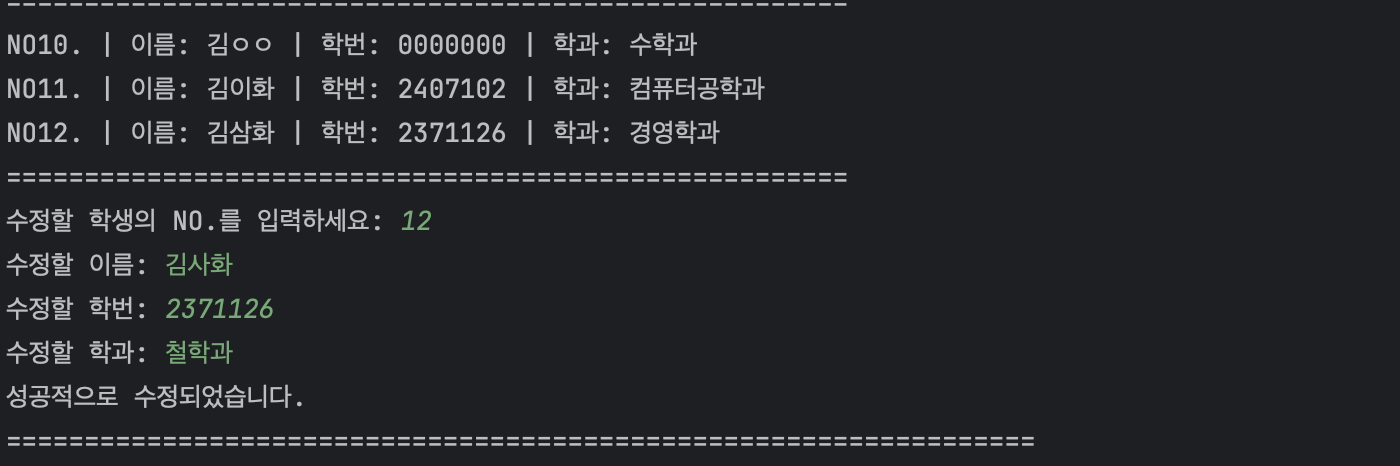
        System.out.println("성공적으로 수정되었습니다.");
    }

    //4. 학생 삭제하기
    public void deleteStudent (int no) {
        String sql = "DELETE FROM student WHERE no=?";

        try(Connection conn = dbConnector.getConnection()) {
            PreparedStatement pstmt = conn.prepareStatement(sql);

            pstmt.setInt(1,no);
            pstmt.executeUpdate();
        } catch (SQLException e) {
            throw new RuntimeException(e);
        }

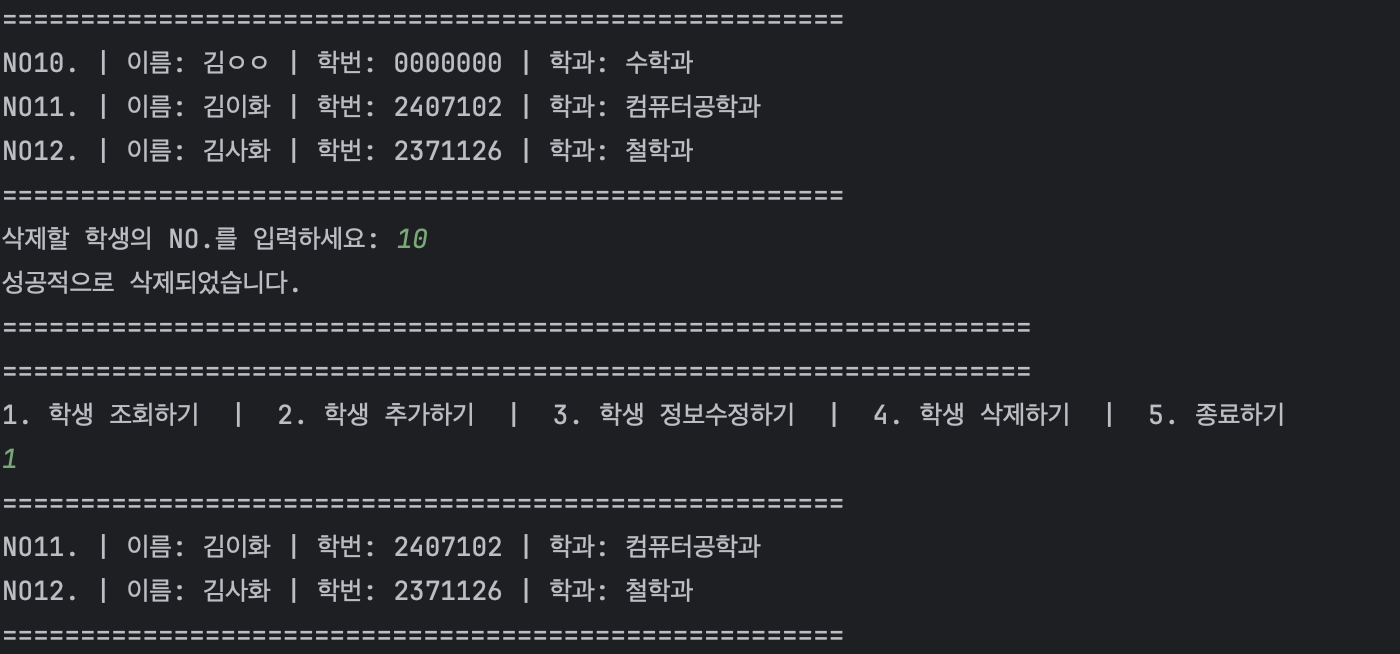
        System.out.println("성공적으로 삭제되었습니다.");
    }
}
StudentService.java
public class StudentService {
    DBConnector dbConnector = new DBConnector();
    StudentDAO dao = new StudentDAO(dbConnector);
    Scanner sc = new Scanner(System.in);
    public void showStudentList() {
        List<Student> studentList = dao.getStudentList();

        System.out.println("======================================================");
        for (Student s : studentList) {
            System.out.printf("NO%d. | 이름: %s | 학번: %s | 학과: %s", s.getNo(), s.getName(), s.getStdID(), s.getDept());
            System.out.println();
        }
        System.out.println("======================================================");
    }

    public void addStudent() {

        System.out.println("추가할 학생 정보를 입력하세요.");
        System.out.print("이름: ");
        String name = sc.next();
        System.out.print("학번: ");
        String stdID = sc.next();
        System.out.print("학과: ");
        String dept = sc.next();

        Student s = new Student(dept, stdID, name);
        dao.insertStudent(s);

    }

    public void editStudent() {
        showStudentList();
        System.out.print("수정할 학생의 NO.를 입력하세요: ");
        int no =sc.nextInt();
        System.out.print("수정할 이름: ");
        String name = sc.next();
        System.out.print("수정할 학번: ");
        String stdID = sc.next();
        System.out.print("수정할 학과: ");
        String dept = sc.next();

        Student s = new Student(dept, stdID, name);
        s.setNo(no);
        dao.updateStudent(s);
    }

    public void deleteStudent() {
        showStudentList();
        System.out.print("삭제할 학생의 NO.를 입력하세요: ");
        int no = sc.nextInt();

        dao.deleteStudent(no);
    }
}
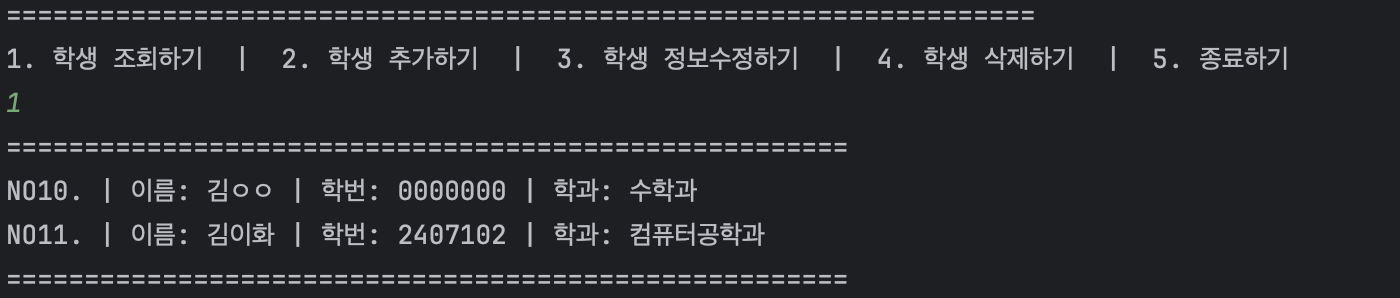
결과화면
-
학생 조회
-
학생 추가
-
학생 정보수정
-
학생 정보삭제
후기
다양한 내용을 한 번에 배운 것 같아서 정리할 필요성을 느꼈던 것 같다. 이전에 DB를 다룰 때는 ORM?을 써서, SQL문이나 직접 DB 테이블을 만들어보거나 JDBC 등을 사용하지 않아서 처음 이런 내용을 접하게 돼서 재밌었다. DB 서버?랑(이 외에도 이전의 네트워크 연결 포함) 연결시키는 방법도 몇 번 하다보니 익숙해져서 괜찮았던 것 같다. 와이파이 바꾸는걸 까먹어서 헤맸다... 궁금했던 점은 현재는 일단 같은 네트워크 안에서 DB를 공유해 사용하는데, 만약 다른 네트워크?에서 DB 서버를 만들어 사용하려면 어떻게 해야할지? 이런 부분에 대해서 생각하게 되었다...

이불 밖은 위험해.