https://github.com/kevinmoran/BeginnerDirect3D11/tree/master
'00.Opening a Win32 Window'는 win32 api에 대한 것이므로 생략한다.
01. Initialising Direct3D 11
#define WIN32_LEAN_AND_MEAN
#define NOMINMAX
#define UNICODE
#include <windows.h>
#include <d3d11_1.h>
#pragma comment(lib, "d3d11.lib")

#include <assert.h>

LRESULT CALLBACK WndProc(HWND hwnd, UINT msg, WPARAM wparam, LPARAM lparam)
{
    LRESULT result = 0;
    switch(msg)
    {
        case WM_KEYDOWN:
        {
            if(wparam == VK_ESCAPE)
                DestroyWindow(hwnd);
            break;
        }
        case WM_DESTROY:
        {
            PostQuitMessage(0);
            break;
        }
        default:
            result = DefWindowProcW(hwnd, msg, wparam, lparam);
    }
    return result;
}

int WINAPI WinMain(HINSTANCE hInstance, HINSTANCE /*hPrevInstance*/, LPSTR /*lpCmdLine*/, int /*nShowCmd*/)
{
    // Open a window
    HWND hwnd;
    {
        WNDCLASSEXW winClass = {};
        winClass.cbSize = sizeof(WNDCLASSEXW);
        winClass.style = CS_HREDRAW | CS_VREDRAW;
        winClass.lpfnWndProc = &WndProc;
        winClass.hInstance = hInstance;
        winClass.hIcon = LoadIconW(0, IDI_APPLICATION);
        winClass.hCursor = LoadCursorW(0, IDC_ARROW);
        winClass.lpszClassName = L"MyWindowClass";
        winClass.hIconSm = LoadIconW(0, IDI_APPLICATION);

        if(!RegisterClassExW(&winClass)) {
            MessageBoxA(0, "RegisterClassEx failed", "Fatal Error", MB_OK);
            return GetLastError();
        }

        RECT initialRect = { 0, 0, 1024, 768 };
        AdjustWindowRectEx(&initialRect, WS_OVERLAPPEDWINDOW, FALSE, WS_EX_OVERLAPPEDWINDOW);
        LONG initialWidth = initialRect.right - initialRect.left;
        LONG initialHeight = initialRect.bottom - initialRect.top;

        hwnd = CreateWindowExW(WS_EX_OVERLAPPEDWINDOW,
                                winClass.lpszClassName,
                                L"01. Initialising Direct3D 11",
                                WS_OVERLAPPEDWINDOW | WS_VISIBLE,
                                CW_USEDEFAULT, CW_USEDEFAULT,
                                initialWidth,
                                initialHeight,
                                0, 0, hInstance, 0);

        if(!hwnd) {
            MessageBoxA(0, "CreateWindowEx failed", "Fatal Error", MB_OK);
            return GetLastError();
        }
    }

    // Create D3D11 Device and Context
    ID3D11Device1* d3d11Device;
    ID3D11DeviceContext1* d3d11DeviceContext;
    {
        ID3D11Device* baseDevice;
        ID3D11DeviceContext* baseDeviceContext;
        D3D_FEATURE_LEVEL featureLevels[] = { D3D_FEATURE_LEVEL_11_0 };
        UINT creationFlags = D3D11_CREATE_DEVICE_BGRA_SUPPORT;
        #if defined(DEBUG_BUILD)
        creationFlags |= D3D11_CREATE_DEVICE_DEBUG;
        #endif

        HRESULT hResult = D3D11CreateDevice(0, D3D_DRIVER_TYPE_HARDWARE,
                                            0, creationFlags,
                                            featureLevels, ARRAYSIZE(featureLevels),
                                            D3D11_SDK_VERSION, &baseDevice,
                                            0, &baseDeviceContext);
        if(FAILED(hResult)){
            MessageBoxA(0, "D3D11CreateDevice() failed", "Fatal Error", MB_OK);
            return GetLastError();
        }

        // Get 1.1 interface of D3D11 Device and Context
        hResult = baseDevice->QueryInterface(__uuidof(ID3D11Device1), (void**)&d3d11Device);
        assert(SUCCEEDED(hResult));
        baseDevice->Release();

        hResult = baseDeviceContext->QueryInterface(__uuidof(ID3D11DeviceContext1), (void**)&d3d11DeviceContext);
        assert(SUCCEEDED(hResult));
        baseDeviceContext->Release();
    }

#ifdef DEBUG_BUILD
    // Set up debug layer to break on D3D11 errors
    ID3D11Debug *d3dDebug = nullptr;
    d3d11Device->QueryInterface(__uuidof(ID3D11Debug), (void**)&d3dDebug);
    if (d3dDebug)
    {
        ID3D11InfoQueue *d3dInfoQueue = nullptr;
        if (SUCCEEDED(d3dDebug->QueryInterface(__uuidof(ID3D11InfoQueue), (void**)&d3dInfoQueue)))
        {
            d3dInfoQueue->SetBreakOnSeverity(D3D11_MESSAGE_SEVERITY_CORRUPTION, true);
            d3dInfoQueue->SetBreakOnSeverity(D3D11_MESSAGE_SEVERITY_ERROR, true);
            d3dInfoQueue->Release();
        }
        d3dDebug->Release();
    }
#endif

    // Create Swap Chain
    IDXGISwapChain1* d3d11SwapChain;
    {
        // Get DXGI Factory (needed to create Swap Chain)
        IDXGIFactory2* dxgiFactory;
        {
            IDXGIDevice1* dxgiDevice;
            HRESULT hResult = d3d11Device->QueryInterface(__uuidof(IDXGIDevice1), (void**)&dxgiDevice);
            assert(SUCCEEDED(hResult));

            IDXGIAdapter* dxgiAdapter;
            hResult = dxgiDevice->GetAdapter(&dxgiAdapter);
            assert(SUCCEEDED(hResult));
            dxgiDevice->Release();

            DXGI_ADAPTER_DESC adapterDesc;
            dxgiAdapter->GetDesc(&adapterDesc);

            OutputDebugStringA("Graphics Device: ");
            OutputDebugStringW(adapterDesc.Description);

            hResult = dxgiAdapter->GetParent(__uuidof(IDXGIFactory2), (void**)&dxgiFactory);
            assert(SUCCEEDED(hResult));
            dxgiAdapter->Release();
        }

        DXGI_SWAP_CHAIN_DESC1 d3d11SwapChainDesc = {};
        d3d11SwapChainDesc.Width = 0; // use window width
        d3d11SwapChainDesc.Height = 0; // use window height
        d3d11SwapChainDesc.Format = DXGI_FORMAT_B8G8R8A8_UNORM_SRGB;
        d3d11SwapChainDesc.SampleDesc.Count = 1;
        d3d11SwapChainDesc.SampleDesc.Quality = 0;
        d3d11SwapChainDesc.BufferUsage = DXGI_USAGE_RENDER_TARGET_OUTPUT;
        d3d11SwapChainDesc.BufferCount = 2;
        d3d11SwapChainDesc.Scaling = DXGI_SCALING_STRETCH;
        d3d11SwapChainDesc.SwapEffect = DXGI_SWAP_EFFECT_DISCARD;
        d3d11SwapChainDesc.AlphaMode = DXGI_ALPHA_MODE_UNSPECIFIED;
        d3d11SwapChainDesc.Flags = 0;

        HRESULT hResult = dxgiFactory->CreateSwapChainForHwnd(d3d11Device, hwnd, &d3d11SwapChainDesc, 0, 0, &d3d11SwapChain);
        assert(SUCCEEDED(hResult));

        dxgiFactory->Release();
    }

    // Create Framebuffer Render Target
    ID3D11RenderTargetView* d3d11FrameBufferView;
    {
        ID3D11Texture2D* d3d11FrameBuffer;
        HRESULT hResult = d3d11SwapChain->GetBuffer(0, __uuidof(ID3D11Texture2D), (void**)&d3d11FrameBuffer);
        assert(SUCCEEDED(hResult));

        hResult = d3d11Device->CreateRenderTargetView(d3d11FrameBuffer, 0, &d3d11FrameBufferView);
        assert(SUCCEEDED(hResult));
        d3d11FrameBuffer->Release();
    }

    // Main Loop
    bool isRunning = true;
    while(isRunning)
    {
        MSG msg = {};
        while(PeekMessageW(&msg, 0, 0, 0, PM_REMOVE))
        {
            if(msg.message == WM_QUIT)
                isRunning = false;
            TranslateMessage(&msg);
            DispatchMessageW(&msg);
        }

        FLOAT backgroundColor[4] = { 0.1f, 0.2f, 0.6f, 1.0f };
        d3d11DeviceContext->ClearRenderTargetView(d3d11FrameBufferView, backgroundColor);

        d3d11SwapChain->Present(1, 0);
    }

    return 0;
}
// Create D3D11 Device and Context
ID3D11Device1* d3d11Device;
ID3D11DeviceContext1* d3d11DeviceContext;
{
ID3D11Device* baseDevice;
ID3D11DeviceContext* baseDeviceContext;
D3D_FEATURE_LEVEL featureLevels[] = { D3D_FEATURE_LEVEL_11_0 };
UINT creationFlags = D3D11_CREATE_DEVICE_BGRA_SUPPORT;
#if defined(DEBUG_BUILD)
creationFlags |= D3D11_CREATE_DEVICE_DEBUG;
#endif
HRESULT hResult = D3D11CreateDevice(0, D3D_DRIVER_TYPE_HARDWARE,
0, creationFlags,
featureLevels, ARRAYSIZE(featureLevels),
D3D11_SDK_VERSION, &baseDevice,
0, &baseDeviceContext);
if(FAILED(hResult)){
MessageBoxA(0, "D3D11CreateDevice() failed", "Fatal Error", MB_OK);
return GetLastError();
}
// Get 1.1 interface of D3D11 Device and Context
hResult = baseDevice->QueryInterface(__uuidof(ID3D11Device1), (void**)&d3d11Device);
assert(SUCCEEDED(hResult));
baseDevice->Release();
hResult = baseDeviceContext->QueryInterface(__uuidof(ID3D11DeviceContext1), (void**)&d3d11DeviceContext);
assert(SUCCEEDED(hResult));
baseDeviceContext->Release();
}ID3D11Device1, ID3D11DeviceContext1 에서 I는 interface, D11은 DirectX11, 마지막에 붙은 1은 DirectX11.1 버전을 의미한다.
Device는 그래픽 카드와 상호 작용을하는 객체로, 하드웨어 지원을 관리하고 제어한다.
실제로 Device는 그래픽 렌더링 파이프라인을 설정 및 shader program compile, load 작업을 하며, 자원을 생성 및 관리 역할도 한다.
DeviceContext는 Device와 관련된 작업을 수행한다. Device에는 하나 이상의 DeviceContext가 있을 수 있다.
DeviceContext는 rendering 관련 명령을 생성 및 device에 전송을 하며, shader profram 설정 및 실행, buffer와 texture를 바인딩 및 데이터 전송을 한다. (stream 역할)
위 코드는 DirectX11.1의 ID3D11Device1과 ID3D11DevieContext1을 얻기 위해서, baseDevice(DirectX11.0)를 만든 후에 QueryInterface를 통해서 DirectX11.1 버전의 Device과 DeviceContext를 생성하고 기존 baseDevice를 초기화한다.
이러한 과정은 DirectX11.0은 Windows 7부터 사용이 가능한 반면, DirectX11.1은 Windows 8부터 사용이 가능하기 때문에 이러한 복잡한 과정을 거치는 것이다. (옛날 코드라, 최근 운영체제에서는 더 높은 버전까지 바로 생성할 수 있다.)
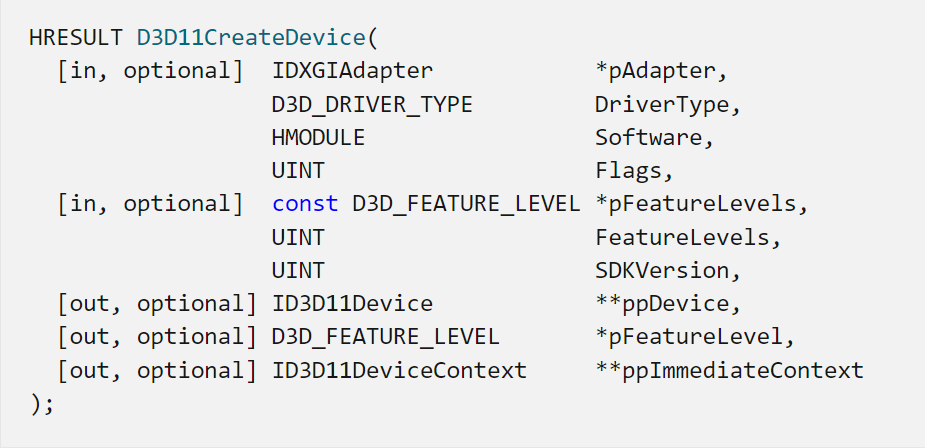
https://learn.microsoft.com/ko-kr/windows/win32/api/d3d11/nf-d3d11-d3d11createdevice
IDXGIAdapter(첫 번째) 인자를 0으로 주어서 첫 번째 기본 어뎁터로 설정하게 했다.
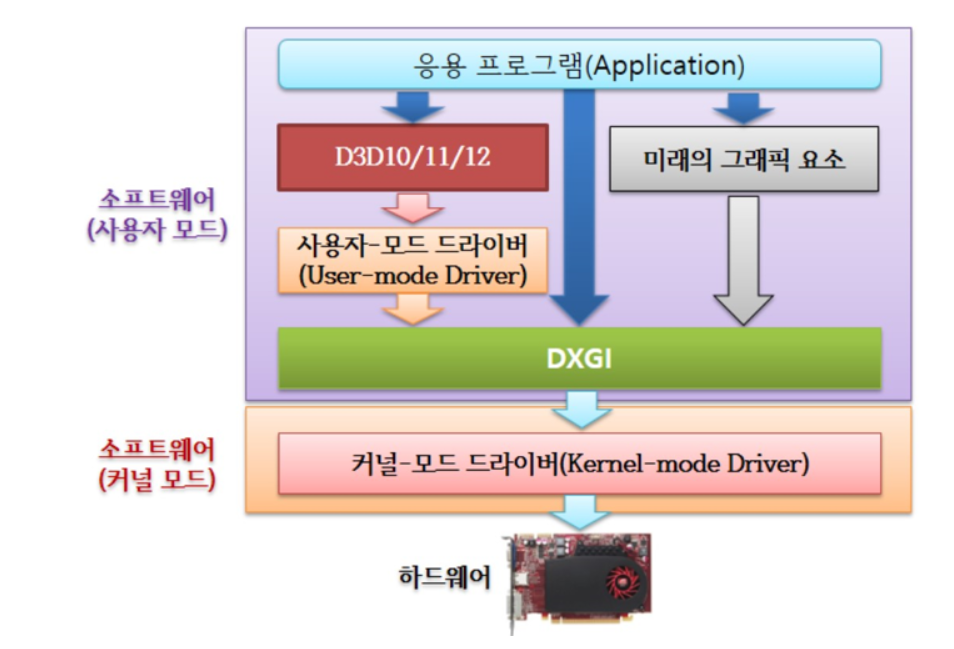
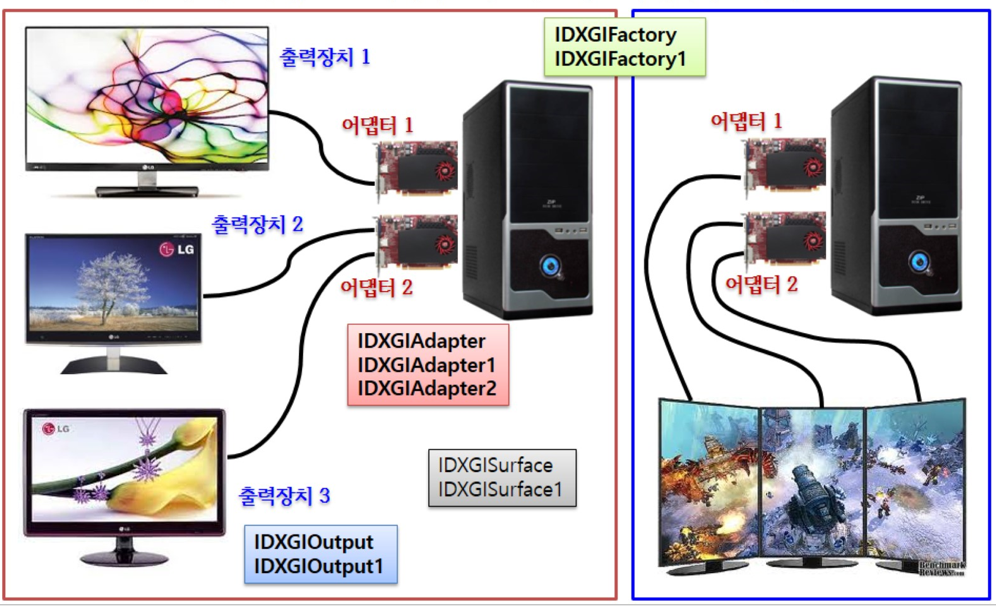
DXGI(DirectX Graphics Infrastructure)는 다양한 그래픽카드(GPU)의 호환성을 유지하며, DirectX와 GPU와의 통신(low-level)을 위한 interface가 되어준다. 멀티 GPU인 경우에 DXGI를 통해서 GPU를 선택해줄 수 있다.
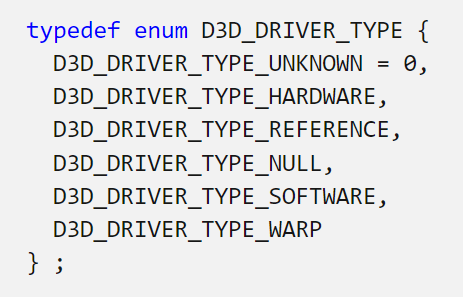
D3D_DRIVER_TYPE은 S/W적으로 처리할지 H/W적으로 처리할지에 대해서 선택할 수 있다.
일반적으로 D3D_DRIVER_TYPE_HARDWARE를 선택하면 된다.
나머지는 쉽게 알 수 있으므로 생략한다.
QueryInterface는 COM 통신으로 DirectX11.1 버전의 Device interface와 DeviceContext interface를 얻어온다. (uuid를 통해서 interface를 구분한다.) 그리고 11.0버전의 interface는 필요없으므로 release한다.
#ifdef DEBUG_BUILD
    // Set up debug layer to break on D3D11 errors
    ID3D11Debug *d3dDebug = nullptr;
    d3d11Device->QueryInterface(__uuidof(ID3D11Debug), (void**)&d3dDebug);
    if (d3dDebug)
    {
        ID3D11InfoQueue *d3dInfoQueue = nullptr;
        if (SUCCEEDED(d3dDebug->QueryInterface(__uuidof(ID3D11InfoQueue), (void**)&d3dInfoQueue)))
        {
            d3dInfoQueue->SetBreakOnSeverity(D3D11_MESSAGE_SEVERITY_CORRUPTION, true);
            d3dInfoQueue->SetBreakOnSeverity(D3D11_MESSAGE_SEVERITY_ERROR, true);
            d3dInfoQueue->Release();
        }
        d3dDebug->Release();
    }
#endif
해당 코드는 Debug로 디버깅 시 사용할 수 있는 것으로 나중에 코드가 있으면 설명하겠다.
   IDXGISwapChain1* d3d11SwapChain;
    {
        // Get DXGI Factory (needed to create Swap Chain)
        IDXGIFactory2* dxgiFactory;
        {
            IDXGIDevice1* dxgiDevice;
            HRESULT hResult = d3d11Device->QueryInterface(__uuidof(IDXGIDevice1), (void**)&dxgiDevice);
            assert(SUCCEEDED(hResult));

            IDXGIAdapter* dxgiAdapter;
            hResult = dxgiDevice->GetAdapter(&dxgiAdapter);
            assert(SUCCEEDED(hResult));
            dxgiDevice->Release();

            DXGI_ADAPTER_DESC adapterDesc;
            dxgiAdapter->GetDesc(&adapterDesc);

            OutputDebugStringA("Graphics Device: ");
            OutputDebugStringW(adapterDesc.Description);

            hResult = dxgiAdapter->GetParent(__uuidof(IDXGIFactory2), (void**)&dxgiFactory);
            assert(SUCCEEDED(hResult));
            dxgiAdapter->Release();
        }

        DXGI_SWAP_CHAIN_DESC1 d3d11SwapChainDesc = {};
        d3d11SwapChainDesc.Width = 0; // use window width
        d3d11SwapChainDesc.Height = 0; // use window height
        d3d11SwapChainDesc.Format = DXGI_FORMAT_B8G8R8A8_UNORM_SRGB;
        d3d11SwapChainDesc.SampleDesc.Count = 1;
        d3d11SwapChainDesc.SampleDesc.Quality = 0;
        d3d11SwapChainDesc.BufferUsage = DXGI_USAGE_RENDER_TARGET_OUTPUT;
        d3d11SwapChainDesc.BufferCount = 2;
        d3d11SwapChainDesc.Scaling = DXGI_SCALING_STRETCH;
        d3d11SwapChainDesc.SwapEffect = DXGI_SWAP_EFFECT_DISCARD;
        d3d11SwapChainDesc.AlphaMode = DXGI_ALPHA_MODE_UNSPECIFIED;
        d3d11SwapChainDesc.Flags = 0;

        HRESULT hResult = dxgiFactory->CreateSwapChainForHwnd(d3d11Device, hwnd, &d3d11SwapChainDesc, 0, 0, &d3d11SwapChain);
        assert(SUCCEEDED(hResult));

        dxgiFactory->Release();
    }
SwapChain은 DirectX에서 화면에 그래픽을 렌더링하는데 필요한 front buffer와 back buffer를 관리 및 담당하는 객체이다.
DXGI는 이전에 설명하였다.
Device에 연결된 DXGI를 불러온 다음, Adapter와, dxgiFactory를 순서대로 불러온다.
dxgiFactory는 SwapChain을 만들기 위해서 불러와야 한다.
https://learn.microsoft.com/ko-kr/windows/win32/api/dxgi1_2/ns-dxgi1_2-dxgi_swap_chain_desc1
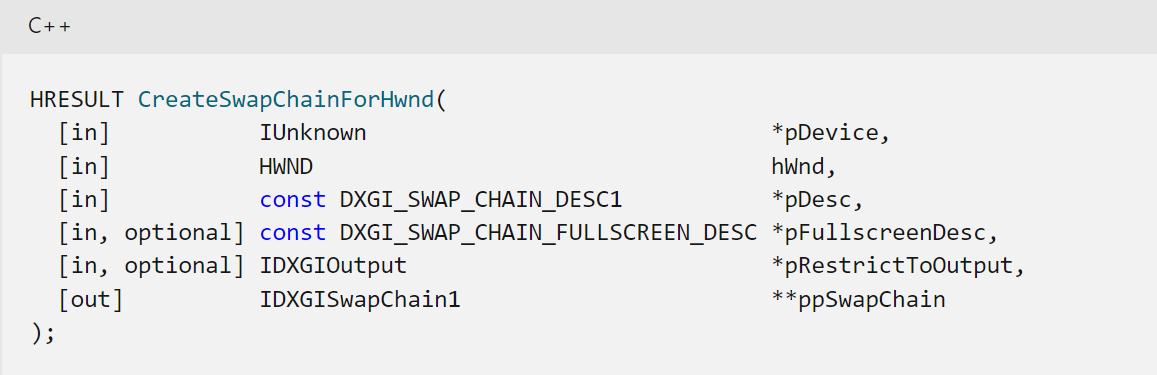
swap chain desc에서 BufferCount를 2개로 설정하여 back buffer를 2개를 만든다.
DXGI_USAGE_RENDER_TARGET_OUTPUT는 back buffer에 그래픽을 그리려고 할 때 사용된다.
그 후 dxgiFactory의 CreateSwapChainForHwnd를 만들어준다.
위와같이 COM으로 부르지 않고 D3D11CreateDeviceAndSwapChain()을 통해서 바로 생성할 수도 있다.
내부적으로는 위와같이 되어있을 것이다.
https://learn.microsoft.com/ko-kr/windows/win32/api/d3d11/nf-d3d11-d3d11createdeviceandswapchain
 // Create Framebuffer Render Target
    ID3D11RenderTargetView* d3d11FrameBufferView;
    {
        ID3D11Texture2D* d3d11FrameBuffer;
        HRESULT hResult = d3d11SwapChain->GetBuffer(0, __uuidof(ID3D11Texture2D), (void**)&d3d11FrameBuffer);
        assert(SUCCEEDED(hResult));

        hResult = d3d11Device->CreateRenderTargetView(d3d11FrameBuffer, 0, &d3d11FrameBufferView);
        assert(SUCCEEDED(hResult));
        d3d11FrameBuffer->Release();
    }

    // Main Loop
    bool isRunning = true;
    while(isRunning)
    {
        MSG msg = {};
        while(PeekMessageW(&msg, 0, 0, 0, PM_REMOVE))
        {
            if(msg.message == WM_QUIT)
                isRunning = false;
            TranslateMessage(&msg);
            DispatchMessageW(&msg);
        }

        FLOAT backgroundColor[4] = { 0.1f, 0.2f, 0.6f, 1.0f };
        d3d11DeviceContext->ClearRenderTargetView(d3d11FrameBufferView, backgroundColor);

        d3d11SwapChain->Present(1, 0);
    }

    return 0;
SwapChain에서 buffer를 갖고와서, device가 렌더링 관련 작업을 할 때 해당 buffer에 렌더링을 하게 RenderTargetView로 설정해준다.
이제 deviceContext를 통해서 렌더링 관련 명령을 내려주면(ex> buffer clear) 내려주면 SwapChain의 buffer가 clear될 것이다.
그리고 SwapChain의 present를 통해서 front buffer와 back buffer가 변경되면서 화면에 그려지는 역할을 수행한다.