CEOS 스터디 5주차
tdmbs.ts 역할
API 호출 로직을 모아두는 유틸 파일
page.tsx에서 이 파일에 포함된 API 호출(예: getPopularMovies())
router.ts역할
Next.js의 서버 라우트 핸들러
/api/...같은 내 서버(API endpoint)를 만드는 파일
데이터 캐싱, 응답 가공이 필요할 때 -> route.ts 사용
서버 컴포넌트에서 데이터 불러올 때 tmdbs.ts에서 fetch
단순히 외부 API를 서버에서 쓰고 싶을 때 -> tmdbs.ts만 사용
fixed vs absolute vs sticky
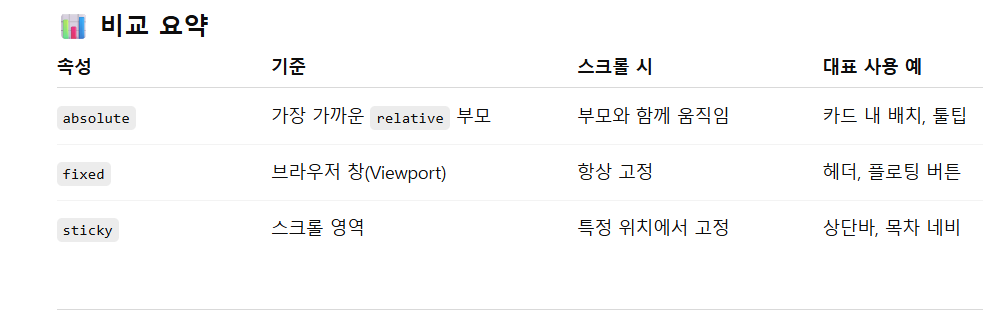
indicator bar 는 따라서
fixed !!
lottie 적용 방법
디자이너가 효과를 json형식으로 만든 것
이 파일은 public 폴더에 두는 것이 좋다
lottie 패키지 설치
npm install lottie-react
lottie-react를 import한 후 다음과 같이 쓰면 된다
import Lottie from "lottie-react";
import loadingAnimation from "@/assets/lottie/loading.json";

export default function Loading() {
  return (
    <div className="flex items-center justify-center h-screen">
      <Lottie
        animationData={loadingAnimation}
        loop={true}
        autoplay={true}
        className="w-40 h-40"
      />
    </div>
  );
}
-animationData는 json파일
-loop는 반복여부
-autoplay는 자동재생 여부

게으른 완벽주의자