App 컴포넌트
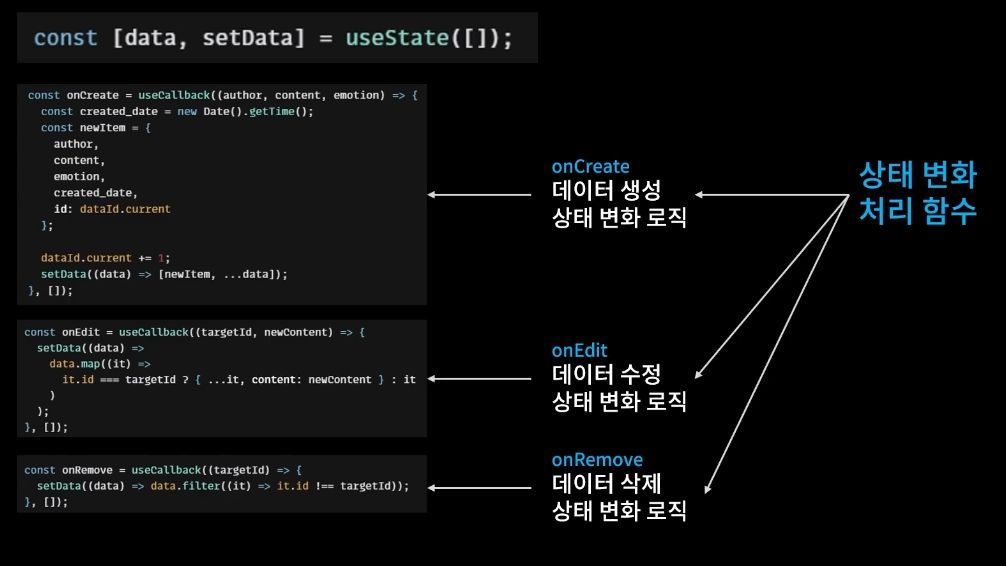
- 데이터 생성, 수정, 삭제 로직을 모두 가지고 있음
- 상태를 업데이트 하기 위해서는 기존의 상태를 참조해야 하기 때문에, 앱 컴포넌트 내에 모든 로직 함수가 존재
useReducer
: 상태변화 로직들을 컴포넌트에서 분리할 수 있게 해주는 react hooks
https://ko.reactjs.org/docs/hooks-reference.html#usereducer
const [state, dispatch] = useReducer(reducer, initialArg, init);useState의 대체 함수입니다. (state, action) => newState의 형태로 reducer를 받고 dispatch 메서드와 짝의 형태로 현재 state를 반환합니다. (Redux에 익숙하다면 이것이 어떻게 동작하는지 여러분은 이미 알고 있을 것입니다.)
- 비구조화 할당을 통해 사용, 배열 반환
- state : state
- dispatch : 상태 변화를 일으키는 함수
- useReducer 함수 idx 0 : reducer 함수를 받아야함
- idx 1 로 받은 dispatch가 상태변화를 일으킬 때(raise), 일어난 상태변화를 reducer가 처리함
- useReducer 함수 idx 1 : state의 초기값
useState vs useReducer
-
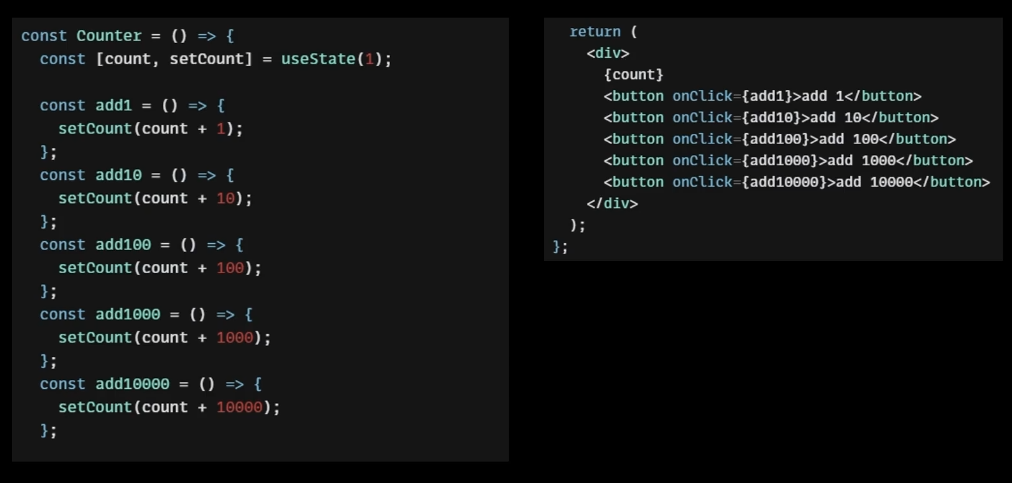
useState를 이용하는 경우, 상태변화 함수를 Counter 컴포넌트 안에 생성해야함
-
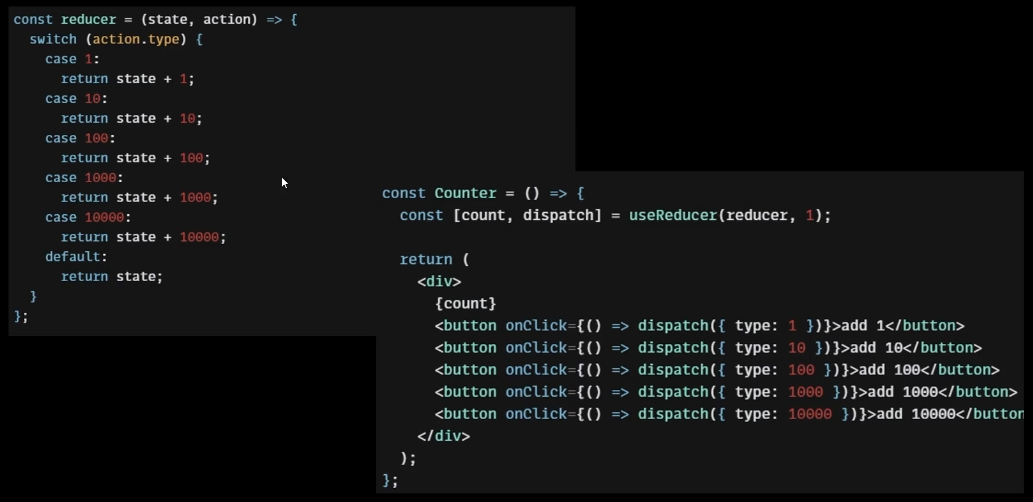
useReducer를 사용 :
reducer라는 상태변화 함수를 컴포넌트 밖으로 분리해서 상태변화 로직을 switch case 문법처럼 사용할 수 있음
useReducer 로직
- 상태가 변화되어야 할 때 dispatch 실행
- dispatch 실행 시
Action 객체를 전달하게 되는데, 해당 객체에는 type 프로퍼티가 있음. - Action = 상태변화 (상태 변화를 설명할 객체)
- Action 객체는 reducer에 전달됨
- dispatch 호출 시 상태변화가 일어나고, 처리를 위해 reducer 호출됨
- 첫 번째 인자(state) : 최신의 state 받음
- 두 번째 인자(action) : dispatch 호출 시 전달한 action 객체
- action.type에 맞는 새로운 state를 반환
App.js 컴포넌트 변경하기
// useReducer를 사용하기 때문에 App() 밖에다가 생성
const reducer = (state, action) => {
  //state:상태, action: 어떤 상태변화를 일으킬지에 대한 정보
  switch (action.type) {
    case "INIT": ""
    case "CREATE": ""
    case "REMOVE": ""
    case "EDIT": ""
    // switch case에는 반드시 default 케이스 필요
    default:
      return state;
  }
};

function App() {
  // useState -> useReduce 사용
  // const [data, setData] = useState([]);
  const [data, dispatch] = useReducer(reducer, []);
  const dataId = useRef(0);

  ...
}- getData
const reducer = (state, action) => {
  //state:상태, action: 어떤 상태변화를 일으킬지에 대한 정보
  switch (action.type) {
    case "INIT": {
      return action.data;
    }
    case "CREATE":
    case "REMOVE":
    case "EDIT":
    default:
      return state;
  }
};

const getData = async () => {
    const res = await fetch(
      "https://jsonplaceholder.typicode.com/comments"
    ).then((res) => res.json());

    // 20개의 data만 가져오기
    // map으로 각 item을 돌면서 author, content, emotion의 값으로 넣어줌
    const initData = res.slice(0, 20).map((it) => {
      return {
        author: it.email,
        content: it.body,
        emotion: Math.floor(Math.random() * 5) + 1,
        created_date: new Date().getTime(),
        id: dataId.current++,
      };
    });
    // 기존 setData의 역할은 reducer가 하게됨
    // setData(initData);
    dispatch({ type: "INIT", data: initData });
};- onCreate
const reducer = (state, action) => {
  //state:상태, action: 어떤 상태변화를 일으킬지에 대한 정보
  switch (action.type) {
    case "INIT": {
      return action.data;
    }
    case "CREATE": {
      const created_date = new Date().getTime();
      const newItem = {
        ...action.data, // dispatch에서 전달한 data
        created_date,
      };
      return [newItem, ...state];
    }
    case "REMOVE":
    case "EDIT":
    // switch case에는 반드시 default 케이스 필요
    default:
      return state;
  }
};


const onCreate = useCallback((author, content, emotion) => {
    dispatch({
      type: "CREATE",
      data: { author, content, emotion, id: dataId.current },
    });

    /* useReducer 로 대체
    const created_date = new Date().getTime();
    const newItem = {
      author,
      content,
      emotion,
      created_date,
      id: dataId.current, // dataId의 초기값 = 0 , 현재 dataId의 값을 가져옴
    }; */
    // setData((data) => [newItem, ...data]);
    dataId.current += 1; // dataId 사용 후, 현재값을 1씩 추가해주기
}, []);- onRemove
const reducer = (state, action) => {
  //state:상태, action: 어떤 상태변화를 일으킬지에 대한 정보
  switch (action.type) {
    case "INIT": {
      return action.data;
    }
    case "CREATE": {
      const created_date = new Date().getTime();
      const newItem = {
        ...action.data, // dispatch에서 전달한 data
        created_date,
      };
      return [newItem, ...state];
    }
    case "REMOVE": {
      return state.filter((it) => it.id !== action.targetId);
    }
    case "EDIT":
    // switch case에는 반드시 default 케이스 필요
    default:
      return state;
  }
};

const onRemove = useCallback((targetId) => {
    // 어떤 일기를 지울지만 지정해주면 되기 때문에 targetID만 전달
    dispatch({ type: "REMOVE", targetId });
    // setData((data) => data.filter((it) => it.id !== targetId));
}, []);- onEdit
const reducer = (state, action) => {
  //state:상태, action: 어떤 상태변화를 일으킬지에 대한 정보
  switch (action.type) {
    case "INIT": {
      return action.data;
    }
    case "CREATE": {
      const created_date = new Date().getTime();
      const newItem = {
        ...action.data, // dispatch에서 전달한 data
        created_date,
      };
      return [newItem, ...state];
    }
    case "REMOVE": {
      return state.filter((it) => it.id !== action.targetId);
    }
    case "EDIT": {
      return state.map((it) =>
        it.id === action.targetId ? { ...it, content: action.newContent } : it
      );
    }
    // switch case에는 반드시 default 케이스 필요
    default:
      return state;
  }
};


const onEdit = useCallback((targetId, newContent) => {
    dispatch({ type: "EDIT", targetId, newContent });
    /* setData((data) =>
      data.map((it) =>
        it.id === targetId ? { ...it, content: newContent } : it
      )
    ); */
  }, []);
상태변화 발생 함수(dispatch)는 함수형 업데이트 필요 없이, 호출하면 현재의 state를 reduce 함수가 참조하기 때문에, useCallback 사용하면서 dependency Array를 걱정하지 않아도 된다.