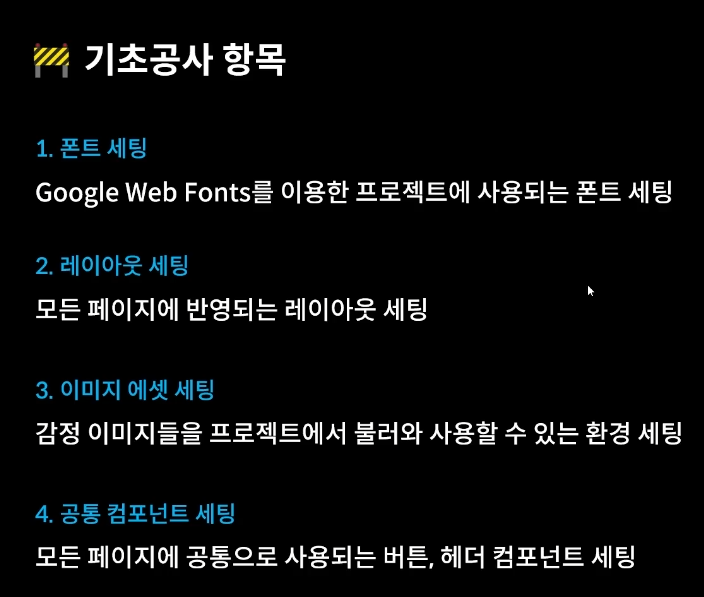
1. 폰트 세팅
폰트 사용 시 저작권을 주의해야함
- Open Font License
상업적 용도만 아니면 자유롭게 사용 가능한 폰트
Google Web Fonts 에서 폰트 다운로드 및 사용
https://fonts.google.com/
font Import
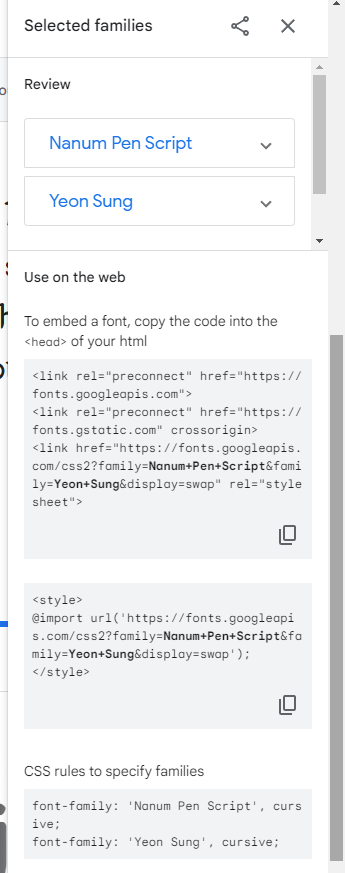
select fonts를 선택하면 선택한 폰트를 import할 수 있는 스크립트가 나옴.- API를 통해서 font를 가져옴
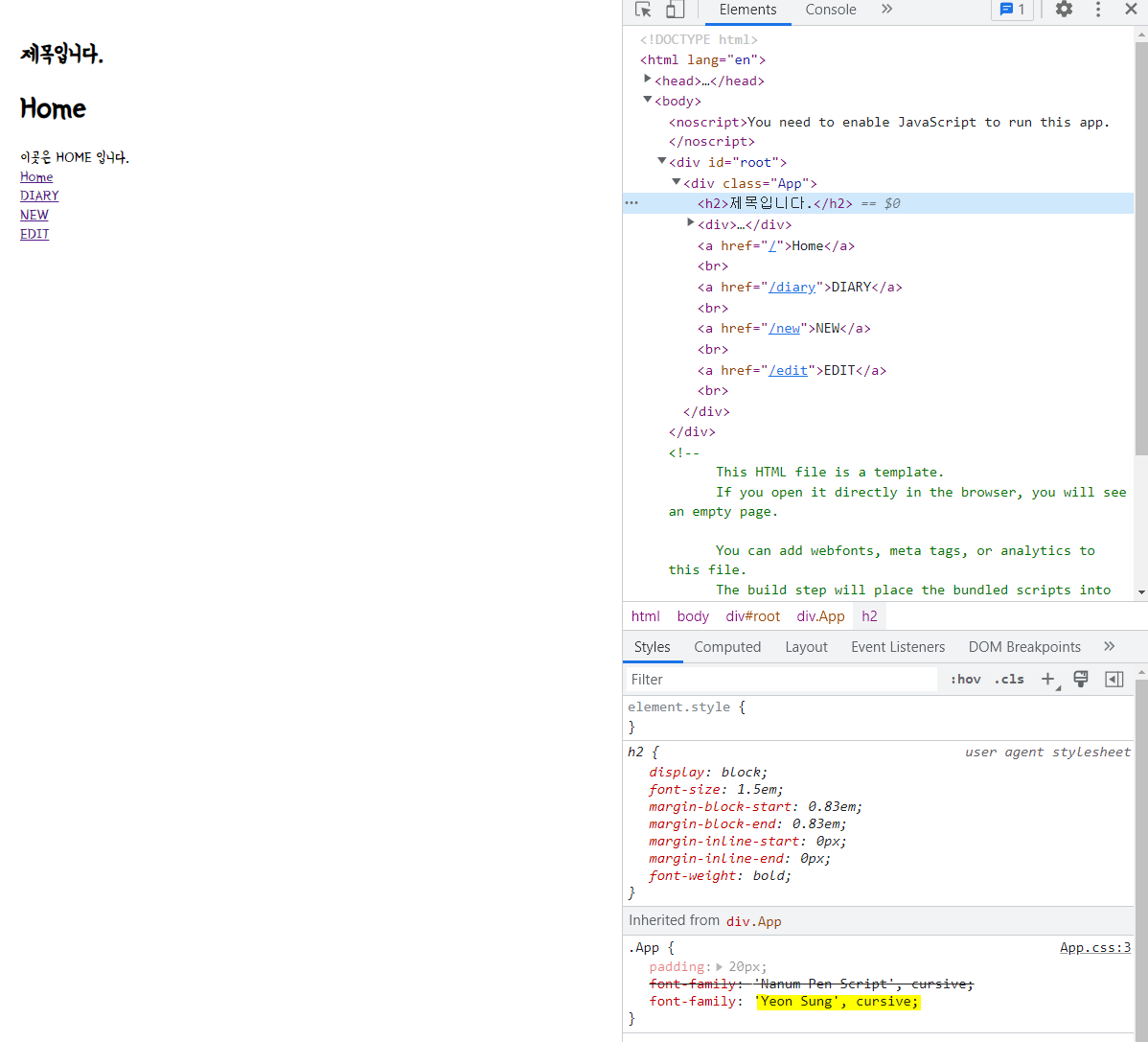
- .App에 font-family 속성으로 사용할 폰트 추가
// App.css
@import url('https://fonts.googleapis.com/css2?family=Nanum+Pen+Script&family=Yeon+Sung&display=swap');

.App{
  padding: 20px;
  font-family: 'Nanum Pen Script', cursive;
  font-family: 'Yeon Sung', cursive;
}
2. 레이아웃 세팅
@import url('https://fonts.googleapis.com/css2?family=Nanum+Pen+Script&family=Yeon+Sung&display=swap');

body{
  background-color: #f6f6f6;
  display: inline-flex;
  width: 100%;
  justify-content: center;
  align-items: center;
  font-family: 'Nanum Pen Script', cursive;
  /* vh : viewport height
  현재 스크린(실제크기)의 100%를 채움 */
  min-height: 100vh;
  margin: 0;
}

.App{
  min-height: 100vh;
  padding: 20px;
  box-sizing: border-box;
}

#root{
  background-color: #fff;
  box-shadow: rgba(100, 100, 111, 0.2) 0px 7px 29px 0px;
}

@media(min-width: 650px){
  /* 스크린이 650px 이상일 때만 css규칙 적용됨 */
  .App{
    width: 640px;
  }
}

@media(max-width: 650px){
  /* 스크린이 650px 이하일 때 css 규칙 적용됨 */
  .App{
    /* vw : viewport width
    현재 스크린(실제크기)의 90%를 채움 */
    width: 90vw;
  }
}
3. 이미지 에셋 세팅
-
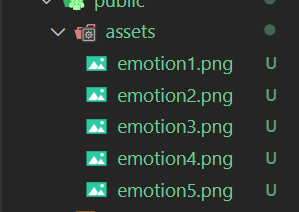
프로젝트에 이미지 추가
-
이미지 불러오기
import "./App.css";
import { BrowserRouter, Route, Routes } from "react-router-dom";

// 페이지 역할 js 임포트
import Home from "./pages/Home";
import New from "./pages/New";
import Edit from "./pages/Edit";
import Diary from "./pages/Diary";

function App() {
  const env = process.env;
  // PUBLIC_URL 이 존재하면 env.PUBLIC_URL 에 저장
  env.PUBLIC_URL = env.PUBLIC_URL || "";

  return (
    <BrowserRouter>
      <div className="App">
        <h2>제목입니다.</h2>
        {/* process.env.PUBLIC_URL : 우리가 어떤 위치에 있던 /public 경로를 지정함 */}
        <img src={env.PUBLIC_URL + "/assets/emotion1.png"} />
        <img src={env.PUBLIC_URL + "/assets/emotion2.png"} />
        <img src={env.PUBLIC_URL + "/assets/emotion3.png"} />
        <img src={env.PUBLIC_URL + "/assets/emotion4.png"} />
        <img src={env.PUBLIC_URL + "/assets/emotion5.png"} />
        <Routes>
          <Route path="/" element={<Home />} />
          <Route path="/new" element={<New />} />
          <Route path="/edit" element={<Edit />} />
          <Route path="/diary/:id" element={<Diary />} />
        </Routes>
      </div>
    </BrowserRouter>
  );
}

export default App;
4. 공통 검포넌트 세팅
버튼 컴포넌트
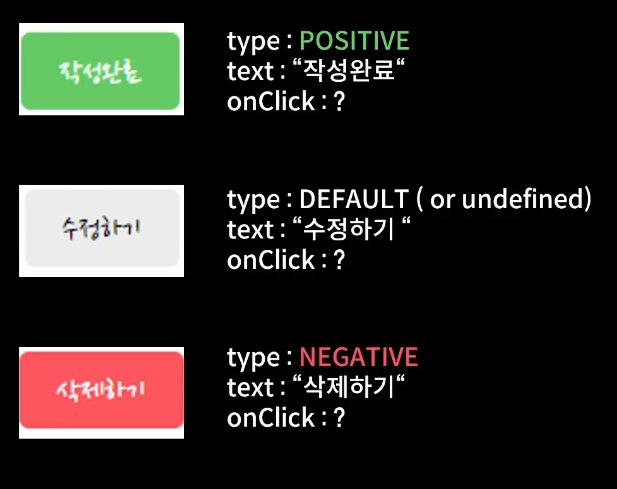
- 동일한 버튼 모양을 사용
- Type, Text, OnClick 속성이 다르기 때문에, 해당 속성은 변경될 수 있도록 세팅
// MyButton.js
const MyButton = ({ text, type, onClick }) => {
  // type이 전달될 때, positive or negative 가 아닌 다른 type이 들어올경우 강제로 default 로 변환
  const btnType = ["positive", "negative"].includes(type) ? type : "default";

  return (
    // className 에 배열 넣어줌 -> join을 사용하여 두 클래스 사이에 띄어쓰기를 추가하여 문자로 변환
    <button
      className={["MyButton", `MyButton_${btnType}`].join(" ")}
      onClick={onClick}
    >
      {text}
    </button>
  );
};

// type이 들어오지 않았을 경우, 기본 type은 default로 지정
MyButton.defaultProps = {
  type: "default",
};

export default MyButton;
//App.js
import "./App.css";
import { BrowserRouter, Route, Routes } from "react-router-dom";
// 페이지 역할 js 임포트
import Home from "./pages/Home";
import New from "./pages/New";
import Edit from "./pages/Edit";
import Diary from "./pages/Diary";
import MyButton from "./components/MyButton";
function App() {
const env = process.env;
// PUBLIC_URL 이 존재하면 env.PUBLIC_URL 에 저장
env.PUBLIC_URL = env.PUBLIC_URL || "";
return (
<BrowserRouter>
<div className="App">
<h2>제목입니다.</h2>
<MyButton
text={"버튼"}
onClick={() => {
alert("버튼 클릭");
}}
type={"positive"}
></MyButton>
<MyButton
text={"버튼"}
onClick={() => {
alert("버튼 클릭");
}}
type={"negative"}
></MyButton>
<MyButton
text={"버튼"}
onClick={() => {
alert("버튼 클릭");
}}
></MyButton>
<Routes>
<Route path="/" element={<Home />} />
<Route path="/new" element={<New />} />
<Route path="/edit" element={<Edit />} />
<Route path="/diary/:id" element={<Diary />} />
</Routes>
</div>
</BrowserRouter>
);
}
export default App;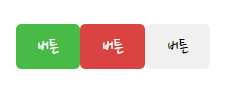
헤더 컴포넌트
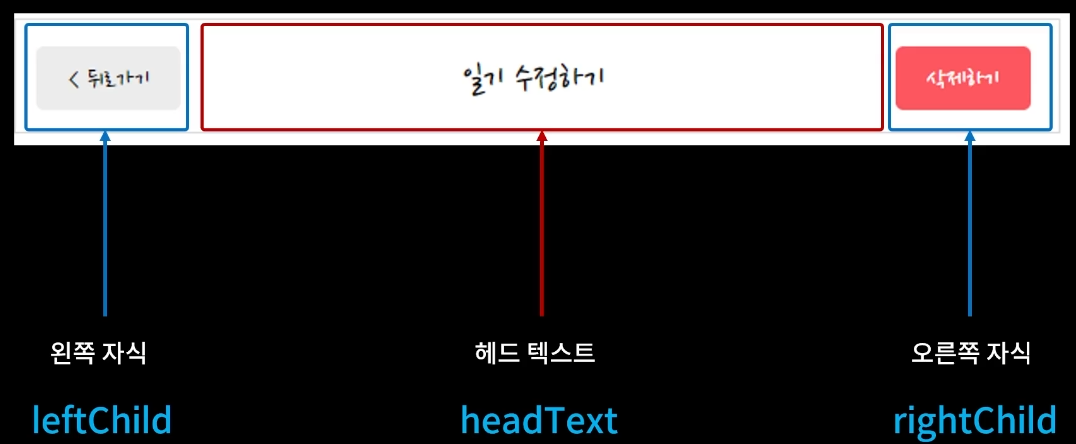
//MyButton.js
const MyButton = ({ text, type, onClick }) => {
  // type이 전달될 때, positive or negative 가 아닌 다른 type이 들어올경우 강제로 default 로 변환
  const btnType = ["positive", "negative"].includes(type) ? type : "default";
  return (
    // className 에 배열 넣어줌 -> join을 사용하여 두 클래스 사이에 띄어쓰기를 추가하여 문자로 변환
    <button
      className={["MyButton", `MyButton_${btnType}`].join(" ")}
      onClick={onClick}
    >
      {text}
    </button>
  );
};

MyButton.defaultProps = {
  type: "default",
};

export default MyButton;
// MyHeader.js
const MyHeader = ({ headText, leftChild, rightChild }) => {
return (
<header>
<div className="head_btn_left">{leftChild}</div>
<div className="head_text">{headText}</div>
<div className="head_btn_right">{rightChild}</div>
</header>
);
};
export default MyHeader;// App.js
import "./App.css";
import { BrowserRouter, Route, Routes } from "react-router-dom";
// 페이지 역할 js 임포트
import Home from "./pages/Home";
import New from "./pages/New";
import Edit from "./pages/Edit";
import Diary from "./pages/Diary";
import MyButton from "./components/MyButton";
import MyHeader from "./components/MyHeader";
function App() {
const env = process.env;
// PUBLIC_URL 이 존재하면 env.PUBLIC_URL 에 저장
env.PUBLIC_URL = env.PUBLIC_URL || "";
return (
<BrowserRouter>
<div className="App">
<MyHeader
headText={"App"}
leftChild={
<MyButton
text={"왼쪽 버튼"}
onClick={() => {
alert("왼쪽 클릭");
}}
></MyButton>
}
rightChild={
<MyButton
text={"오른쪽 버튼"}
onClick={() => {
alert("오른쪽 클릭");
}}
></MyButton>
}
></MyHeader>
<h2>제목입니다.</h2>
<MyButton
text={"버튼"}
onClick={() => {
alert("버튼 클릭");
}}
type={"positive"}
></MyButton>
<MyButton
text={"버튼"}
onClick={() => {
alert("버튼 클릭");
}}
type={"negative"}
></MyButton>
<MyButton
text={"버튼"}
onClick={() => {
alert("버튼 클릭");
}}
></MyButton>
<Routes>
<Route path="/" element={<Home />} />
<Route path="/new" element={<New />} />
<Route path="/edit" element={<Edit />} />
<Route path="/diary/:id" element={<Diary />} />
</Routes>
</div>
</BrowserRouter>
);
}
export default App;