#include <stdio.h>
#include <curses.h>

int main(int argc, char *argv[]) {
    initscr();
    // send requests
    clear(); // clear screen
    move(10,20); // row 10, col 20
    addstr("Hello, world"); // add a string
    move(LINES-1, 0); // move to LL

    refresh(); // update the screen
    getch(); //wait for user input

    endwin(); // turn off curses
}
// 터미널 화면에 대각선으로 나열된 헬로월드를 출력하는 프로그램
// 프로그램 종료 전 5초 간 화면을 유지함
#include <stdio.h>
#include <curses.h>
int main(int argc, char *argv[]) {
int i;
initscr();
clear();
for (i=0; i<LINES; i++) {
move(i, i+i);
if (i%2 == 1) // 현재 행이 홀수일 때,
standout(); // 텍스트를 강조 표시함
addstr("Hello, world"); // 문자열을 현재 위치에 추가함
if (i%2 == 1) // 현재 행이 홀수일 때,
standend(); // 강조 표시를 해제함
}
// curses는 출력을 누적하므로
// 변경된 내용을 표시하려면 refresh를 호출해야 함
refresh();
// 5초 간 출력 내용이 유지됨
sleep(5);
// curses 모드 종료, 터미널을 일반 모드로 돌려놓음
endwin();
}refresh()
code에서 refresh()를 지워봅시다.
- Hello 라는 글자는 출력되지 않는다.
- addstr() writes to screen buffer
- refresh() updates real screen
#include <stdio.h>
#include <curses.h>

int main(int argc, char *argv[]) {
    int i;
    initscr();
    clear();
    for (i=0; i<LINES; i++) {
    // LINES는 화면으로 보이는 터미널 길이임
    // 터미널 창을 작게 하면 LINES가 작아짐
        move(i, i+i);
        if (i%2 == 1)
            standout();
        addstr("Hello, world");
        if (i%2 == 1)
            standend();
        sleep(1);
        refresh();
    }
    endwin();
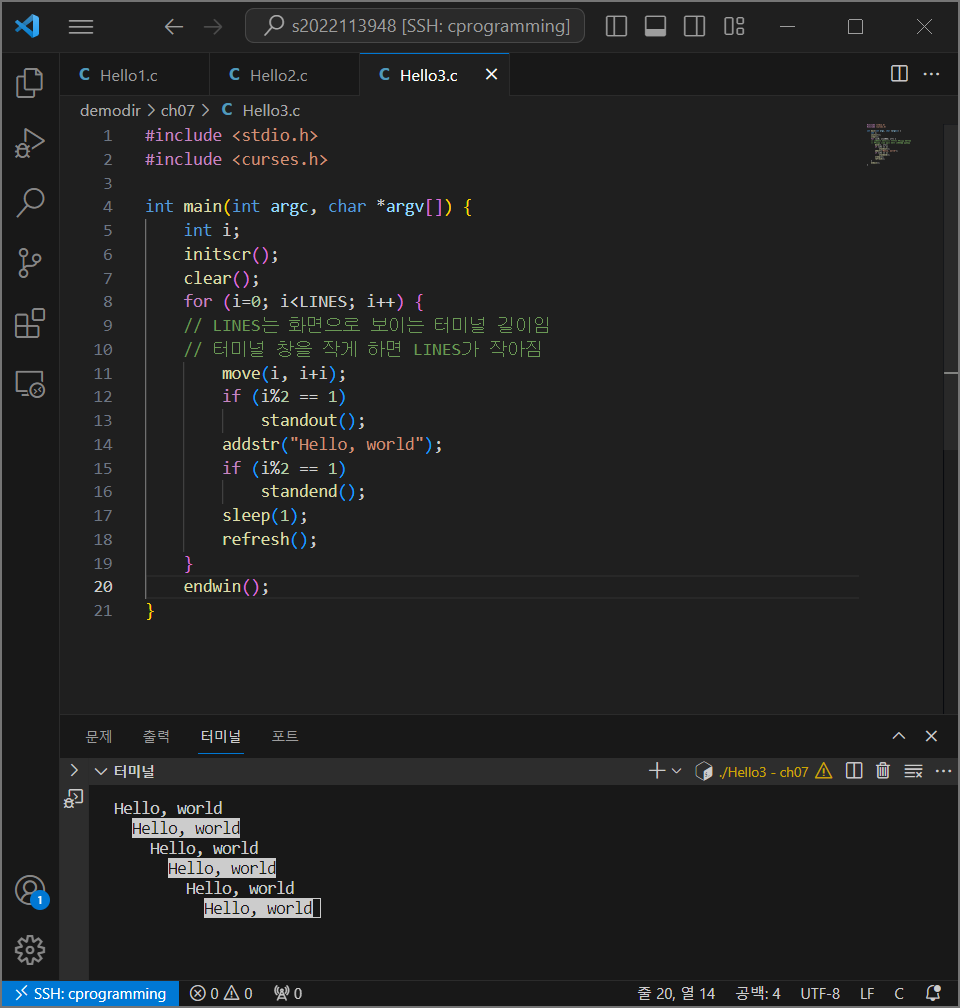
}
#include <curses.h>

#define LEFTEDGE 10
#define RIGHTEDGE 15
#define ROW 10

int main(int argc, char *argv[]) {
    char message[] = "Hello";
    char blank[] = "     ";
    int dir = +1;
    int pos = LEFTEDGE;

    initscr();
    clear();
    while(1) {
        move(ROW, pos);
        addstr(message); //draw string
        move(LINES-1, COLS-1); //커서를 화면 우측 하단에 위치시킴
        refresh(); //show string
        sleep(1);
        move(ROW, pos); //메시지가 있던 위치로 다시 가서
        addstr(blank); //blank를 씀 -> erase string
        pos += dir; // 현재 열 위치를 이동 방향에 따라 업데이트
        // 열의 경계에 도달하면 이동방향을 반대로 바꿈
        if (pos >= RIGHTEDGE)
            dir = -1;
        if (pos <= LEFTEDGE)
            dir = +1;
    }
}
Time Handling1 : ALRAMS
sleep()
signal(SIGALRM, handler);
alarm(m);
pause(); // pause()는 signal이 handle될 때까지 process를 block시킴
-
즉, pause는 signal을 받을 때까지 대기하고 있음
-
usleep(n)
: 좀더 세밀한 delay, n microseconds
Time Handling2 : Interval Timers
각 프로세스는 3개의 timer를 가진다.
- real
- virtual
usermode - profile
user+kenel mode
ITIMER_REAL
실제 시간에 기반한 타이머
ITIMER_VIRTUAL
프로세스가 CPU를 소비하는 가상 시간
주로 프로세스의 CPU 사용 시간을 제한하거나 측정하는 데 사용
ITIMER_PROF
프로세스가 CPU 및 시스템 리소스를 사용하는 전반적인 시간
itimerval 구조체
struct itimerval {
    struct timeval it_interval;  // 타이머 간격(interval) 설정
    struct timeval it_value;     // 초기 타이머 값 설정
};
timeval 구조체
struct timeval {
    time_t      tv_sec;  // 초 단위
    suseconds_t tv_usec; // 마이크로초 단위
};
itimerval 구조체 안에 timeval 구조체가 있는 형태
struct itimerval 구조체를 설정하여 setitimer()로 넘긴다
#include <stdio.h>
#include <sys/time.h>
#include <signal.h>

int main() {
    void countdown(int);

    // signal() : 핸들러 등록, SIGALRM 신호가 발생할 때 countdown을 호출
    signal(SIGALRM, countdown);
    // set_ticker(m): SIGALRM 신호를 주기적으로(500밀리초, 0.5초) 발생시킴
    if (set_ticker(500) == -1)
        perror("set_ticker");
    else
        while(1)
            pause(); // pause(): 프로세스가 SIGALRM 신호를 기다림
    return 0;
}

void countdown(int signum) {
    static int num = 10;
    printf("%d ..", num--);
    fflush(stdout);
    if (num < 0) {
        printf("DONE!\n");
        exit(0);
    }
}

int set_ticker(int n_msecs) {
    struct itimerval new_timeset;
    long n_sec, n_usecs;

    n_sec = n_msecs / 1000;
    n_usecs = (n_msecs % 1000) * 1000L;

    new_timeset.it_interval.tv_sec = n_sec;
    new_timeset.it_interval.tv_usec = n_usecs;
    new_timeset.it_value.tv_sec = n_sec;
    new_timeset.it_value.tv_usec = n_usecs;
    // 구조체를 설정하여 setitimer에 넘김
    return setitimer(ITIMER_REAL, &new_timeset, NULL);
}
SIGNAL HANDLING 1: signal()
signal() 사용법
- default action
signal(SIGALRM, SIG_DFL) - ignore the signal
signal(SIGALRM, SIG_IGN) - invoke a function
signal(SIGALRM, handler)
여러 개의 signal이 같이 도착한다면 어떻게 될까? 다음 코드로 알아보자.
#include <stdio.h>
#include <signal.h>
#include <string.h>
#include <unistd.h>

#define INPUTLEN 100

// Ctrl+C (SIGINT) 핸들러
void inthandler(int s) {
    printf("\nReceived signal %d .. waiting\n", s);
    sleep(2);
    printf("Leaving inthandler\n");
}

// Ctrl+\ (SIGQUIT) 핸들러
void quithandler(int s) {
    printf("\nReceived signal %d .. waiting\n", s);
    sleep(3);
    printf("Leaving quithandler\n");
}

int main(int ac, char *av[]) {
    // 시그널 핸들러 등록
    signal(SIGINT, inthandler);   // Ctrl+C 핸들러 등록
    signal(SIGQUIT, quithandler); // Ctrl+\ 핸들러 등록

    char input[INPUTLEN];
    int nchars;

    do {
        printf("\nType a message\n");
        nchars = read(0, input, (INPUTLEN-1)); // 표준 입력에서 입력을 받음
        if (nchars == -1)
            perror("read returned an error");
        else {
            input[nchars] = '\0'; // 입력 문자열의 마지막에 널문자 추가
            printf("You typed: %s", input);
        }
    } while (strncmp(input, "quit", 4) != 0); // "quit"이 입력되면 종료

    return 0;
}
SIGNAL HANDLING 1: sigaction()
쓰는중