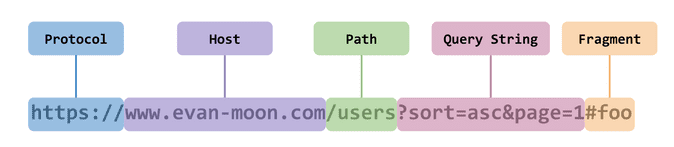
문제 상황
http://localhost:8080: Spring Boothttp://localhost:3000: React
Udemy 강의를 수강 중에 Cors 에러가 발생하였다. 예제 코드는 Spring Security가 적용되지 않았지만 필자는 이전에 Security 적용을 한 코드로 진행하고 싶어 코딩을 하다가 결국 막히고 말았다...
Key Point
- Spring Security에서 Cors 설정
- Spring MVC에서 Cors 설정
- Spring Security에 앞서 Cors가 반드시 처리되어야함!!
- Preflight Request는
JSESSSIONID와 같은 쿠키를 포함하고 있지 않고, 이는 Request가 인증되지 않은 사용자라고 판단되어 302에러를 보낸다.
Cors(Cross-Origin Resource Sharing)
CORS는 영어 그래로 교차 출처를 공유할 수 있는 권한을 부여하도록 브라우저에 알려주는 정책이다. 서로 다른 출처를 가진 Application이 서로의 Resource에 접근할 수 있도록 해준다.
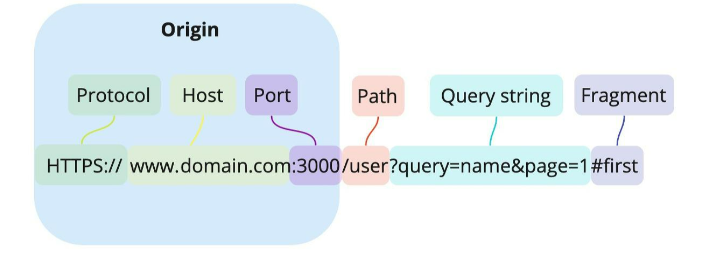
Origin
URL의 요소중 Protocol, Host, Port를 합친 용어
SOP(Same-Origin-Policy)
동일한 출처에 대한 정책을 의미한다.
동일한 출처에만 리소스를 공유할 수 있다.`라는 법률을 가진고 있다.
Cors와 반대 의미로 생각하면 쉽다.
Cors의 핵심
- 클라이언트는 HTTP요청의 헤더에 Origin을 담아서 전달한다. (Origin : http:localhost:3000)
- 서버는 응답헤더에 Access-Control-Allow-Origin을 담아 클라이언드로 전달한다.(Access-Control-Allow-Origin : http:localhost:3000)
- 클라이언트에서 자신이 보냈던 요청의 Origin과 서버가 보내준 Access-Control-Allow-Origin을 비교한다.
- 이때 비교해 같다면 허용 다르면 CORS 에러!
즉, 서버에서 Access-Control-Allow-Origin 헤더를 설정해 CORS에러를 해결해야한다.
Cors 시나리오
여러 시나리오가 있지만 Preflight Request(예비 요청)를 알아야한다.
- 브라우저는 요청을 보낼때 한번에 바로 보내지 않고, 먼저 예비 요청을 보내 서버와 잘 통신되는지 확인한 후 본 요청을 보낸다.
- 이를 이용해 본 요청이 가기전에 CORS 설정을 해주는 것이다.
자세한 시나리오는 아래 링크를 읽어보자
문제 해결
Spring Security
CORS 처리는 반드시 Spring Security에 앞서 처리되어야 한다. Preflight Request는 JSESSSIONID와 같은 쿠키를 포함하고 있지 않고, 이는 Request가 인증되지 않은 사용자라고 판단되어 302에러를 보낸다.
이를 해결하기 위해 CorsConfigurationSource를 Spring Security에 적용할 수 있다.
	//CORS 설정
    @Bean
    public CorsConfigurationSource corsConfigurationSource() {
        CorsConfiguration config = new CorsConfiguration();

        config.setAllowCredentials(true);
        config.setAllowedOrigins(Arrays.asList("http://localhost:3000"));
        config.setAllowedMethods(Arrays.asList("HEAD","POST","GET","DELETE","PUT"));
        config.setAllowedHeaders(Arrays.asList("*"));

        UrlBasedCorsConfigurationSource source = new UrlBasedCorsConfigurationSource();
        source.registerCorsConfiguration("/**", config);
        return source;
    }
//CORS 설정 적용
@Override
protected void configure(HttpSecurity http) throws Exception{
http
.httpBasic().disable()
.cors().configurationSource(corsConfigurationSource())
.and()
.authorizeRequests(
auth -> auth.anyRequest().authenticated()
);
http.formLogin(withDefaults());
http.csrf().disable();
http.headers().frameOptions().disable();
}이때 반드시 Authentication Filter보다 앞에 CorsFilter를 추가해주어야 한다.
Spring MVC
Spring MVC에서 CORS를 적용하는 방법은 크게 2가지가 있다.
- 컨트롤러에서
@CrossOrigin어노테이션을 사용해서 설정하는 방법 - 전역적으로
Spring MVC설정에서CORS를 설정하는 방법
어노테이션 방법
//@CrossOrigin(origins = "http://localhost:3000")
@RestController
public class HelloWorldController {

	@GetMapping(path = "/hello-world")
	//@CrossOrigin(origins = "http://localhost:3000", methods = RequestMethod.GET) //특정 url에 cors에러 해결법
	public String helloWorld() {
		return "Hello World";
	}

}http://localhost:3000URL 허용(클래스 단위, 메서드 단위 둘다 가능)- @RequestMappig에 명시된 HTTP Method(GET)이 허용된다.
전역적인 방법
@SpringBootApplication
public class MywebappApplication {

    public static void main(String[] args) {
        SpringApplication.run(MywebappApplication.class, args);
    }

//    @Bean
//    public WebMvcConfigurer corsConfigurer() {//전역적으로 cors에러 해결법 Spring mvc에서 사용
//        return new WebMvcConfigurer() {
//            public void addCorsMappings(CorsRegistry registry) {
//                registry.addMapping("/**")
//                        .allowedMethods("*")
//                        .allowedOrigins("http://localhost:3000");
//            }
//        };
//    }
}
Spring MVC와 Security를 둘 다 사용한다면
만약 Spring MVC의 CORS 지원을 사용한다면, Spring Security의 CorsConfigurationSource 설정을 생략할 수 있다. Spring Security는 Spring MVC에서 제공되어지는 CORS 설정을 자동으로 탐지하여 활용할 것이다.
참고문헌 및 관련 Commit