
Lab. Build a Database Server
워크플로우
1. 보안 그룹 생성
2. 인스턴스 생성
3. RDS 구성
3.1. 서브넷 그룹 생성
3.2. 파라미터 그룹 생성
3.3. 옵션 그룹 생성
4. RDS 데이터베이스 생성
5. 웹 서버 접속 후 DB 정보 기록
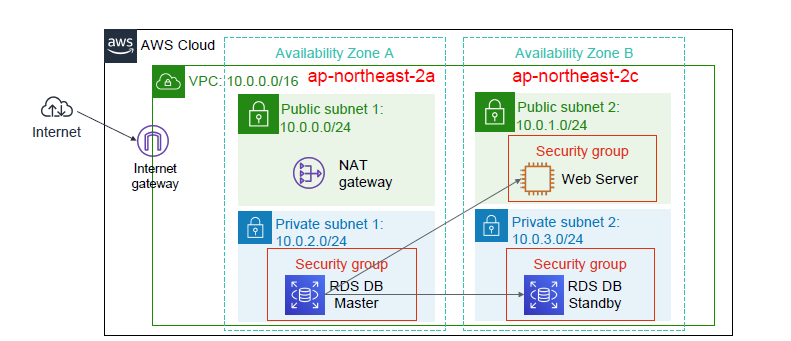
1. 보안 그룹 생성
- name : web-sg
- vpc : lab-vpc
- inbound : HTTP 80, SSH 22
- name : rds-sg
- vpc : lab-vpc
- inbound : MySQL/Aurora 3306, source web-sg
2. 인스턴스 생성
- name : Web Server
- vpc : lab-vpc
- subnet : public 2c
- sg : web-sg
- user data
#!/bin/bash -ex
# Install http php, mysql
dnf update
dnf install httpd php php-mysqlnd php-fpm php-json mariadb105 -y

#Web Service start
systemctl enable --now httpd

#Download web data
cd /var/www/html/
wget https://aws-largeobjects.s3.ap-northeast-2.amazonaws.com/AWS-AcademyACF/lab7-app-php7.zip
unzip lab7-app-php7.zip -d /var/www/html/
chown apache:root /var/www/html/rds.conf.php
3. RDS 구성
-
서브넷 그룹
- name : db-subnetgroup
- vpc : lab-vpc
- az : ap-northeast-2a, ap-northeast-2c
- subnet : 10.0.2.0/24(Private Subnet 2a), 10.0.3.0/24(Private Subnet 2c)
-
파라미터 그룹
- name : db-parm-group
- 엔진 유형: MySQL Community
- 파라미터 그룹 패밀리 : mysql8.0
-
옵션 그룹
- name : db-options-group
- 엔진 유형: mysql
- 엔진 버전: 8.0
4. RDS DB 인스턴스 생성
- 엔진 유형 : mysql
- 엔진 버젼 : MySQL 8.0.39
- 템플릿 : 개발/테스트
- 가용성 및 내구성 : 다중AZ DB 인스턴스
- 설정
1. name : lab-rds
2. 마스터 사용자 이름 : admin
3. 자격 증명 관리 : 자체 관리
4. 마스터 암호 : lab-password- 인스턴스 구성
- 버스터블 클래스
- 인스턴스 클래스 : db.t3.micro
- 스토리지
- 스토리지 유형 : 범용 SSD(gp3)
- 할당된 스토리지 : 20GB
- 스토리지 자동 조정 활성화 : 해제
- 연결
- 컴퓨팅 리소스 : EC2 컴퓨팅 리소스에 연결 안함 (보안을 위해 로컬에서만 접근할 수 있게 하기 위해)
- 네트워크 유형 : IPv4
- vpc : lab-vpc
- 서브넷 그룹 : db-subnetgroup
- 퍼블릭 액세스 : 아니오
- VPC 보안 그룹(방화벽) : rds-sg
- 추가 구성 : 3306
- 데이터베이스 인증
- 암호 인증
- 모니터링
- 모니터링 활성화 : 해제
- 추가 구성
- 초기 데이터베이스 이름 : labdb
- 파라미터 그룹 : db-parm-group
- 옵션 그룹 : db-options-group
- 백업 해제, 암호화 해제
- 로그 내보내기 : 해제
- 유지 관리 : 마이너 버전 자동 업그레이드 사용 해제
- 삭제 방지 : 활성화 해제
- 인스턴스 구성
5. 웹 서버 접속 후 DB 정보 기록
- rds 정보 입력
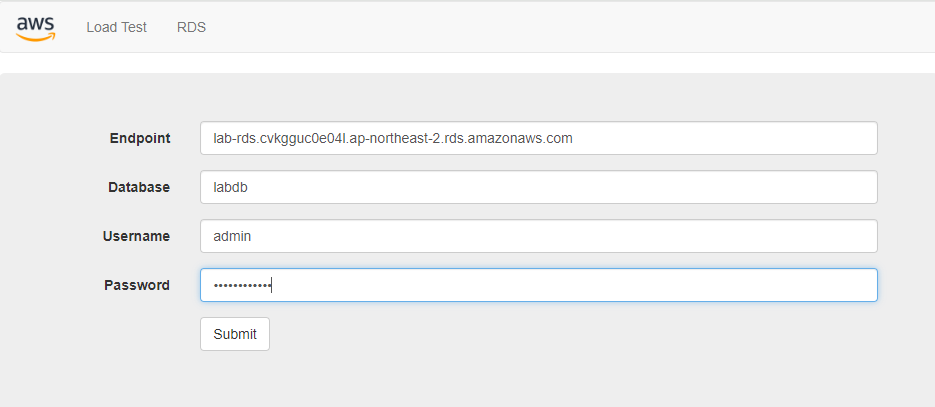
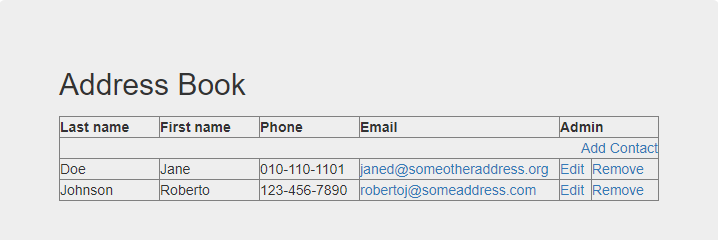
자동으로 실행되는 작업
1. 테이블 생성
2. 샘플 데이터 입력

# 데이터베이스 접속
mysql -h lab-rds.cvkgguc0e04l.ap-northeast-2.rds.amazonaws.com -u admin

[root@ip-10-0-1-113 html]# cat sql/addressbook.sql
CREATE TABLE address (id INT(4) NOT NULL AUTO_INCREMENT PRIMARY KEY, lastname VARCHAR(30), firstname VARCHAR(30), phone VARCHAR(30), email VARCHAR(30));
INSERT INTO address (lastname, firstname, phone, email) VALUES ( "Johnson", "Roberto", "123-456-7890", "robertoj@someaddress.com"), ( "Doe", "Jane", "010-110-1101", "janed@someotheraddress.org" );- rds 위치 확인 - Matster RDS
[root@ip-10-0-1-113 html]# nslookup lab-rds.cvkgguc0e04l.ap-northeast-2.rds.amazonaws.com
Server:         10.0.0.2
Address:        10.0.0.2#53

Non-authoritative answer:
Name:   lab-rds.cvkgguc0e04l.ap-northeast-2.rds.amazonaws.com
Address: 10.0.3.174
지금 이 순간이 다시 넘겨볼 수 있는 한 페이지가 될 수 있게