Firebase Realtime Database
JavaScript SPA 프로젝트에서는 Could Firesotre를 이용했었다. 딱히 Realtime Database와 차이를 고려한 것은 아니었고, 좀 더 최근에 나왔다기에 막연히 더 좋을 것이라고 생각했던 것 같다.
앞서 React Todo List 과제에서 json-server를 사용했었는데, Realtime도 데이터를 json 덩어리로 저장한다는 점이 비슷했다.
단점으로는 하나의 쿼리에서 필터링/정렬을 동시에 할 수 없고, json depth가 깊어질수록 당연히 성능이 떨어진다. 따라서 평면적인 데이터 설계가 요구된다.
이번 프로젝트에서 사용할 데이터는 depth가 2였고 고급 필터링/정렬이 필요하지 않았기에 Realtime Database를 쓰기에 적합하다고 생각했다.
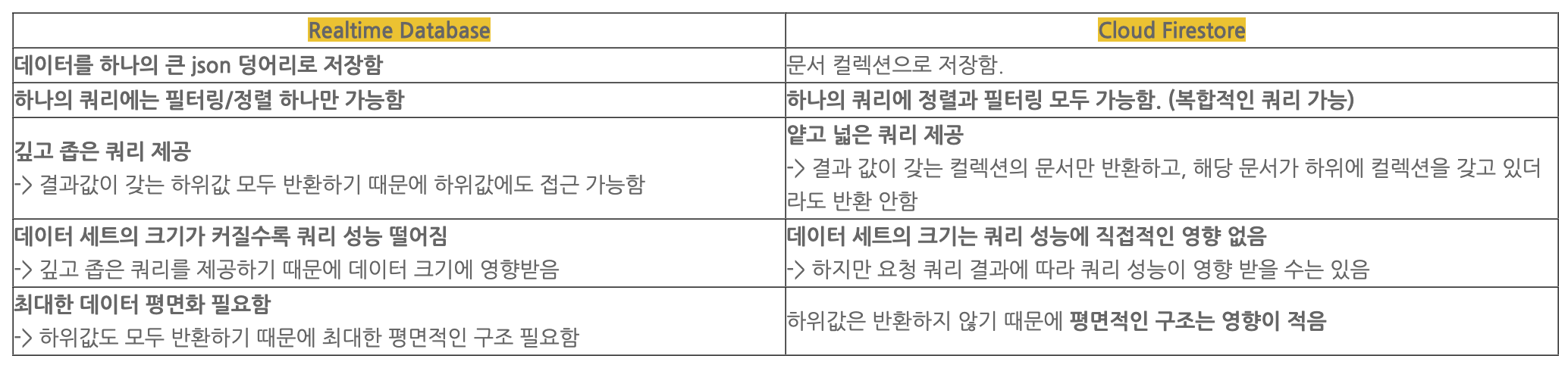
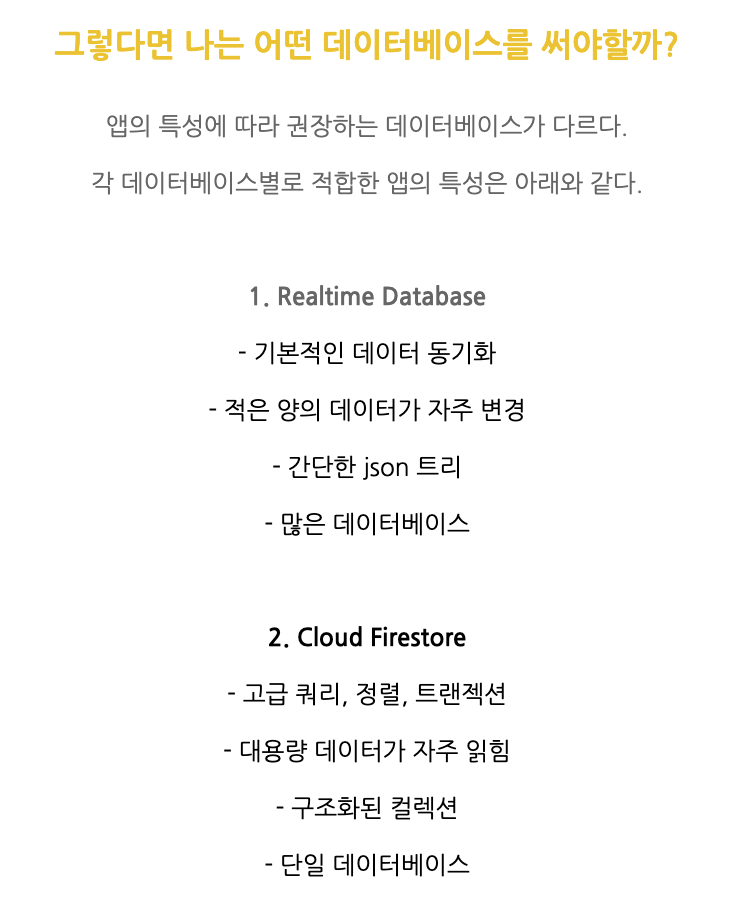
Firebase Realtime, Cloud Firestore [의미, 공통점, 차이점, 앱 기능에 따라 데이터베이스 추천]
Read
Firebase/database에서 제공하는 onValue()는 특정한 경로에 있는 데이터의 스냅샷을 읽을 수 있다.
리스너가 연결될 때 한 번 실행되고, 하위 데이터가 변경될 때마다 다시 실행된다.
따라서 데이터를 추가, 삭제, 변경하는 함수 내에서 setTodos를 따로 해줄 필요가 없다.
// App.js

export default function App() {
  const [todos, setTodos] = useState([]);
  const [category, setCategory] = useState('');

  useEffect(() => {
    // Firebase에서 todos 값이 변경될 때마다 가져오기
    const todoRef = query(ref(dbService, 'todos'), orderByChild('id'));
    onValue(todoRef, (snapshot) => {
      console.log('todos 받아오는 중');
      const data = snapshot.val();
      const todoArray = [];
      for (const idx in data) {
        todoArray.push(data[idx]);
      }
      setTodos(todoArray ?? []);
    });

    // Firebase에서 category 값이 변경될 때마다 가져오기
    onValue(ref(dbService, 'category'), (snapshot) => {
      const data = snapshot.val();
      setCategory(data ?? 'JavaScript');
    });
  }, []);
}
Create
Firebase의 set(), ref()를 사용한다.
set(데이터 위치, 데이터)ref(database 인스턴스, 경로)
// components/TodoInput.jsx

export default function Input({ category }) {
  const [text, setText] = useState('');

  const addTodo = () => {
    const newTodo = {
      id: Date.now(),
      text,
      isDone: false,
      category,
    };
    // Firebase에 Todo 추가
    set(ref(dbService, `todos/${newTodo.id}`), newTodo);
    setText('');
  };

  return (
    <TextInput
      style={styles.input}
      placeholder='할 일을 입력하세요.'
      maxLength={20}
      defaultValue={text}
      onChangeText={setText}
      onSubmitEditing={() => addTodo()}
    />
  );
}
Update
isDone 토글
Firebase의 update(), ref()를 사용한다.
update(database 인스턴스, 변경할 내용)
const doneTodo = () => {
  // Firebase 업데이트
  const updates = {};
  updates[`todos/${id}`] = { ...todo, isDone: !isDone };
  update(ref(dbService), updates);
};
text 변경
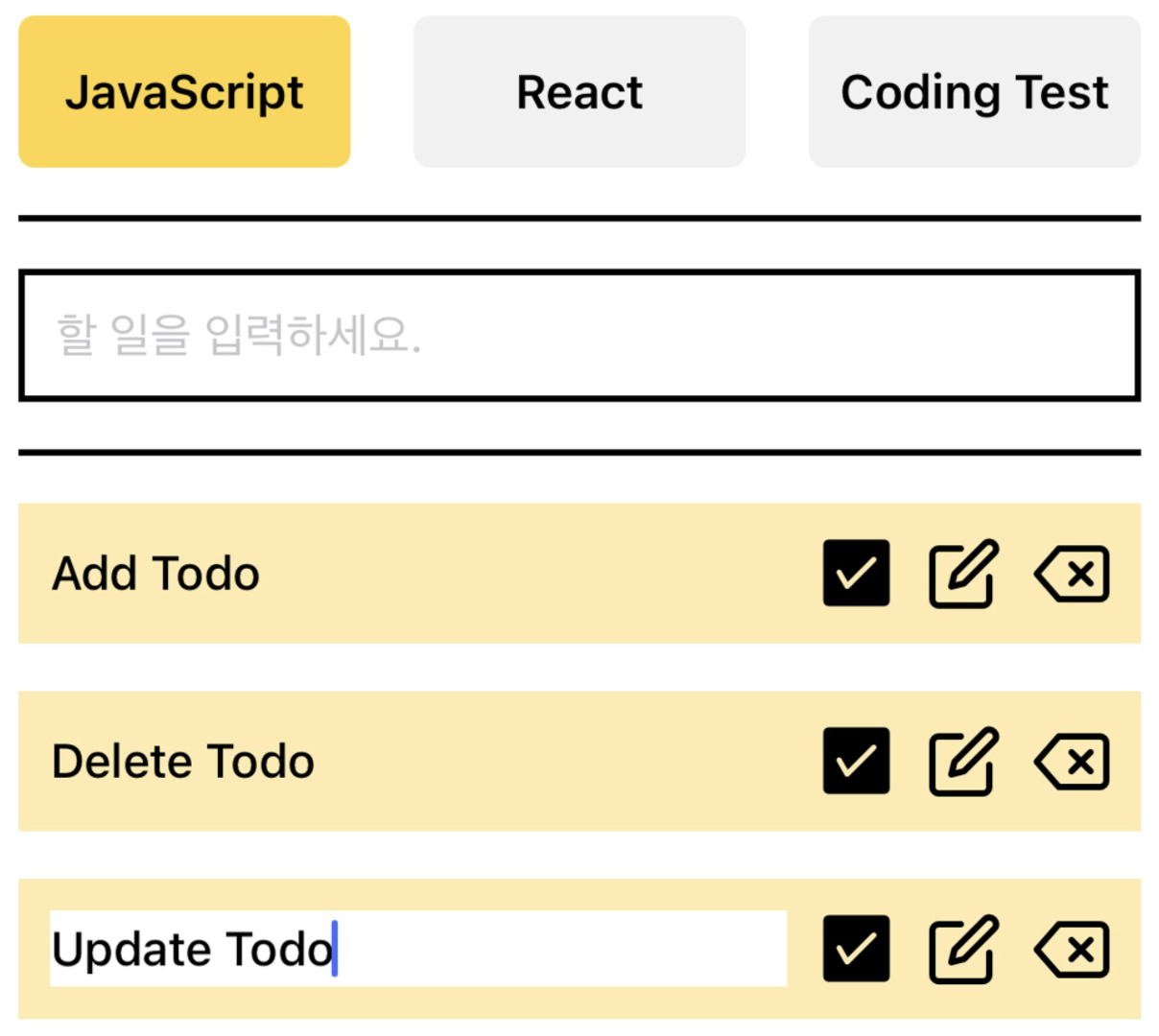
조건부 렌더링
// components/Todo.jsx

// isEditing state를 만들어서, true일 때 input을 보여준다.
// input이 submit 될 때 editTodo 함수가 실행된다.
{isEditing ? (
  <TextInput
    style={styles.textInput}
    autoFocus={true}
    maxLength={20}
    defaultValue={editText}
    onChangeText={setEditText}
    onSubmitEditing={editTodo}
  />
) : (
  <Text style={isDone ? styles.doneTodoText : styles.todoText}>
    {text}
  </Text>
)}
수정 버튼
// components/Todo.jsx

<Feather
  style={styles.todoButton}
  name='edit'
  size={24}
  color='black'
  onPress={() => {
    if (!isEditing) {
			// 수정 중이 아닐 경우, isEdit을 true로 토글해서 TextInput을 보여준다.
      setIsEditing(true);
    } else {
      // 수정 중일 경우 (TextInput이 보이는 상태일 경우), 수정버튼 다시 누르면 수정 완료하기
      editTodo();
    }
  }}
/>
수정 함수
// components/Todo.jsx

const editTodo = () => {
  // Firebase 수정
  const updates = {};
  updates[`todos/${id}`] = { ...todo, text: editText };
  update(ref(dbService), updates);

	// 수정 상태를 false로 변경 -> TextInput 숨기고 Text 보여주기
  setIsEditing(false);
};
Delete
Firebase의 remove() 또는 update()를 이용한다.
remove(ref(databse 인스턴스, 경로))update(): 변경할 내용을null로 지정하면 삭제가 가능하다.
// components/Todo.jsx

const alertDeleteTodo = () => {
  Alert.alert('Todo 삭제', '정말 삭제하시겠습니까?', [
    {
      text: '취소',
      style: 'cancel',
      onPress: () => console.log('취소'),
    },
    {
      text: '삭제',
      style: 'default',
      onPress: () => deleteTodo(),
    },
  ]);
};

const deleteTodo = () => {
  // Firebase 삭제
  remove(ref(dbService, `todos/${id}`));
};
Reference

Software Engineer 🍊