✅ 오늘 한 일
-
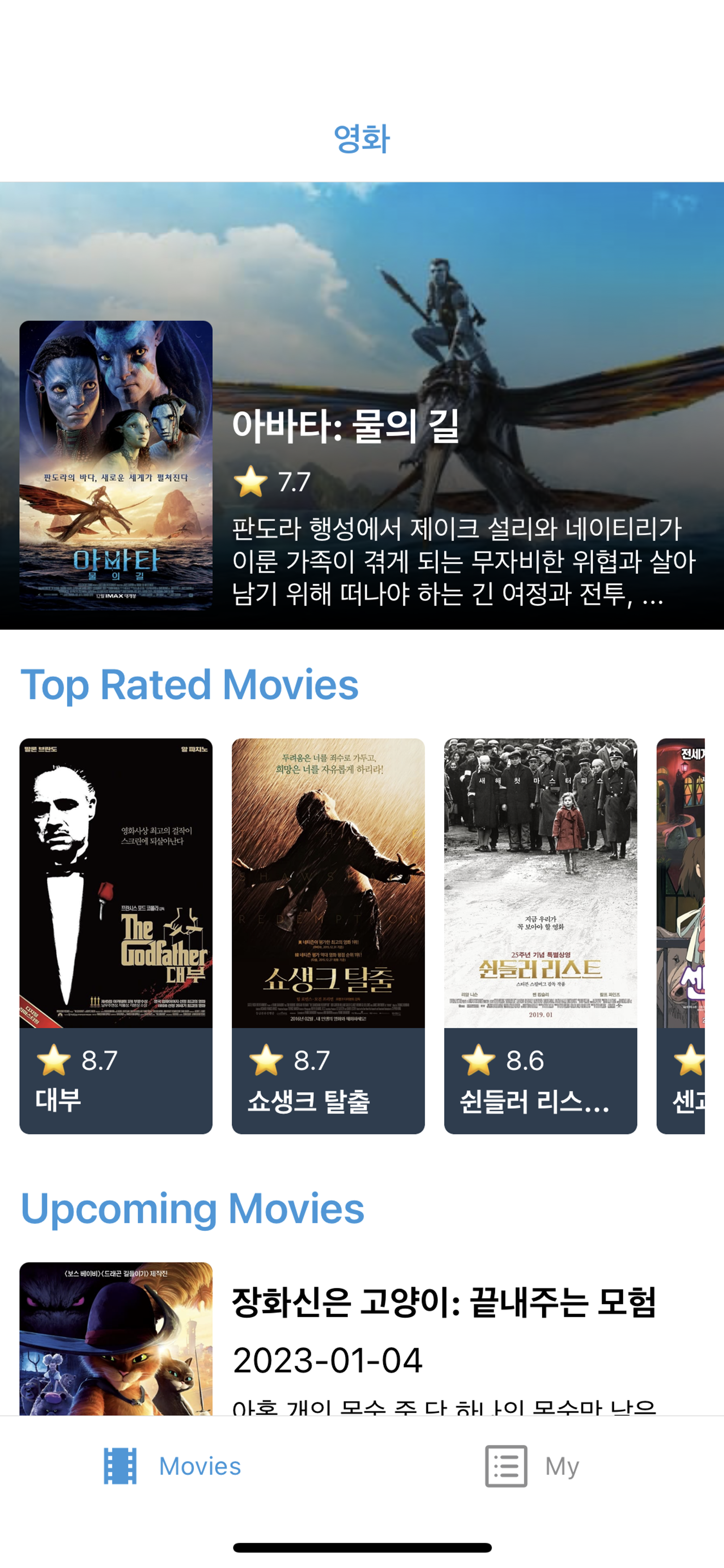
React Native 영화 앱 메인화면 구현
-
Custom Hook 리팩토링
useData라는 커스텀훅을 만들어 API fetching 로직을 분리하니까 컴포넌트가 매우 깔끔해졌다.import { ActivityIndicator, FlatList, View } from 'react-native'; import styled from '@emotion/native'; import Swiper from 'react-native-swiper'; import { SCREEN_HEIGHT } from '../utils'; import MovieSlide from './MovieSlide'; import TopMovie from './TopMovie'; import UpMovie from './UpMovie'; import { useData } from '../hooks'; export default function Movies() { const { isLoading, refreshing, onRefresh, nowPlayings, upcoming, topRated } = useData(); if (isLoading) { return ( <Loader> <ActivityIndicator size='large' /> </Loader> ); } return ( <FlatList refreshing={refreshing} onRefresh={onRefresh} ItemSeparatorComponent={() => <View style={{ height: 10 }} />} ListHeaderComponent={() => ( <> <Swiper height={SCREEN_HEIGHT / 3.5} showsPagination={false} autoplayTimeout={4} autoplay loop > {nowPlayings.map((movie) => ( <MovieSlide key={movie.id} movie={movie} /> ))} </Swiper> <MarginHorizontal> <Heading>Top Rated Movies</Heading> <FlatList data={topRated} renderItem={({ item: movie }) => ( <TopMovie key={movie.id} movie={movie} /> )} horizontal keyExtractor={(movie) => movie.id} showsHorizontalScrollIndicator={false} ItemSeparatorComponent={() => <View style={{ width: 10 }} />} /> <Heading>Upcoming Movies</Heading> </MarginHorizontal> </> )} data={upcoming} renderItem={({ item: movie }) => <UpMovie key={movie.id} movie={movie} />} keyExtractor={(movie) => movie.id} /> ); } const Loader = styled.View` flex: 1; justify-content: center; align-items: center; `; const Heading = styled.Text` font-size: 22px; font-weight: 600; color: #3498db; margin: 15px 0; `; const MarginHorizontal = styled.View` margin: 0 10px; `;
💡 오늘 배운 것
React Native 컴포넌트
RefreshControlScrollView 또는 ListView 내부에서 쓰인다.<ScrollView refreshControl={ <RefreshControl refreshing={refreshing} onRefresh={onRefresh} /> } />FlatListScrollView는 자식 컴포넌트를 한번에 렌더링해서 성능이 상대적으로 안 좋다.FlatList는 자식 컴포넌트가 화면에 나타날 때 렌더링 하기 때문에 메모리와 프로세스 타임을 절약할 수 있다. props에refreshing,onRefresh가 존재함.<FlatList refreshing={refreshing} onRefresh={onRefresh} />
스타일링
- Emotion vs Styled Component 차이 결론: 사용성, 성능 면에서 유의미한 차이 없음. 모르겠다면 emotion 쓰는게 나아 보임.
styled-components 과 emotion, 도대체 차이가 뭔가?
@emotion/native
- React Native Swiper
https://github.com/leecade/react-native-swiper
- 디바이스의 스크린 정보 가져오기
import { Dimensions } from 'react-native'; export const { width: SCREEN_WIDTH, height: SCREEN_HEIGHT } = Dimensions.get('window'); - css 부모 요소만큼 채우기
style = {StyleSheet.absoluteFill}
JavaScript 문법
Promise.all([])모든 Promise를 병렬적으로 실행하여 결과를 반환
Promise.race([])가장 빨리 수행된 Promise 결과를 반환
Promise.allSettled([])모든 Promise의 결과를 배열로 반환
🏃♀️ 학습할 것
- BottomTab을 유지하면서 NativeStack을 이용하는 방법
👾 구현할 것
- Detail 페이지 구현
- 원티드 프리온보딩 과제
💭 오늘의 잡담
- 허리 아프다…🥲 금요일에 프로젝트 시작이니까 내일은 반드시 병원에 다녀와야겠다!

Software Engineer 🍊