anaconda -> python별 가상환경 제작해줌
다만 anaconda 공식 배포버전이 aarch64 구조를 지원 안해서
(xavier nx, nano 이런게 arm64)
aarch64에 맞춰준 archiconda 사용 (거의 같은듯?)
archiconda 설치법)
https://forums.developer.nvidia.com/t/anaconda-for-jetson-nano/74286
들가서 krunal씨 답변:
- First download and install a version of the archiconda installer:
#use install path: $HOME/archiconda3
wget --quiet -O archiconda.sh https://github.com/Archiconda/build-tools/releases/download/0.2.3/Archiconda3-0.2.3-Linux-aarch64.sh && \
    sh archiconda.sh -b -p $HOME/archiconda3 && \
rm archiconda.sh- Next we update the conda environment and add channels containing recipes for 64 bit Arm packages.
export PATH=$HOME/archiconda3/bin:$PATH
conda config --add channels gaiar && \
conda config --add channels conda-forge && \
conda config --add channels c4aarch64 && \
conda update -n base --all && \
conda install -y python=3.6.7 libiconv && \
conda install -y conda-build && \
conda install -y anaconda-client- A standard conda environment should now be available in $HOME/archiconda3/bin. To automatically edit your .bashrc and activate the base environment on login, use conda init bash or see $HOME/archiconda3/etc/profile.d/conda.sh
I hope it helps
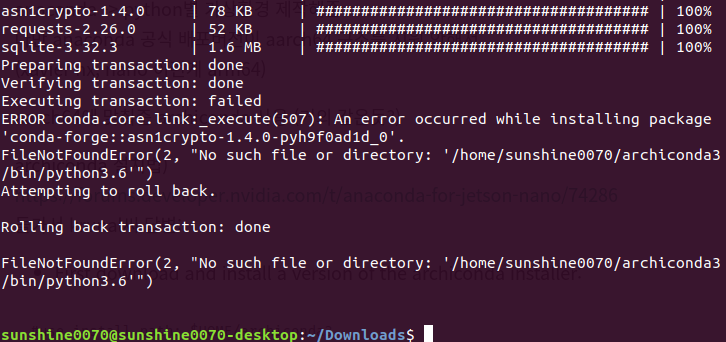
잘 되다가, 에러남 (여기까지 한 상태)

Backend Web Developer