Scalability란?
- 애플리케이션의 부하가 커질 때 확장성을 높이는 방법
- 두 가지 종류가 있습니다:
- Vertical Scalability: 인스턴스의 사이즈를 키우는 방식
- Increase instance size (=scale up/down)
=> 예를 들어, t2.micro에서 t2.large로 업그레이드하는 것처럼, 하드웨어 성능을 높여서 처리할 수 있는 부하를 증가
- Increase instance size (=scale up/down)
- Horizontal Scalability: 인스턴스나 시스템의 개수를 늘리는 방식
- Increase number of instances(=scale out/ in)
=> 여러 대의 서버를 추가하여 분산해서 부하를 처리하는 구조입니다. - 예시) Auto Scaling Group, Load Balancer
- Increase number of instances(=scale out/ in)
High Availability (고가용성)
- 일반적으로 Horizontal Scaling과 함께 사용됩니다.
- 애플리케이션이나 시스템을 최소 2개의 데이터 센터(즉, Availability Zones)에 분산 배치하여 데이터 센터의 장애에도 서비스가 유지되도록 합니다.
- 고가용성의 목표는 데이터 센터 손실 상황에서도 시스템이 정상적으로 운영되는 것입니다.
- Auto Scaling Group multi AZ
- Load Baloancer multi AZ
What is Load Balancing?
- Servers that forward traffic to multiple servers downstream
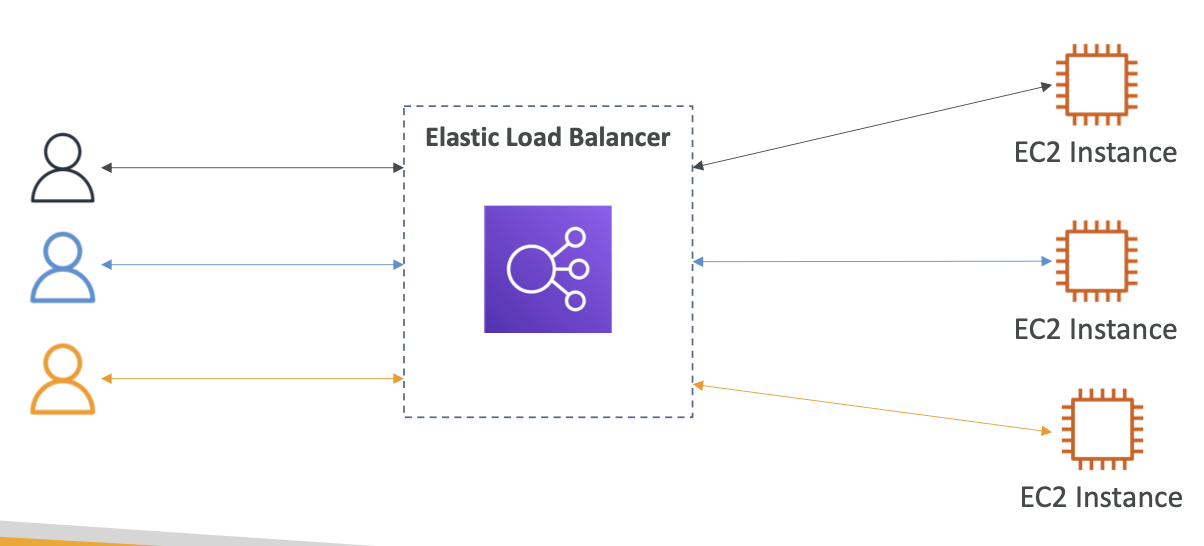
더 많은 유저가 있을수록 더 많은 분산이 일어 난다
왜 사용하는것인가?
- Spread load across multiple downstream instances
- Expose a single point of access (DNS) to your application
- Seamlessly handle failures of downstream instances
- Do regular health checks to your instances
- Provide SSL termination (HTTPS) for your websites
- Enforce stickiness with cookies
- High availability across zones
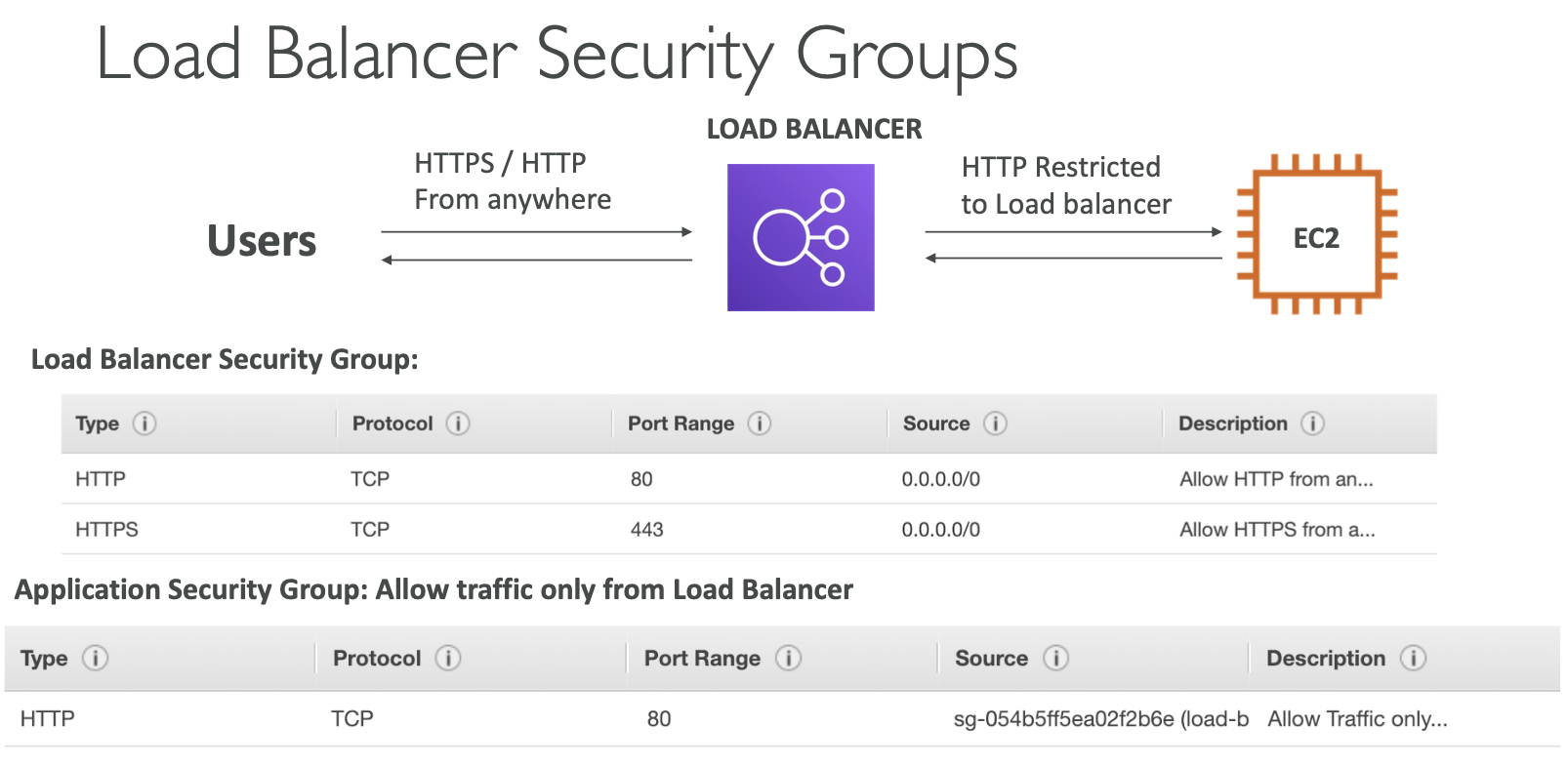
- Separate public traffic from private traffic
Health checks
- 작동이 올바르게 되고 있는지 확인
- 작동하지 않느다면 트래픽을 보낼 수 없기 때문이다
- Health check is done on a port and a route
- if not 200, instance is unhealthy -> not send traffic to that
Types of load balancer on AWS
- Classic Load Balancer - (CLB)
- HTTP, HTTPS, TCP, SSL - Application Load Balancer - (ALB)
- HTTP, HTTPS, WebSocket - Network Load Balancer - (NLB)
- TCP, TLS, UDP - Gateway Load Balancer - (GLB)
- Network Layer - IP Protocol
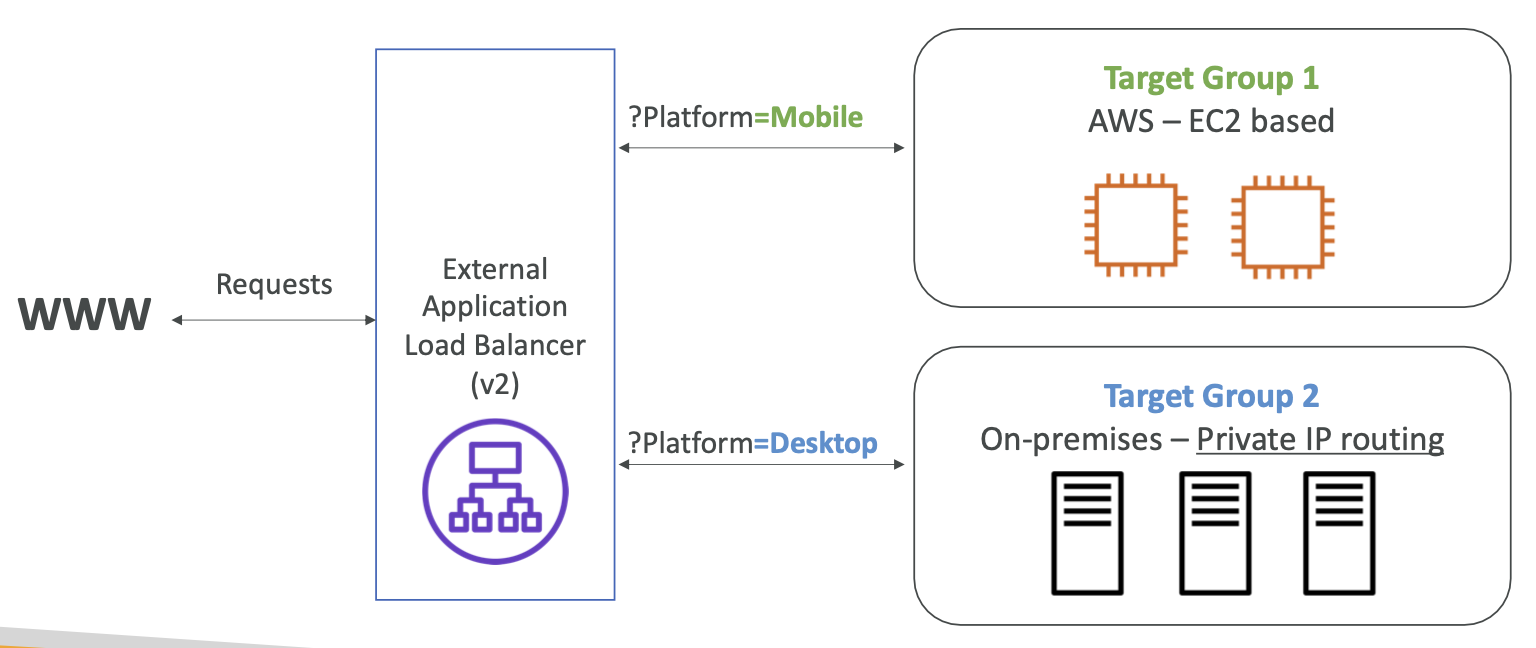
Application Load Balancer
특징
- Layer 7(HTTP)
- Target Groups
- Multiple applications on the same machine
- Support for HTTP/2 and WebSocket
- Support redirects
Routing tables to different target groups:
- Routing based on path in URL (example.com/users & example.com/posts)
- Routing based on hostname in URL (one.example.com & other.example.com)
- Routing based on Query String, Headers (example.com/users?id=123&order=false)
Fixed hostname (XXX.region.elb.amazonaws.com)
The application servers don’t see the IP of the client directly
• The true IP of the client is inserted in the header X-Forwarded-For
• We can also get Port (X-Forwarded-Port) and proto (X-Forwarded-Proto)
X-Forwarded-Port와 X-Forwarded-Proto:
- X-Forwarded-Port: 클라이언트가 접근한 포트 정보를 포함하며, 주로 ALB가 요청을 받은 포트
- X-Forwarded-Proto: 클라이언트가 HTTP인지 HTTPS를 통해 접근했는지를 나타내며, ALB가 이 정보를 헤더로 전달

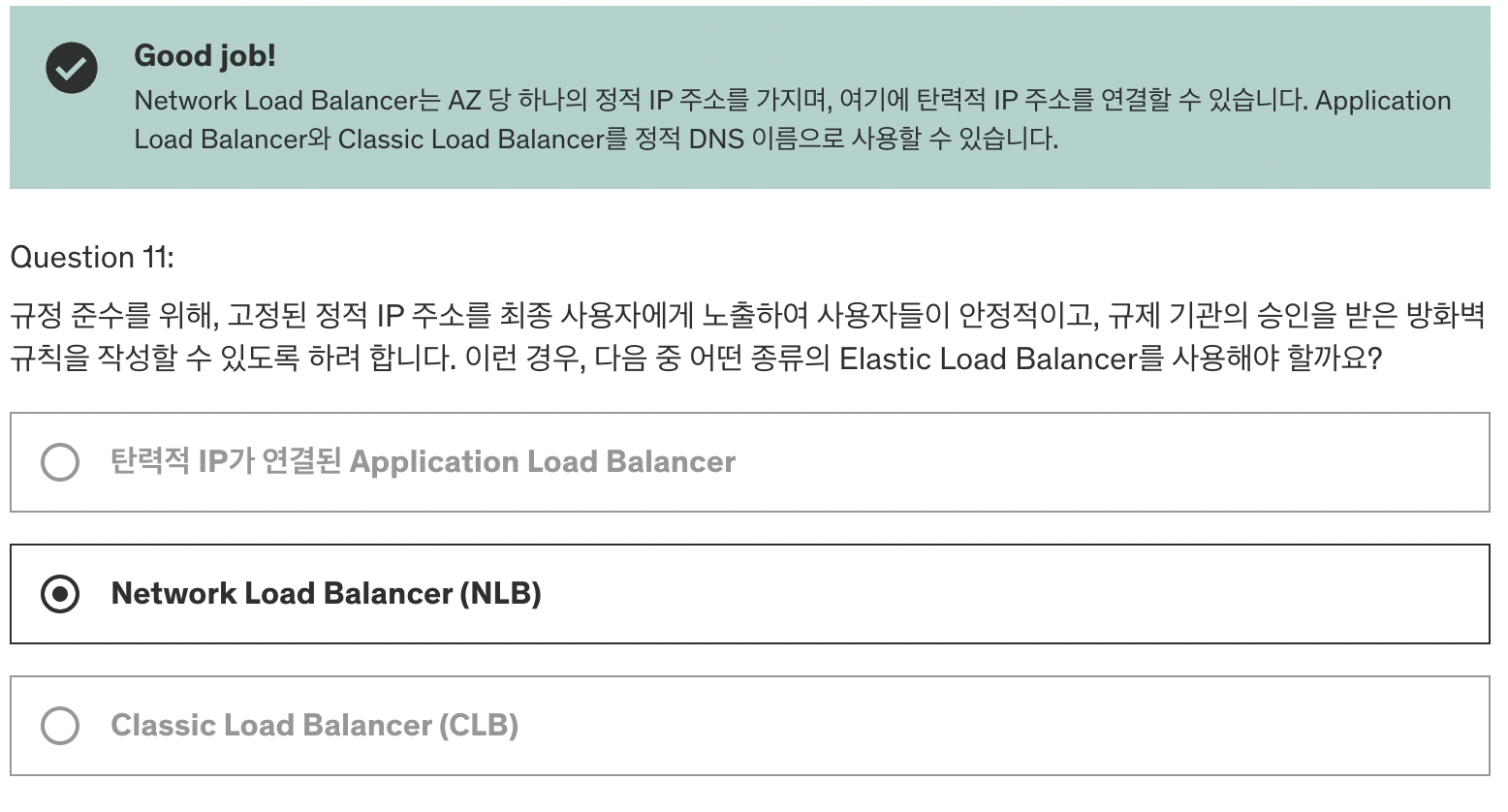
Network Load Balancer
특징
- Layer 4(TCP, UDP)
- handle millions of request per seconds
- less latency ~100ms (vs 400ms for ALB)
- one static ip per AZ and supports assigning elasitc ip
- not included in AWS Free tier
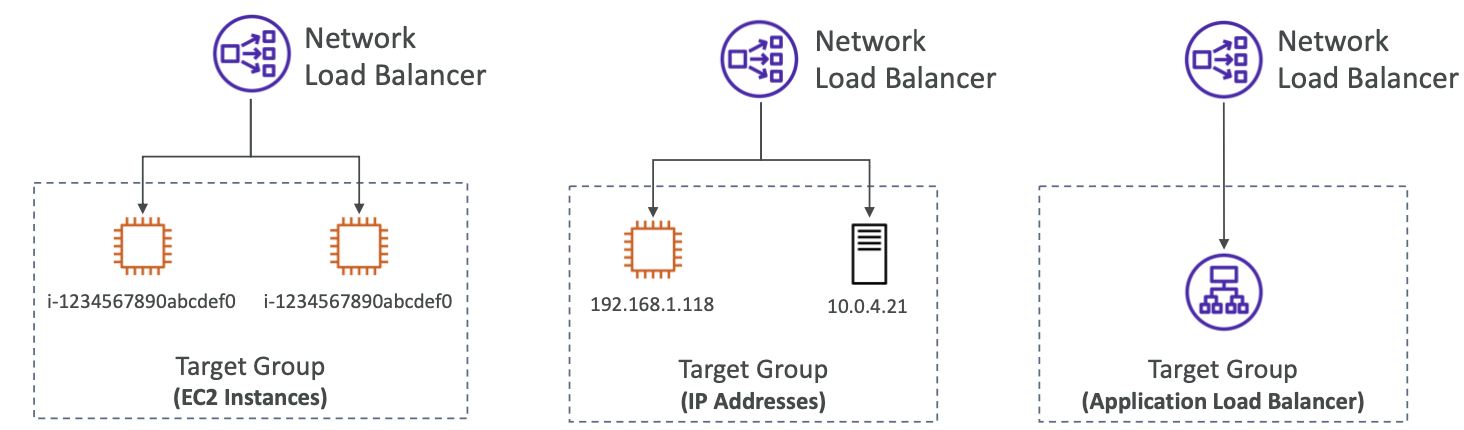
Target groups
- ec2 isntances
- ip addresses(private ip)
- applicatin load balancer
- health check - tcp, http, https
Gateway Load Balancer
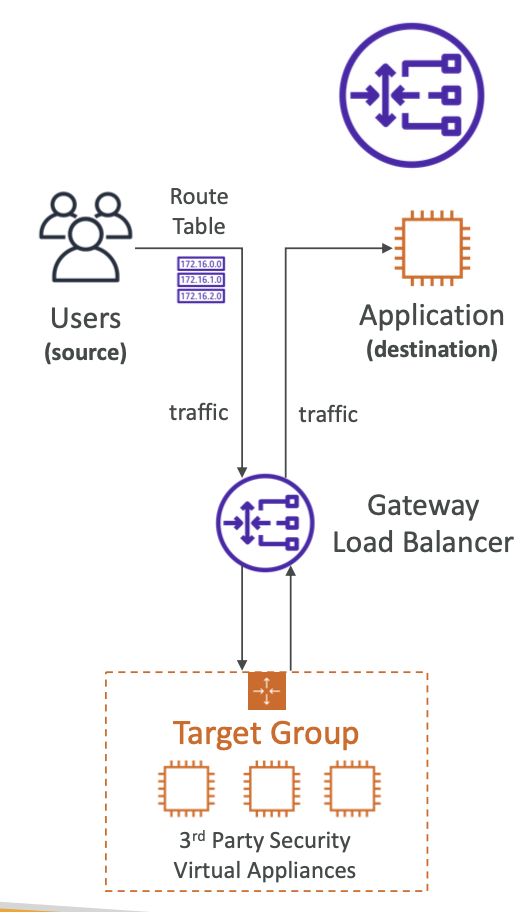
- Deploy, scale, and manage a fleet of 3rd party network virtual appliances in AWS
- Example: Firewalls, intrusion detection and prevention system, deep packet inspection...
- Operates at Layer 3 (Network Layer) – IP Packets
Combines the following functions:
- Transparent Network Gateway – single
- Load Balancer – distributes traffic to your virtual appliances
Uses the GENEVE protocol on port 6081
=> 다양한 네트워크 가상화 솔루션에서 표준으로 채택된 프로토콜로, 네트워크 가상화를 지원하면서도 고성능 및 확장성을 제공
Target Group
- Ec2 instances
- ip addresses - private ip
Sticky Sessions
- Implement stickness so that same client is always redirected to the same instance behind a load balancer
Use Case: make sure the user does not lose session data
-> may bring imbalance to load over the backend ec2 instances
AWS 로드 밸런서 쿠키는 사용자의 세션을 유지하고, 특정 요청이 동일한 서버로 전달되도록 하는 기능을 제공
Cookie Names
- Application-based Cookies
- custom cookie
- generated by the target
- include any custom attributes required by the application
예) 사용자가 로그인한 상태를 유지하거나 특정 페이지로의 이동을 제어할 때 사용 - Application cookie
- cookie name is AWSALBAPP- 로드 밸런서에서 자동으로 생성
- AWS의 Application Load Balancer (ALB)가 애플리케이션에 대한 세션을 관리하는 데 사용
- custom cookie
- Duration-based Cookies
- generated by load balancer- cookie name is AWSALB for ALB, AWSELB for CLB
- 일정한 시간 동안 세션을 유지하며, 쿠키가 만료되기 전까지는 동일한 사용자 요청을 동일한 서버로 전달
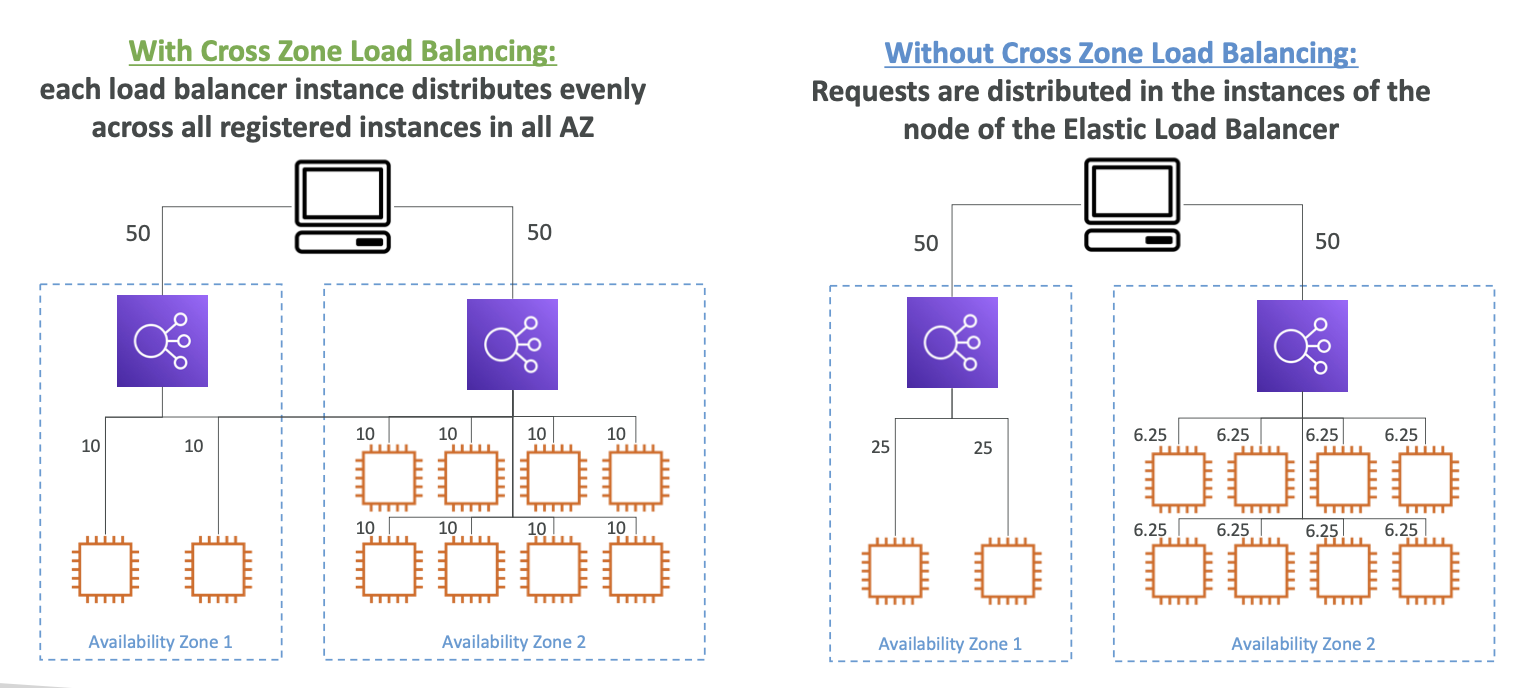
Cross-Zone Load Balancing
Application Load Balancer
- Enabled by default
- No charges for inter AZ data
Network Load Balancer & Gateway Load Balancer
- Disabled by default
- You pay charges for inter AZ data if enabled
SSL/TLS - Basics
- SSL Certificate allows traffic between client and load balancer to be encrypted in transit
SSL -> refers Secure Sockets Layer used to encrypt connections
TLS -> Transport Layer Security -> newer version
public SSL certificates -> issued by CA(certificate Authorities)
- GoDaddy, Comodo..

The load balancer uses an X.509 certificate (SSL/TLS server certificate)
- You can manage certificates using ACM (AWS Certificate Manager)
- You can create upload your own certificates alternatively
HTTPS listener:
- You must specify a default certificate
- You can add an optional list of certs to support multiple domains
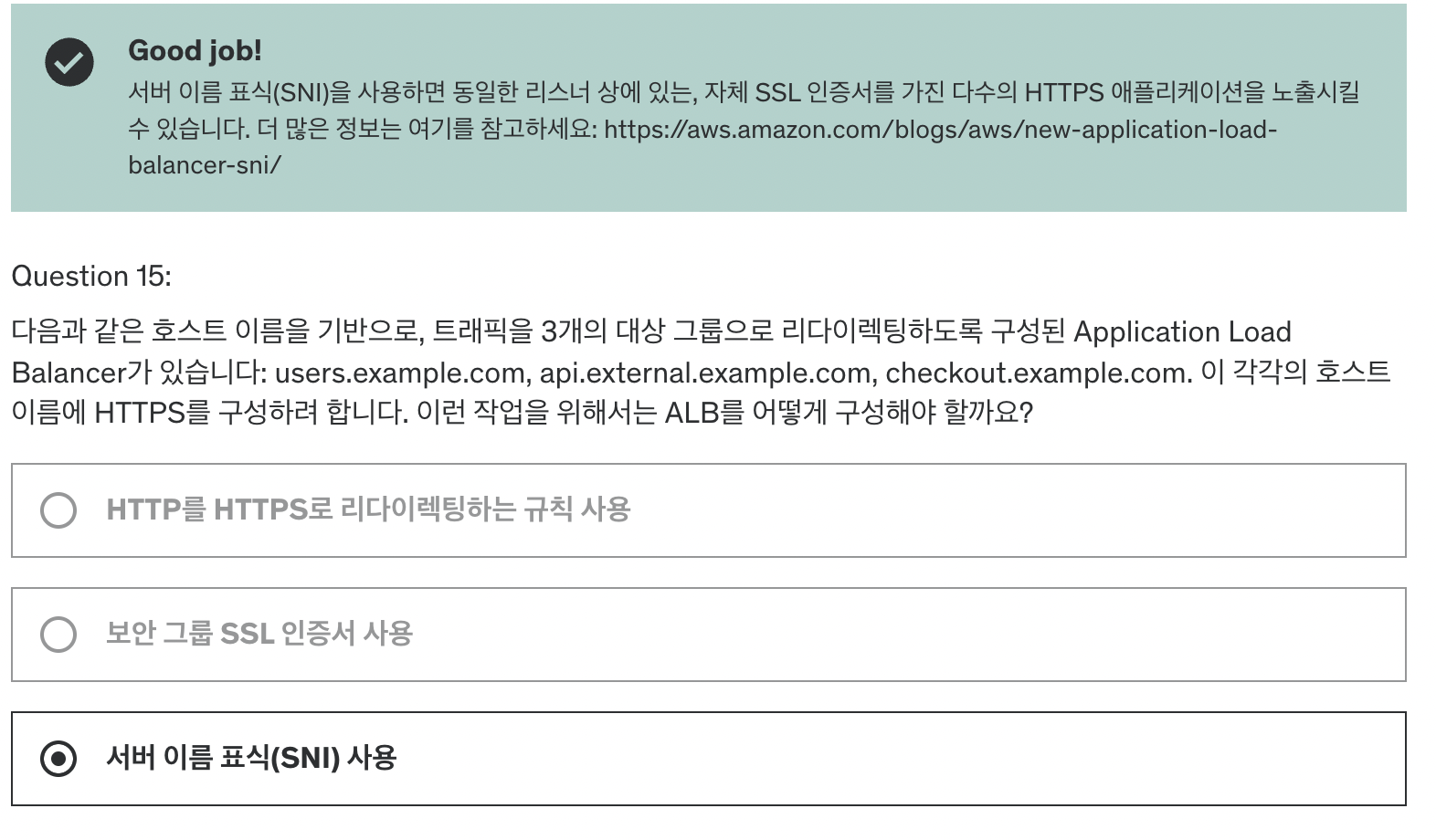
- Clients can use SNI (Server Name Indication) to specify the hostname they reach
- Ability to specify a security policy to support older versions of SSL /TLS (legacy clients)
SSL - server name indication
- 문제 해결: SNI는 단일 웹 서버에 여러 SSL 인증서를 로드할 수 있도록 합니다.
=> 여러 도메인을 하나의 서버에서 호스팅하면서 각 도메인에 맞는 SSL 인증서를 사용 가능 - client to indicate the hostname of the target server in the initial ssl handshake
- only for ALB & NLB, CloudFront에서는 지원하여 여러 SSL인증서 사용 가능
Classic Load Balancer - support only ssl certificate
- CLB는 SNI를 지원하지 않기 때문에 여러 도메인을 처리하려면 각 도메인에 대해 별도의 CLB를 구성해야 합니다.
Connection Draining
- Deregistration Delay - for ALB & NLB
- 로드 밸런서에서 연결이 해제 중인 인스턴스가 있는 경우, 해당 인스턴스가 현재 처리 중인 요청을 완료할 수 있도록 일정 시간을 부여 (인스턴스 등록 해제 OR 인스턴스 unhealthy 상태시 작동)
- Time to complete in-flight requests while instance is de-registering or unhealthy
- 이미 처리중인 요청은 즉시 중단 되지 않고 지정된 Deregistration Delay 시간동안 계속 처리
- Connection Draining이 활성화 되는 동안 로드 밸런서는 해제 중인 인스턴스에 새로운 요청을 전송하지 않는다
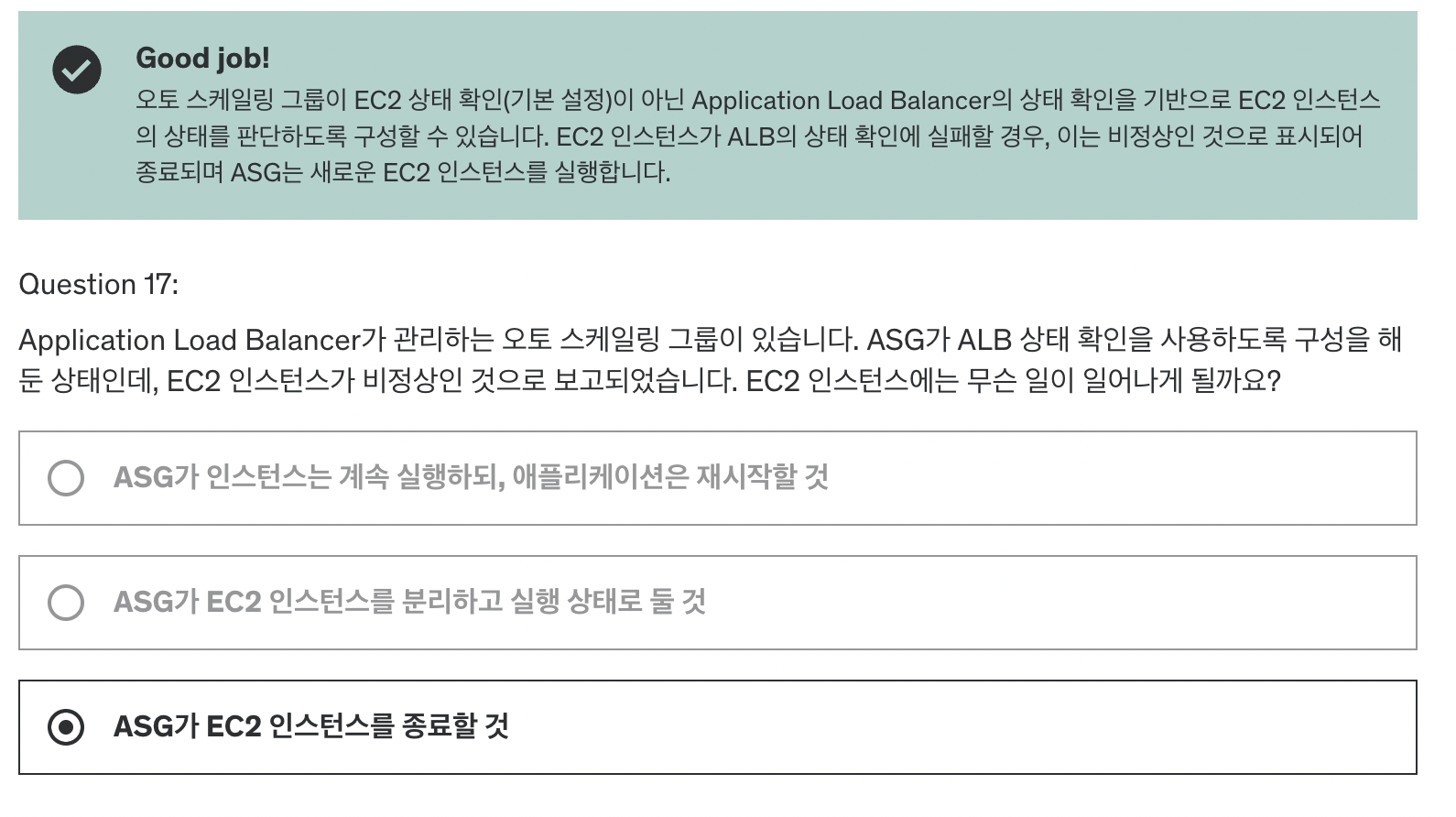
Auto Scaling Group?
Auto Scaling Group (ASG)의 주요 기능과 목적
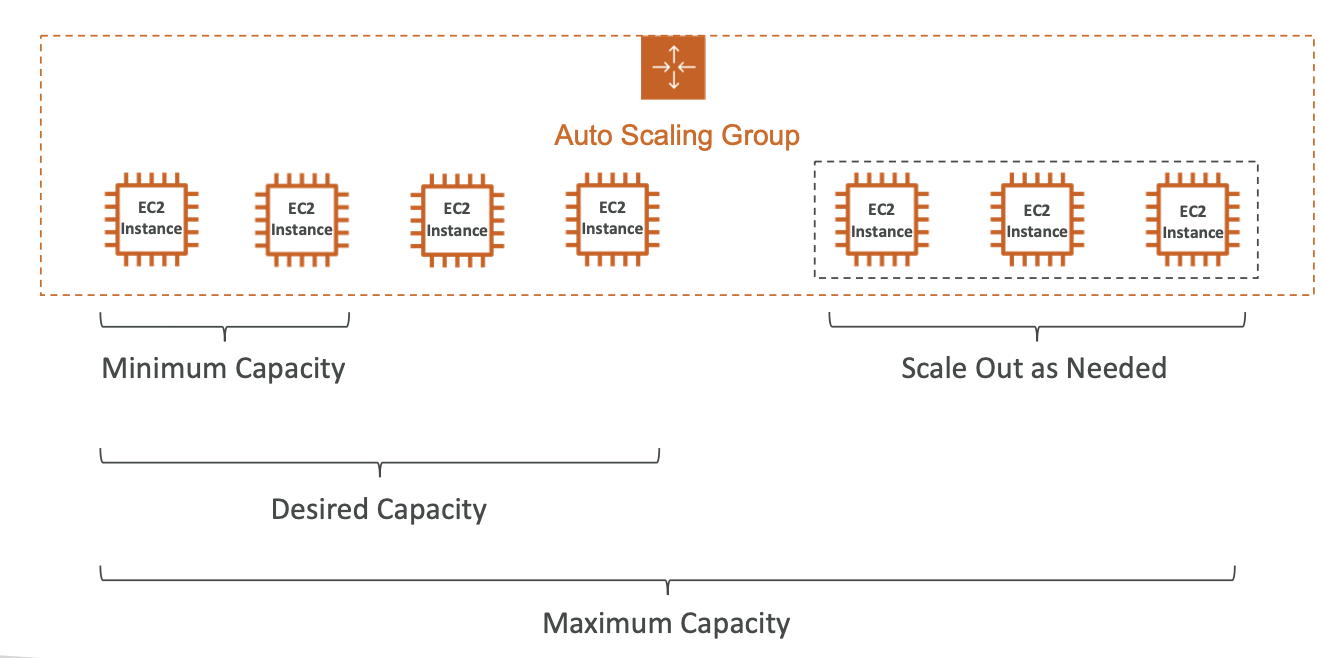
- 동적 확장 및 축소:
- Scale Out: 트래픽 증가 시, 자동으로 EC2 인스턴스를 추가하여 증가한 부하에 대응합니다.
- Scale In: 트래픽 감소 시, EC2 인스턴스를 자동으로 줄여 리소스를 효율적으로 사용합니다.
- 최소 및 최대 EC2 인스턴스 수 보장:
- ASG는 설정한 최소 및 최대 EC2 인스턴스 수를 항상 유지하여 서비스 가용성을 보장합니다.
- 로드 밸런서와의 자동 연동:
- 새로 생성된 인스턴스는 자동으로 로드 밸런서에 등록되어 트래픽을 분산받을 준비를 합니다.
- 인스턴스 복구:
- 기존 인스턴스가 종료되면 새로운 인스턴스를 생성하여 서비스를 지속적으로 유지합니다.
- 비용:
- ASG 자체는 무료이며, 사용한 EC2 인스턴스와 관련된 비용만 지불합니다.
ASG는 서비스 안정성 유지와 리소스 효율성 최적화를 목표로 하여, 자동으로 인스턴스를 관리하고 트래픽에 맞춰 확장 및 축소하는 기능을 제공합니다.
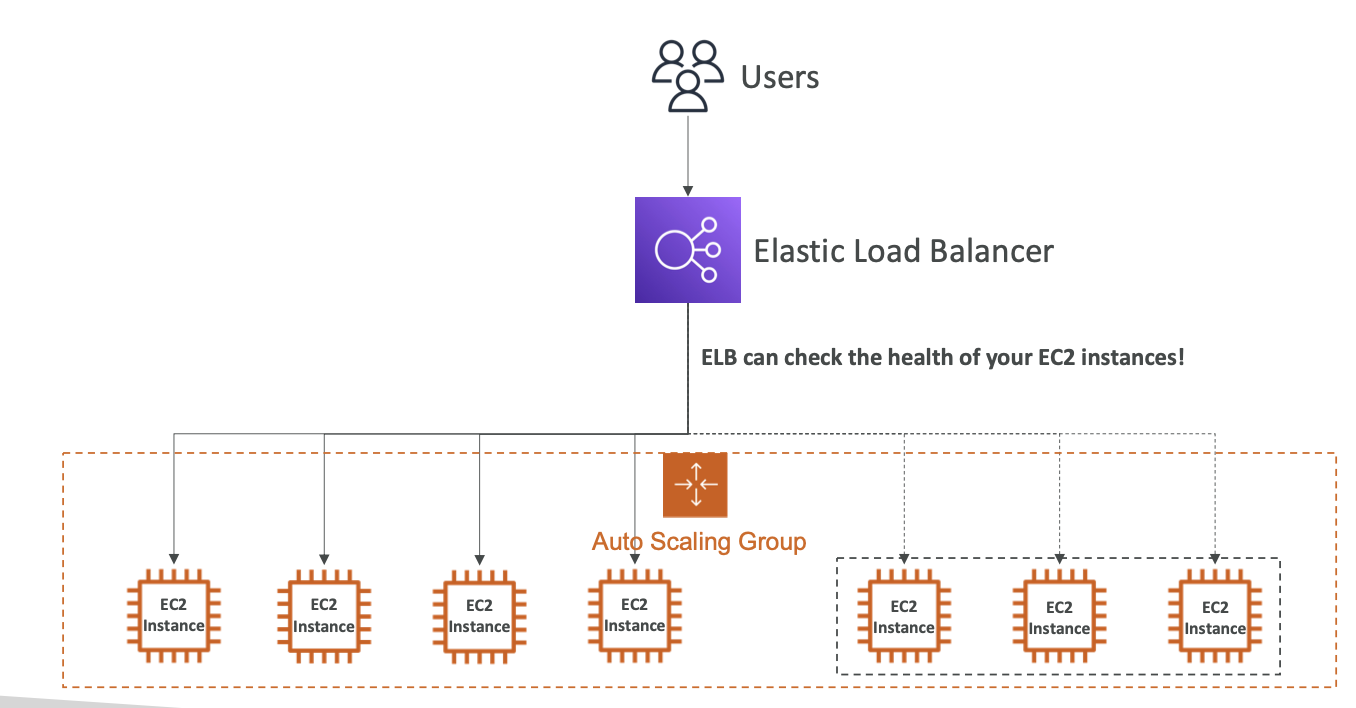
Auto Scaling Group Attributes
- AMI 및 인스턴스 타입:
- ASG에서 사용할 EC2 인스턴스의 AMI(Amazon Machine Image)와 인스턴스 타입을 지정합니다. AMI는 EC2 인스턴스의 운영체제와 기본 소프트웨어를 정의하며, 인스턴스 타입은 CPU, 메모리 등 하드웨어 스펙을 결정합니다.
- EC2 User Data:
- 인스턴스가 시작될 때 자동으로 실행할 스크립트(예: 소프트웨어 설치, 설정 스크립트 등)를 지정하는 User Data입니다. 주로 초기 설정을 자동화하는 데 사용됩니다.
- EBS 볼륨:
- 인스턴스에 연결할 EBS(Elastic Block Store) 볼륨 설정을 포함합니다. ASG가 생성하는 인스턴스들은 이 볼륨을 스토리지로 사용합니다.
- Security Groups (보안 그룹):
- 인스턴스의 네트워크 트래픽을 제어하는 규칙을 정의합니다. 특정 IP, 포트 등을 허용하거나 차단할 수 있어 인스턴스의 보안을 강화합니다.
- SSH Key Pair:
- 인스턴스에 SSH로 접근할 때 사용하는 키 페어입니다. 이 설정을 통해 EC2 인스턴스에 안전하게 원격 접속할 수 있습니다.
- IAM Role:
- 인스턴스가 AWS 리소스에 접근할 수 있도록 허용하는 IAM 역할입니다. 예를 들어, S3나 DynamoDB와 같은 AWS 서비스에 접근할 권한을 부여할 수 있습니다.
- Network Subnet Info (네트워크 서브넷 정보):
- ASG가 생성하는 인스턴스들이 배치될 VPC 및 서브넷 정보를 지정합니다. 인스턴스가 네트워크에 어떻게 연결되는지 결정하는 중요한 속성입니다.
- Load Balancer Info (로드 밸런서 정보):
- ASG에서 생성된 인스턴스를 로드 밸런서에 등록하여 트래픽을 분산시킵니다. 이 설정을 통해 인스턴스가 자동으로 로드 밸런서와 연동되며, 트래픽이 효율적으로 분산될 수 있습니다.
CloudWatch Alarms & Scaling
-
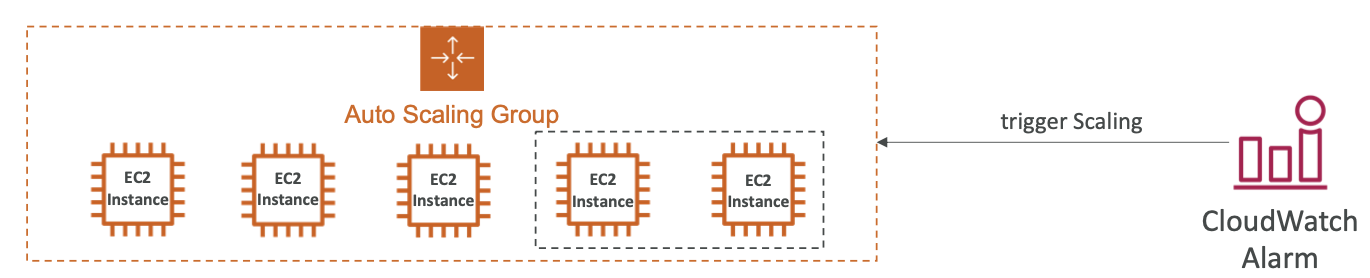
possible to scale an asg based on cloudwatch alarms
-
ASG 평균 CPU가 높으면 지표가 울리고 스케일링 활동 유발
Scaling Policies
- Dynamic Scaling (동적 확장)
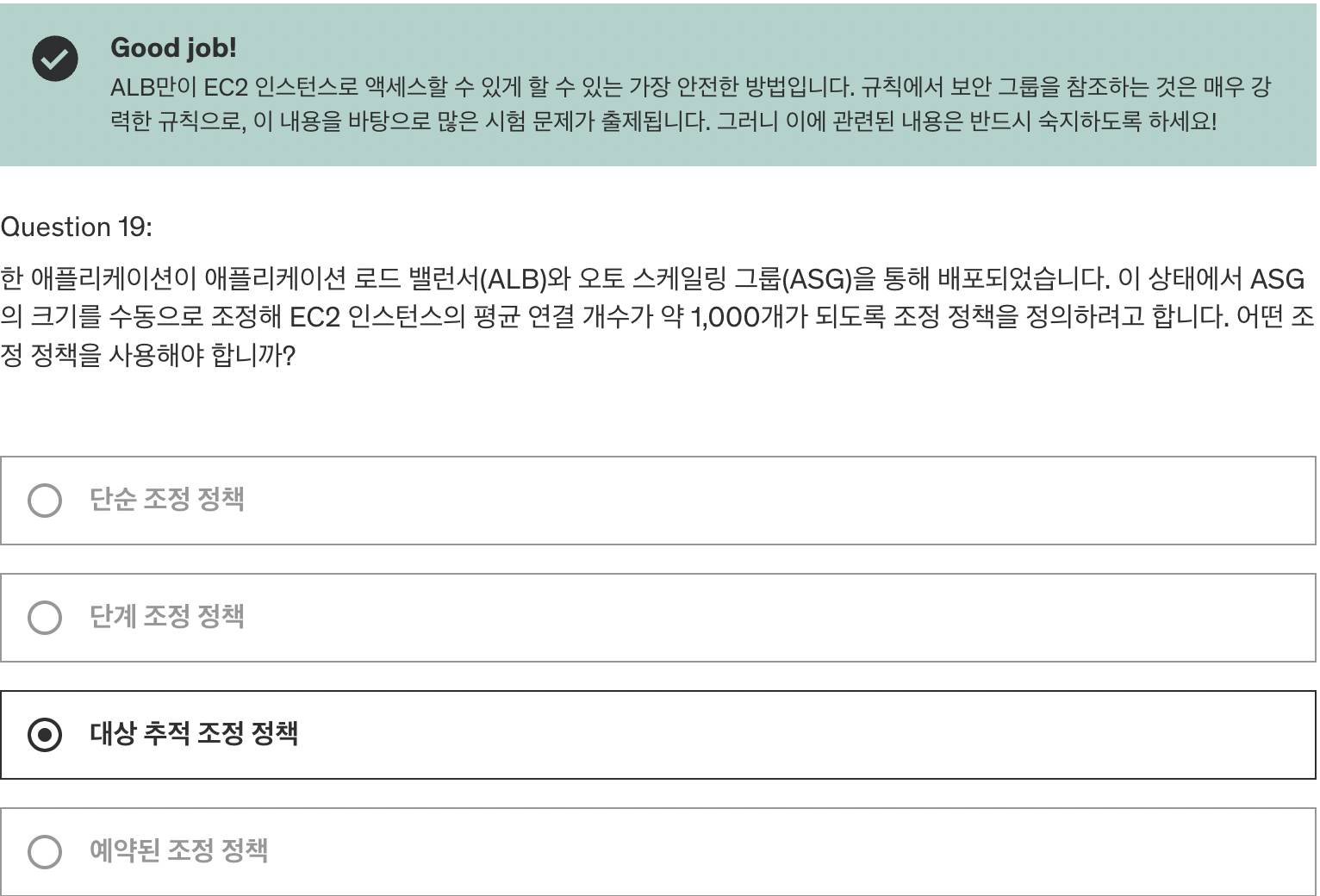
- Target Tracking Scaling (목표 추적 확장):
- 설정이 간단한 방식으로, ASG의 평균 CPU 사용률이나 네트워크 대역폭을 특정 목표값에 유지하도록 합니다.
- 예를 들어, ASG CPU 사용률을 40%로 유지하도록 설정하면 ASG가 CPU 사용률을 지속적으로 모니터링하며 인스턴스 수를 자동으로 조정합니다. - Simple/Step Scaling (간단/단계 확장):
- 경보(Alarm) 기반의 설정 방식입니다. 특정 조건이 충족될 때마다 사전에 정의한 확장 동작을 수행합니다.
- 예를 들어, CPU 사용률이 70%를 초과할 경우 인스턴스를 2개 추가하는 규칙을 설정할 수 있습니다.
- Scheduled Scaling (예약 확장)
- 사전에 설정된 일정에 따라 확장이 이루어집니다.
- 예를 들어, 매일 오후 5시에 기본 용량을 10개로 확장하도록 예약할 수 있습니다.
- 트래픽의 피크 시간이 예측 가능할 때 유용하며, 예측된 시간에 맞춰 리소스를 미리 확보할 수 있습니다.
- Predictive Scaling (예측 확장)
- 미래의 트래픽과 부하를 예측하여 사전에 확장을 준비하는 방식입니다.
- 기계 학습 모델을 사용하여 부하를 예측하고, 예측된 부하에 맞춰 필요한 리소스를 미리 준비함으로써, 트래픽 급증 시 안정적인 성능을 유지합니다.
Good metrics to scale
- CPU Utilization: Average CPU utilization across instances
- request count per target
- number of requests per ec2 instances is stable - average network in /out
- any custom metric
Scaling Cooldowns
- after scaling -> you are in cooldown period
- asg will not lauch or terminate additional instances to allow metrics to stabilize
문제들