개발 환경
Tuist 4.55.6
Xcode 16.4
macOS Sequoia 15.6
Swift 6.1.2
iOS 18
기본 상태
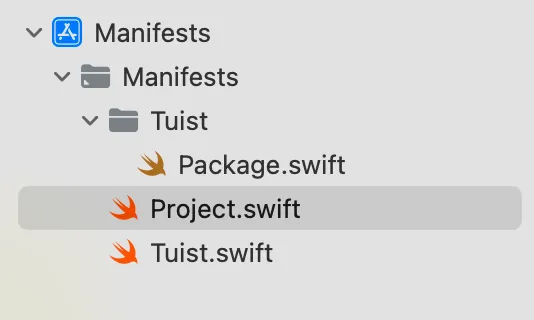
tuist init 후 Manifests 파일 구조
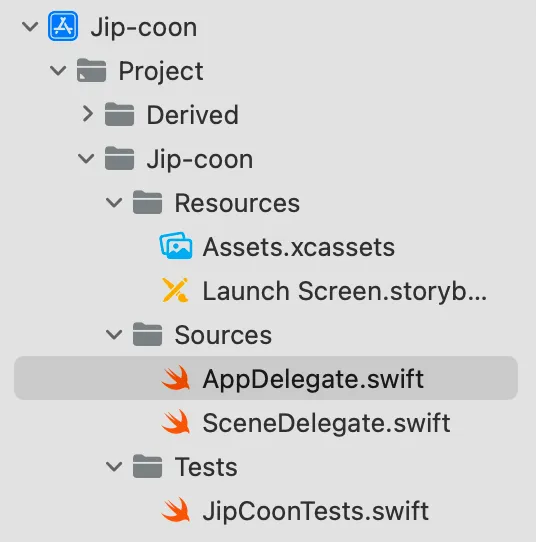
프로젝트 구조(UIKit 사용)
Finder
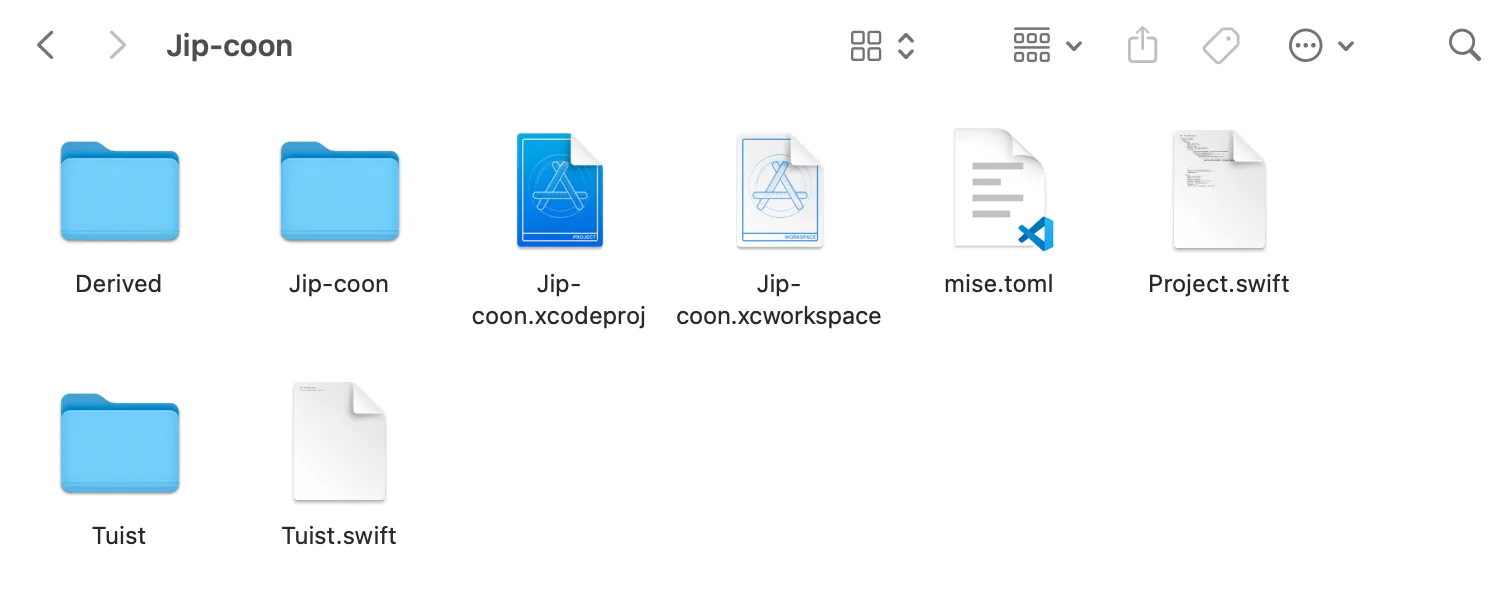
mise.toml 파일은 tuist version을 4.55.6으로 사용하도록 설정해서 생긴 파일이다.
Manifests 파일을 수정한다. 구조는 공식 문서에 나와있는 표준 Tuist 프로젝트를 기준으로 했다.
$ tuist edit표준 Tuist 프로젝트 구조
Tuist.swift
Tuist/
  Package.swift
  ProjectDescriptionHelpers/	// 이 폴더는 쓰이지 않아서 안 만듦
Projects/
  App/
    Project.swift
  Feature/
    Project.swift
Workspace.swift
할 일 순서
- 없는 폴더와 파일을 생성하여 구조를 맞춘다.
- Workspace.swift 파일 내용 작성
- 각 폴더의 Project.swift 파일 내용을 작성
작업을 시작하기 이전에 기본 설정되어 있던 파일의 내용을 공유한다. tuist init을 하면 생기는 기본 파일이다.
Tuist.swift
import ProjectDescription

let tuist = Tuist(project: .tuist())
Tuist/Package.swift
// swift-tools-version: 6.0
import PackageDescription

#if TUIST
    import struct ProjectDescription.PackageSettings

    let packageSettings = PackageSettings(
        // Customize the product types for specific package product
        // Default is .staticFramework
        // productTypes: ["Alamofire": .framework,]
        productTypes: [:]
    )
#endif

let package = Package(
    name: "Jip-coon",
    dependencies: [
        // Add your own dependencies here:
        // .package(url: "https://github.com/Alamofire/Alamofire", from: "5.0.0"),
        // You can read more about dependencies here: https://docs.tuist.io/documentation/tuist/dependencies
    ]
)
주석으로 처리된 Alamofire 추가 코드는 팀원분이 설정해놓으신 것 같다(?)
Project.swift
import ProjectDescription

let project = Project(
  name: "Jip-coon",
  targets: [
    .target(
      name: "Jip-coon",
      destinations: .iOS,
      product: .app,
      bundleId: "dev.tuist.Jip-coon",
      infoPlist: .extendingDefault(
        with: [
          "UILaunchStoryboardName": "Launch Screen.storyboard",
          "UIApplicationSceneManifest": [
            "UIApplicationSupportsMultipleScenes": false,
            "UISceneConfigurations": [
              "UIWindowSceneSessionRoleApplication": [
                [
                  "UISceneConfigurationName": "Default Configuration",
                  "UISceneDelegateClassName": "$(PRODUCT_MODULE_NAME).SceneDelegate"
                ],
              ]
            ]
          ]
        ]
      ),
      sources: ["Jip-coon/Sources/**"],
      resources: ["Jip-coon/Resources/**"],
      dependencies: []
    ),
    .target(
      name: "Jip-coonTests",
      destinations: .iOS,
      product: .unitTests,
      bundleId: "dev.tuist.Jip-coonTests",
      infoPlist: .default,
      sources: ["Jip-coon/Tests/**"],
      resources: [],
      dependencies: [.target(name: "Jip-coon")]
    ),
  ]
)
모듈 만들기 시작
없는 폴더와 파일을 생성하여 구조를 맞춘다.
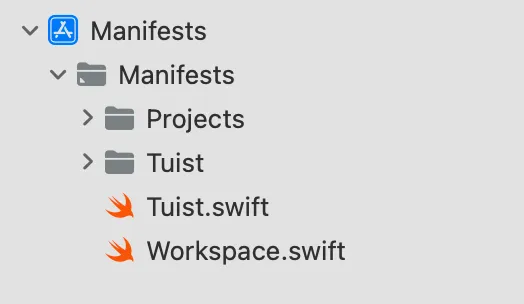
표준 Tuist 프로젝트 구조와 현재 Manifests 파일의 구조를 비교하여 없는 폴더와 파일을 생성하여 구조를 맞춘다. 지금 현재 상태로는 파일 안에 내용은 없다.
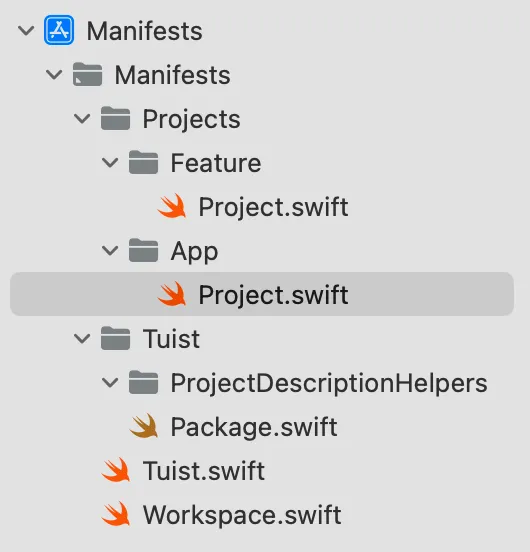
열려있는 폴더를 모두 접으면 아래와 같은 모습이다.
Workspace.swift
import ProjectDescription

let workspace = Workspace(
  name: "Jip-coon",
  projects: [
    "Projects/App",
    "Projects/Feature"
  ]
)
공식 문서 Workspace.swift 와 블로그를 참고하여 작성했다. Feature 경로를 작성하지 않으면 프로젝트 파일에 모듈로 따로 나타나지 않는다. 모듈별 경로를 꼭 추가해주어야 한다.
App/project.swift
import ProjectDescription

let project = Project(
    name: "Jip-coon",
    targets: [
        .target(
            name: "Jip-coon",
            destinations: .iOS,
            product: .app,
            bundleId: "dev.tuist.Jip-coon",
            infoPlist: .extendingDefault(
                with: [
                    "UILaunchStoryboardName": "Launch Screen.storyboard",
                    "UIApplicationSceneManifest": [
                        "UIApplicationSupportsMultipleScenes": false,
                        "UISceneConfigurations": [
                            "UIWindowSceneSessionRoleApplication": [
                                [
                                    "UISceneConfigurationName": "Default Configuration",
                                    "UISceneDelegateClassName": "$(PRODUCT_MODULE_NAME).SceneDelegate"
                                ],
                            ]
                        ]
                    ],
                ]
            ),
            sources: ["Sources/**"],
            resources: ["Resources/**"],
            dependencies: []
        ),
        .target(
            name: "Jip-coonTests",
            destinations: .iOS,
            product: .unitTests,
            bundleId: "dev.tuist.Jip-coonTests",
            infoPlist: .default,
            sources: ["Tests/**"],
            resources: [],
            dependencies: [.target(name: "Jip-coon")]
        ),
    ]
)
tuist init을 하면 생기는 Project.swift 파일의 내용에서 소스와 리소스 파일경로만 수정했다.아 UIKit 설정을 위해 infoPlist의 내용이 수정되어 있다.
Troubleshooting
나중에 Feature/Project.swift 파일까지 다 작성하고 tuist generate를 했더니 문제가 발생했다.

처음 tuist init을 하고 생성된 Project.swift 파일을 App 폴더 내로 이동시켰더니 발생한 문제같았다. 그래서 기존에 이동시킨 파일은 삭제하고, 새롭게 생성한 Project.swift 파일에 이전 내용을 복사 붙여넣기 했다.
다음 오류

Sources 폴더를 찾을 수 없다는 내용이었다.
Manifests 파일에 직접 Sources, Resources, Tests 파일을 만들어서 해결했다.
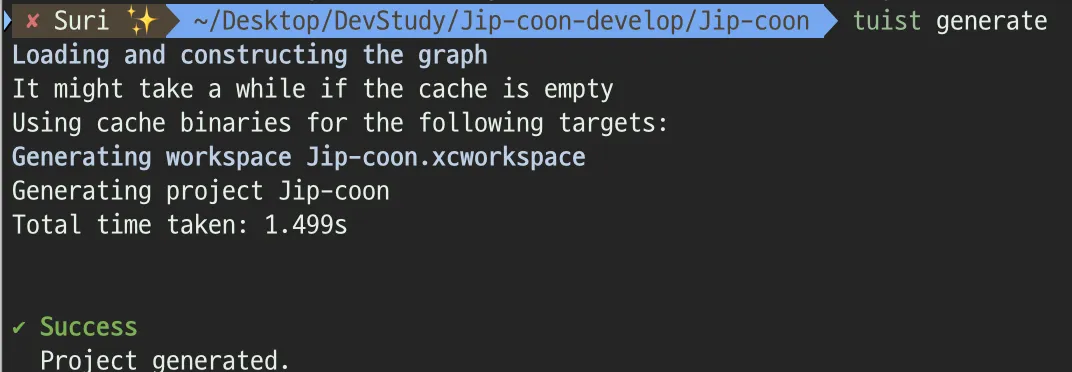
아무튼 드디어 generate에 성공했는데!

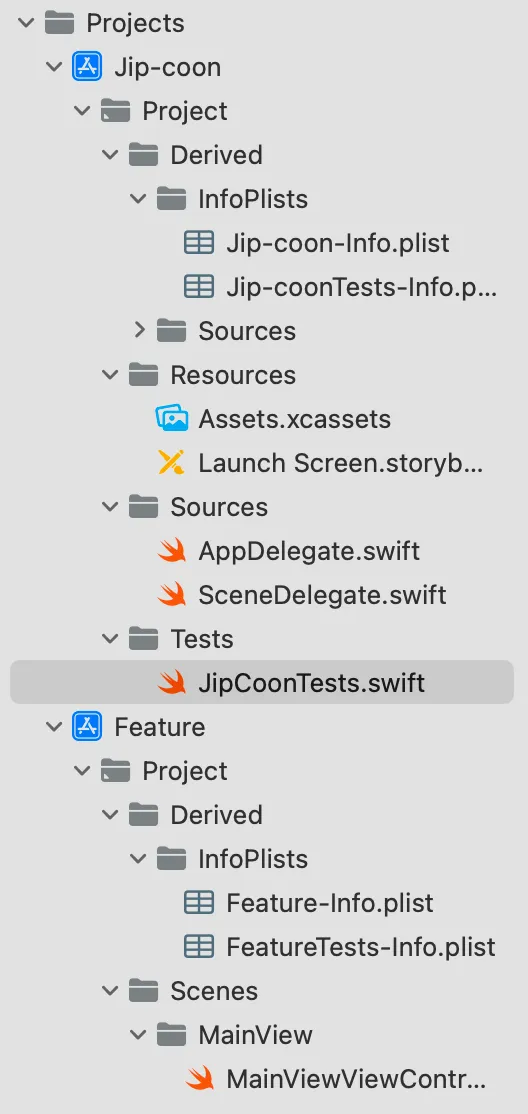
파인더에는 Resources, Sources, Tests 폴더가 보이는데, 프로젝트 파일에서는 보이지가 않았다. Derived 폴더만 달랑..

찾아보니 Jip-coon-develop/Jip-coon/Jip-coon 폴더에 이전에 생성해둔 내용들(스토리보드, AppDelegate.swift 등등..)이 모두 있어서 그런것이었다.
그래서 Jip-coon-develop/Jip-coon/Projects/App 으로 내용들을 옮겨주었다. 이후에 정상작동이 잘 되는 모습을 보였다.
나중에 하다보니 알게 된 사실인데,
- Manifest 파일에서 직접 폴더를 만들고
- 안에 유효한 파일을 넣어야
- 올바르게 폴더가 생성되어서 프로젝트 파일에서 볼 수 있다.
그리고 tuist generate 후 다시 tuist edit으로 mainfest 파일을 보면 만들었던 폴더들이 사라지고 project.swift 파일만 남아있는 모습을 볼 수 있다.
Feature/Project.swift
import ProjectDescription

let project = Project(
  name: "Feature",
  targets: [
    .target(
      name: "Feature",
      destinations: .iOS,
      product: .staticFramework,
      bundleId: "com.jipcoon.feature",
      infoPlist: .default,
      sources: "Scenes/**",
      dependencies: []
    ),
    .target(
        name: "FeatureTests",
        destinations: .iOS,
        product: .unitTests,
        bundleId: "com.jipcoon.featureTests",
        infoPlist: .default,
        dependencies: [.target(name: "Feature")]
    )
  ]
)
Troubleshooting
Feature 모듈이 프로젝트 파일에 나타나지 않는 문제가 발생했다.
Workspace.swift에 원래는 이렇게 되어있었는데, Projects/Feature을 추가하지 않아서 발생한 문제였다.
import ProjectDescription

let workspace = Workspace(
  name: "Jip-coon",
  projects: [
    "Projects/App"
  ]
)
추가하니 정상적으로 모듈이 나타났다.
import ProjectDescription

let workspace = Workspace(
  name: "Jip-coon",
  projects: [
    "Projects/App",
    "Projects/Feature"
  ]
)
Feature 모듈을 만들 때에도 임의로 Manifests 파일에서 Scenes 폴더를 만들어서 진행했었는데, Scenes 폴더가 나타나지 않는 문제가 있었다.
Scenes 폴더가 빈 파일이라 발생한 문제였다. 임의로 더미 파일을 하나 넣어주고 프로젝트 파일에서 제대로 된 파일을 넣어주는 것으로 해결했다.
모듈 추가 완료
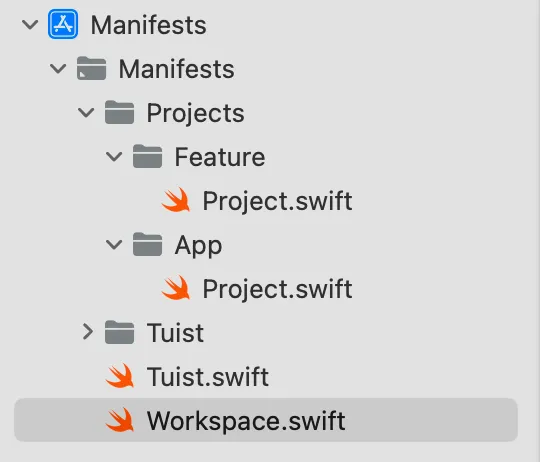
Manifests 파일
프로젝트
의존성 추가
여러 블로그와 공식 문서를 보다보니 의존성 설정이 다양했다. 그 중 많은 글이 App 모듈에서 나머지 모듈에 대해 의존성을 가지도록 설정되어 있었다. 그래서 아 무조건 이렇게 해야되는 건가? 라는 생각도 들었다.
내가 고민한 부분은 “App 모듈에서 다 관리할 필요가 있나?” 였다. 그럴거면 뭐하러 모듈화를 해놨지 싶기도 하고,,(물론 모듈화를 한 다른 이유도 있지만.) 뭔가 석연치 않았다. 어떤 구조로 사용할 것인가 생각했을 때
- Jip-coon(App): 최상위 실행 모듈
- Core: 핵심 로직, 서비스, 유틸
- Feature: 화면 단위 기능
- UI: 디자인 시스템
이런 형태로 쓰일 것 같은데,
Feature 모듈에서 Core와 UI를 사용하고, App에서는 Feature만 알고 있으면 될 것 같았다.
App에서 Core나 UI 모듈의 내용을 직접 가져다 쓸 일이 없을 것이라고 생각했다.
그래서 App → Feature → Core, UI 형식으로 의존성 설정을 해두었다.
App/Project.swift
import ProjectDescription

let project = Project(
    name: "Jip-coon",
    targets: [
        .target(
            ...,
            dependencies: [
              .project(target: "Feature", path: .relativeToRoot("Projects/Feature"))
            ]
        )
    ]
Feature/Project.swift
import ProjectDescription

let project = Project(
  name: "Feature",
  targets: [
    .target(
      ...,
      dependencies: [
        .project(target: "Core", path: .relativeToRoot("Projects/Core")),
        .project(target: "UI", path: .relativeToRoot("Projects/UI"))
      ]
    )
최종
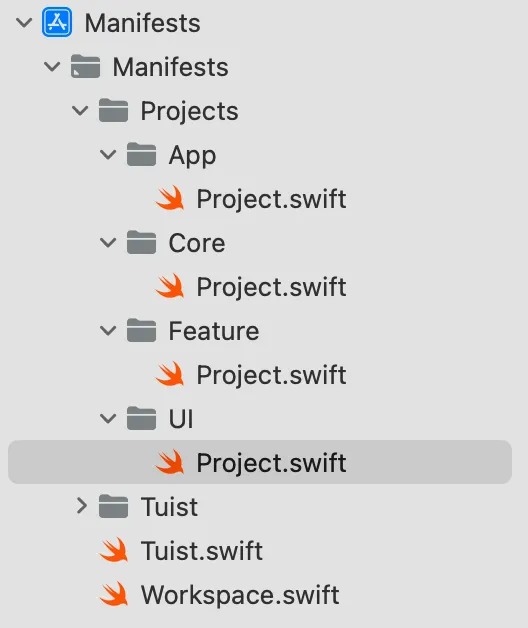
Mainfests 파일 구조
App/Project.swift
import ProjectDescription

let project = Project(
    name: "Jip-coon",
    targets: [
        .target(
            name: "Jip-coon",
            destinations: .iOS,
            product: .app,
            bundleId: "dev.tuist.Jip-coon",
            infoPlist: .extendingDefault(
                with: [
                    "UILaunchStoryboardName": "Launch Screen.storyboard",
                    "UIApplicationSceneManifest": [
                        "UIApplicationSupportsMultipleScenes": false,
                        "UISceneConfigurations": [
                            "UIWindowSceneSessionRoleApplication": [
                                [
                                    "UISceneConfigurationName": "Default Configuration",
                                    "UISceneDelegateClassName": "$(PRODUCT_MODULE_NAME).SceneDelegate"
                                ],
                            ]
                        ]
                    ],
                ]
            ),
            sources: ["Sources/**"],
            resources: ["Resources/**"],
            dependencies: [
              .project(target: "Feature", path: .relativeToRoot("Projects/Feature"))
            ]
        ),
        .target(
            name: "Jip-coonTests",
            destinations: .iOS,
            product: .unitTests,
            bundleId: "dev.tuist.Jip-coonTests",
            infoPlist: .default,
            sources: ["Tests/**"],
            resources: [],
            dependencies: [.target(name: "Jip-coon")]
        ),
    ]
)
Core/Project.swift
import ProjectDescription

let project = Project(
  name: "Core",
  targets: [
    .target(
      name: "Core",
      destinations: .iOS,
      product: .staticFramework,
      bundleId: "com.jipcoon.Core",
      infoPlist: .default,
      sources: "Sources/**",
      dependencies: []
    ),
    .target(
        name: "CoreTests",
        destinations: .iOS,
        product: .unitTests,
        bundleId: "com.jipcoon.coreTests",
        infoPlist: .default,
        dependencies: [.target(name: "Core")]
    )
  ]
)
Feature/Project.swift
import ProjectDescription

let project = Project(
  name: "Feature",
  targets: [
    .target(
      name: "Feature",
      destinations: .iOS,
      product: .staticFramework,
      bundleId: "com.jipcoon.Feature",
      infoPlist: .default,
      sources: "Scenes/**",
      dependencies: [
        .project(target: "Core", path: .relativeToRoot("Projects/Core")),
        .project(target: "UI", path: .relativeToRoot("Projects/UI"))
      ]
    ),
    .target(
        name: "FeatureTests",
        destinations: .iOS,
        product: .unitTests,
        bundleId: "com.jipcoon.featureTests",
        infoPlist: .default,
        dependencies: [.target(name: "Feature")]
    )
  ]
)
UI/Project.swift
import ProjectDescription

let project = Project(
  name: "UI",
  targets: [
    .target(
      name: "UI",
      destinations: .iOS,
      product: .framework,
      bundleId: "com.jipcoon.UI",
      infoPlist: .default,
      sources: "Sources/**",
      resources: "Resources/**",
      dependencies: []
    ),
    .target(
        name: "UITests",
        destinations: .iOS,
        product: .unitTests,
        bundleId: "com.jipcoon.uiTests",
        infoPlist: .default,
        dependencies: [.target(name: "UI")]
    )
  ]
)
Workspace.swift
import ProjectDescription

let workspace = Workspace(
  name: "Jip-coon",
  projects: [
    "Projects/App",
    "Projects/Feature",
    "Projects/Core",
    "Projects/UI"
  ]
)
프로젝트 파일
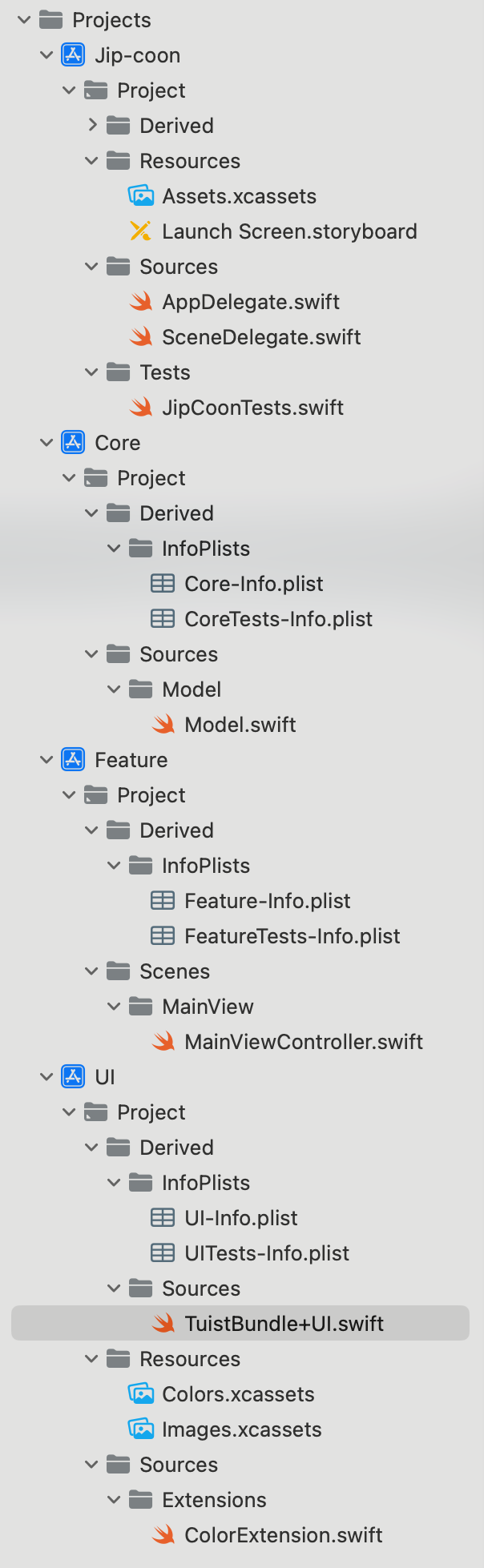
모듈 역할
- Jip-coon: 최상위 실행 모듈
- Core: 핵심 로직, 서비스, 유틸
- Feature: 화면 단위 기능
- UI: 디자인 시스템