Django 프로젝트
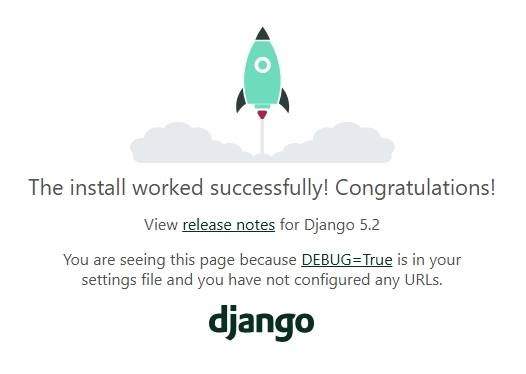
프로젝트 생성 및 서버 실행
-
Django 설치
pip install django- 현재 환경에 Django 패키지를 설치
-
프로젝트 생성
django-admin startproject firstpjt .- “firstpjt”라는 이름의 django 프로젝트를 생성
-
서버 실행
python manage.py runserver- manage.py와 동일한 위치에서 명령어 진행
Design Pattern
- 디자인 패턴
- 소프트웨어 설계에서 반복적으로 발생하는 문제에 대한, 검증되고 재사용 가능한 일반적인 해결책
- “애플리케이션의 구조는 이렇게 구성하자”라는 모범 답안 또는 관행
- 대표적인 디자인 패턴: MVC
- MVC 디자인 패턴
- 하나의 애플리케이션을 구조화하는 대표적인 구조적 디자인 패턴
- Model: 데이터 및 비즈니스 로직을 처리 (DB)
- View: 사용자에게 보이는 화면을 담당 (html)
- Controller: 사용자의 입력을 받아 Model과 View를 제어
- 시각적 요소와 뒤에서 실행되는 로직을 서로 영향 없이, 독립적으로 쉽게 유지 보수할 수 있는 애플리케이션을 만들기 위함
- 하나의 애플리케이션을 구조화하는 대표적인 구조적 디자인 패턴
- MTV 디자인 패턴 (Model, Template, View)
- Django에서 애플리케이션을 구조화하는 디자인 패턴
- View → Template
- Controller → View
- Django에서 애플리케이션을 구조화하는 디자인 패턴
프로젝트와 앱
- Django project: 애플리케이션의 집합
- DB 설정, URL 연결, 전체 앱 설정 등을 처리
- Django application: 독립적으로 작동하는 기능 단위 모듈
- 각자 특정한 기능을 담당
- 다른 앱들과 함께 하나의 프로젝트를 구성
-
앱 생성
python manage.py startapp articles- ‘articles’라는 폴더와 내부에 여러 파일이 새로 생성됨
- 앱의 이름은 복수형으로 지정하는 것을 권장
-
앱 등록
# settings.py INSTALLED_APPS = [ 'articles', ... ]- 반드시 앱을 생성한 후에 등록해야 함
- settings.py 파일 내 INSTALLED_APPS 리스트에 ‘articles’ 추가
프로젝트 및 앱 구조
- 프로젝트 구조 (
firstpjt폴더 내부)settings.py: 프로젝트의 모든 설정을 관리urls.py: 요청 들어오는 URL에 따라 이에 해당하는 적절한 views를 연결__init__.py: 해당 폴더를 패키지로 인식하도록 설정하는 파일asgi.py: 비동기식 웹 서버와의 연결 관련 설정wsgi.py: 웹 서버와의 연결 관련 설정manage.py: Django 프로젝트와 다양한 방법으로 상호작용하는 커맨드라인 유틸리티
- 앱 구조 (
articles폴더 내부)admin.py: 관리자용 페이지 설정models.py: DB와 관련된 Model을 정의 (MTV 패턴의 M)views.py: url, model, template과 연동하여 HTTP의 요청을 처리하고 해당 요청에 대한 응답을 반환 (MTV 패턴의 V)apps.py: 앱의 정보가 작성된 곳tests.py: 프로젝트 테스트 코드를 작성하는 곳
요청과 응답
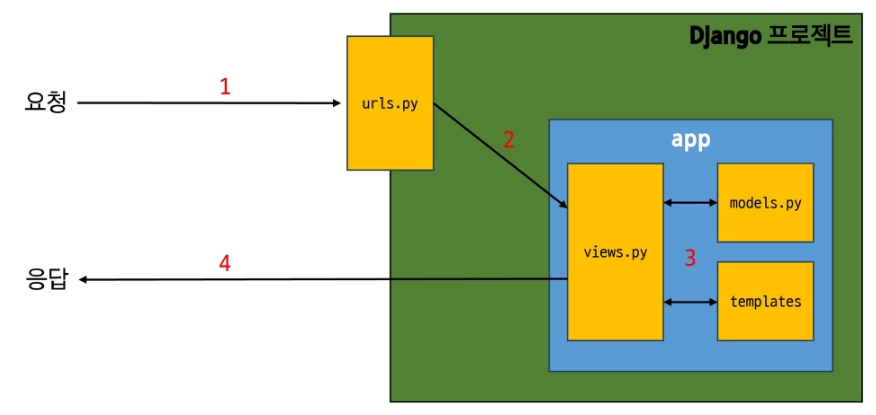
Django에서의 요청과 응답
-
사용자가 서버에 접속하는 과정
-
URLs
# urls.py from django.contrib import admin from django.urls import path from articles import views urlpatterns = [ path('admin/', admin.site.urls), path('articles/', views.index), ]- http://127.0.0.1:8000/articles/ 로 요청이 왔을 때, request 객체를 views 모듈의 index view 함수에 전달하며 호출
- url 경로는 반드시
/(slash)로 끝나야 함
-
View
# views.py from django.shortcuts import render def index(request): return render(request, 'articles/index.html')- 특정 경로에 있는 template과 request 객체를 결합해 응답 객체를 반환
- 모든 view 함수는 첫번째 인자로 요청 객체(request)를 필수적으로 받음
-
Template
- articles 앱 폴더 안에 templates 폴더 생성
- templates 폴더 안에 articles 폴더 생성
- articles 폴더 안에 템플릿 파일 생성
Django에서 template을 인식하는 경로 규칙
-
app폴더/templates/articles/index.html -
app폴더 / templates /→ 이 지점까지 기본 경로로 인식 -
view 함수에서 template 경로 작성 시 해당 지점 이후의 경로를 작성해야 함
from django.shortcuts import render

def index(request):
		return render(request, 'articles/index.html')
-
요청 후 응답 페이지 확인
- 주소창에 http://127.0.0.1:8000/articles/ 입력
-
데이터 흐름에 따른 코드 작성하기
- 사용자의 요청에서부터 데이터의 흐름은 URLs → View → Template
- 코드의 작성도 마찬가지로 데이터의 흐름을 따라 작성할 것
URLs :      path('articles/', view.index),
 View :      def index(request):
							 return render(request, 'articles/index.html')
 Template :  articles/templates/articles/index.html

🌱 🐜