EC2 SSH 연결 준비
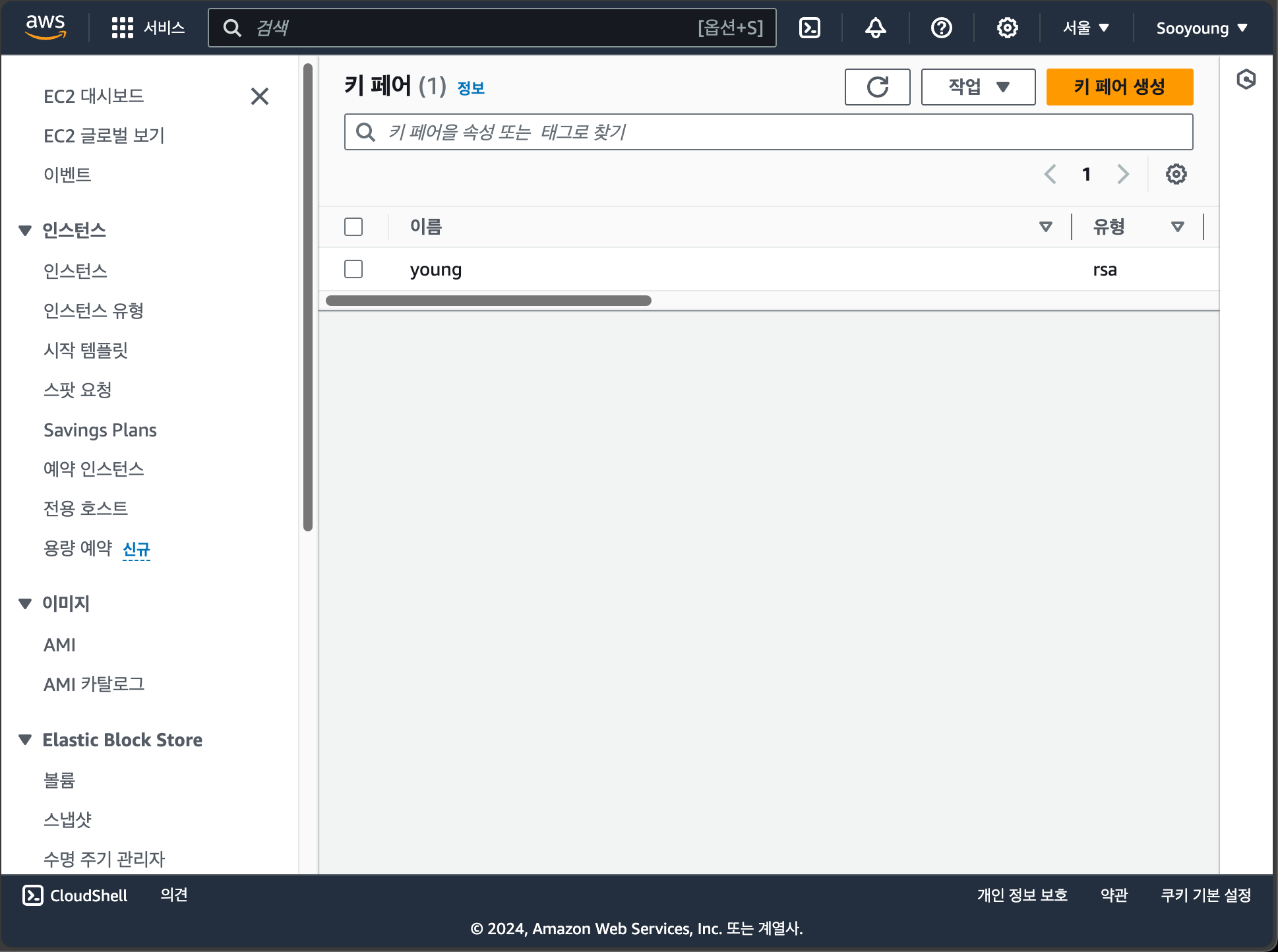
키 페어 생성
AWS 콘솔에서 EC2 인스턴스의 키 페어 파일을 .pem 형식으로 생성했다.
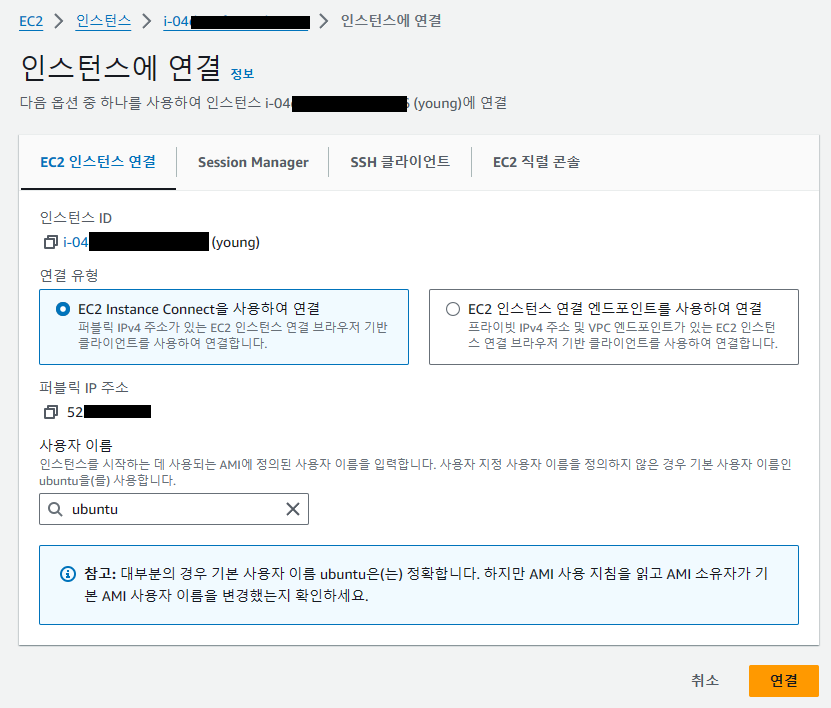
'EC2 인스턴스 연결' 메뉴에서의 접속은 정상적으로 이용 가능했다.
위의 방법으로도 접속이 되지 않는다면 보안 그룹에서 아래와 같이 EC2 instance connect 서비스의 IP주소에서 TCP 22 포트에 접근할 수 있도록 허용해야 한다.
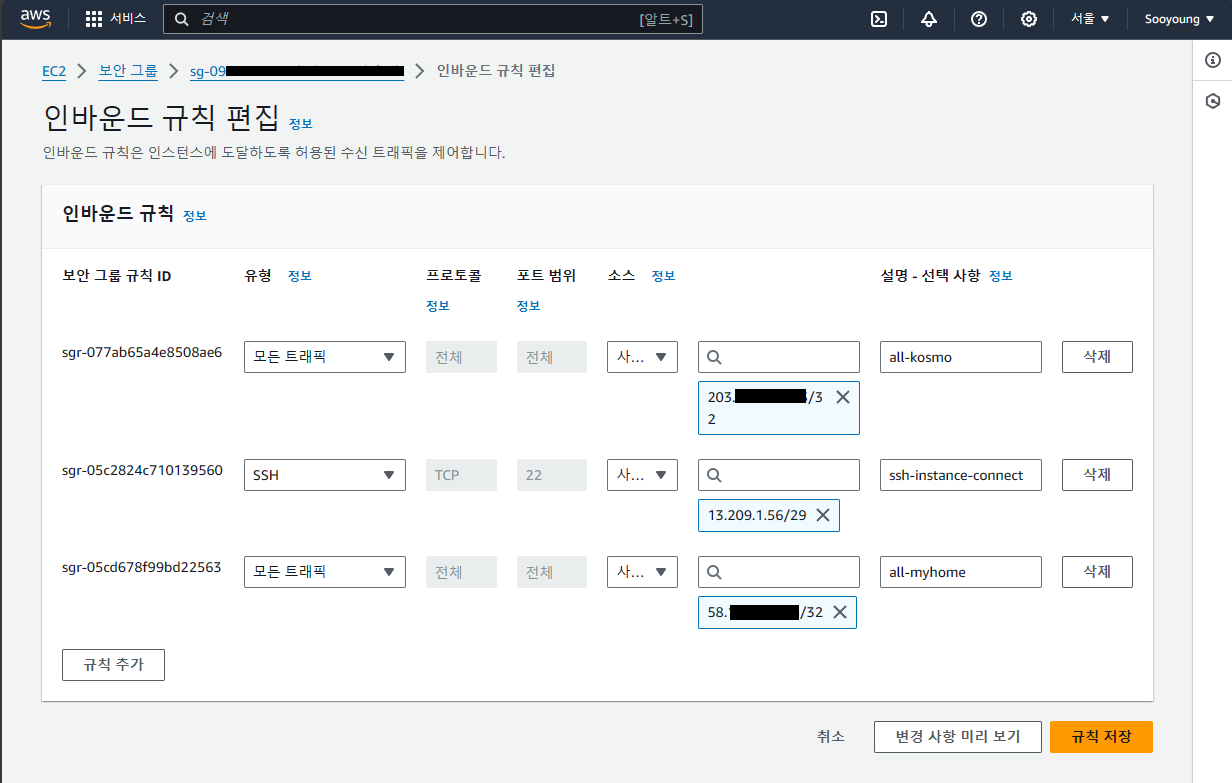
Region에 따른 IP address는 다음을 참고하여 입력하면 된다. 나의 경우는 EC2 인스턴스가 서울(ap-northeast-2) 리전에 생성되어 있으므로 13.209.1.56/29로 입력했다.
Stack Overflow: EC2 Instance Connect - Which AWS IPs For Inbound For Browser Console Access?
{
  "ip_prefix": "18.252.4.0/30",
  "region": "us-gov-east-1",
  "service": "EC2_INSTANCE_CONNECT",
  "network_border_group": "us-gov-east-1"
}
{
  "ip_prefix": "15.200.28.80/30",
  "region": "us-gov-west-1",
  "service": "EC2_INSTANCE_CONNECT",
  "network_border_group": "us-gov-west-1"
}
{
  "ip_prefix": "13.244.121.196/30",
  "region": "af-south-1",
  "service": "EC2_INSTANCE_CONNECT",
  "network_border_group": "af-south-1"
}
{
  "ip_prefix": "3.112.23.0/29",
  "region": "ap-northeast-1",
  "service": "EC2_INSTANCE_CONNECT",
  "network_border_group": "ap-northeast-1"
}
{
  "ip_prefix": "13.209.1.56/29",
  "region": "ap-northeast-2",
  "service": "EC2_INSTANCE_CONNECT",
  "network_border_group": "ap-northeast-2"
}
{
  "ip_prefix": "13.233.177.0/29",
  "region": "ap-south-1",
  "service": "EC2_INSTANCE_CONNECT",
  "network_border_group": "ap-south-1"
}
{
  "ip_prefix": "3.0.5.32/29",
  "region": "ap-southeast-1",
  "service": "EC2_INSTANCE_CONNECT",
  "network_border_group": "ap-southeast-1"
}
{
  "ip_prefix": "13.239.158.0/29",
  "region": "ap-southeast-2",
  "service": "EC2_INSTANCE_CONNECT",
  "network_border_group": "ap-southeast-2"
}
{
  "ip_prefix": "35.183.92.176/29",
  "region": "ca-central-1",
  "service": "EC2_INSTANCE_CONNECT",
  "network_border_group": "ca-central-1"
}
{
  "ip_prefix": "3.120.181.40/29",
  "region": "eu-central-1",
  "service": "EC2_INSTANCE_CONNECT",
  "network_border_group": "eu-central-1"
}
{
  "ip_prefix": "13.48.4.200/30",
  "region": "eu-north-1",
  "service": "EC2_INSTANCE_CONNECT",
  "network_border_group": "eu-north-1"
}
{
  "ip_prefix": "15.161.135.164/30",
  "region": "eu-south-1",
  "service": "EC2_INSTANCE_CONNECT",
  "network_border_group": "eu-south-1"
}
{
  "ip_prefix": "18.202.216.48/29",
  "region": "eu-west-1",
  "service": "EC2_INSTANCE_CONNECT",
  "network_border_group": "eu-west-1"
}
{
  "ip_prefix": "3.8.37.24/29",
  "region": "eu-west-2",
  "service": "EC2_INSTANCE_CONNECT",
  "network_border_group": "eu-west-2"
}
{
  "ip_prefix": "35.180.112.80/29",
  "region": "eu-west-3",
  "service": "EC2_INSTANCE_CONNECT",
  "network_border_group": "eu-west-3"
}
{
  "ip_prefix": "18.228.70.32/29",
  "region": "sa-east-1",
  "service": "EC2_INSTANCE_CONNECT",
  "network_border_group": "sa-east-1"
}
{
  "ip_prefix": "18.206.107.24/29",
  "region": "us-east-1",
  "service": "EC2_INSTANCE_CONNECT",
  "network_border_group": "us-east-1"
}
{
  "ip_prefix": "3.16.146.0/29",
  "region": "us-east-2",
  "service": "EC2_INSTANCE_CONNECT",
  "network_border_group": "us-east-2"
}
{
  "ip_prefix": "13.52.6.112/29",
  "region": "us-west-1",
  "service": "EC2_INSTANCE_CONNECT",
  "network_border_group": "us-west-1"
}
{
  "ip_prefix": "18.237.140.160/29",
  "region": "us-west-2",
  "service": "EC2_INSTANCE_CONNECT",
  "network_border_group": "us-west-2"
}
인스턴스에 접속하기 위해 AWS 콘솔에 로그인하기는 귀찮아 터미널에서 바로 SSH 연결을 이용하고 싶었다.
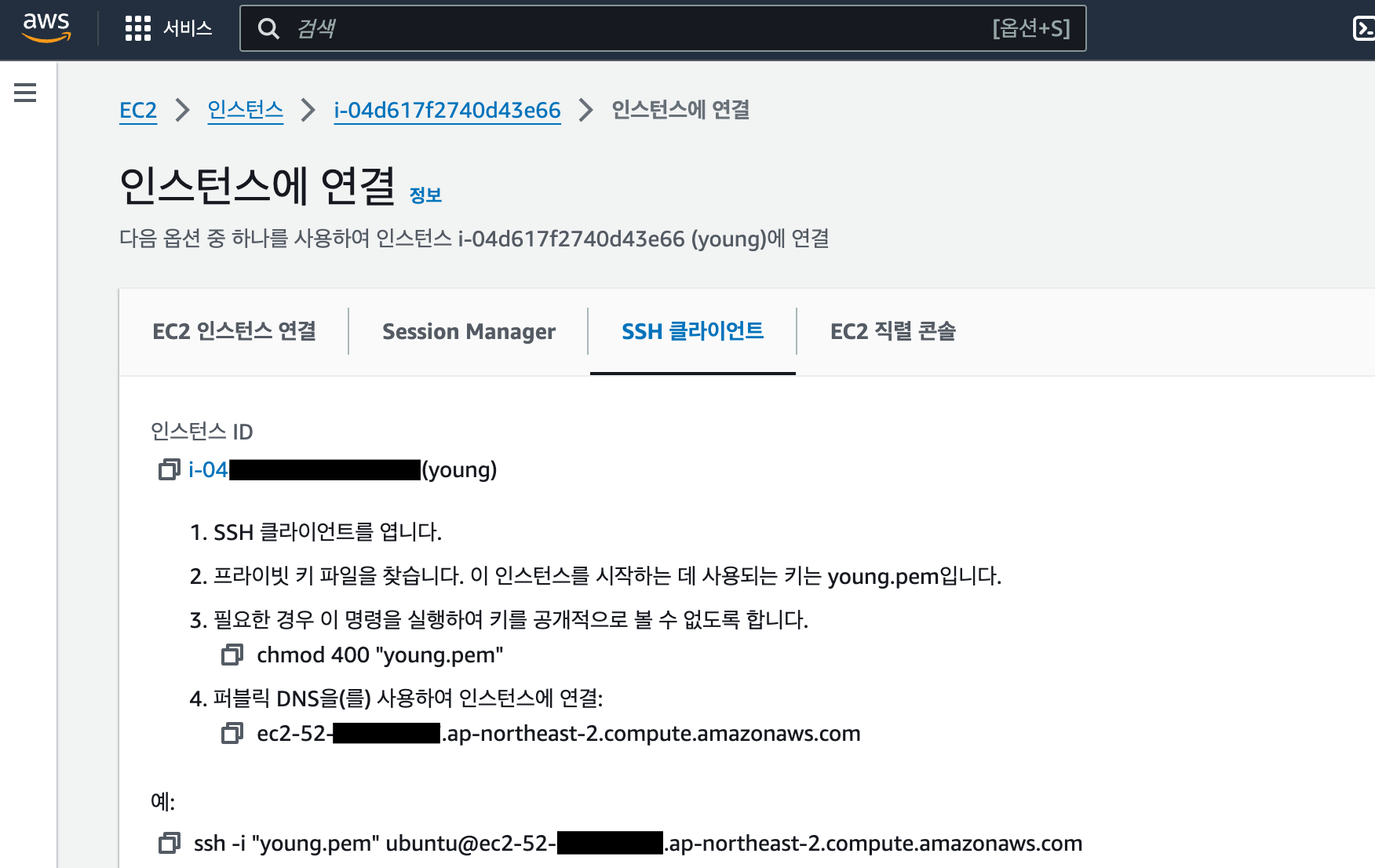
인스턴스에 연결 - SSH 클라이언트 페이지에 접속하니 ssh 명령어 예시가 제공되었다.
연결 시도
터미널에 그대로 입력해 보았다.
.pem 파일은 AWS 폴더 안에 두었다.
cd AWS
ssh -i "young.pem" ubuntu@ec2-52-00-00-00.ap-northeast-2.compute.amazonaws.com
The authenticity of host 'ec2-52-00-00-00.ap-northeast-2.compute.amazonaws.com (52.00.00.00)' can't be established.
ED25519 key fingerprint is SHA256:1gznhlBxSnQ5AXyNTi3TGDijYuSQX4Ivx7D8jk/ZmoM.
This key is not known by any other names
Are you sure you want to continue connecting (yes/no/[fingerprint])? yes
Warning: Permanently added 'ec2-52-00-00-00.ap-northeast-2.compute.amazonaws.com' (ED25519) to the list of known hosts.
Bad permissions. Try removing permissions for user: NT AUTHORITY\\Authenticated Users (S-1-5-11) on file young.pem.
@@@@@@@@@@@@@@@@@@@@@@@@@@@@@@@@@@@@@@@@@@@@@@@@@@@@@@@@@@@
@ WARNING: UNPROTECTED PRIVATE KEY FILE! @
@@@@@@@@@@@@@@@@@@@@@@@@@@@@@@@@@@@@@@@@@@@@@@@@@@@@@@@@@@@
Permissions for 'young.pem' are too open.
It is required that your private key files are NOT accessible by others.
This private key will be ignored.
Load key "young.pem": bad permissions
ubuntu@ec2-52-00-00-00.ap-northeast-2.compute.amazonaws.com: Permission denied (publickey).Troubleshoot
1차: chmod 400 권한 설정
Permissions for 'young.pem' are too open. 문장에 주목했다.
chmod 400을 해야 하는데 윈도우에서는 chmod를 쓸 수 없어 다른 방법을 찾아야 했다.
다행히도 유튜브 검색 결과 나와 똑같은 문제를 해결한 사례가 있었다.
아래 영상을 참고하여 다음 명령어를 그대로 작성했다.
icacls young.pem /reset
icacls young.pem /grant:r "$($env:username):(r)"
icacls young.pem /inheritance:r
다시 시도했지만 이번에도 연결에 실패했다. 그래도 오류 메시지의 양이 확연히 줄었다.
ssh -i "young.pem" ubuntu@ec2-52-00-00-00.ap-northeast-2.compute.amazonaws.comubuntu@ec2-52-00-00-00.ap-northeast-2.compute.amazonaws.com: Permission denied (publickey).2차: RSA 공개 키 동기화
(publickey)가 뭔지는 모르겠지만 뭔가 키가 잘 맞지 않는다는 뜻으로 이해했다. 그래서 키를 맞추어 보기로 했다. 'EC2 인스턴스 연결' 화면에서 다음과 같이 입력했다.
root@ip-172-00-00-00:/home/ubuntu# ls -al
total 36
drwxr-x--- 4 ubuntu ubuntu 4096 Mar  2 13:17 .
drwxr-xr-x 3 root   root   4096 Feb 20 09:24 ..
-rw------- 1 ubuntu ubuntu  342 Mar  2 13:17 .bash_history
-rw-r--r-- 1 ubuntu ubuntu  220 Jan  6  2022 .bash_logout
-rw-r--r-- 1 ubuntu ubuntu 3771 Jan  6  2022 .bashrc
drwx------ 2 ubuntu ubuntu 4096 Feb 20 09:31 .cache
-rw-r--r-- 1 ubuntu ubuntu  807 Jan  6  2022 .profile
drwx------ 2 ubuntu ubuntu 4096 Mar  2 13:17 .ssh
-rw-r--r-- 1 ubuntu ubuntu    0 Feb 20 09:35 .sudo_as_admin_successful
-rw------- 1 ubuntu ubuntu  739 Mar  2 13:17 .viminfo
vim .ssh/authorized_keysssh-rsa AA ... Ex young현재 EC2의 공개 키는 위와 같이 설정되어 있었다. 이제 윈도우 PC의 young.pem 파일에 담긴 개인 키에 맞는 공개 키를 확인해 보자.
ssh-keygen -f young.pem -yssh-rsa AA ... n/두 공개 키가 서로 일치하지 않았다.
EC2 인스턴스의 SSH 공개 키는 'Ex'으로 끝났고, young.pem 파일의 공개 키는 'n/'으로 끝났다. young.pem 파일의 공개 키를 EC2 인스턴스에 넣어 보았다.
vim .ssh/authorized_keys해결
SSH 접속을 다시 시도했다. 이후 접속이 잘 되었다.
ssh -i "young.pem" ubuntu@ec2-52-00-00-00.ap-northeast-2.compute.amazonaws.comWelcome to Ubuntu 22.04.4 LTS (GNU/Linux 6.5.0-1014-aws x86_64)
* Documentation: https://help.ubuntu.com
* Management: https://landscape.canonical.com
* Support: https://ubuntu.com/pro
System information as of Mon Mar 4 13:07:03 UTC 2024
System load: 0.0 Processes: 103
Usage of /: 12.6% of 28.89GB Users logged in: 1
Memory usage: 59% IPv4 address for eth0: 172.00.00.00
Swap usage: 0%
* Ubuntu Pro delivers the most comprehensive open source security and
compliance features.
https://ubuntu.com/aws/pro
Expanded Security Maintenance for Applications is not enabled.
1 update can be applied immediately.
To see these additional updates run: apt list --upgradable
Enable ESM Apps to receive additional future security updates.
See https://ubuntu.com/esm or run: sudo pro status
Last login: Mon Mar 4 05:40:04 2024 from 13.00.00.00
ubuntu@ip-172-00-00-00:~$