Controller와 HTTP Response 메시지
Response에 대한 형태가 다양하게 나뉘어있다. 특히, Header와 Body의 형태에서 차이가 있다.
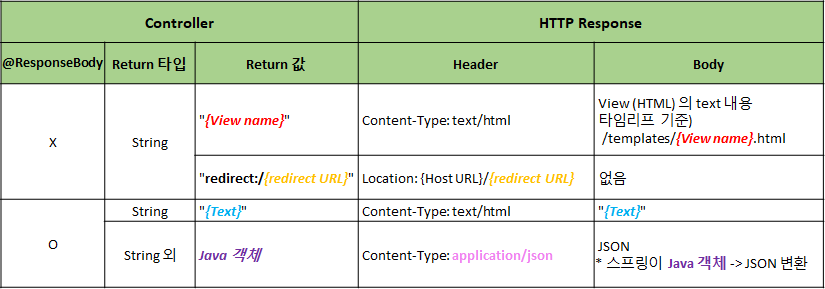
이 그림은 밑에서 마저 살펴보도록 하자.
경우에 따른 Response 응답 방법
정적 웹페이지를 불러오는 방법 4가지
-
static 폴더 :
http://localhost:8080/hello.html -
Redirect :
http://localhost:8080/hello/response/html/redirect- Controller 이용
➡ 서버 개발자 : redirect 시킬 때에는@Controller @RequestMapping("/hello/response") public class HelloResponseController { @GetMapping("/html/redirect") public String htmlFile() { return "redirect:/hello.html"; } }redirect:/뒤에 작성
- Controller 이용
-
Template Engine :
http://localhost:8080/hello/response/html/templates@GetMapping("/html/templates") public String htmlTemplates() { return "hello"; }- hello라는 이름의 string이 들어오면, template 폴더에서 기본적으로 View를 찾음.
- static의 html 파일을 template에 복제하면 됨
-
@ResponseBody :
http://localhost:8080/hello/response/html/templates@GetMapping("/body/html") @ResponseBody public String helloStringHTML() { return "<!DOCTYPE html>" + "<html>" + "<head><title>By @ResponseBody</title></head>" + "<body> Hello, 정적 웹 페이지!!</body>" + "</html>"; }@ResponseBody: View 를 사용하지 않고, HTTP Body 에 들어갈 String 을 직접 입력
동적 웹페이지 불러오기
-
Thymeleaf :
http://localhost:8080/hello/response/html/dynamic-
View :
"hello-visit"→resources/templates/hello-visit.html<div> (방문자 수: <span th:text="${visits}"></span>) </div> -
Model
visits: 방문 횟수 (visitCount)<!-- ex) 방문 횟수: 1,000,000번--> <div> (방문자 수: <span>1000000</span>) </div>
-
📌 Client 입장에서는, 동적인지 정적인지 알 수 없다!
JSON 데이터
-
반환값 = String :
http://localhost:8080/hello/response/json/string@GetMapping("/json/string") @ResponseBody public String helloStringJson() { return "{\"name\":\"BTS\",\"age\":28}"; } -
반환값 = String 외 Java 클래스 :
http://localhost:8080/hello/response/json/string@GetMapping("/json/class") @ResponseBody public Star helloJson() { return new Star("BTS", 28); }💡 실무 Tip
프론트, 백 개발자들간에, Content-type을 잘 맞춰 보내줘야 한다.
다시 위 표를 살펴보면,
-
RespondeBody가 없는 경우 ➡ 반환값이 모두String
-
첫 번째 줄 : view 이름을 string으로만 전달해준 것에
.html을 붙여, ① static 폴더에서 찾거나 ② template Engine을 통해 template에서 찾게 된다. -
두번째 줄 : redirect로 가는 경우에는 HTTP에 Location이 전달되는 것. 즉, 클라이언트가 갈 위치를 지정해주는 것
-
-
ResponseBody가 있는 경우
-
세번째 줄 : 반환값이 String인 경우는 html 형식으로 받아준다. (Json값 등 다른 형식으로 하면 오류남!)
-
네 번째 줄 : 반환값이 String 외의 형식인 경우는 json 형태로 스프링이 변환해줌 + Header에 application/json으로 설정해줌
-
💡 Tip
Servelet의 경우는 response 형식을 다 구현해줬어야 하는데, Controller는 그렇지 않다.
반환값이 String이 아닌 Java객체의 경우 Spring이 알아서 Json 형식으로 바꿔줌.
Response 트렌드의 변화
- 정적 웹페이지
- 동적 웹페이지 (JSP를 가장 많이 썼고, 아직도 많이 쓰이고 있긴 함)
- JSON 데이터
- 프론트와 백의 역할을 좀 더 깔끔하게 함
- HTML을 내려주는 것이 복잡한 작업이기 때문에 줄여주기 위해
👉🏻 Single Page Application (SPA)
@RestController
= @Controller + @ResponseBody