Colleciton Types
Swift에서는 콜렉션타입으로 Array, Set, Dictionary 세가지를 지원한다.
Mutability of Collections (콜렉션의 변경)
var에 할당하면 변경 가능, let에 할당하면 변경 불가능하다.
Array (배열)
-
배열의 축양형 문법
Array 라고 적을 수 있지만 [Element] 형태로도 작성 가능하다.
-
빈 배열의 생성
var someInts = [Int]()기본 값으로 빈 배열 생성
var threeDoubles = Array(repeating: 0.0, count: 3)
// [0.0, 0.0, 0.0]
다른 배열을 추가한 배열의 생성
배열을 + 연산자를 통해 합칠 수 있다.
var anotherThreeDoubles = Array(repeating: 2.5, count: 3)
// anotherThreeDoubles : [2.5, 2.5, 2.5]

var sixDoubles = threeDoubles + anotherThreeDoubles
// sixDoubles : [0.0, 0.0, 0.0, 2.5, 2.5, 2.5]
배열 생성
var shoppingList: [String] = ["Eggs", "Milk"]배열의 접근 및 변환
shoppingList.count배열이 비었는지 확인
shoppingList.isEmpty배열에 원소 추가
shoppingList.append("Four")
shoppingList += ["bake", "cheese"]
배열의 특정 위치의 원소 접근
인덱싱을 통해 접근한다.
shoppingList.insert("Maple Syrup", at:0)

let mapleSyrup = shoppingList.remove(at: 0)

firstItem = shoppingList[0]
// firstItem : "Six eggs"

let apples = shoppingList.removeLast()
배열의 순회
for-in loop 을 이용해 배열을 순회 가능하다.
배열의 값과 인덱스가 필요할 때는 enumerated() 메소드를 사용한다.
for (index, value) in shoppingList.enumerated() {
    print("Item \(index + 1): \(value)")
}
// Item 1: Six eggs
// Item 2: Milk
// Item 3: Flour
// Item 4: Baking Powder
// Item 5: Bananas
Set (셋)
Set 형태로 저장되기 위해서는 반드시 타입이 Hasable이어야 한다. Swift 에서 Stirng, Int, Double, Bool 같은 기본 타입은 기본적으로 Hashable이다.
빈 Set 생성
var letters = Set<Character>()

letters.insert("a")
letters = []
배열 리터럴을 이용한 Set 생성
var favoriteGenres: Set<String> = ["Rock", "Classical", "Hip hop"]Set의 접근과 변경
비었는지 확인
favorite.isEmpty추가
favorite.insert("jazz")삭제
favorite.remove("rock")값 확인
favorite.contains("funk")-
Set의 순회
for-in loop 를 이용해 Set을 순회 가능하다.
-
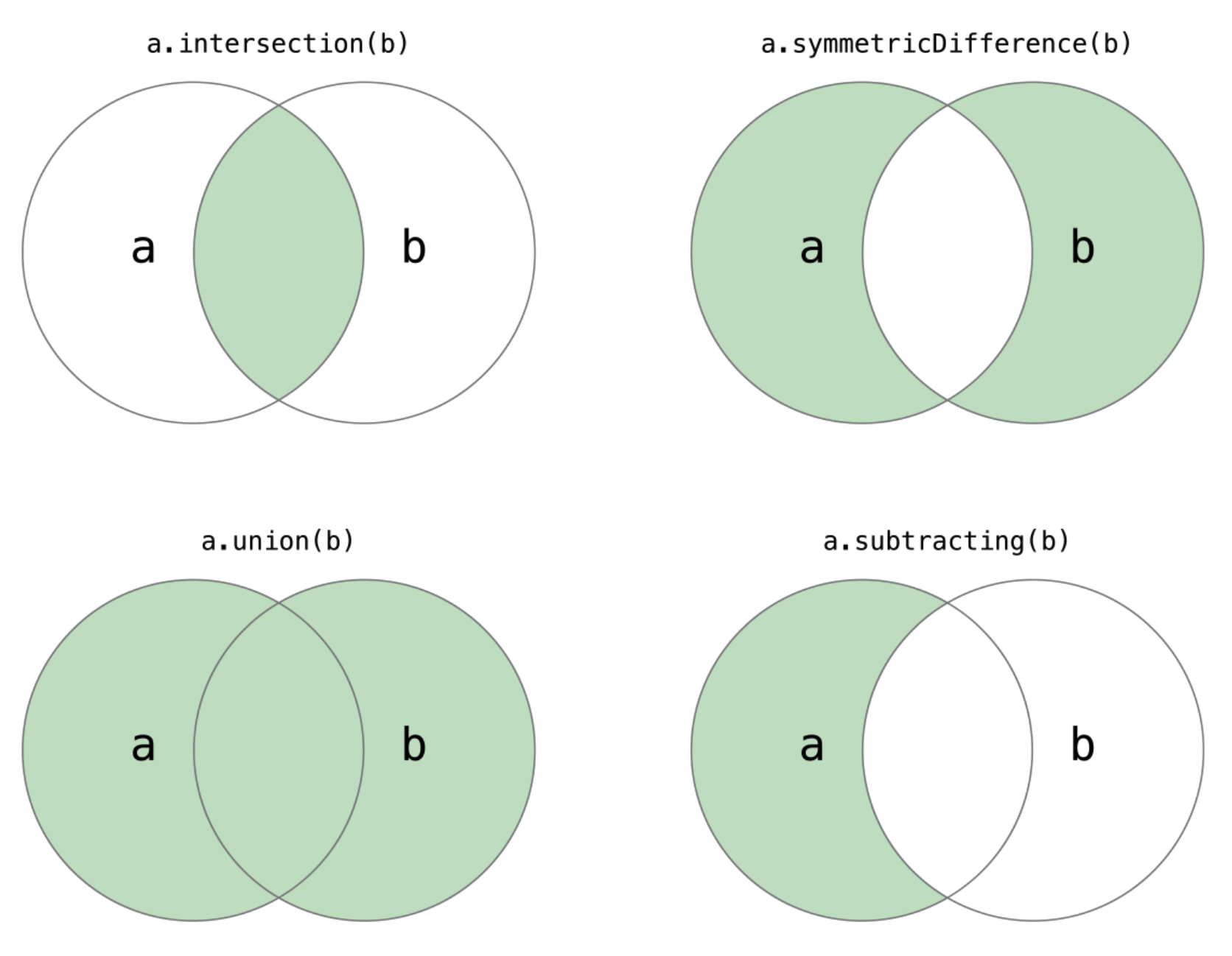
Set 명령
let oddDigits: Set = [1, 3, 5, 7, 9]
let evenDigits: Set = [0, 2, 4, 6, 8]
let singleDigitPrimeNumbers: Set = [2, 3, 5, 7]

oddDigits.union(evenDigits).sorted()
// [0, 1, 2, 3, 4, 5, 6, 7, 8, 9]
oddDigits.intersection(evenDigits).sorted()
// []
oddDigits.subtracting(singleDigitPrimeNumbers).sorted()
// [1, 9]
oddDigits.symmetricDifference(singleDigitPrimeNumbers).sorted()
// [1, 2, 9]
Set의 맴버십과 동등 비교
let houseAnimals: Set = ["🐶", "🐱"]
let farmAnimals: Set = ["🐮", "🐔", "🐑", "🐶", "🐱"]
let cityAnimals: Set = ["🐦", "🐭"]

houseAnimals.isSubset(of: farmAnimals)
// 참
farmAnimals.isSuperset(of: houseAnimals)
// 참
farmAnimals.isDisjoint(with: cityAnimals)
// 참
Dictionaries (사전)
-
축약형 Dictionary
[Key: Value] 형태로 Dictionary를 선언해 사용할 수 있다.
-
빈 Dictionary 생성
var namesOfIntegers = [Int: String]()

namesOfIntegers[16] = "sixteen"
namesOfIntegers = [:]
// 빈 사전
리터럴을 이용한 Dictionray의 생성
var airports: [String: String] = = ["YYZ": "Toronto Pearson", "DUB": "Dublin"]Dictionary의 접근과 변경
빈 Dictionary 확인
airports.isEmpty값 할당
airports["LHR"] = "London"
정리왕을 꿈꾸며!