멀티캠퍼스 데이터분석 수업 — concat/merge 실습, 파일 일괄 로드 자동화, 모듈 생성 및 활용
📌 목차
- concat — 다중 파일 행 결합
- merge — 조인 결합 실습
- 시계열 데이터 변환 & 활용
- os & glob — 파일 목록 로드
- 파일 일괄 로드 함수 구현
- 모듈(Module) 개념 & 활용
- 모듈 코드 전문
1. concat — 다중 파일 행 결합
구조가 같은 여러 파일을 하나의 데이터프레임으로 합칠 때 사용합니다.
import pandas as pd

tran_1 = pd.read_csv('../csv/tran_1.csv')   # 5000행
tran_2 = pd.read_csv('../csv/tran_2.csv')   # 1786행

# 단순 행 결합 → 5000 + 1786 = 6786행
tran = pd.concat([tran_1, tran_2], axis=0, ignore_index=True)
tran.info()
# 마찬가지로 tran_d_1, tran_d_2 결합
tran_d_1 = pd.read_csv('../csv/tran_d_1.csv')
tran_d_2 = pd.read_csv('../csv/tran_d_2.csv')
tran_d = pd.concat([tran_d_1, tran_d_2], axis=0, ignore_index=True)💡
concat()은 결과를 반환하므로 반드시 변수에 저장해야 합니다.
inplace매개변수가 없습니다.
2. merge — 조인 결합 실습
서로 다른 구조의 데이터프레임을 공통 컬럼 기준으로 결합합니다.
# tran(6786행) + tran_d(7144행) → transaction_id 기준 outer 결합
transaction = pd.merge(
    tran, tran_d,
    on='transaction_id',
    how='outer'
)
# item_master, customer_master 추가 결합
item_master = pd.read_csv('../csv/item_master.csv')
customer_master = pd.read_csv('../csv/customer_master.csv')
# transaction + item_master (item_id 기준 inner 결합)
df = transaction.merge(item_master, on='item_id', how='inner')
# df + customer_master (customer_id 기준 right 결합)
df = pd.merge(df, customer_master, on='customer_id', how='right')💡
DataFrame.merge(다른_df)와pd.merge(df1, df2)는 같은 동작입니다.
3. 시계열 데이터 변환 & 활용
문자열 → 시계열 변환
# 방법 1: pd.to_datetime() ✅ Series 전체에 한 번에 적용 가능
df['payment_date'] = pd.to_datetime(df['payment_date'])

# 방법 2: datetime.strptime() — 단일 값만 변환 가능, Series에 직접 사용 불가
from datetime import datetime

df['payment_date'].map(
    lambda x: datetime.strptime(x, '%Y-%m-%d %H:%M:%S')
)| 방법 | 특징 |
|---|---|
pd.to_datetime(Series) | Series 전체에 한 번에 적용, 일반 포맷 자동 인식 |
datetime.strptime() | 단일 값만 처리 가능, Series에는 map() 필요 |
Series.dt — 시계열 속성 접근
문자열에 .str이 있듯이, 시계열에는 .dt로 접근합니다.
# 시계열 컬럼으로 변환 후
df['payment_date'] = pd.to_datetime(df['payment_date'])

# .dt 로 다양한 속성 추출
df['요일'] = df['payment_date'].dt.strftime('%A')   # 'Monday', 'Tuesday'...
df['payment_date'].dt.weekday   # 0=월, 1=화, ..., 6=일
요일별 판매 수량 집계
df[['요일', 'item_id', 'quantity']].groupby(['요일', 'item_id']).sum()4. os & glob — 파일 목록 로드
특정 경로에 있는 파일 목록을 가져와 반복문으로 일괄 로드합니다.
import os
from glob import glob
os.listdir() — 파일 이름 목록
# 특정 폴더의 파일 목록 확인
os.listdir('../csv/2017/')

# 반복문으로 일괄 로드
file_path = '../csv/2017/'
file_list = os.listdir(file_path)

for file_name in file_list:
    df = pd.read_csv(file_path + file_name)
    # ⚠️ 반복마다 df를 덮어씀 → 마지막 파일만 남음
⚠️ 위 코드의 문제 → 반복마다
df가 덮어씌워집니다.
해결 방법 두 가지:
1.globals()로 파일마다 다른 변수명에 저장
2. 빈 데이터프레임에 누적 결합 (concat)
방법 1 — globals()로 개별 변수 저장
file_path = '../csv/2017'
file_list = os.listdir(file_path)

for file_name in file_list:
    if not file_path.endswith('/'):
        file_path += '/'
    # 파일명에서 날짜 부분만 추출하여 변수명으로 사용
    # '201701_expense_list.csv' → 'df_201701'
    globals()[f'df_{file_name.split("_")[0]}'] = pd.read_csv(file_path + file_name)

df_201704.info()
df_201702.head(1)
방법 2 — 빈 DataFrame에 누적 concat ✅ 권장
df = pd.DataFrame()   # 빈 데이터프레임 생성
file_path = '../csv/2017/'
file_list = os.listdir(file_path)

for file_name in file_list:
    data = pd.read_csv(file_path + file_name)
    df = pd.concat([df, data], axis=0)   # 반복마다 누적 결합

df.reset_index(drop=True, inplace=True)
df.info()
glob() — 경로 포함 파일 목록 + 확장자 필터
# 특정 확장자 파일만 선택 가능 (* 와일드카드 사용)
glob('../csv/2021/*.xlsx')
# 결과: ['../csv/2021/파일1.xlsx', '../csv/2021/파일2.xlsx', ...]
os.listdir() | glob() | |
|---|---|---|
| 반환 형태 | 파일 이름만 | 경로 포함한 파일명 |
| 확장자 필터 | 직접 구현 필요 | *.확장자 로 바로 가능 |
# glob + os.path로 파일명, 확장자 분리
for file_name in glob('../csv/2021/*.json'):
    f_path, f_name = os.path.split(file_name)      # 경로 / 파일명 분리
    name, ext = os.path.splitext(f_name)            # 파일명 / 확장자 분리
    print(name, ext)
5. 파일 일괄 로드 함수 구현
경로와 확장자를 받아 파일을 자동으로 로드하는 범용 함수입니다.
import os
import pandas as pd

def data_load(file_path,
              file_ext='csv',
              output_type='concat',
              engine='utf-8'):

    file_path += '/'
    file_list = os.listdir(file_path)

    # 해당 확장자 파일만 필터링
    file_list2 = [x for x in file_list if x.endswith(file_ext)]

    # output_type에 따라 초기값 설정
    if output_type == 'concat':
        result = pd.DataFrame()
    elif output_type == 'global':
        vari_cnt = 1
    else:
        raise ValueError("output_type에는 concat이나 global만 사용이 가능합니다.")

    # 파일 로드 반복
    for file_name in file_list2:
        if file_ext == 'csv':
            df = pd.read_csv(file_path + file_name, encoding=engine)
        elif file_ext == 'json':
            df = pd.read_json(file_path + file_name, encoding=engine)
        elif file_ext == 'xml':
            df = pd.read_xml(file_path + file_name, encoding=engine)
        elif file_ext in ['xlsx', 'xls']:
            df = pd.read_excel(file_path + file_name)   # encoding 매개변수 없음
        else:
            raise ValueError("file_ext에는 csv, json, xml, xlsx, xls만 가능합니다.")

        if output_type == 'concat':
            result = pd.concat([result, df])
        else:
            globals()[f'df_{vari_cnt}'] = df.copy()
            print(f'df_{vari_cnt} 전역변수 생성')
            vari_cnt += 1

    try:
        return result
    except:
        print('전역변수 생성 완료')
함수 사용 예시
# csv 일괄 로드 후 하나의 데이터프레임으로 반환
df = data_load('../csv/2021')
df.info()

# 각각 전역변수로 저장
data_load('../csv/2021', output_type='global')

# json 파일 로드
df = data_load('../csv/2022', file_ext='json', output_type='concat')| 매개변수 | 기본값 | 설명 |
|---|---|---|
file_path | 필수 | 로드할 폴더 경로 |
file_ext | 'csv' | 파일 확장자 |
output_type | 'concat' | 'concat' (하나로 합침) / 'global' (개별 변수) |
engine | 'utf-8' | 인코딩 ('cp949', 'euc-kr' 등) |
6. 모듈(Module) 개념 & 활용
모듈이란?
모듈    → 하나의 .py 파일
라이브러리 → 여러 모듈을 모아둔 폴더
프레임워크  → 여러 라이브러리를 모아둔 것
import 방식
import path_load                                    # 모듈 전체 import
df = path_load.data_load('../csv/2022', ...)        # 모듈명.함수명으로 호출

from mod import variable                            # 특정 변수/함수만 import
모듈 재로드
import importlib

importlib.reload(mod)   # 수정된 모듈을 다시 불러올 때
⚠️ 한 번
import된 모듈은 파일을 수정해도 자동으로 반영되지 않습니다.
importlib.reload()를 사용하거나 커널을 재시작해야 합니다.
환경변수(sys.path) — 모듈 탐색 경로
import sys

sys.path           # python이 모듈을 찾는 경로 목록

# 현재 세션에서만 유효한 경로 추가 (일회성)
sys.path.append(r'C:\Users\경로')
💡
pip install로 설치한 라이브러리는 python 환경변수 경로에 자동 저장됩니다.
모듈 내 변수 & 함수 활용
import mod

# 모듈 내 변수 접근
print(mod.variable)        # 'Module Variable'

# 모듈 내 함수 호출
mod_result = mod.module_func(10, 4)
print(mod_result)          # 14  (a + b 반환)
print(mod.func_res)        # 6   (a - b, mod 전역변수에 저장)
# print(func_res)          # ❌ 에러 — mod 영역의 변수는 mod. 접두사 필요

# 모듈 내 클래스 사용
mod_class = mod.Module_Class('test')
print(mod_class.x)                    # 'test'
print(mod_class.class_variable)       # []

mod_class2 = mod.Module_Class(10)
print(mod_class2.info())              # 100  (x ** 2)
패키지(폴더) 모듈 — mod2
import mod2

print(mod2.vari)
print(mod2.vari2)
print(mod2.test.test_vari)   # mod2 폴더 안 test 모듈의 변수

# 서브 모듈만 import
from mod2 import test
test.test_vari
💡 폴더를 모듈로 사용하려면 폴더 안에
__init__.py파일이 있어야 합니다.
7. 모듈 코드 전문
mod.py
# 전역 변수
variable = 'Module Variable'

def module_func(a, b):
    result = a + b
    # mod.py 전역변수에 저장 (globals()는 mod.py 영역의 전역변수)
    globals()['func_res'] = a - b
    return result

class Module_Class:
    class_variable = []   # 클래스 변수 — 모든 인스턴스가 공유

    def __init__(self, x):
        self.x = x
        self.class_variable = Module_Class.class_variable

    def info(self):
        return self.x ** 2
path_load.py
import pandas as pd
import os

def data_load(file_path,
              file_ext='csv',
              output_type='concat',
              engine='utf-8'):

    file_path += '/'
    file_list = os.listdir(file_path)
    file_list2 = [x for x in file_list if x.endswith(file_ext)]

    if output_type == 'concat':
        result = pd.DataFrame()
    elif output_type == 'global':
        vari_cnt = 1
    else:
        raise ValueError("output_type에는 concat이나 global만 사용이 가능합니다.")

    for file_name in file_list2:
        if file_ext == 'csv':
            df = pd.read_csv(file_path + file_name, encoding=engine)
        elif file_ext == 'json':
            df = pd.read_json(file_path + file_name, encoding=engine)
        elif file_ext == 'xml':
            df = pd.read_xml(file_path + file_name, encoding=engine)
        elif file_ext in ['xlsx', 'xls']:
            df = pd.read_excel(file_path + file_name)
        else:
            raise ValueError("file_ext에는 csv, json, xml, xlsx, xls만 가능합니다.")

        if output_type == 'concat':
            result = pd.concat([result, df])
        else:
            globals()[f'df_{vari_cnt}'] = df.copy()
            print(f'df_{vari_cnt} 전역변수 생성')
            vari_cnt += 1

    try:
        return result
    except:
        print('전역변수 생성 완료')
mod2 패키지 구조
mod2/
├── __init__.py
└── test.py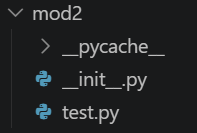
💡 폴더를 모듈로 인식시키려면 폴더 안에 반드시
__init__.py가 있어야 합니다.
mod2/__init__.py
from mod2.test import test_vari

# mod2 영역의 전역변수 생성
vari = 'mod2 폴더 안에 __init__.py에 변수'

# mod2/test.py 안의 test_vari 값을 vari2에 대입
vari2 = test_vari
mod2/test.py
test_vari = 'mod2 폴더 안에 test.py 안에 데이터'사용 예시
import mod2

print(mod2.vari)           # 'mod2 폴더 안에 __init__.py에 변수'
print(mod2.vari2)          # 'mod2 폴더 안에 test.py 안에 데이터'
print(mod2.test.test_vari) # 'mod2 폴더 안에 test.py 안에 데이터'

# 서브 모듈만 직접 import
from mod2 import test
test.test_vari              # 'mod2 폴더 안에 test.py 안에 데이터'
💡
__init__.py의 역할
import mod2를 했을 때 가장 먼저 실행되는 파일- 여기서
from mod2.test import test_vari를 해두면
mod2.test_vari형태로 바로 접근 가능해집니다.- 패키지 초기화, 외부에 공개할 변수/함수 설정 등에 사용합니다.
📎 핵심 함수 요약
| 함수 | 설명 |
|---|---|
pd.concat([df1, df2]) | 유니언 결합 (행/열) |
pd.merge(df1, df2, on, how) | 조인 결합 |
pd.to_datetime(Series) | 문자열 → 시계열 일괄 변환 |
Series.dt.strftime('%A') | 시계열 → 문자열 추출 |
Series.dt.weekday | 요일 숫자 추출 (0=월) |
os.listdir(경로) | 폴더의 파일 목록 (이름만) |
glob('경로/*.확장자') | 경로 포함 파일 목록 + 필터 |
os.path.split(경로) | 경로 / 파일명 분리 |
os.path.splitext(파일명) | 파일명 / 확장자 분리 |
importlib.reload(모듈) | 수정된 모듈 재로드 |
sys.path.append(경로) | 환경변수에 경로 추가 |
__init__.py | 폴더를 패키지로 인식, 패키지 초기화 파일 |

공부 기록