
1. 클래스
❕ 객체지향
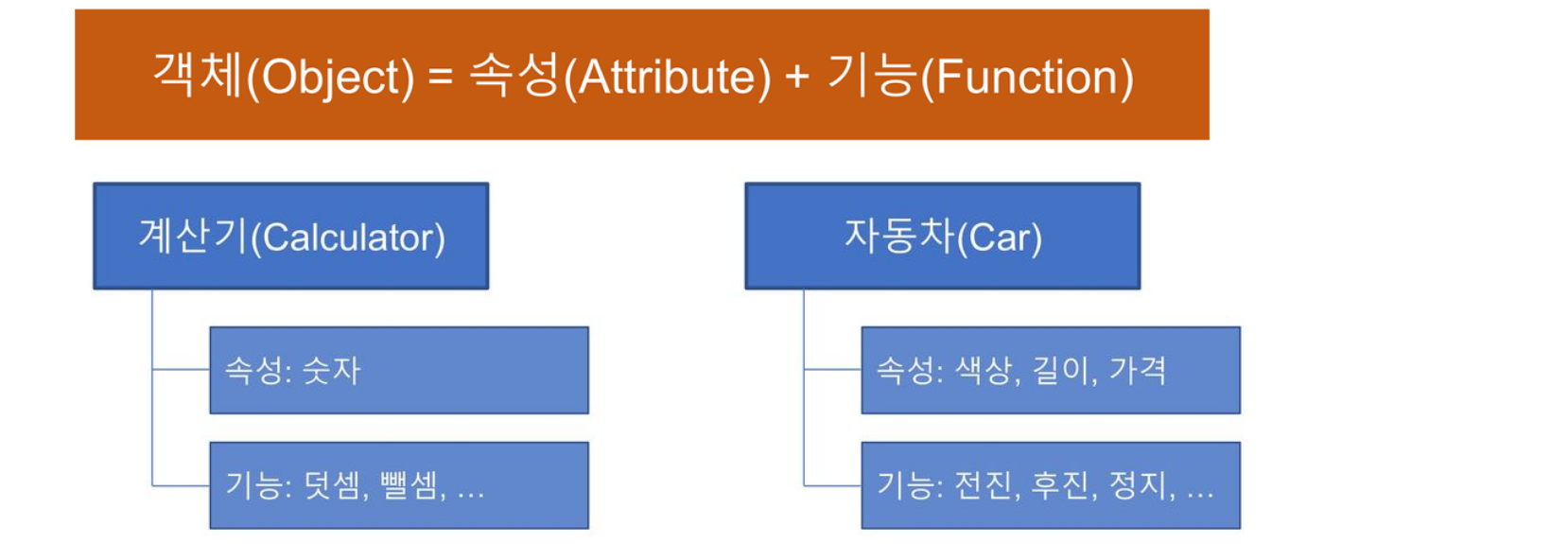
-
현실의 객체 성질을 반영해 프로그램 코드를 짜는 것
-
객체는 클래스로 구현하고, 속성은 변수(field)로 구현하며, 기능은 함수(method)로 구현한다.
-
객체 사용의 장점은 코드 재사용과 모듈화에 좋다.
❕ 클래스 선언
classKeyword를 이용해 클래스를 선언한다.
-
__init__()메서드에 클래스의 속성값(변수)들을 선언하고 초기화한다. -
defKeyword를 이용해 클래스의 기능 함수(메서드)들을 정의한다.
    '''
     ▶ <클래스 선언>
    '''
    class Car:
        # 생성자는 안보이는 곳에 숨어 있다.

        # 객체 초기화 함수
        def __init__(self, color, length):
            # 속성(변수)
            self.color = color
            self.length = length

        # 기능_1
        def doStop(self):
            print('STOP!!')

        # 기능_2
        def doStart(self):
            print('START!!')
❕ 클래스 생성자
-
객체가 생성될 때 생성자를 호출하면
__init__()초기화 함수가 자동 호출된다.
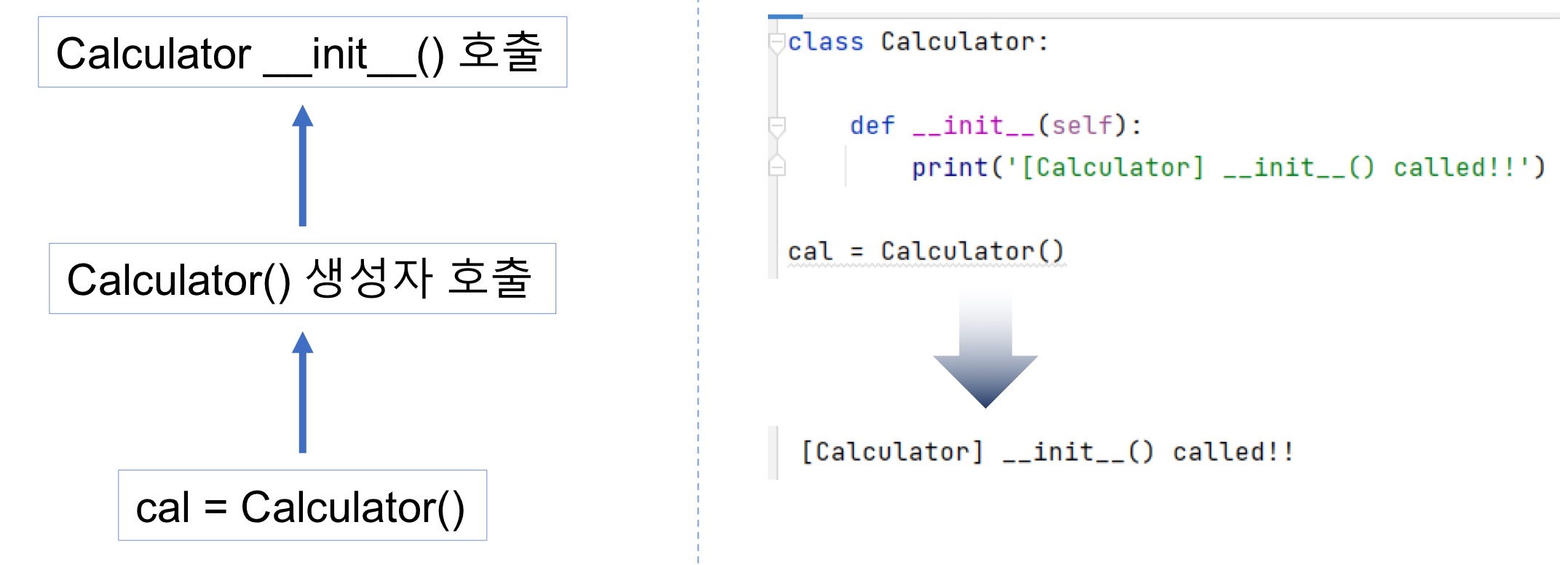
-
클래스의 속성은 매개변수로 초기화하거나 Default 값을 지정해줄 수 있다.
    class Calculator:
        def __init__(self, n1, n2):
            print('[Calculator] __init__() called!!')
    # 	  ✔ 매개변수로 초기화
            self.num1 = n1
            self.num2 = n2

    cal = Calculator(10, 20)


    class DefaultCalculator:
        def __init__(self):
            print('[DefaultCalculator] __init__() called!!')
    # 	  ✔ Default 값으로 초기화
            self.num1 = 11
            self.num2 = 101

    cal = DefaultCalculator()
❕ 객체
🔅 객체 생성
객체는 클래스의 생성자(클래스명)를 호출함으로써 생성된다.
- 클래스의 생성자는 클래스의 이름과 동일하다.
    class Car: # 자동차 클래스
        def __init__(self, color, length):
            self.color = color
            self.length = length

    car1 = Car('red', 200) # 객체 생성
    car2 = Car('blue', 300)
🔅 객체속성값 변경
    # 클래스 선언
    class NewGenerationPC:
        def __init__(self, name, cpu, memory, ssd):
                    # 속성들
            self.name = name
            self.cpu = cpu
            self.memory = memory
            self.ssd = ssd

    # 객체 생성
    myPc = NewGenerationPC('myPC', 'i5', '16G', '256G')

    # 객체 속성값 변경
    myPc.cpu = 'i9'
    myPc.memory = '64G'
    myPc.ssd = '1T'
⭐ 레퍼런스변수
객체의 메모리 주소를 저장하고 이를 이용해 객체를 참조하는 변수
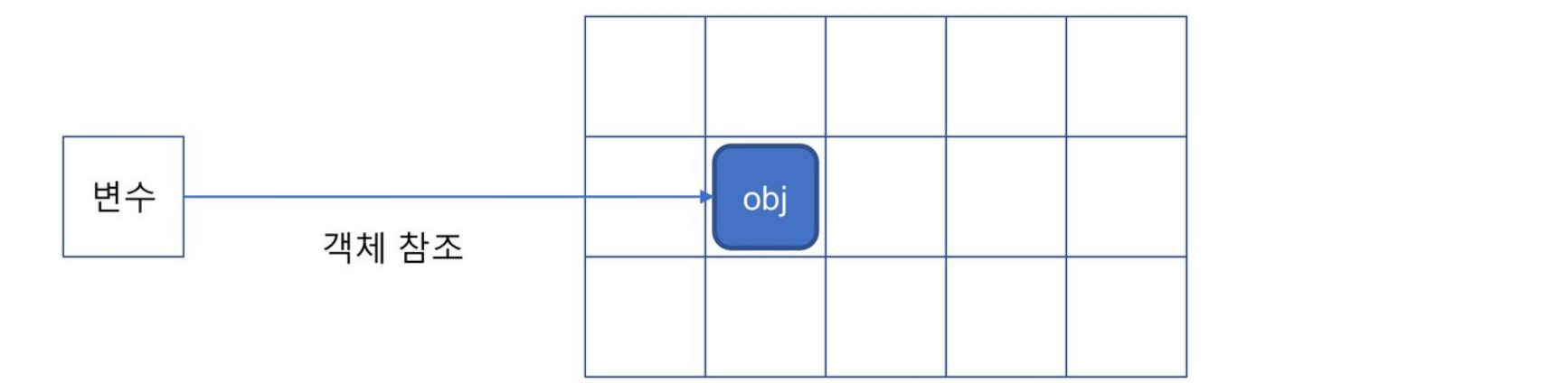
- 레퍼런스 변수끼리의 대입은 주소만 복사되는 얕은 복사가 이루어진다.
    class Robot:
        def __init__(self, color, height, weight):
            self.color = color
            self.height = height
            self.weight = weight
    '''
     ✔ rb1은 Robot 객체가 저장되어 있는 메모리 주소를 가지고 있다.
        이때 주소가 저장된 rb1을 레퍼런스 변수라고 한다.
    '''
    rb1 = Robot('red', 200, 80)
    rb2 = rb1 ⭐ # 객체 주소 복사 ➡ 얕은 복사

    print(rb1)  # <__main__.Car object at 0x000001FD022CD670>
    print('%X' % id(rb1))  #                     1FD022CD670
    print('%X' % id(rb2))  #                     1FD022CD670
🔔 id() 함수는 객체가 저장된 메모리 주소값을 반환한다.
⭐ 얕은복사 vs 깊은복사
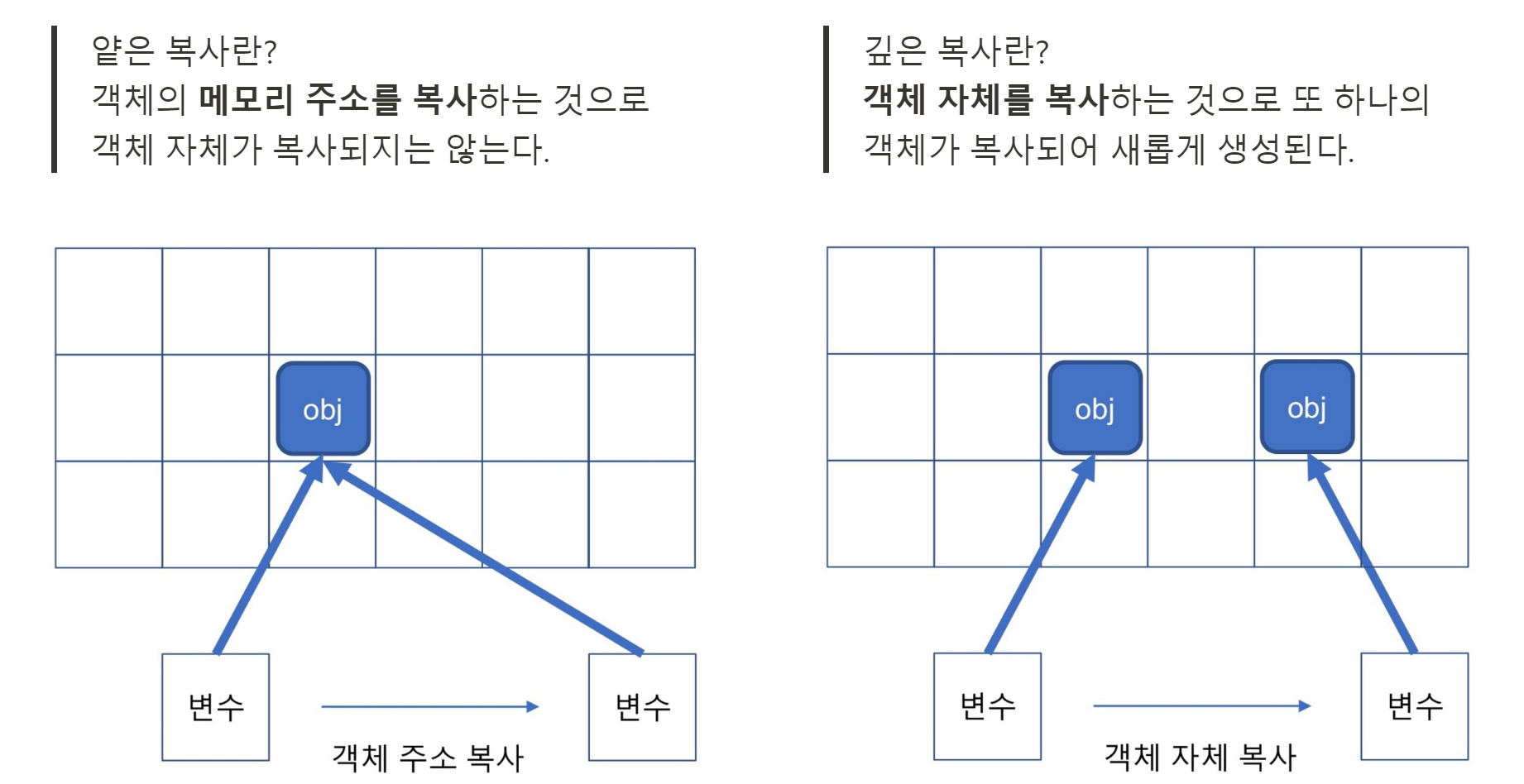
-
copy모듈을 이용하면 깊은 복사를 할 수 있다.# <Q> ---------------------------------------------------------- # 국어, 영어, 수학 점수를 입력받아 리스트에 저장하고 원본을 유지한 상태로, # 복사본을 만들어 과목별 점수를 10% 올린 후 평균을 출력 scores = [int(input('국어 점수 입력: ')), int(input('영어 점수 입력: ')), int(input('수학 점수 입력: '))] scores = [77, 82, 91] # 원본 copyScores = scores.copy() ⭐ # 복사본 ➡ 새로운 객체 for idx, score in enumerate(copyScores): result = score * 1.1 copyScores[idx] = 100 if result > 100 else result print(f'이전 평균: {round(sum(scores) / len(scores), 2)}') print(f'이후 평균: {round(sum(copyScores) / len(copyScores), 2)}') # 이전 평균: 83.33 # 이후 평균: 91.63 -

      scoresDeepCopy = []

      # case_1️⃣ for문 사용 : 새로운 객체에 값만 복사

      ⭐ for s in scores:
              scoresDeepCopy.append(s)

      print(f'id(scores): {id(scores)}')
      print(f'id(scoresDeepCopy): {id(scoresDeepCopy)}')
      # id(scores)  	    : 2162736100160
      # id(scoresDeepCopy): 2162736573696


      # case_2️⃣ 리스트의 extend()메서드로 리스트 연결 확장

      ⭐ scoresDeepCopy.extend(scores)


      # case_3️⃣ 리스트의 copy()메서드 사용

      ⭐ scoresDeepCopy = scores.copy()


      # case_4️⃣ slice 사용 : 처음부터 끝까지 slicing한 데이터 할당

      ⭐ scoresDeepCopy = scores[:]
❕ 클래스 상속
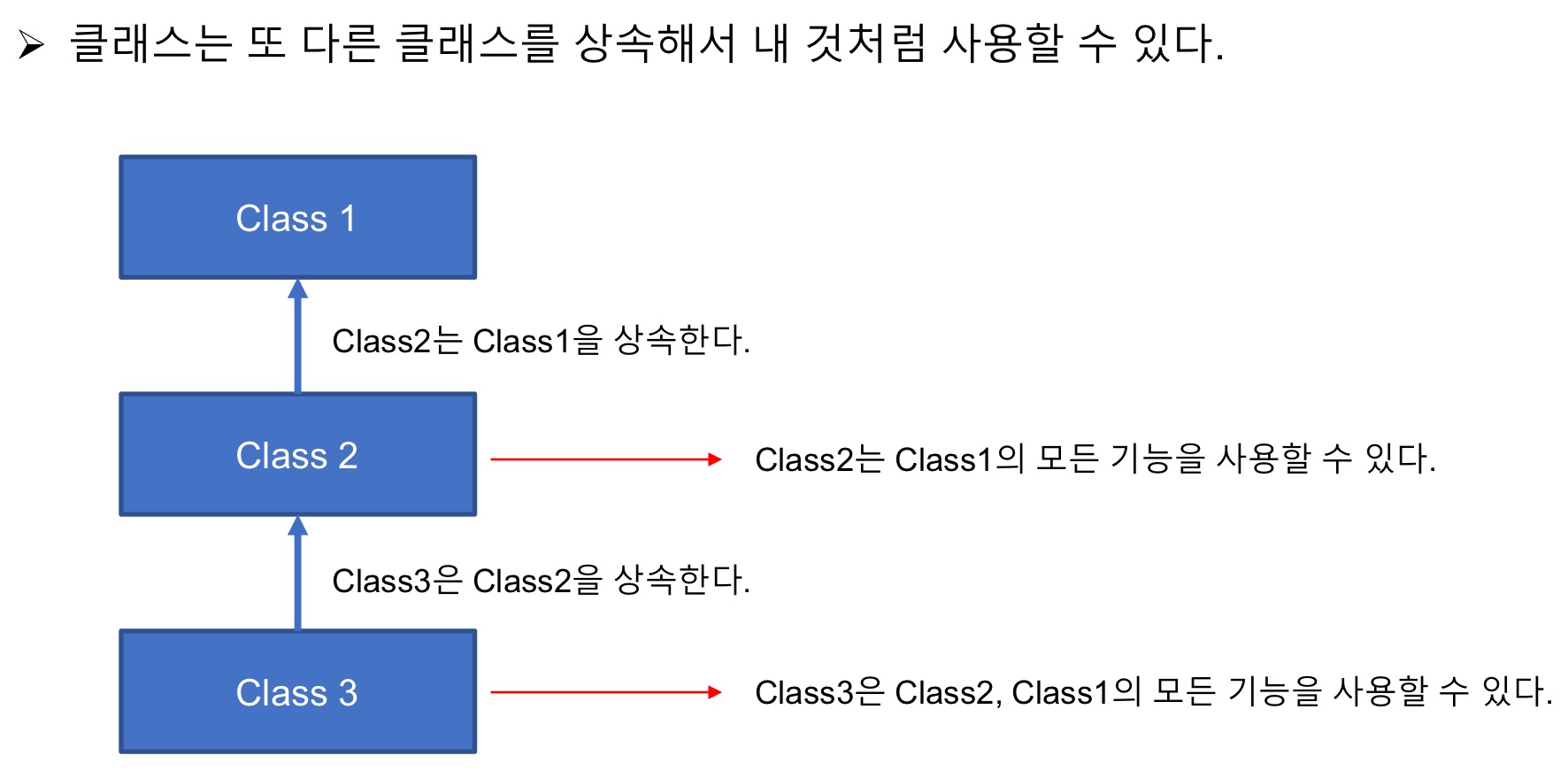
-
기능 메서드는 상속으로 하위 클래스가 상위 클래스의 기능을 바로 사용할 수 있다.
class NormalCar: def drive(self): print('[NormalCar] drive() called!!') def back(self): print('[NormalCar] back() called!!') # 클래스 상속 class TurboCar(NormalCar): def turbo(self): print('[TurboCar] turbo() called!!') myTurboCar = TurboCar() myTurboCar.drive() # [NormalCar] drive() called!! myTurboCar.back() # [NormalCar] back() called!! myTurboCar.turbo() # [TurboCar] turbo() called!! -
속성값은 상속만으로 하위 클래스가 상위 클래스의 속성값을 바로 사용할 수 없다.
속성값은 상위 클래스의__init__()메소드를 반드시 호출해 주어야 하위 클래스가 사용 가능해진다.class P_Class: def __init__(self, pNum1, pNum2): print('[pClass] __init__()') self.pNum1 = pNum1 self.pNum2 = pNum2 class C_Class(P_Class): def __init__(self, cNum1, cNum2): print('[cClass] __init__()') # 상위 클래스의 속성을 초기화하기 위해 # case_1️⃣ # 부모 클래스의 __init__() 메소드를 강제로 호출하는 방법 P_Class.__init__(self, 100, 200) # case_2️⃣ # super() 함수로 부모 클래스의 __init__() 메소드를 호출 # super() 함수를 사용할 경우 'self' Keyword는 생략한다. super().__init__(100, 200) self.cNum1 = cNum1 self.cNum2 = cNum2 cls = C_Class(10, 20) print(f'cls.cNum1: {cls.cNum1}') # cls.cNum1: 10 print(f'cls.cNum2: {cls.cNum2}') # cls.cNum2: 20 print(f'cls.pNum1: {cls.pNum1}') # cls.pNum1: 100 print(f'cls.pNum2: {cls.pNum2}') # cls.pNum2: 200
🔅 메서드 재정의
-
하위 클래스에서 상위 클래스의 메서드를 재정의(Override)할 수 있다.
class Robot:
    def __init__(self, c, h ,w):
        self.color = c
        self.height = h
        self.weight = w

    def fire(self):
        print('총알 발사!!')

class NewRobot(Robot):
    def __init__(self, c, h ,w):
        super().__init__(c, h, w)

    # Method Override
    # 부모의 '총알 발사!!'기능을 '레이저 발사!!'기능을 재정의한다.
    def fire(self):
        print('레이저 발사!!')

myRobot = NewRobot('blue', 200, 300)
myRobot.fire() ➡# 레이저 발사!!
🔅 다중 상속
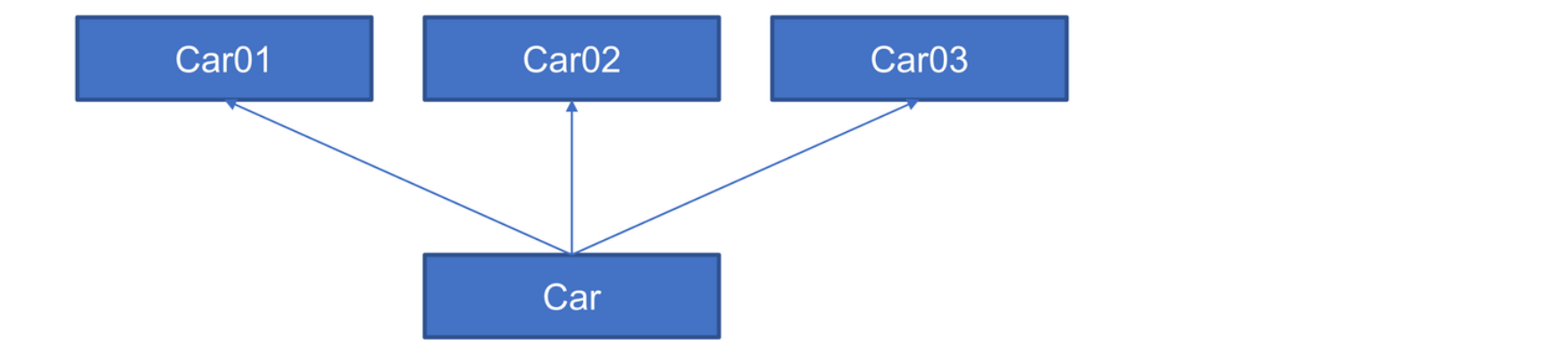
- 2개 이상의 클래스를 상속하는 경우 상속하고자 하는 클래스를 콤마로 나열한다.
    class Car01:
        def drive(self):
            print('drive() method called!!')

    class Car02:
        def turbo(self):
            print('turbo() method called!!')

    class Car03:
        def fly(self):
            print('fly() method called!!')

    # 다중상속
    class Car(Car01, Car02, Car03):
        def __int__(self):
            pass


    myCar = Car()
    myCar.drive()
    myCar.turbo()
    myCar.fly()
    # drive() method called!!
    # turbo() method called!!
# fly() method called!!- 다중 상속은 남발하면 안된다.!!! 다중 상속의 늪에 빠질 수 있다.
❕ 추상 클래스
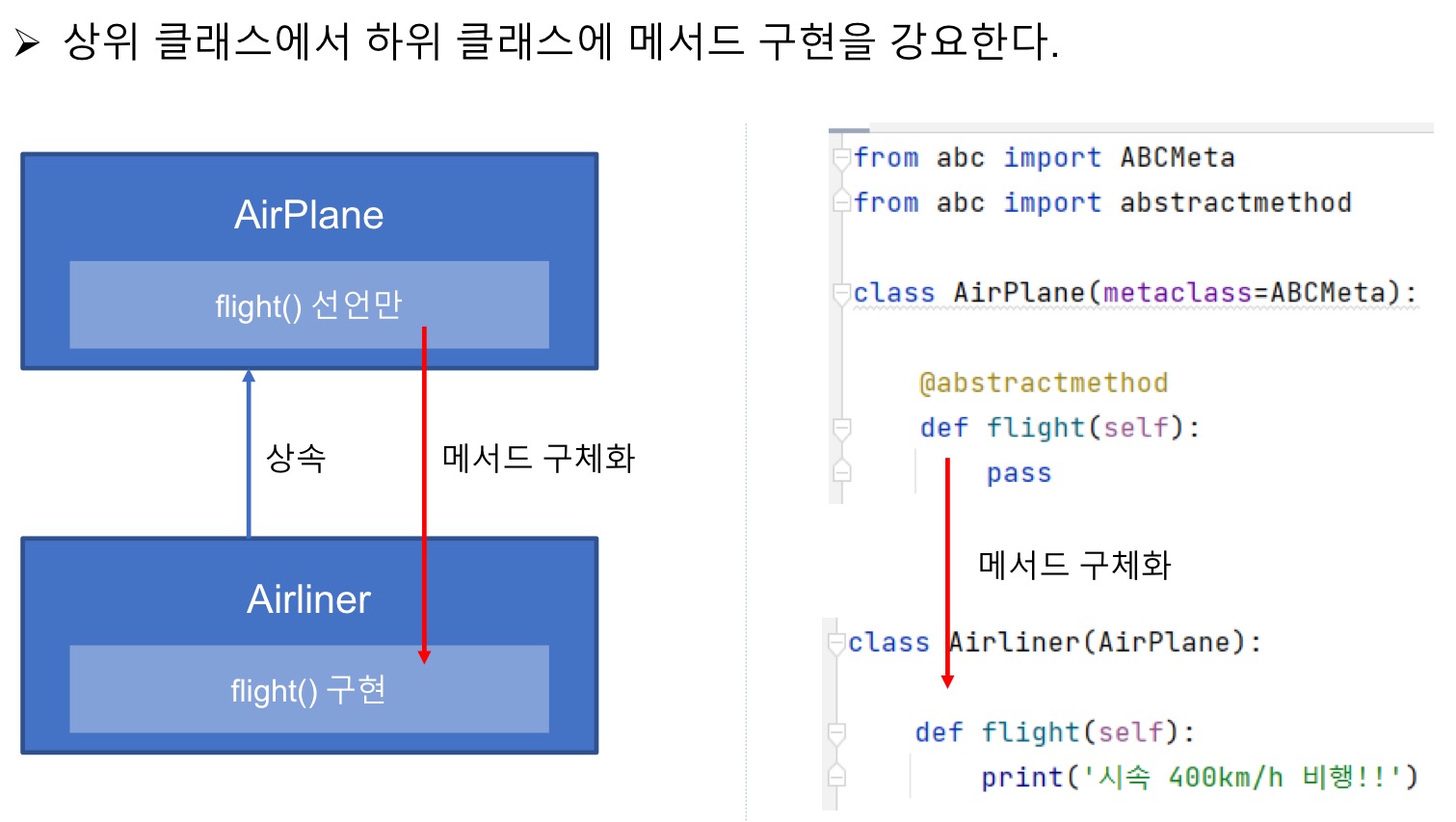
- 추상 클래스를 선언하기 위해서는 모듈 2가지가 필요한다.
    # 추상 클래스를 선언하기 위한 모듈 2가지
    from abc import ABCMeta
    from abc import abstractmethod

    # 추상 클래스 선언
    class AirPlane(metaclass=ABCMeta):

        @abstractmethod
        def flight(self):
pass- 추상 클래스는 메서드를 선언만하고 상속하는 하위 클래스가 메서드를 구체화해야 한다.
고정된 기능이 아니라 상속하는 각자의 클래스에 맞게 알아서 쓰라는 의미!
2. 예외처리
❕ 예외란
예외란, 문법적인 문제는 없으나 실행 중 발생하는 예상하지 못한 문제이다.
- 예외는 에러와는 다르다.
에러는 소프트웨어적으로 처리하거나 해결할 수 없는 문제이다.
ex> Syntax나 Network 문제, 전기 문제, 천재지변, 등
❕ 예외처리 방법
발생된 예외를 별도로 처리함으로써 프로그램 전체의 실행에 문제가 없도록 하는 것
💠 try ~ except
-
예외 발생 예상 구문을
try ~ exceptKeyword로 감싸서 처리 -
정확하게 예외가 발생할 것 같은 구문만 감싸야 한다.
예외가 발생하면 이후 실행 구문들은 모두 SKIP~!된다.
💠 else
elseKeyword는 예외가 발생하지 않은 경우에 실행할 구문에 사용
💠 finally
finallyKeyword는 예외 발생과 상관없이 항상 실행하는 구문에 사용
  # 예외 발생 감시 : 예외가 발생하면 예외객체를 except로 던짐
  try:
      inputData = input('input number: ')
      numInt = int(inputData)

  # 예외가 발생하면 try에서 던진 예외 객체를 받은 후 코드블록 실행
  except:
      print('exception raise!!')
      print('not number!!')
      numInt = 0

  # 예외가 발생하지 않으면 실행 : 짝/홀수 구분
  else:
      if numInt % 2 == 0:
          print('inputData is even number!!')
      else:
          print('inputData is odd number!!')

  # 예외 발생과 상관없이 항상 실행
  finally:
      print(f'inputData: {inputData}')
💠 raise
-
raiseKeyword는 임의로 내가 원하는 시점에 예외를 발생시킬 수 있다.def divCalculator(n1, n2): if n2 != 0: print(f'{n1} / {n2} = {n1 / n2}') else: # Exception 객체를 생성해서 임의로 예외를 발생시킴. 👉 raise Exception('0으로 나눌 수 없습니다.') num1 = int(input('input numer1: ')) num2 = int(input('input numer2: ')) try: divCalculator(num1, num2) except Exception as e: print(f'Exception: {e}') # 실행결과 # input numer1: 9 # input numer2: 0 # Exception: 0으로 나눌 수 없습니다.
❕ 예외 클래스
-
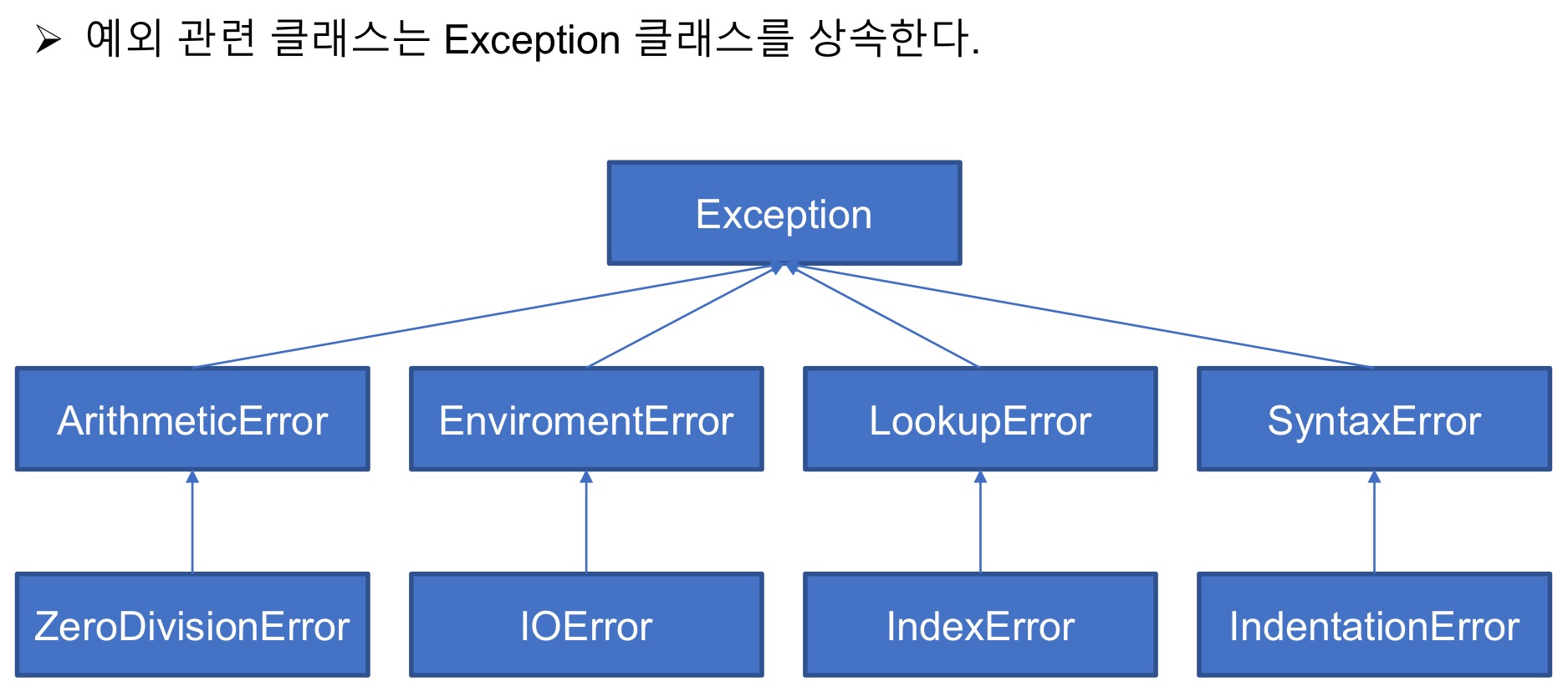
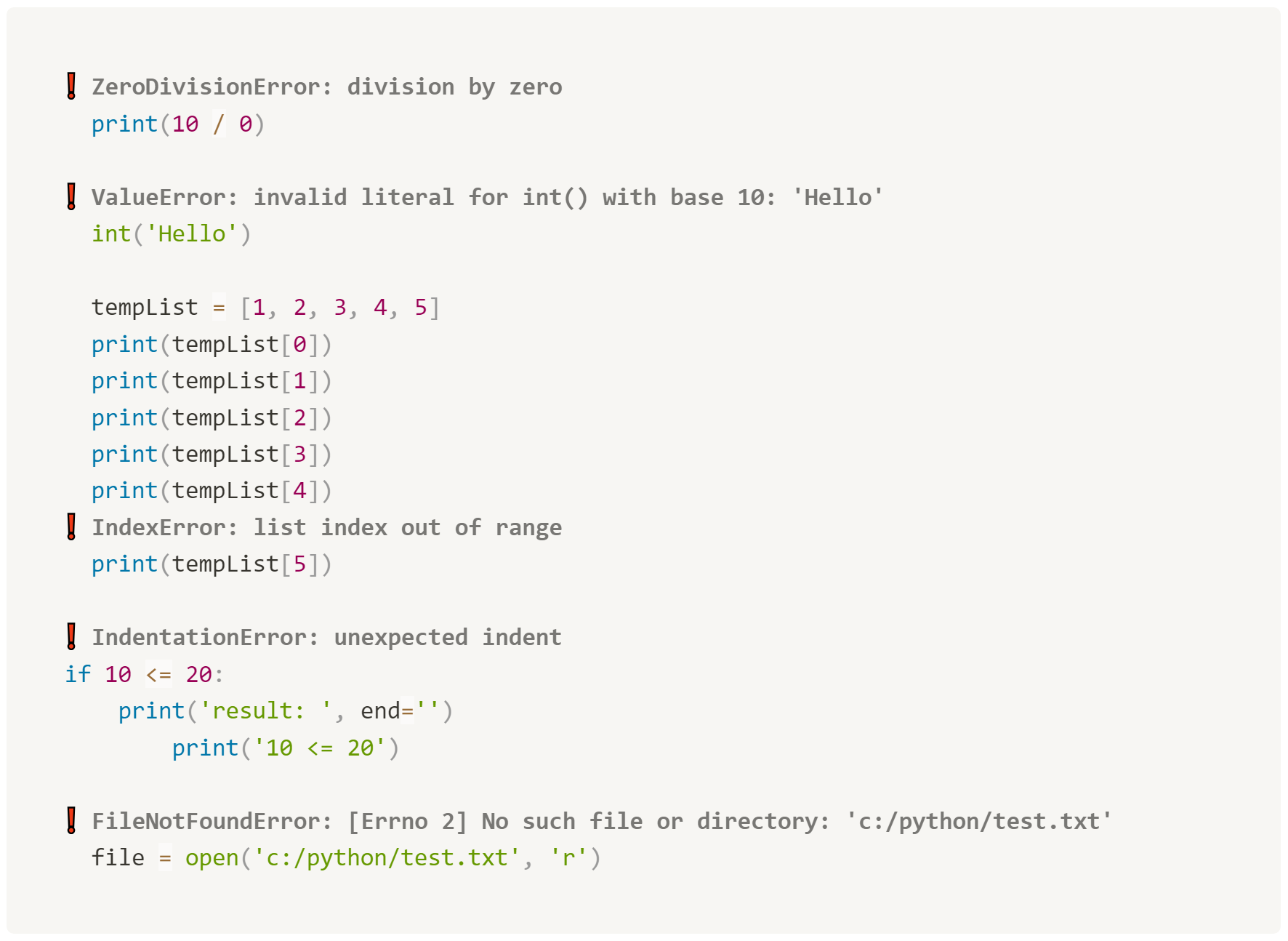
예외 에러마다 담당하는 다양한 클래스가 있다.
-
Exception은 예외를 담당하는 클래스로 어떤 종류의 에러가 발생했는지에 대한 정보를 담고 있다.
❕ 사용자 예외 클래스
Exception Class를 상속해서 사용자 예외 클래스를 직접 정의할 수 있다.
  # 사용자 정의 예외 클래스
  class NotUseZeroException(Exception):
      def __init__(self, n):
          super().__init__(f'{n}은 사용할 수 없습니다!!')


  # 예외를 사용자 임의로 발생시키는 함수
  def divCalculator(num1, num2):
      if num2 == 0:
          raise NotUseZeroException(num2)
      else:
          print(f'{num1} / {num2} = {num1 / num2}')


  num1 = int(input('input number1: '))
  num2 = int(input('input number2: '))

  try:
      divCalculator(num1, num2)
  except NotUseZeroException as e:
      print(e)
3. 파일입출력
❕ 기본함수
open(),read(),write(),close()
💠 open()
➡️ 형식 : open_file = open(file_path, option)
-
파이썬에서 쓰고 읽을 파일을 연다.
-
open()함수의 인수는 2가지로 오픈할 파일의 경로와 파일 사용 모드이다.
-
파일 사용 모드에는 쓰기 모드[
‘w’,‘a’,‘x’]와 읽기 모드[‘r’]가 있다. -
open()함수는 인수로 쓴 파일 경로에 해당 파일이 없으면 새 파일을 생성하고 열어준다.
-
open()함수로 연 파일은 읽기 또는 쓰기한 후
반드시 close()함수로 닫아줘야 한다.
💠 close()
- 파이썬에서 연 파일을 사용 완료 후 닫아준다
💠 write()
➡️ 형식 : open_file.write('str....')
-
파이썬에서 연 파일에 데이터를 기록한다.
-
write()함수는 인수에 쓴 문자열의 길이를
int로 반환한다. -
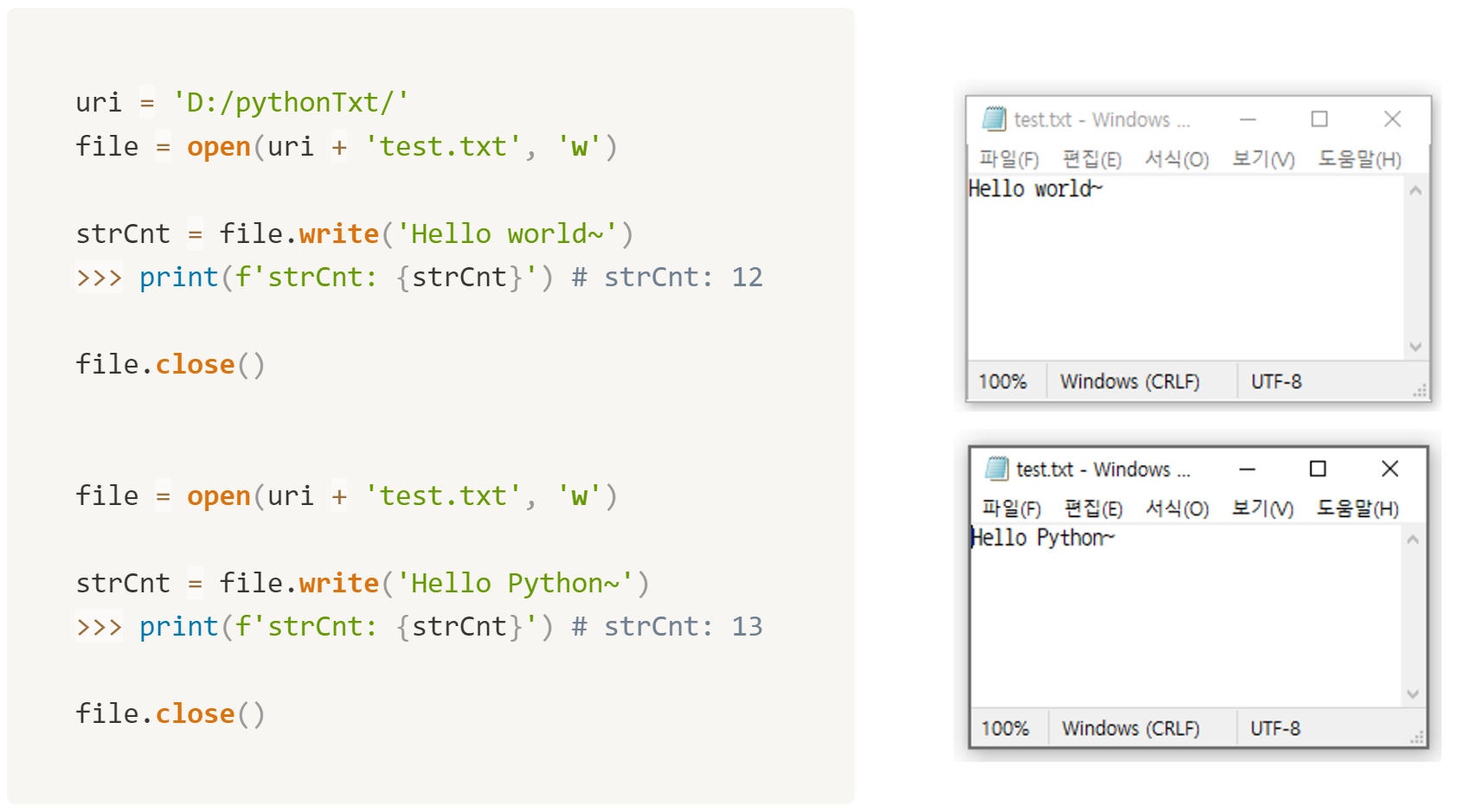
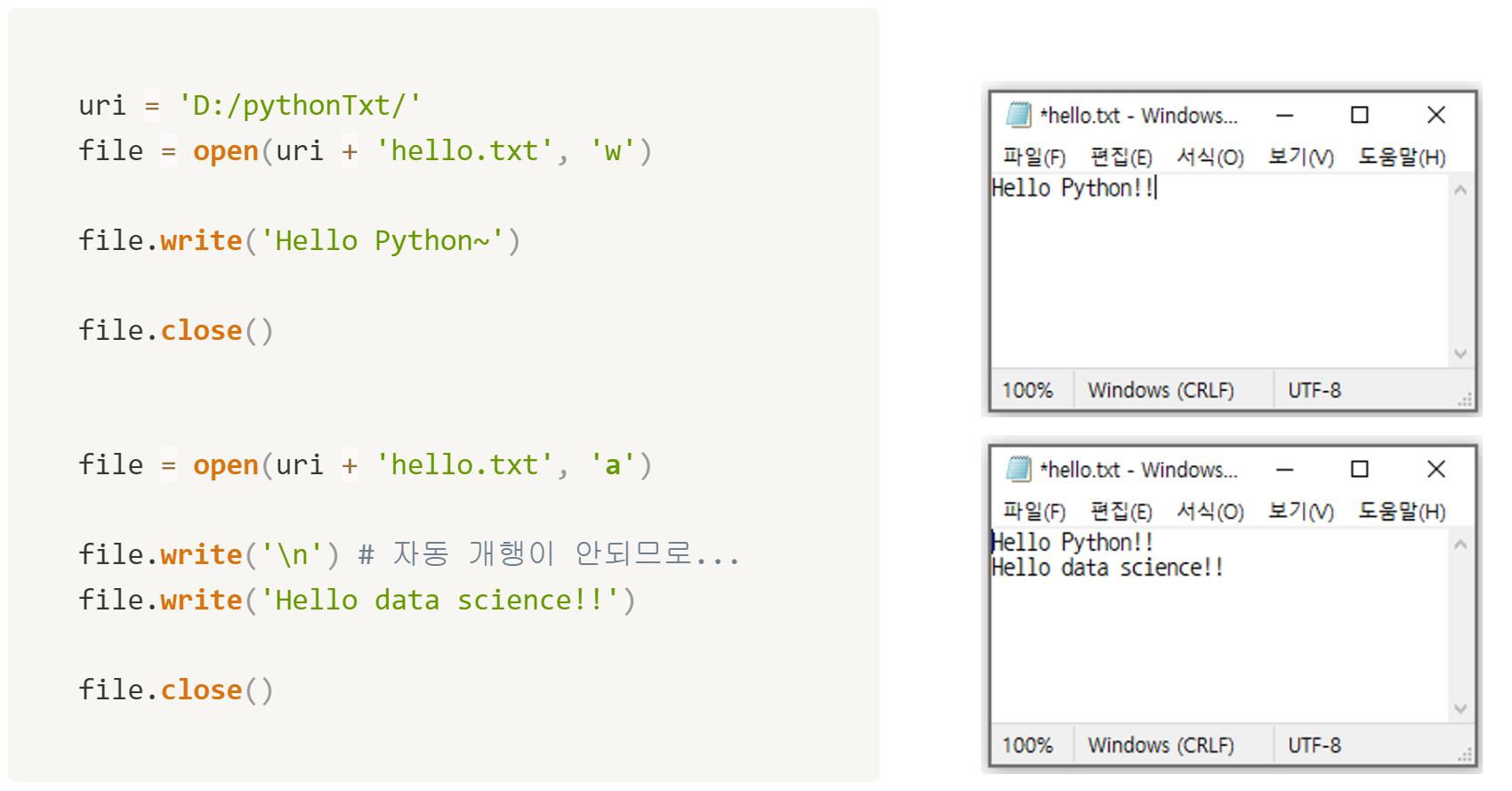
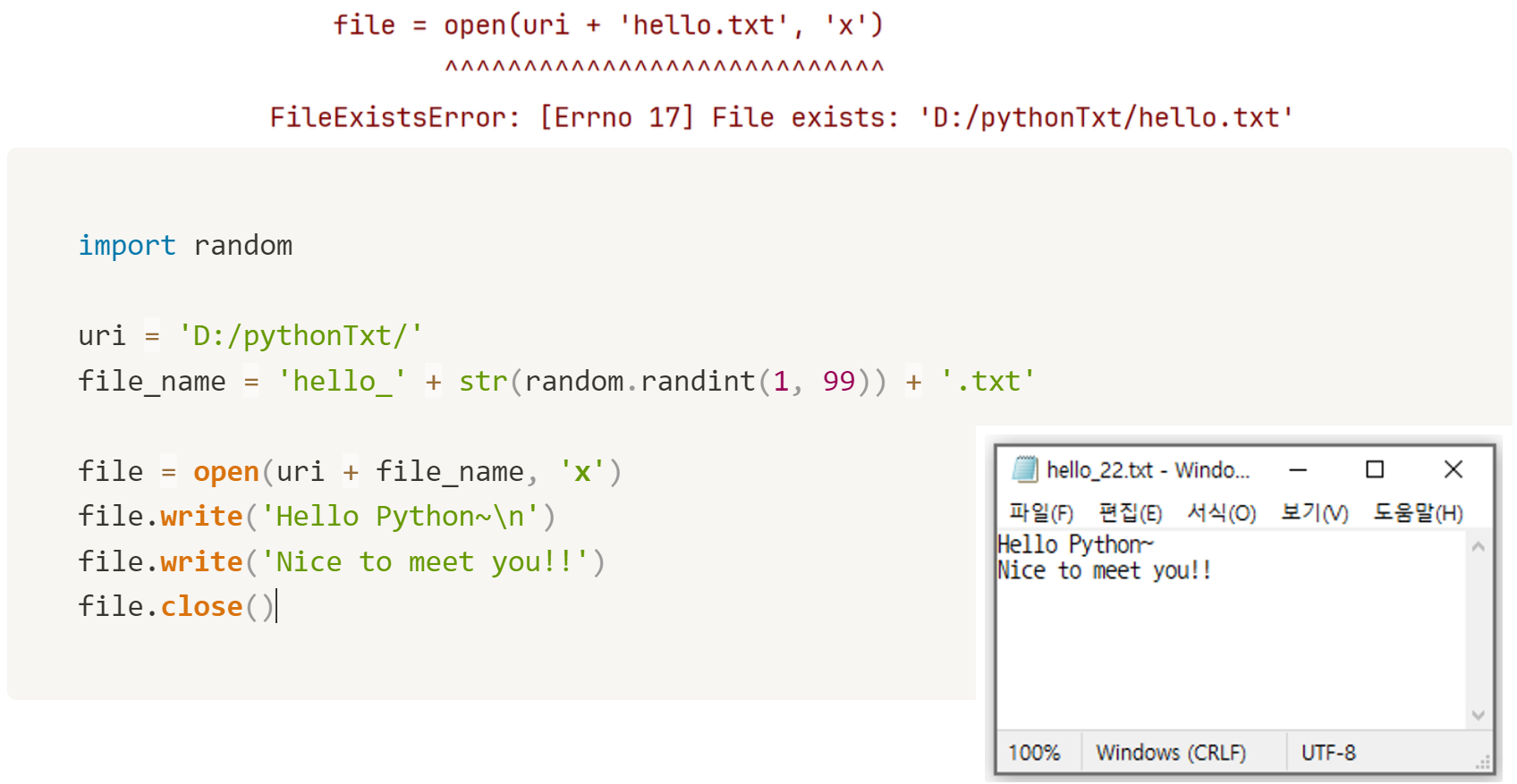
write()함수를 이용해 문자열을 모드 옵션에 따라 파일로 출력한다.
→ <자동 개행 ❌>‘w’(write) 모드 : 덮어쓰기
‘a’(append) 모드 : 이어쓰기
‘x’모드 : 새 파일에 쓰기 모드(파일을 새로 만들고 쓴다.)
→ 파일이 이미 존재하면 Error 발생
💠 read()
-
파이썬에서 연 파일의 데이터를 읽어온다.
-
읽기 모드(
‘r’)로 파일을 열 때 해당 파일이 없으면 Error 발생! -
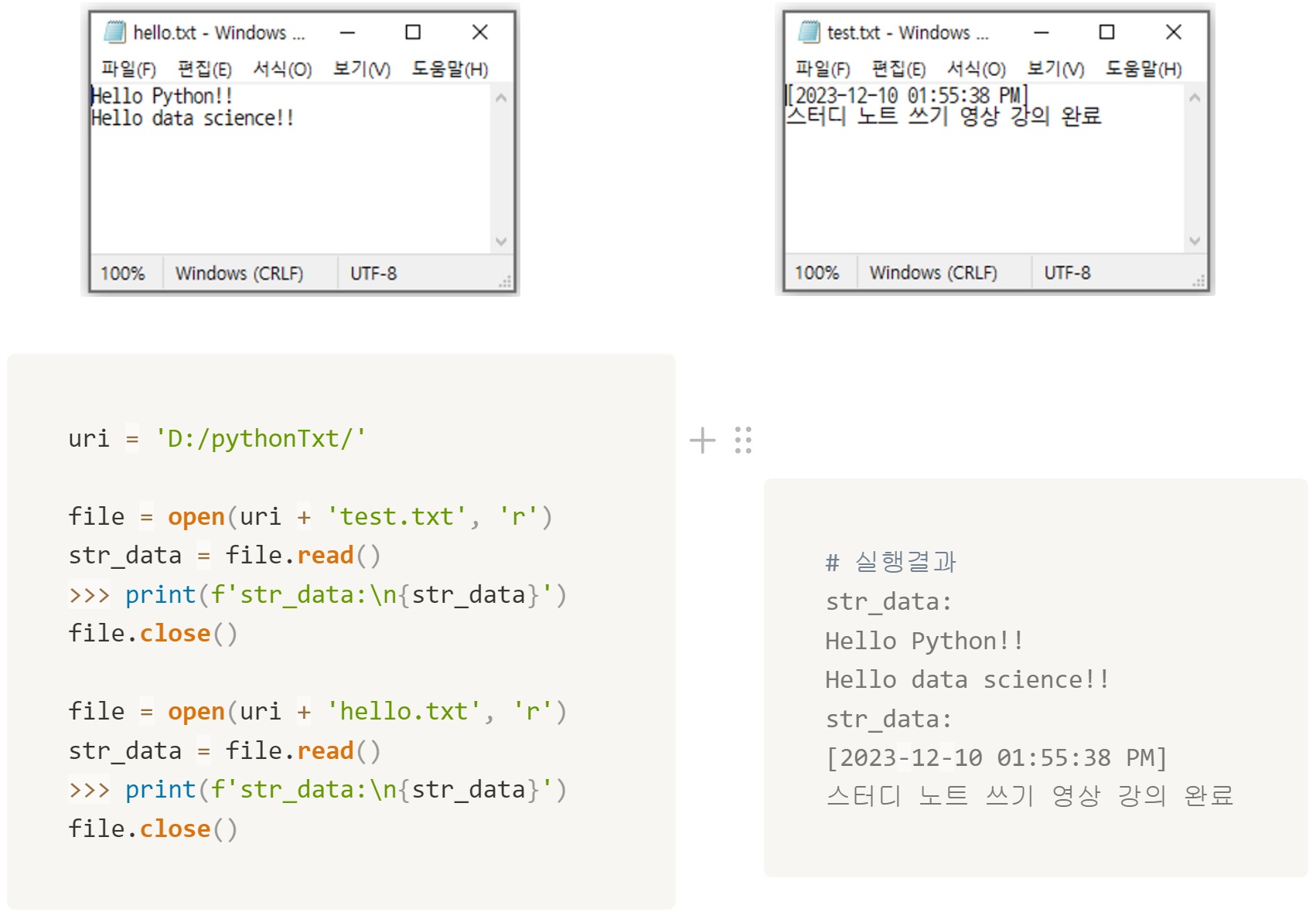
open()함수에서 읽기 모드로 파일을 열고,
read()함수로 파일 내용을 문자열 형태로 받아온다.
❕ 응용함수
with ~ as,writelines(),readlines(),readline()
💠 with ~ as
➡️ 형식 : with open() as file_alias
- 파일을 닫는 close() 함수를 생략할 수 있다.
  with open('C:/pythonTxt/test.txt', 'a') as f:
      f.write('Study Python~!!'')

  with open('C:/pythonTxt/test.txt', 'r') as f:
      print(f.read())
💠 writelines()
➡️ 형식 : open_file.writelines(enum_Object)
- 반복 가능한 자료형의 데이터를 파일에 쓸 때 사용한다.
languages = ['c/c++', 'java', 'c#', 'python', 'javascript'] # <class 'list'>

with open('C:/pythonTxt/languages.txt', 'a') as f:
		for item in languages:
        f.write(item)
        f.write('\n')

# list나 tuple과 같은 열거형 객체를 for문을 이용해 item 하나씩 가오는 대신
# 파이썬에서 제공하는 내부적으로 반복 기능을 가진 함수를 쓴다.

languages = ('c/c++', 'java', 'c#', 'python', 'javascript') # <class 'tuple'>

with open('C:/pythonTxt/languages.txt', 'a') as f:
    f.writelines(item + '\n' for item in languages)
💠 readline()
➡️ 형식 : line = open_file.readline()
-
파일 내 데이터 한 행씩을 읽어서 문자열로 반환한다.
-
눈에 보이지 않는 개행 문자('\n')도 포함된다.
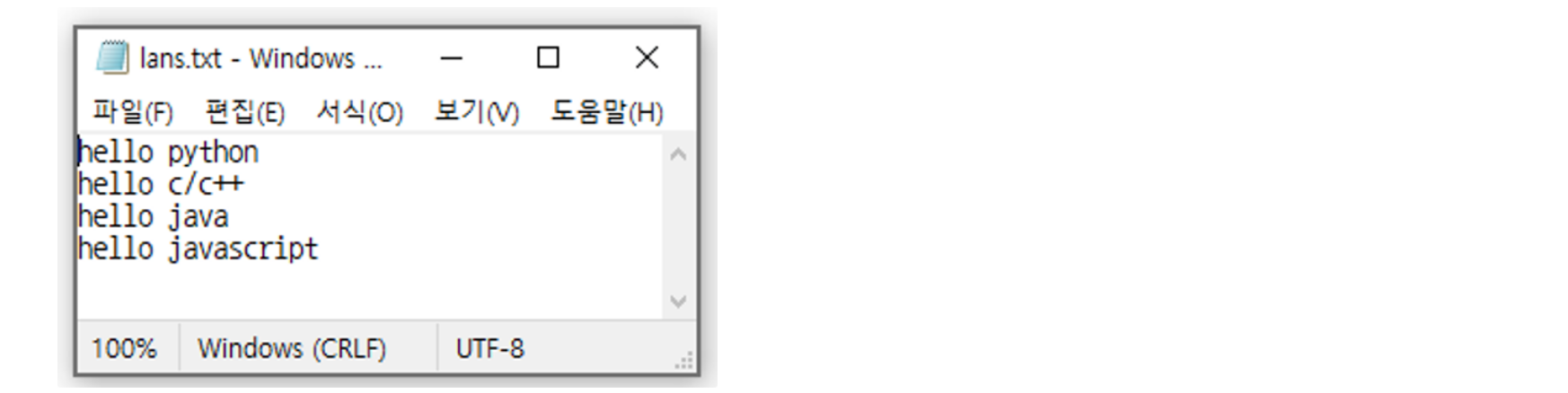
    with open('C:/pythonTxt/lans.txt', 'r') as f:
        line = f.readline()

        while line != '':
            # print()도 자동 개행되므로 이중 개행됨.
            print(f'line: {line}', end='')
            line = f.**readline**()

    # 실행 결과
    line: hello python
    line: hello c/c++
    line: hello java
    line: hello javascript
💠 readlines()
➡️ 형식 : line = open_file.readline()
-
파일의 모든 데이터를 읽어서 리스트 형태로 반환
-
개행 문자가 포함되어 있으므로 개행을 List 요소의 구분자로 사용할 수 있다.
    with open('C:/pythonTxt/lans.txt', 'r') as f:
        lanList = f.readlines()

    >>> print(f'lanList: {lanList}')
    >>> print(f'lanList type: {type(lanList)}')
    # lanList: ['hello python\n', 'hello c/c++\n', 'hello java\n', 'hello javascript\n']
    # lanList type: <class 'list'>