
튜플이란?
List와 비슷하지만 Item 추가, 삭제, 수정 등 변경이 불가능한 자료 구조이다.
리스트와 유사하지만 몇 가지 중요한 차이점이 있다.
📍 리스트와의 차이점과 공통점에 중점을 두고 학습한다.
-
( )(parenthesis)를 이용해 정의하고, 각 요소는,로 구분한다.strs = (3.14, '십', 20, 'one', '3.141592', [20, 30], (40, 50, 60)) -
리스트와 튜플은 자료형 변환이 가능하다.
요소 편집이 필요할 때 튜플을 리스트로 변환한 후 진행할 수 있다.students = ['홍길동', '박찬호', '이용규', '강호동'] print(students) print(type(students)) # ['홍길동', '박찬호', '이용규', '강호동'] # <class 'list'> students = tuple(students) print(students) print(type(students)) # ('홍길동', '박찬호', '이용규', '강호동') # <class 'tuple'> students = list(students) print(students) print(type(students)) # ['홍길동', '박찬호', '이용규', '강호동'] # <class 'list'>
< List와의 차이점 >
❗ 불변성(Immutable)
튜플은 생성 후에 Item을 추가하거나 삭제, 변경할 수 없다.
이러한 불변성은 리스트와의 주요 차이점 중 하나이다.


❗ 선언 방식
튜플은 선언 시 괄호 생략이 가능하다.
  students = ('홍길동', '박찬호', '이용규', '강호동')
  print(students)
  print(type(students))
  # ('홍길동', '박찬호', '이용규', '강호동')
  # <class 'tuple'>

  students = '홍길동', '박찬호', '이용규', '강호동'
  print(students)
  print(type(students))
  # ('홍길동', '박찬호', '이용규', '강호동')
  # <class 'tuple'>
❗ 튜플 확장
튜플에는
extend()메서드가 없다.
  studentTuple1 = ('홍길동', '박찬호', '이용규')
  studentTuple2 = ('박승철', '김지은', '강호동')

  studentTuple1.extend(studentTuple2)
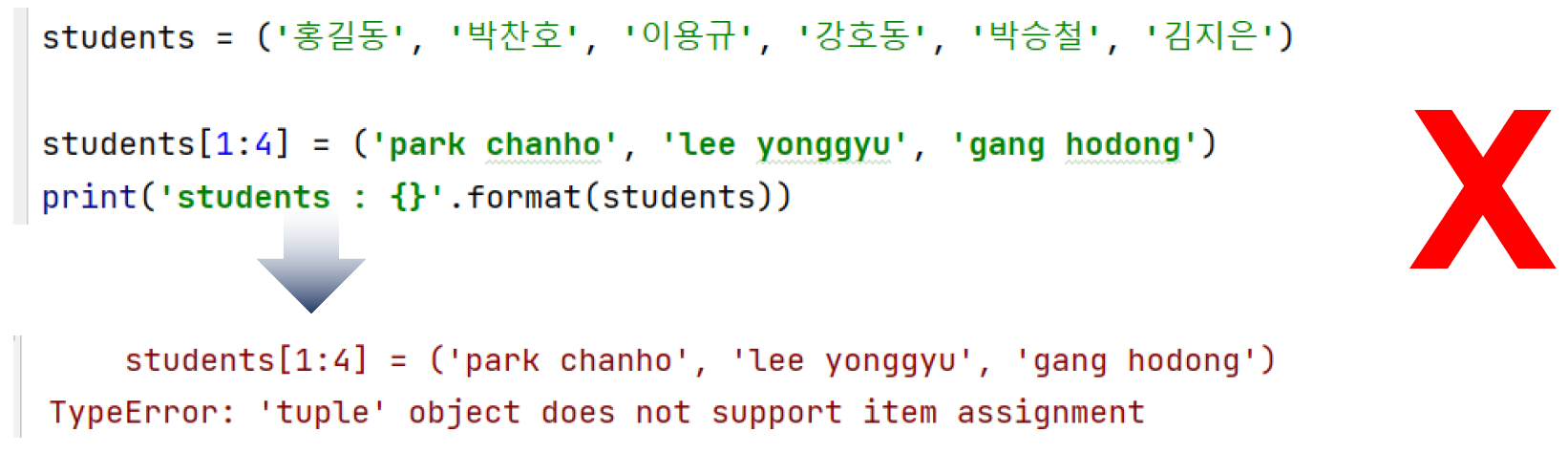
❗ 슬라이싱
튜플은
[ ]를 이용한 슬라이싱으로 item을 변경할 수 없다.
❗ 튜플 정렬
튜플에는
sort()메서드가 없다.
-
내장 함수인
sorted()함수를 이용하면 튜플도 정렬 가능하다.
sorted()함수는 리스트 자료형을 새로운 객체로 반환하므로
튜플을 인수로 받아 정렬한 후 새로운 리스트 객체를 반환한다.students = ('홍길동', '박찬호', '이용규', '강호동', '박승철', '김지은') sortedStudents = sorted(students) ❕ 내림차순 정렬된 새로운 리스트 객체 print('sortedStudents type: {}'.format(type(sortedStudents))) print('sortedStudents: {}'.format(sortedStudents)) # sortedStudents type: <class 'list'> # sortedStudents: ['강호동', '김지은', '박승철', '박찬호', '이용규', '홍길동'] ❕ 원본 튜플 객체 print('students type: {}'.format(type(students))) print('students: {}'.format(students)) # students type: <class 'tuple'> # students: ('홍길동', '박찬호', '이용규', '강호동', '박승철', '김지은') ❕ 오름차순 정렬된 새로운 리스트 객체 sortedStudents = sorted(students, reverse=True) print('sortedStudents type: {}'.format(type(sortedStudents))) print('sortedStudents: {}'.format(sortedStudents)) # sortedStudents type: <class 'list'> # sortedStudents: ['홍길동', '이용규', '박찬호', '박승철', '김지은', '강호동']
-
튜플은 수정이 불가하기 때문에 리스트로 변환한 후 정렬할 수 있다.
students = ('홍길동', '박찬호', '이용규', '강호동', '박승철', '김지은')
 print('students type: {}'.format(type(students)))
 print('students: {}'.format(students))
 # students type: <class 'tuple'>
 # students: ('홍길동', '박찬호', '이용규', '강호동', '박승철', '김지은')

 ❕ 리스트로 변환 후 오름차순 정렬
 students = list(students)
 students.sort()
 print('students type: {}'.format(type(students)))
 print('students: {}'.format(students))
 # students type: <class 'list'>
 # students: ['강호동', '김지은', '박승철', '박찬호', '이용규', '홍길동']

 ❕ 다시 튜플로 Casting
 students = tuple(students)
 print('students type: {}'.format(type(students)))
 print('students: {}'.format(students))
 # students type: <class 'tuple'>
 # students: ('강호동', '김지은', '박승철', '박찬호', '이용규', '홍길동')

 ❕ 리스트로 변환 후 내림차순 정렬
 students = list(students)
 students.sort(reverse=True)
 print('students: {}'.format(students))
 # students: ['홍길동', '이용규', '박찬호', '박승철', '김지은', '강호동']

 ❕ 다시 튜플로 Casting
 students = tuple(students)
 print('students type: {}'.format(type(students)))
 print('students: {}'.format(students))
 # students type: <class 'tuple'>
 # students: ('홍길동', '이용규', '박찬호', '박승철', '김지은', '강호동')
< List와의 공통점 >
-
순서가 있는(Ordered) 자료 구조이다.
튜플의 각 요소는 특정한 위치(Index)를 가지고 그 순서가 유지된다. -
인덱스로 요소에 접근할 수 있다.
각 요소는 고유한 인덱스를 가지고 있어 이를 통해 특정 요소에 접근할 수 있다.
인덱스는 [0]부터 시작한다. -
다양한 데이터 타입 허용한다.
리스트와 마찬가지로 서로 다른 데이터 타입의 요소를 포함할 수 있다. -
패킹과 언패킹
튜플은 여러 변수에 값을 한 번에 할당하는 패킹(packing)과
여러 변수의 값을 튜플에서 추출하여 변수에 할당하는 언패킹(unpacking)이 가능하다.list_ex = (1, 2, 3, 4, 5) print(list_ex) # (1, 2, 3, 4, 5) item1, item2, item3, item4, item5 = list_ex print(item1, item2, item3, item4, item5) # 1 2 3 4 5 list_ex = item1, item2, item3, item4, item5 print(list_ex) # (1, 2, 3, 4, 5)
❕ Item 조회
리스트와 동일한 방식으로 Index, 반복문을 이용해 요소를 조회할 수 있다.
  myFavoriteSports = ('수영', '배구', '야구', '조깅', '축구')

  for i in range(len(myFavoriteSports)):
      print('myFavoriteSports[{}]: {}'.format(i, myFavoriteSports[i]))

  n = 0
  while n < len(myFavoriteSports):
      print('myFavoriteSports[{}]: {}'.format(n, myFavoriteSports[n]))
      n += 1

  studentCnts = (1, 19), (2, 20), (3, 22), (4, 18), (5, 21)

  for i in range(len(studentCnts)):
	  print('{}학급 학생수: {} '.format(studentCnts[i][0], studentCnts[i][1]))

  for classNo, cnt in studentCnts:
	  print('{}학급 학생수: {}'.format(classNo, cnt))

	# 실행결과
	# 1학급 학생수: 19
	# 2학급 학생수: 20
	# 3학급 학생수: 22
	# 4학급 학생수: 18
	# 5학급 학생수: 21
❕ 튜플 확장
리스트와 같이
+,*연산자로 튜플을 연결해 확장할 수 있다.
-
튜플 덧셈 연산은 두 개의 튜플을 결합시킨다.
studentTuple1 = ('홍길동', '박찬호', '이용규') studentTuple2 = ('박승철', '김지은', '강호동') studentTuple3 = studentTuple1 + studentTuple2 print('studentTuple3: {}'.format(studentTuple3)) # studentTuple3: ('홍길동', '박찬호', '이용규', '박승철', '김지은', '강호동') -
튜플 곱셈 연산은 튜플 객체 반복이다.
numbers = (2, 50, 0.12, 1, 9)

 numbersMul = numbers * 3
 print('numbersMul: {}'.format(numbersMul))
 # numbersMul: (2, 50, 0.12, 1, 9, 2, 50, 0.12, 1, 9, 2, 50, 0.12, 1, 9)
❕ 슬라이싱
slice notation: []로 튜플에서 원하는 범위의 부분을 잘라 새로운 튜플 객체로 반환받을 수 있다.
  numbers = (8.7, 9.0, 9.1, 9.2, 8.6, 9.3, 7.9, 8.1, 8.3)

  #<index: 0 ~ 3>
  print(f'numbers[:4] : {numbers[0:4]}')
  # numbers[:4] : (8.7, 9.0, 9.1, 9.2)

  #<index: 2 ~ 4>
  print(f'numbers[2:5] : {numbers[2:5]}')
  # numbers[2:5] : (9.1, 9.2, 8.6)

  #<index: 3 ~ end>
  print(f'numbers[3:] : {numbers[3:]}')
  # numbers[3:] : (9.2, 8.6, 9.3, 7.9, 8.1, 8.3)

  #<index: 2 ~ end-2>
  print(f'numbers[2:-1] : {numbers[2:-1]}')
  # numbers[2:-1] : (9.1, 9.2, 8.6, 9.3, 7.9, 8.1)

  #<index: 0 ~ end, step = 3>
  print(f'numbers[::3] : {numbers[::3]}')
  # numbers[::3] : (8.7, 9.2, 7.9)
❕ index() 메서드
찾으려는 요소의 index를 반환해 주는
index()메서드를 사용할 수 있다.
  numbers = (8.7, 9.0, 9.1, 9.2, 8.6, 9.3, 7.9, 8.1, 8.3)

  ❕ 최솟값
  print(f'최솟값 : {min(numbers)}')
  print(f'최솟값 인덱스 : {numbers.index(min(numbers))}')
  #	최솟값 : 7.9
  #	최솟값 인덱스 : 6

  ❕ 최댓값
  print(f'최댓값 : {max(numbers)}')
  print(f'최댓값 인덱스 : {numbers.index(max(numbers))}')
  #	최댓값 : 9.3
  #	최댓값 인덱스 : 5