CSS (Cascading Style Sheet) : 웹 페이지 디자인 요소
- 인라인 방식 : 요소 안에 직접 적음
- 내장 Style 방식 :
head아래에style로 따로 적음 - 링크 방식 : 다른 파일을 생성해
link로 연결함
인라인 > 내장 ? 링크
    <!-- 인라인 방식  -->
    <div style="background-color: lightcoral">
      <p>1</p>
    </div>

    <!-- 내장 스타일 방식 -->
    <style>
      p {
        font-size: 20px;
        text-align: center;
        margin: 0;
        line-height: 200px;
      }
    </style>

	<!-- 링크 방식 -->
	<link rel="stylesheet" href="./230705_css.css" />
CSS 작성법
선택자 { 프로퍼티 : 값 }
CSS 선택자
기본 선택자
- 전체 :
* - 태그 선택자 :
태그명 - Class 선택자 :
. - ID 선택자 :
#
아이디 선택자 > 클래스 선택자
    /* 전체 코드 변경 */
      * {
       color: red;
      }

    /* 태그 선택자 */
     span {
      background-color: red;
      }

    /* 클래스 선택자 */
    .orange {
      color: orange;
    }

    /* 아이디 선택자  */
    #orange {
      color: blue;
    }
복합 선택자 : 특수한 요소 호출 (띄어쓰기 중요)
- 일치 선택자:
선택자1선택자2
일치 선택자 > 클래스 선택자
- 자식 선택자 :
선택자1 > 선택자2
바로(한단계) 아래에 있는 자식 요소만 선택
- 하위 선택자 :
선택자1 선택자2
아래에 있는 모든 클래스를 선택
- 인접 형제 선택자 :
선택자1 + 선택자2
선택 클래스 이후에 바로 인접한(바로 다음) 태그들을 선택함 - 일반 형제 선택자 :
선택자1 ~ 선택자2
뒤에 오는 모든 선택자들을 선택함
    /* 일치 선택자 */
    span.orange {
      color: violet;
    }

    /* 자식 선택자 */
    ul > .orange {
      background-color: gray;
    }

    /* 하위 선택자 */
    ul .orange {
      font-weight: bold;
    }

    /* 인접 형제 선택자 */
    .orange + li {
      font-size: 30px;
    }

    /* 일반 형제 선택자 */
    .orange ~ li {
      color: green;
    }
가상 클래스 선택자
- 행동
:hover: 커서를 올려놨을 때:active: 커서로 누르고 있을 때:focus: 커서를 눌렀을 때
- 요소
:first-child: 형제 요소 중 첫번째 요소만 적용:last-child: 형제 요소 중 마지막 요소만 적용:nth-child(n): n번 째 요소 적용 (2n:짝수, 2n+1: 홀수)
- 부정 선택
-:not(): ()안에 있는 것을 제외하고 적용
가상 요소 선택자
html 태그 없이 요소 삽입이 가능해 자주 사용
-::before: 태그 앞에 가상 요소 추가
-::after: 뒤에 가상 요소 추가
속성 선택자
특정 속성을 갖고 있는 태그 선택
[disabled]: 속성값이 없는 속성 선택- ㅏ
readonly: 값 변경이 불가능(ex.회원가입시 ID변경 불가능)
실습 문제
- css 적용해보기
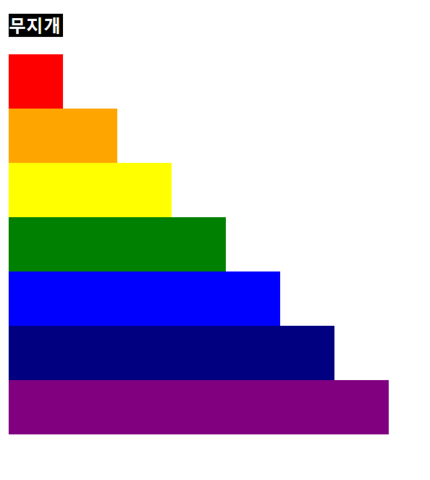
<html lang="en">
  <head>
    <meta charset="UTF-8" />
    <meta name="viewport" content="width=device-width, initial-scale=1.0" />
    <title>Document</title>
    <style>
      div {
        height: 50px;
      }
      h3 {
        width: fit-content;
        color: white;
        background-color: black;
      }
    </style>
  </head>
  <body>
    <!-- <div
      style="color: white; background-color: black; height: auto; width: 50px"
    >
      <p><b>무지개</b></p>
    </div> -->
    <h3>무지개</h3>
    <div style="background-color: red; width: 50px"></div>
    <div style="background-color: orange; width: 100px"></div>
    <div style="background-color: yellow; width: 150px"></div>
    <div style="background-color: green; width: 200px"></div>
    <div style="background-color: blue; width: 250px"></div>
    <div style="background-color: navy; width: 300px"></div>
    <div style="background-color: purple; width: 350px"></div>
  </body>
</html>
- 기본 선택자 연습하기
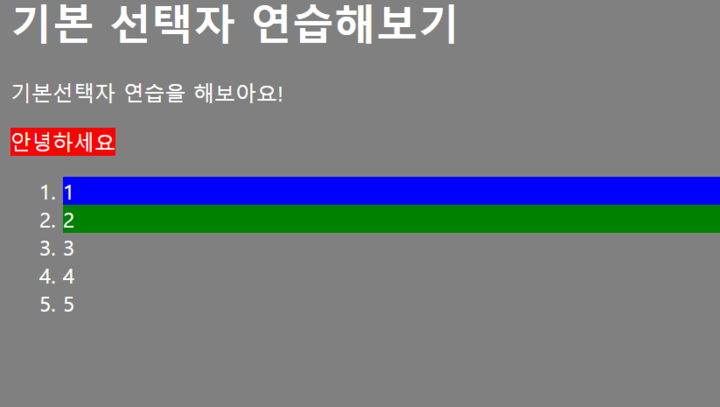
<!-- html 코드 -->
<html lang="en">
  <head>
    <link rel="stylesheet" href="./230705_practice_css.css" />
    <meta charset="UTF-8" />
    <meta name="viewport" content="width=device-width, initial-scale=1.0" />
    <title>Document</title>
  </head>
  <body>
    <h1>기본 선택자 연습해보기</h1>
    <p>기본선택자 연습을 해보아요!</p>
    <span>안녕하세요</span>
    <ol>
      <li id="first">1</li>
      <li class="second">2</li>
      <li>3</li>
      <li>4</li>
      <li>5</li>
    </ol>
  </body>
</html>
/* css 코드 */
* {
color: white;
background-color: gray;
}
span {
background-color: red;
}
#first {
background-color: blue;
}
.second {
background-color: green;
} - 조건!
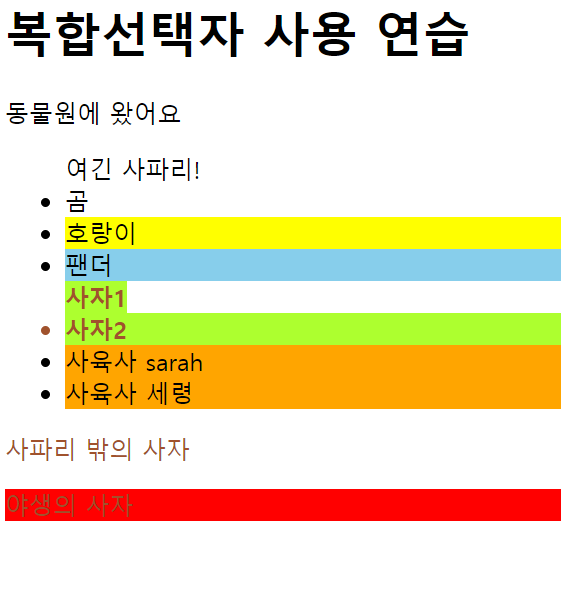
<!-- html 코드 -->
<html>
  <head>
    <link rel="stylesheet" href="./230705_practice_css.css" />
    <meta charset="UTF-8" />
    <meta name="viewport" content="width=device-width, initial-scale=1.0" />
    <title>실습3</title>
  </head>
  <body>
    <h1>복합선택자 사용 연습</h1>
    <p>동물원에 왔어요</p>
    <div class="zoo">
      <ul>
        <span>여긴 사파리!</span>
        <li>곰</li>
        <li id="tiger">호랑이</li>
        <li>팬더</li>
        <span class="lion">사자1</span>
        <li class="lion">사자2</li>
        <li>사육사 sarah</li>
        <li>사육사 세령</li>
      </ul>
      <span class="lion">사파리 밖의 사자</span>
    </div>
    <p class="lion">야생의 사자</p>
  </body>
</html>
/* css 코드 */
/* 야생의 사자 */
/* .zoo + .lion */
p.lion {
background-color: red;
}
/* 사파리 안의 사자 */
/* .zoo .lion */
ul .lion {
background-color: greenyellow;
font-weight: bold;
}
/* 호랑이 */
#tiger {
background-color: yellow;
}
/* 사자 */
.lion {
color: sienna;
}
/* 팬더 */
#tiger + li {
background-color: skyblue;
}
/* 사파리 사자 뒤 사육사 전부 */
/* .zoo li.lion ~li */
li.lion ~ li {
background-color: orange;
}- 가상 클래스 선택자1
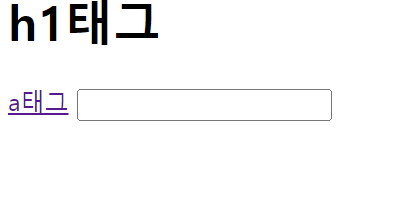
<!-- html 코드 -->
<!DOCTYPE html>
<html lang="en">
  <head>
    <link rel="stylesheet" href="./230705_practice_css.css" />
    <meta charset="UTF-8" />
    <meta name="viewport" content="width=device-width, initial-scale=1.0" />
    <title>Document</title>
  </head>
  <body>
    <h1>h1태그</h1>
    <a href="https://www.naver.com">a태그</a>
    <input type="text" name="" id="" />
  </body>
</html>
/* css 코드 */
h1:hover {
color: red;
}
a:active {
background-color: blue;
}
input:focus{
background-color: orange;
}- 줄무늬 모양 만들기
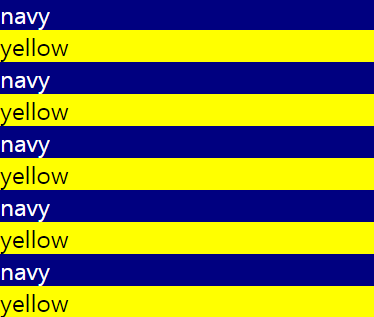
<!-- html 코드 -->
<!DOCTYPE html>
<html lang="en">
  <head>
    <link rel="stylesheet" href="./230705_practice_css.css" />
    <meta charset="UTF-8" />
    <meta name="viewport" content="width=device-width, initial-scale=1.0" />
    <title>실습5</title>
  </head>
  <body>
    <div class="stripes">
      <div>navy</div>
      <div>yellow</div>
      <div>navy</div>
      <div>yellow</div>
      <div>navy</div>
      <div>yellow</div>
      <div>navy</div>
      <div>yellow</div>
      <div>navy</div>
      <div>yellow</div>
    </div>
  </body>
</html>
/* css 코드 */
.stripes div:nth-child(2n) {
background-color: yellow;
}
.stripes div:nth-child(2n + 1) {
background-color: navy;
color: white;
}
- 가상 요소 선택자

<!-- html 코드 -->
<!DOCTYPE html>
<html lang="en">
  <head>
    <link rel="stylesheet" href="./practice6.css" />
    <meta charset="UTF-8" />
    <meta name="viewport" content="width=device-width, initial-scale=1.0" />
    <title>실습6</title>
  </head>
  <body>
    <div class="box">여기요!</div>
  </body>
</html>
/* css 코드 */
.box::before {
  content: "택시";
}
.box::after {
  content: "빨리";
}- 속성 선택자

<!-- html 코드 -->
<!DOCTYPE html>
<html lang="en">
  <head>
    <link rel="stylesheet" href="./practice7.css" />
    <meta charset="UTF-8" />
    <meta name="viewport" content="width=device-width, initial-scale=1.0" />
    <title>Document</title>
  </head>
  <body>
    <input type="text" placeholder="이름" />
    <input type="password" value="password" />
    <input type="text" value="010-0000-0000" />
    <input type="text" placeholder="핸드폰" />
    <input type="text" placeholder="주민번호" disabled />
  </body>
</html>
/* css 코드 */

input[disabled] {
  background-color: red;
}

input[placeholder="이름"] {
  background-color: orange;
}

input:not(input[placeholder]) {
  background-color: blue;
}
css때문에 프론트가 싫음 백엔드 배우고싶다

⋆。˚☁。⋆。˚☾˚。⋆