
Tailwind CSS에서는 first, last, only, odd, even, first-of-type, last-of-type, only-of-type, empty 등의 구조적 가상 클래스를 사용하여 요소를 스타일링할 수 있다. 이를 통해 리스트나 테이블의 특정 항목에 대해 다양한 스타일을 적용할 수 있다. 아래는 각 상태에 대한 예시이다.
1. First, Last, Only
first 수정자는 요소가 첫 번째 자식일 때 스타일을 적용하고, last 수정자는 요소가 마지막 자식일 때 스타일을 적용하며, only 수정자는 요소가 유일한 자식일 때 스타일을 적용한다.
예시:
<ul role="list" class="p-6 divide-y divide-slate-200">
  {#each people as person}
    <!-- 첫 번째 자식일 때 상단 패딩 제거, 마지막 자식일 때 하단 패딩 제거, 유일한 자식일 때 패딩 제거 -->
    <li class="flex py-4 first:pt-0 last:pb-0 only:py-0">
      <img class="h-10 w-10 rounded-full" src="{person.imageUrl}" alt="" />
      <div class="ml-3 overflow-hidden">
        <p class="text-sm font-medium text-slate-900">{person.name}</p>
        <p class="text-sm text-slate-500 truncate">{person.email}</p>
      </div>
    </li>
  {/each}
</ul>
2. Odd와 Even
odd 수정자는 요소가 홀수 번째 자식일 때 스타일을 적용하고, even 수정자는 요소가 짝수 번째 자식일 때 스타일을 적용한다.
예시:
<table>
  <!-- ... -->
  <tbody>
    {#each people as person}
      <!-- 홀수 행에는 흰색 배경을, 짝수 행에는 slate-50 배경을 적용 -->
      <tr class="odd:bg-white even:bg-slate-50">
        <td>{person.name}</td>
        <td>{person.title}</td>
        <td>{person.email}</td>
      </tr>
    {/each}
  </tbody>
</table>
3. First-of-type, Last-of-type, Only-of-type
first-of-type 수정자는 요소가 같은 타입의 첫 번째 자식일 때 스타일을 적용하고, last-of-type 수정자는 같은 타입의 마지막 자식일 때 스타일을 적용하며, only-of-type 수정자는 같은 타입의 유일한 자식일 때 스타일을 적용한다.
예시:
<nav>
  {#each links as link}
    <!-- 첫 번째 링크 요소에 추가적인 왼쪽 마진, 마지막 링크 요소에 추가적인 오른쪽 마진, 유일한 링크 요소에 추가적인 좌우 마진 -->
    <a href="#" class="ml-2 first-of-type:ml-6 mr-2 last-of-type:mr-6 only-of-type:mx-6">
      <!-- 링크 내용 -->
    </a>
  {/each}
</nav>
여기서 first-of-type은 주어진 타입(여기서는 <a> 요소) 중 첫 번째 요소에 스타일을 적용한다. last-of-type은 주어진 타입 중 마지막 요소에 스타일을 적용하고, only-of-type은 주어진 타입이 유일한 경우에 스타일을 적용한다.
<h1 class="first:text-blue-500">첫 번째 헤딩</h1>
<p class="first-of-type:text-red-500">첫 번째 단락</p>
<p class="first-of-type:text-red-500">첫 번째 단락</p>
<h1 class="first:text-blue-500">첫 번째 헤딩</h1>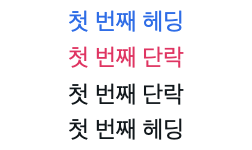
4. Empty 상태
empty 수정자는 요소가 내용이 없을 때 스타일을 적용한다.
예시:
<ul>
  <li class="empty:hidden ...">
    <!-- 요소 내용 -->
  </li>
</ul>
위의 예시에서는 요소가 비어 있을 때(empty:hidden) 요소를 숨긴다.
5. Target
target 수정자를 사용하여 요소의 ID가 현재 URL 프래그먼트와 일치할 때 스타일을 적용할 수 있다.
<a href="#about" class="text-blue-500 hover:underline">About</a>

<div id="about" class="target:shadow-lg p-4 mb-4 border border-slate-300 rounded-md">
  <h2>About Us</h2>
  <p>We are a company dedicated to providing the best services.</p>
</div>