
Tailwind CSS를 사용하면 형제 요소의 상태에 따라 특정 요소를 스타일링할 수 있다. 이를 위해 형제 요소에 peer 클래스를 추가하고, 다른 요소에 peer-* 수정자를 사용하면 된다. 아래는 다양한 예시를 통해 이를 설명한다.
1. 기본 사용법
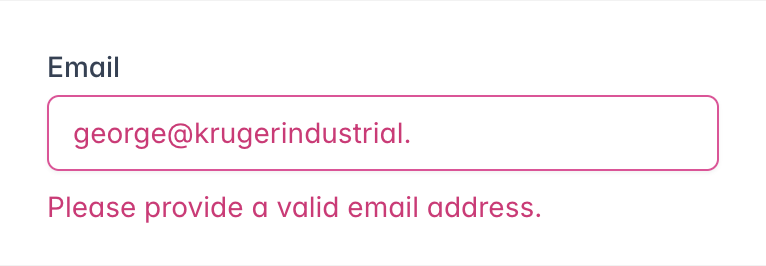
형제 요소에 peer 클래스를 추가하고, 다른 요소에 peer-invalid와 같은 수정자를 사용한다.
예시:
<form>
  <label class="block">
    <span class="block text-sm font-medium text-slate-700">Email</span>
    <input type="email" class="peer ..."/>
    <p class="mt-2 invisible peer-invalid:visible text-pink-600 text-sm">
      Please provide a valid email address.
    </p>
  </label>
</form>
위 예시에서는 이메일 입력이 유효하지 않을 때 경고 메시지가 표시된다.
2. 중첩된 피어
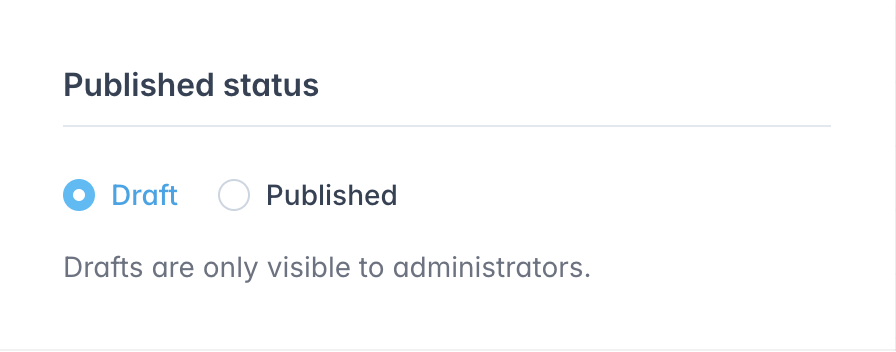
중첩된 피어를 다룰 때, 특정 피어의 상태에 따라 요소를 스타일링하려면 피어에 고유한 이름을 부여한다. 이를 통해 중첩된 피어 간의 혼동을 피할 수 있다.
예시:
<fieldset>
  <legend>Published status</legend>

  <input id="draft" class="peer/draft" type="radio" name="status" checked />
  <label for="draft" class="peer-checked/draft:text-sky-500">Draft</label>

  <input id="published" class="peer/published" type="radio" name="status" />
  <label for="published" class="peer-checked/published:text-sky-500">Published</label>

  <div class="hidden peer-checked/draft:block">Drafts are only visible to administrators.</div>
  <div class="hidden peer-checked/published:block">Your post will be publicly visible on your site.</div>
</fieldset>
위 예시에서는 peer/draft와 peer/published 클래스를 사용하여 중첩된 피어를 다루고, 각각의 피어 상태에 따라 요소를 스타일링한다. peer-checked/draft는 peer/draft의 상태에 반응하고, peer-checked/published는 peer/published의 상태에 반응한다.
3. 임의의 피어
임의의 peer-* 수정자를 생성하여 독특한 스타일을 적용할 수 있다.
예시:
<form>
  <label for="email">Email:</label>
  <input id="email" name="email" type="email" class="is-dirty peer" required />
  <div class="peer-[.is-dirty]:peer-required:block hidden">This field is required.</div>
</form>
또한, & 문자를 사용하여 피어가 최종 선택자에서 어디에 위치할지 지정할 수 있다.
예시:
<div>
  <input type="text" class="peer" />
  <div class="hidden peer-[:nth-of-type(3)_&]:block">
    <!-- ... -->
  </div>
</div>
위 예시에서는 :nth-of-type(3) 조건에 따라 피어 상태를 지정하여 스타일을 적용한다.
이와 같은 방법을 통해 Tailwind CSS를 사용하여 형제 요소의 상태에 따라 특정 요소를 손쉽게 스타일링할 수 있다.

LG CNS 클라우드 엔지니어 / 웹 프론트엔드 개발자
input 과 div 의 조합이 아니라 div + div 나 span + div 처럼 이벤트가 없는 애들것들끼리의 조합은 없나요?