1. Property 'highlightColor' has no initializer and is not definitely assigned in the constructor.ts(2564)
import { Directive, ElementRef, HostListener, Input } from '@angular/core';

@Directive({
  selector: '[appHighlight]'
})
export class HighlightDirective {
  @Input("appHighlight") highlightColor: string;
  ...
}-
오류
: 멤버변수를 초기화하지 않은 오류 -
조치
highlightColor!: string; 처럼 bang sign(!)을 넣어주거나 혹은, tsconfig.json에서 "strictPropertyInitialization"을 true를 false로 바꿔주면 된다.
※ 느낌표는 주로 false를 의미하는데 highlightColor! 처럼 변수명 뒤에 느낌표를 쓰는 경우 Non-null assertion operator 또는 Definite Assignment Assertions 으로 사용되어, 오류메세지를 회피 할 수 있다.
: Non-null assertion operator : 피연산자가 null이 아니라고 컴파일러에 전달
: Definite Assignment Assertions : 값이 할당되어 있다고 컴파일러에 전달
참고자료 : https://developer-talk.tistory.com/191
2. npm install 설치시 npm ERR! code ERESOLVE
얼마전에 잘 설치했던 ng-bootstrap 모듈을 새로운 프로젝트에 설치하는 데 다음과 같은 오류가 발생했다.
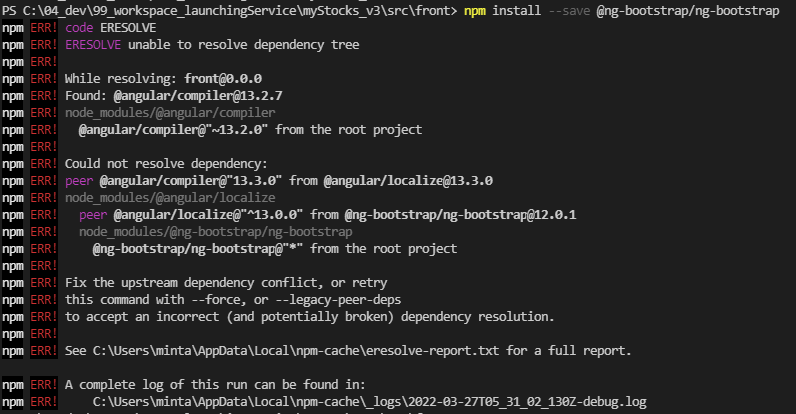
조치
npm install 뒤에 ' --save --legacy-peer-deps ' 를 추가해주면 된다.
npm install @ng-bootstrap/ng-bootstrap --save --legacy-peer-deps
참고사이트 : https://iancoding.tistory.com/154
3. Error: bundle initial exceeded maximum budget. Budget 1.00 MB was not met by 17.03 kB with a total of 1.02 MB. (ng build 오류)
ng build하는데 제목과 같은 오류가 발생했다.
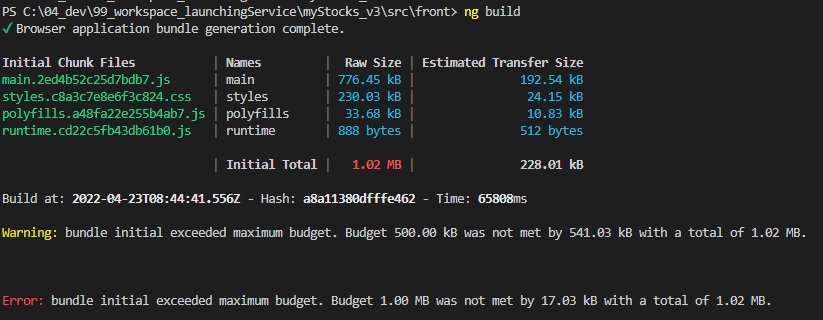
조치 : angular.json 파일 수정
          "configurations": {
            "production": {
              "budgets": [
                {
                  "type": "initial",
                  "maximumWarning": "2mb",   // 500kb → 2mb
                  "maximumError": "5mb"		 // 1mb → 5mb
                },
                {
                  "type": "anyComponentStyle",
                  "maximumWarning": "2kb",
                  "maximumError": "4kb"
                }
              ],
              "fileReplacements": [
                {
                  "replace": "src/environments/environment.ts",
                  "with": "src/environments/environment.prod.ts"
                }
              ],
              "outputHashing": "all"
}, 
한걸음 더 내딛는 개발자