ES6와 타입스크립트의 클래스 생성
자바스크립트 ES6 의 클래스 문법을 살펴보겠습니다
class Car{
	constructor(color){ //생성자 함수
      this.color = color;
    }
  //...code
}
위 문법으로 클래스를 작성하면 타입스크립트는 에러를 표시합니다.
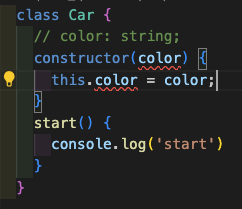
class Car {
  color : string; //선언, 타입지정
	constructor(color : string){ //타입지정
      this.color=color;
    }
}
위와 같이 작성해야 에러를 표시하지 않습니다.
또 다른 방법으로는 접근제한자, 읽기전용 속성으로 만드는것입니다.
ES6 클래스 문법에서는 접근제한자를 지원하지 않았습니다. 하지만 타입스크립트는 접근제한자를 지원합니다.
접근제한자
타입스크립트는 public,private,protected 세가지 접근제한자를 지원합니다.
public
공개된 속성, 메서드로 클래스를 상속받은 다른 클래스들도 접근이 가능합니다.
접근제한자를 사용하지 않으면 기본적으로 public 으로 간주됩니다.
private, #
private === # 같은 의미로 속성이 선언된 클래스 내부에서만 접근이 가능합니다.
  class Car {
    #name: string = "car"; //private 속성
    color: string;
    constructor(color: string) {
      this.color = color;
    }
    start() {
      console.log("start");
    }
  }

  class Bmw extends Car {
    constructor(color: string) {
      super(color);
    }
    showName() {
      console.log(super.start);
      console.log(this.name)  //Error : 접근제한
    }
  }
super키워드는 상속받은 직계부모의 생성자를 가리킵니다.super키워드는 상속받은 직계부모의 속성에는 접근할 수 없습니다. 메서드에만 접근 가능합니다.this키워드를 이용해 직계부모의 속성에 접근할 수 있습니다.
protected
자식클래스의 내부에서만 접근이 가능합니다 생성된 인스턴스에서는 접근이 불가능합니다.
  class Car {
    private name: string = "car";
    protected wheel: number;
    color: string;
    constructor(color: string, wheel: number) {
      this.wheel = wheel;
      this.color = color;
    }
    start() {
      console.log("start");
    }
  }

  class Bmw extends Car {
    constructor(color: string, wheel: number) {
      super(color, wheel);
    }
    showName() {
      console.log(super.start);
    }
  }

  const m3 = new Bmw('red',4);
  console.log(m3.wheel)
  //Error : 'wheel' 속성은 보호된 속성이며 'Car' 클래스 및 해당 하위 클래스 내에서만 액세스할 수 있습니다.
readonly
readonly 키워드는 클래스로 생성된 인스턴스에서 조회 전용으로만 사용하게 할 때 사용합니다. 수정이 불가능합니다.
  class Car {
    private name: string = "car";
    protected wheel: number;
    color: string;
    constructor(color: string, wheel: number) {
      this.wheel = wheel;
      this.color = color;
    }
    start() {
      console.log("start");
    }
  }

  class Bmw extends Car {
    readonly handle: string = "D컷 핸들 튜닝";

    constructor(color: string, wheel: number) {
      super(color, wheel);
    }
    showName() {
      console.log(super.start);
    }
  }

  const m3 = new Bmw("red", 4);
  m3.handle = "순정 핸들"; //Error : 읽기 전용 속성이므로 'handle'에 할당할 수 없습니다.
static
정적 멤버변수를 만들 때 사용합니다. 스태틱으로 선언된 변수나 메서드는 this 키워드가 아닌 클래스명.변수 식으로 사용합니다.
class Car {
    private name: string = "car";
    protected wheel: number;
    static mission:number; // 정적 멤버변수
    color: string;
    constructor(color: string, wheel: number) {
      this.wheel = wheel;
      this.color = color;
    }
    start() {
      console.log("start");
    }
  }

  class Bmw extends Car {
    readonly handle: string = "D컷 핸들 튜닝";

    constructor(color: string, wheel: number) {
      super(color, wheel);
    }
    showName() {
      console.log(Car.mission); // 사용 예시
      console.log(super.start);
    }
  }
추상 클래스
abstract 키워드를 사용하여 클래스를 정의합니다. new 연산자를통해 인스턴스를 생성할 수 없습니다. 상속을 통해서만 사용이 가능합니다.
추상클래스 내부의 추상 메서드는 반드시 상속받은 클래스에서 구체적으로 정의해야합니다.
프로퍼티, 메서드의 이름만 선언해주고 구체적인 구현은 상속받은 클래스에서 해야합니다.
  abstract class Car {
    color: string;
    constructor(color: string) {
      this.color = color;
    }

    abstract start(): void; //미리 구현하면 Error
  }

  class Bmw extends Car {
    constructor(color: string) {
      super(color);
    }

    start(): void {
      console.log("start"); //구현 안해주면 Error
    }
  }

  const z4 = new Car('red'); //Error : 추상클래스의 인스턴스를 만들 수 없습니다.
const m4 = new Bmw('red');