
Next 13 Data Fetching Patterns 문서 기반으로 작성했습니다.
Fetching Data on the Server
데이터는 가능하면 서버에서 fetch하는 것을 추천하는데 그 이유는 다음과 같다.
- 백엔드 데이터 리소스(ex, 데이터베이스)에서 직접 접근 가능
- Access Token, API Keys와 같은 중요한 정보는 클라이언트에 노출되지 않도록 함으로써 어플리케이션을 더욱 안전하게 유지
- 동일한 환경에서 데이터를 fetch하고 render하여 클라이언트와 서버 간의 통신과 클라이언트의 메인 스레드에 대한 작업을 감소
- 클라이언트에서 여러 개의 개별적인 요청대신 한 번의 요청으로 여러 곳에서 데이터 사용 가능
Server Components, Route Handlers, Server Actions에서 데이터를 fetch할 수 있다.
Fetching Data Where It's Needed
현재 사용자 정보와 같은 동일한 데이터를 여러 컴포넌트에서 사용해야 하는 경우
=> 데이터가 필요한 컴포넌트에서 fetch 또는 React cache를 사용하면 동일한 데이터를 위해 여러번 요청할 때 fetch가 자동으로 memoize되기 때문에 성능 문제를 걱정할 필요 없다.
Streaming
Streaming, Suspense는 클라이언트에 렌더링된 UI 단위를 점진적으로 렌더링 및 스트리밍할 수 있는 React 기능이다.
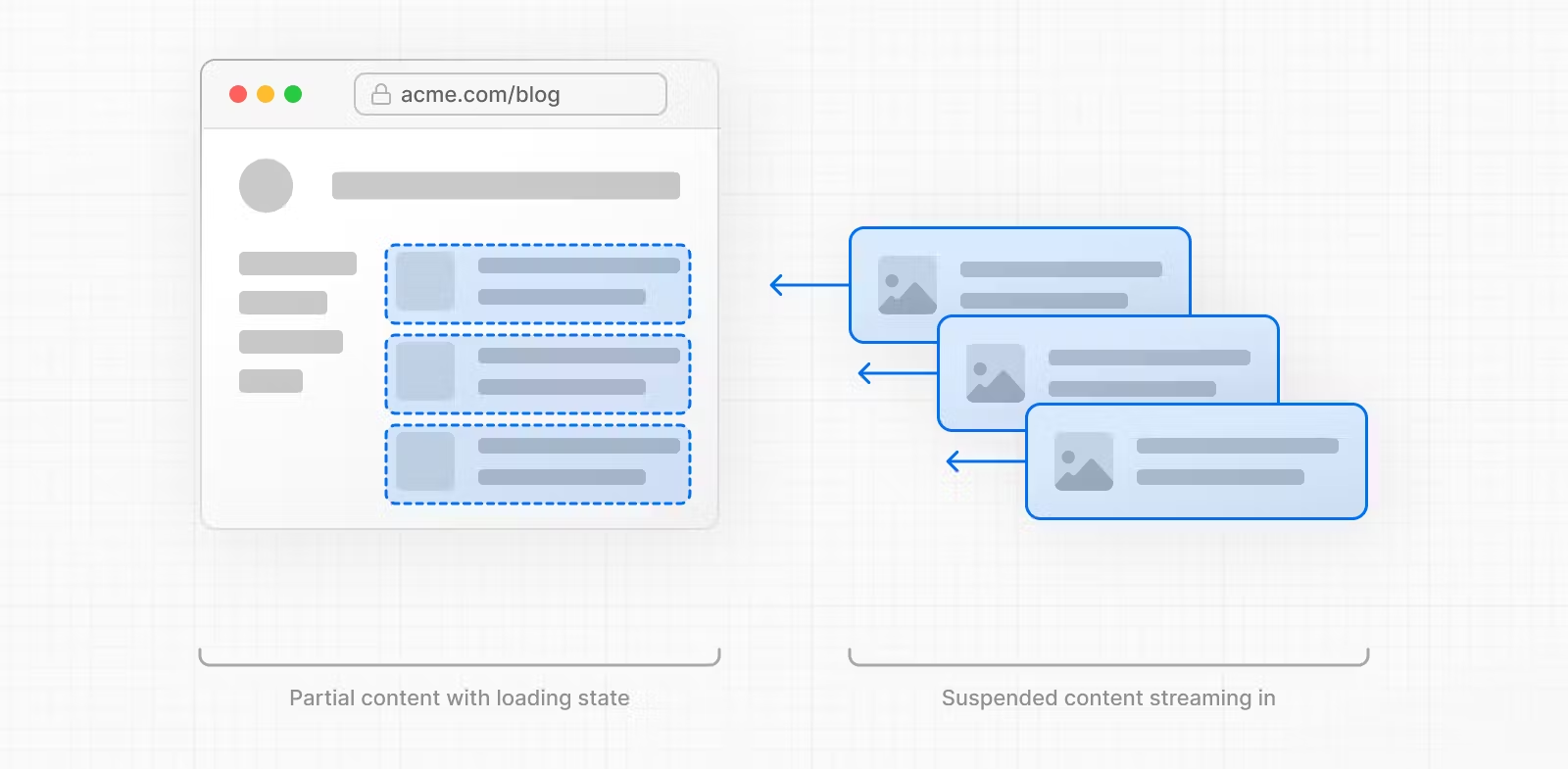
Streaming을 하면 사용자는 페이지와 상호 작용을 시작하기 전에 전체 페이지가 로딩될 때까지 기다릴 필요 없다.
Parallel and Sequential Data Fetching
React 컴포넌트 내부의 데이터를 fetch할 때, Parallel(병렬)과 Sequential(순차)의 두 가지 데이터 fetching 패턴에 유의해야 한다.
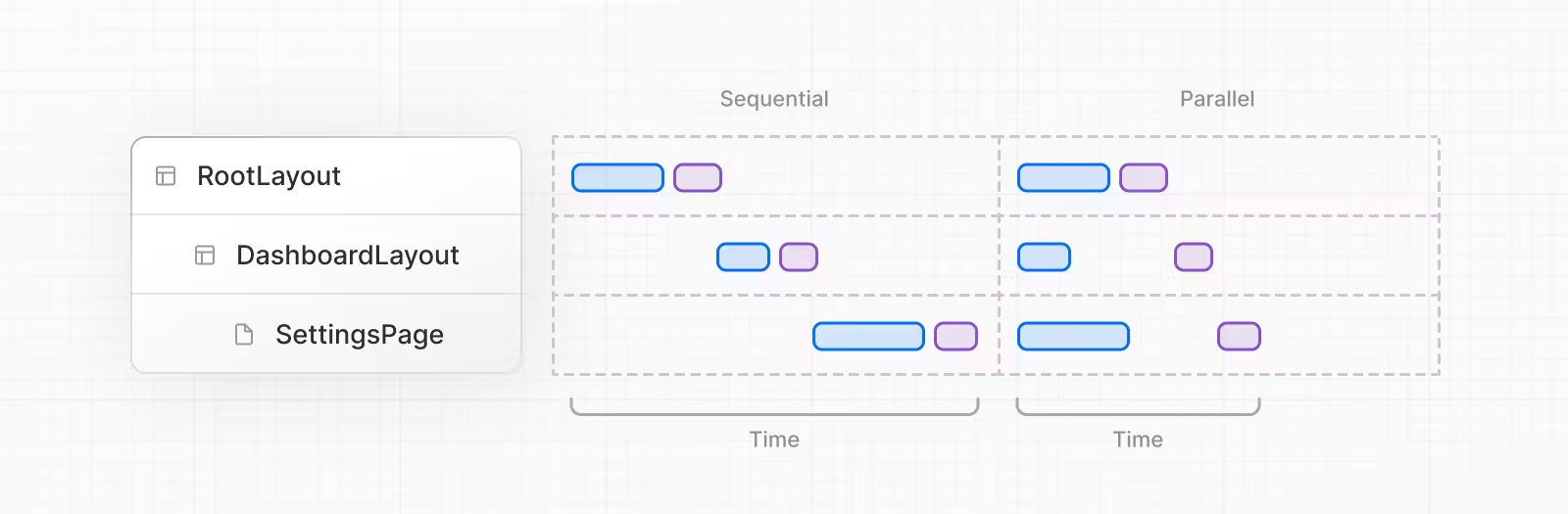
Sequential Data Fetching
Sequential Data Fetching을 하면 경로에 따라 요청이 서로 종속되어 순차적으로 수행된다. (동일한 데이터 요청은 적용되지 않음)
한 fetch는 다른 fetch의 결과에 따라 달라진다면 이 패턴을 사용하면 좋다.
하지만 잘못 사용한다면 의도치 않게 로딩 시간이 길어질 수 있다.
// app/artist/page.tsx

async function Playlists({ artistID }: { artistID: string }) {
  // Wait for the playlists
  const playlists = await getArtistPlaylists(artistID)

  return (
    <ul>
      {playlists.map((playlist) => (
        <li key={playlist.id}>{playlist.name}</li>
      ))}
    </ul>
  )
}

export default async function Page({
  params: { username },
}: {
  params: { username: string }
}) {
  // Wait for the artist
  const artist = await getArtist(username)

  return (
    <>
      <h1>{artist.name}</h1>
      <Suspense fallback={<div>Loading...</div>}>
        <Playlists artistID={artist.id} />
      </Suspense>
    </>
  )
}
위 코드에서 Playlists 컴포넌트는 props로 전달 받은 artistID에 따라 달라지기 때문에 artist가 데이터 fetching을 마친 후에만 playlists 데이터 fetching이 진행된다.
이때 Suspense에 있는 fallback을 통해 결과가 반환되기 전까지 로딩 상태를 보여줄 수 있다.
Parallel Data Fetching
Parallel data fetching을 하면 route에 있는 요청이 시작하고 동시에 데이터를 로드하므로 클라이언트와 서버 간의 waterfall과 데이터를 로딩하는 데 걸리는 총 시간이 줄어든다.
// app/artist/[username]/page.tsx

import Albums from './albums'

async function getArtist(username: string) {
  const res = await fetch(`https://api.example.com/artist/${username}`)
  return res.json()
}

async function getArtistAlbums(username: string) {
  const res = await fetch(`https://api.example.com/artist/${username}/albums`)
  return res.json()
}

export default async function Page({
  params: { username },
}: {
  params: { username: string }
}) {
  // Initiate both requests in parallel
  const artistData = getArtist(username)
  const albumsData = getArtistAlbums(username)

  // Wait for the promises to resolve
  const [artist, albums] = await Promise.all([artistData, albumsData])

  return (
    <>
      <h1>{artist.name}</h1>
      <Albums list={albums}></Albums>
    </>
  )
}
위 코드에서 getArtist, getArtistAlbums 함수는 Page 컴포넌트 외부에서 정의된 후 컴포넌트 내부에서 호출되어 두 promise가 모두 해결될 때까지 기다린다.
Preloading Data
waterfall을 방지하는 또 다른 방법은 Preload 패턴을 사용하는 것이다.
parallel data fetching을 더 최적화하기 위해 preload 함수를 만들면 promise를 props로 전달할 필요가 없다.
// components/Item.tsx

import { getItem } from '@/utils/get-item'

export const preload = (id: string) => {
  // void 연산자는 주어진 표현식을 평가하고 undefined를 반환한다.
  // https://developer.mozilla.org/docs/Web/JavaScript/Reference/Operators/void
  void getItem(id)
}
export default async function Item({ id }: { id: string }) {
  const result = await getItem(id)
  // ...
}
// app/item/[id]/page.tsx
import Item, { preload, checkIsAvailable } from '@/components/Item'
export default async function Page({
params: { id },
}: {
params: { id: string }
}) {
// starting loading item data
preload(id)
// perform another asynchronous task
const isAvailable = await checkIsAvailable()
return isAvailable ? <Item id={id} /> : null
}preloading과 parallel 성능 비교
참고한 사이트를 통해서 비교 결과는 크게 다르지 않고 오히려 Parallel Data Fetching 성능이 좋았다.
Using React cache, server-only, and the Preload Pattern
React cache 함수, preload 패턴, server-only 패키지를 결합하여 앱에서 사용할 수 있는 데이터 fetching utility를 만들 수 있다.
// utils/get-item.ts

import { cache } from 'react'
import 'server-only'

export const preload = (id: string) => {
  void getItem(id)
}

export const getItem = cache(async (id: string) => {
  // ...
})
이 방법을 사용하면 데이터를 fetch 및 응답을 캐시할 수 있고 오직 서버에서만 수행되도록 보장할 수 있다.
server-only를 사용하여 클라이언트에서 server data fetching 함수가 사용되지 않도록 하는 것이 좋다.