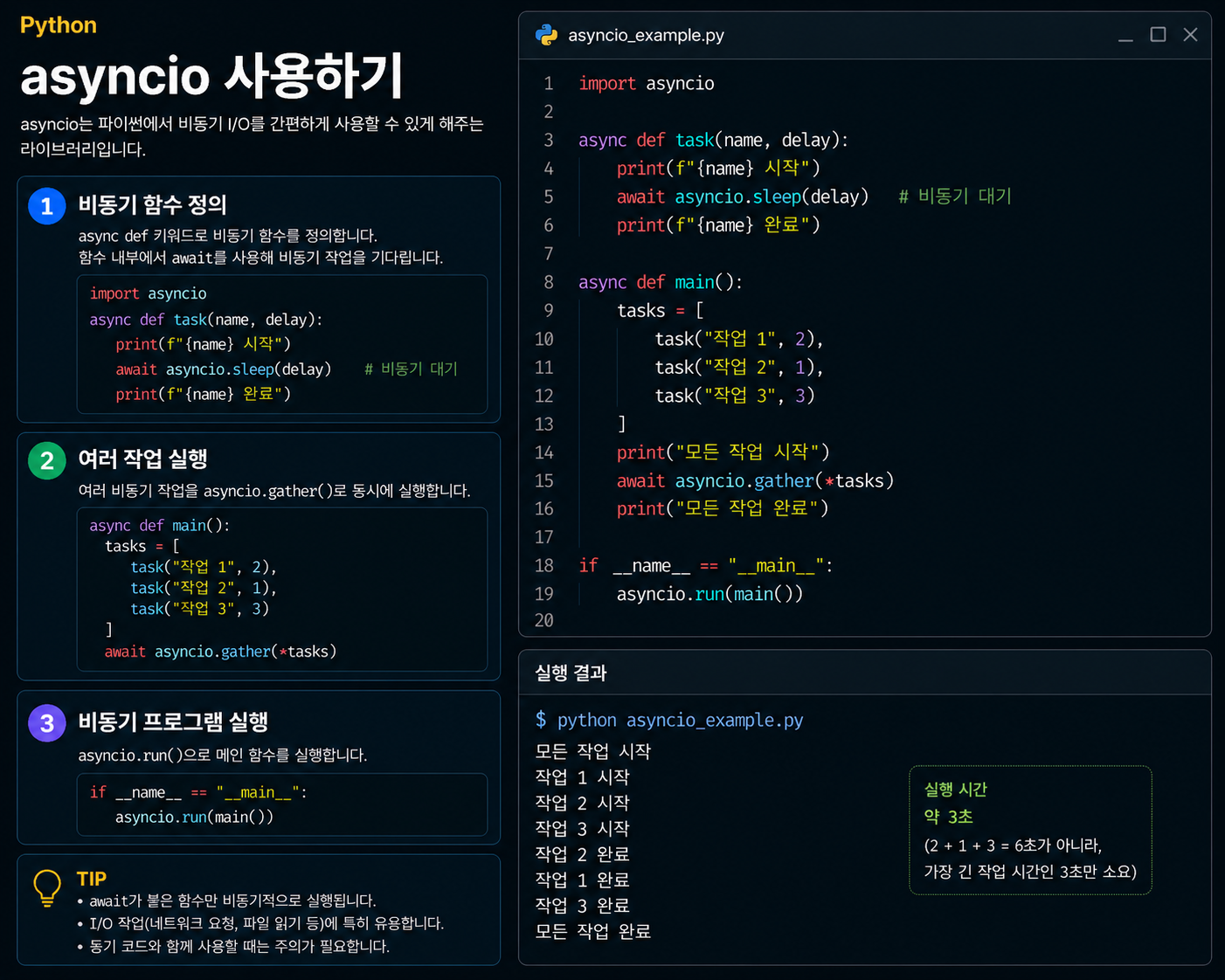
1. 동기 vs 비동기
동기(Synchronous) 는 특정 작업이 끝나야 다음 작업을 처리하는 순차 처리 방식입니다. 반면 비동기(Asynchronous) 는 여러 작업을 동시에 처리하도록 맡겨두고, 작업이 끝나면 결과를 받는 방식입니다.
동기 처리
작업 A ━━━━━━━━━━━━━┓
                    ┗━ 작업 B ━━━━━━━━━━━━━┓
                                           ┗━ 작업 C ━━━━━

비동기 처리
작업 A ━━━━━━━━━━━━━┓
작업 B ━━━━━━━━━━━━━┫  (동시에 진행)
작업 C ━━━━━━━━━━━━━┛
파일 읽기, 네트워크 요청처럼 I/O 대기 시간이 긴 작업에서 비동기 처리가 특히 효과적입니다. 기다리는 동안 다른 작업을 처리할 수 있기 때문입니다.
2. 네이티브 코루틴 — async def
asyncio를 사용하려면 먼저 async def로 네이티브 코루틴(Native Coroutine) 을 만듭니다. 이전 코루틴 편에서 배운 yield 기반 코루틴과 개념은 같지만, 문법이 더 직관적입니다.
import asyncio

# async def로 네이티브 코루틴 정의
async def hello():
    print("Hello, asyncio!")

# 코루틴 함수를 호출하면 코루틴 객체가 반환됨 (바로 실행 X)
print(hello())  # <coroutine object hello at 0x...>

# asyncio.run()으로 실행
asyncio.run(hello())  # Hello, asyncio!
3. await — 코루틴 실행하고 기다리기
await는 단어 뜻 그대로 특정 객체가 끝날 때까지 기다린 뒤 결과를 반환합니다. await 뒤에는 코루틴 객체, 퓨처 객체, 태스크 객체를 지정할 수 있습니다.
import asyncio

async def fetch_data(name, delay):
    print(f"{name} 시작")
    await asyncio.sleep(delay)   # delay초 동안 대기 (다른 작업에 양보)
    print(f"{name} 완료")
    return f"{name} 결과"

async def main():
    # await: fetch_data가 끝날 때까지 기다린 뒤 다음 줄 실행
    result = await fetch_data("작업 A", 2)
    print(result)

asyncio.run(main())
# 작업 A 시작
# 작업 A 완료
# 작업 A 결과
💡
await는async def함수 안에서만 사용할 수 있습니다.
4. 여러 작업 동시에 실행하기 — asyncio.gather()
await만 사용하면 순차 실행이 됩니다. 여러 코루틴을 동시에 실행하려면 asyncio.gather()를 활용합니다.
import asyncio
import time

async def fetch_data(name, delay):
    print(f"{name} 시작")
    await asyncio.sleep(delay)
    print(f"{name} 완료")
    return f"{name} 결과"

async def main():
    start = time.time()

    # 순차 실행 — 총 3초 소요
    # result_a = await fetch_data("작업 A", 1)
    # result_b = await fetch_data("작업 B", 2)

    # 동시 실행 — 총 2초 소요 (가장 오래 걸리는 작업 기준)
    results = await asyncio.gather(
        fetch_data("작업 A", 1),
        fetch_data("작업 B", 2),
        fetch_data("작업 C", 1),
    )

    print(f"소요 시간: {time.time() - start:.1f}초")
    print(results)

asyncio.run(main())
# 작업 A 시작
# 작업 B 시작
# 작업 C 시작
# 작업 A 완료
# 작업 C 완료
# 작업 B 완료
# 소요 시간: 2.0초
# ['작업 A 결과', '작업 B 결과', '작업 C 결과']
5. async with — 비동기 컨텍스트 매니저
async with는 클래스나 함수를 비동기로 처리한 뒤 결과를 반환하는 문법입니다. 일반 with문의 비동기 버전으로, 파일이나 네트워크 연결처럼 열고 닫는 작업에서 주로 사용합니다.
import asyncio
import aiofiles   # pip install aiofiles

async def read_file():
    # async with: 비동기로 파일을 열고 작업 후 자동으로 닫음
    async with aiofiles.open('data.txt', 'r') as f:
        content = await f.read()
        print(content)

asyncio.run(read_file())
6. async for — 비동기 반복
async for는 비동기 이터레이터를 순회할 때 사용하는 문법입니다. 일반 for문의 비동기 버전입니다.
import asyncio

# 비동기 이터레이터 클래스
class AsyncCounter:
    def __init__(self, stop):
        self.current = 0
        self.stop = stop

    def __aiter__(self):
        return self

    async def __anext__(self):
        if self.current >= self.stop:
            raise StopAsyncIteration
        await asyncio.sleep(0.5)    # 각 항목마다 비동기 대기
        self.current += 1
        return self.current

async def main():
    async for num in AsyncCounter(3):   # async for로 비동기 순회
        print(num)

asyncio.run(main())
# 1 (0.5초 후)
# 2 (0.5초 후)
# 3 (0.5초 후)
7. 핵심 문법 정리
| 문법 | 의미 | 비고 |
|---|---|---|
async def | 네이티브 코루틴 정의 | 코루틴 객체 반환 |
await | 코루틴이 끝날 때까지 대기 | async def 안에서만 사용 |
asyncio.run() | 코루틴 실행 진입점 | 프로그램당 1회 |
asyncio.gather() | 여러 코루틴 동시 실행 | 결과를 리스트로 반환 |
async with | 비동기 컨텍스트 매니저 | 파일, 네트워크 연결 등 |
async for | 비동기 이터레이터 순회 | 비동기 스트림 처리 |

ML Engineer 🧠 | AI 모델 개발과 최적화 경험을 기록하며 성장하는 개발자 🚀 The light that burns twice as bright burns half as long ✨