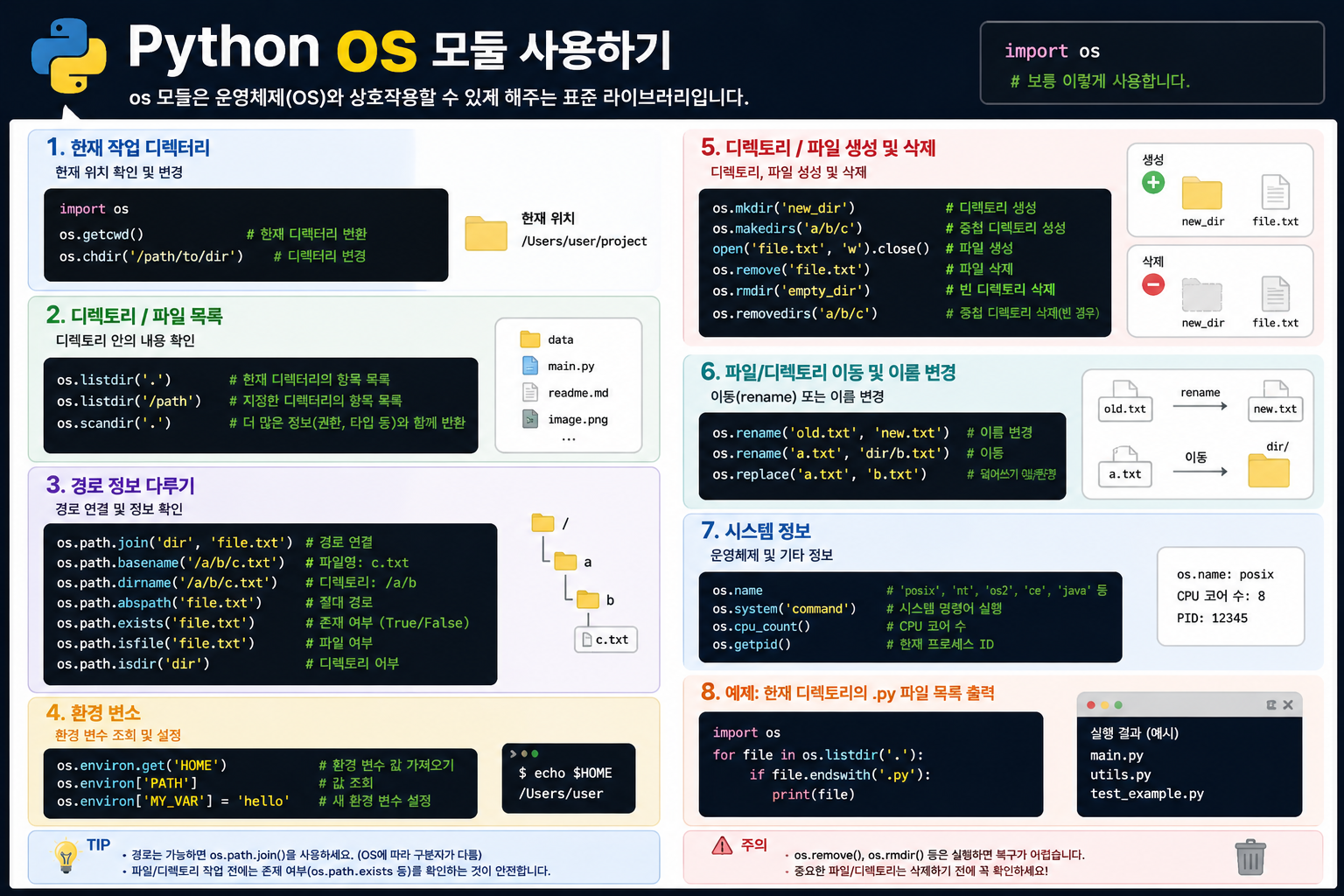
1. 기본 개념
os 모듈은 운영체제(OS)와 상호작용하는 기능을 제공하는 Python 표준 라이브러리입니다. 파일 경로, 환경변수, 프로세스 정보 등 OS 수준의 작업을 처리할 때 사용합니다.
import os2. os.name — 현재 운영체제 확인
os.name # Windows → "nt" / macOS·Linux → "posix"| OS | os.name |
|---|---|
| Windows | "nt" |
| macOS / Linux | "posix" |
nt는 Windows NT에서 따온 이름입니다. Windows XP, 7, 10, 11 전부 NT 계열입니다.
실전 활용 — OS별 분기 처리
if os.name == "nt":
    # Windows 전용 처리
    tesseract_path = r"C:\Program Files\Tesseract-OCR\tesseract.exe"
else:
    # macOS / Linux
    tesseract_path = "/usr/bin/tesseract"
3. os.path — 경로 처리
파일 경로를 OS에 맞게 안전하게 다룰 때 사용합니다.
# 경로 존재 여부 확인
os.path.exists("/some/path")   # → True / False

# 경로 결합 (OS에 맞는 구분자 자동 적용)
os.path.join("folder", "file.txt")  # → "folder/file.txt" (Mac/Linux)
                                     # → "folder\file.txt" (Windows)

# 파일명 / 디렉토리 분리
os.path.basename("/home/user/file.txt")  # → "file.txt"
os.path.dirname("/home/user/file.txt")   # → "/home/user"
요즘은
os.path대신pathlib.Path를 더 많이 씁니다. 객체지향 방식이라 훨씬 직관적입니다.
4. os.environ — 환경변수
# 환경변수 읽기
os.environ["HOME"]               # 없으면 KeyError
os.environ.get("HOME", "/tmp")   # 없으면 기본값 반환 (안전)

# 환경변수 설정 (현재 프로세스 내에서만 유효)
os.environ["MY_KEY"] = "my_value"
.env 파일과 함께 python-dotenv를 쓰는 패턴이 실무에서 많이 사용됩니다.
from dotenv import load_dotenv
load_dotenv()

api_key = os.environ.get("OPENAI_API_KEY")
5. 그 외 자주 쓰는 것들
os.getcwd()          # 현재 작업 디렉토리 반환
os.listdir(".")      # 현재 디렉토리 파일 목록
os.makedirs("a/b/c", exist_ok=True)  # 디렉토리 재귀 생성
os.remove("file.txt")    # 파일 삭제
os.rename("old", "new")  # 파일 이름 변경
6. os.path vs pathlib.Path
# os.path 방식 (구식)
import os
path = os.path.join("tests", "sample_docs", "file.pdf")
if os.path.exists(path):
    print(os.path.basename(path))

# pathlib 방식 (현대적, 권장)
from pathlib import Path
path = Path("tests") / "sample_docs" / "file.pdf"
if path.exists():
    print(path.name)
/ 연산자로 경로를 이어붙일 수 있어서 훨씬 읽기 좋습니다.
핵심 요약
| 기능 | 코드 |
|---|---|
| OS 종류 확인 | os.name |
| 경로 존재 확인 | os.path.exists() |
| 환경변수 읽기 | os.environ.get() |
| 현재 디렉토리 | os.getcwd() |
| 디렉토리 생성 | os.makedirs() |
한 줄 요약:
os모듈은 OS와 대화하는 창구입니다. 경로·환경변수·프로세스 등 시스템 레벨 작업을 처리할 때 씁니다. 경로 처리는 요즘pathlib으로 대체되는 추세입니다.

ML Engineer 🧠 | AI 모델 개발과 최적화 경험을 기록하며 성장하는 개발자 🚀 The light that burns twice as bright burns half as long ✨