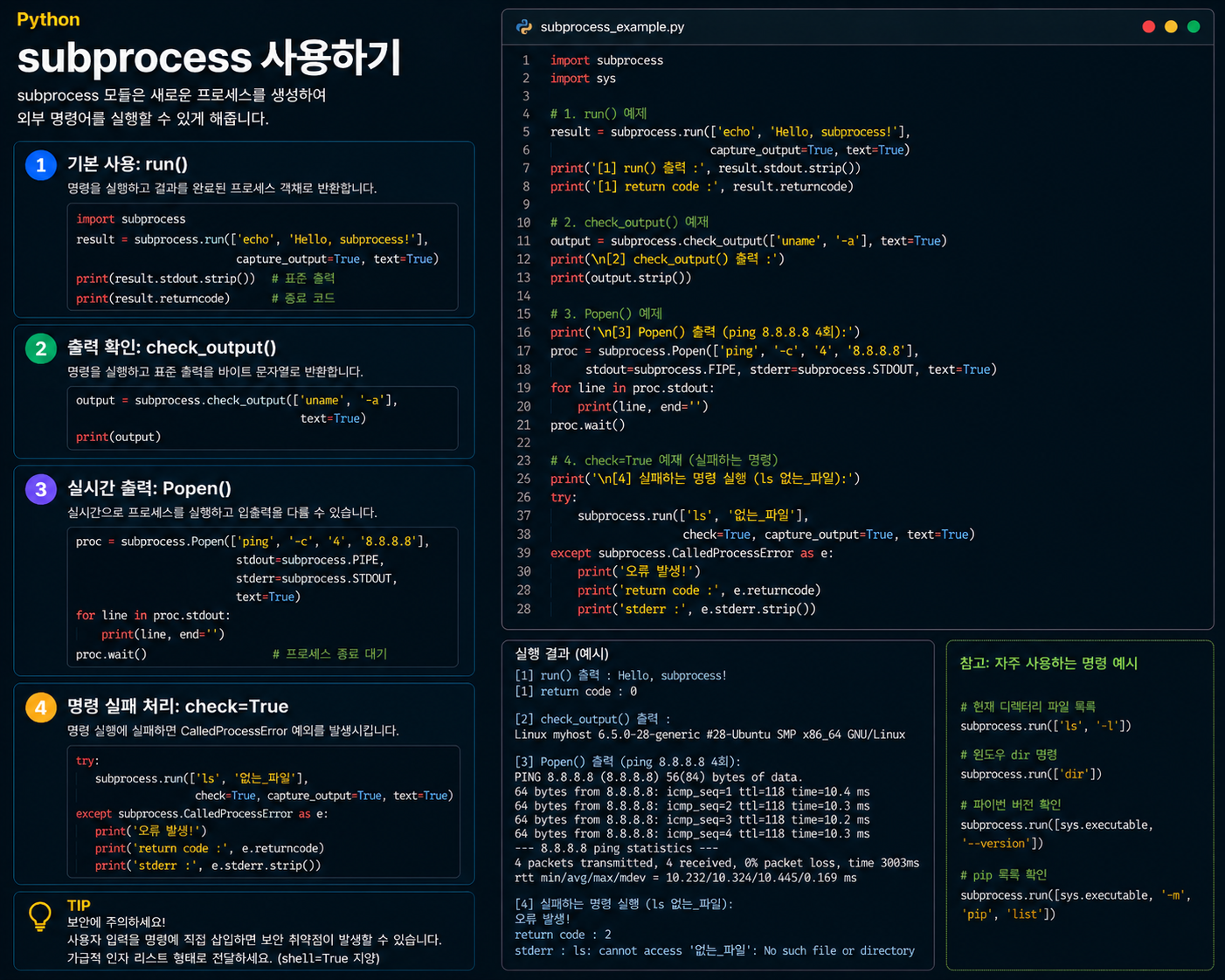
1. subprocess란?
subprocess는 Python 표준 라이브러리 중 하나로, Python 코드 안에서 터미널 명령어를 실행할 수 있게 해줍니다.
터미널에서 직접 치는 명령어를:
libreoffice --headless --convert-to docx file.docPython 코드 안에서 이렇게 실행할 수 있습니다.
import subprocess

subprocess.run(["libreoffice", "--headless", "--convert-to", "docx", "file.doc"])
2. subprocess.run() 기본 사용법
subprocess.run()은 subprocess에서 가장 많이 쓰이는 함수입니다. 명령어를 리스트로 넘기는 것이 기본 방식입니다.
import subprocess

# 터미널에서: echo "Hello"
subprocess.run(["echo", "Hello"])
터미널 명령어를 띄어쓰기 기준으로 쪼개서 리스트에 담으면 됩니다.
# 터미널
libreoffice --headless --convert-to docx --outdir /output /file.doc

# Python
subprocess.run([
    "libreoffice",
    "--headless",
    "--convert-to", "docx",
    "--outdir", "/output",
    "/file.doc"
])
3. 반환값 — CompletedProcess 객체
subprocess.run()은 실행이 끝나면 CompletedProcess 객체를 반환합니다. 이 객체에는 실행 결과 정보가 담겨 있습니다.
result = subprocess.run(["echo", "Hello"])

result.returncode  # 종료 코드 (0 = 성공, 그 외 = 실패)
result.stdout      # 표준 출력 (기본값 None)
result.stderr      # 에러 출력 (기본값 None)
4. returncode — 성공 여부 확인
터미널 명령어가 끝나면 운영체제가 종료 코드를 자동으로 반환합니다. 이것이 returncode입니다.
result.returncode == 0   # 성공
result.returncode != 0   # 실패 (1, 2, 127 등 0이 아닌 숫자)
이를 활용해 명령어 실패 시 에러를 처리할 수 있습니다.
result = subprocess.run(["libreoffice", "--convert-to", "docx", "file.doc"])

if result.returncode != 0:
    raise RuntimeError("LibreOffice 변환 실패!")
💡
returncode는 Python만의 개념이 아닙니다. 터미널에서echo $?로 직전 명령어의 종료 코드를 확인할 수 있으며,0 = 성공, 그 외 = 실패라는 규칙은 모든 운영체제에서 동일합니다.
5. capture_output=True — 출력 결과 담기
기본적으로 subprocess.run()은 명령어 실행 결과를 그냥 흘려보냅니다. capture_output=True를 지정해야 결과를 변수에 담을 수 있습니다.
# capture_output=False (기본값) — 결과를 흘려보냄
result = subprocess.run(["echo", "Hello"])
result.stdout  # None
result.stderr  # None

# capture_output=True — 결과를 변수에 담음
result = subprocess.run(["echo", "Hello"], capture_output=True)
result.stdout  # b'Hello\n'
result.stderr  # b''
6. text=True — 결과를 문자열로 받기
capture_output=True만 쓰면 결과가 bytes로 반환됩니다. text=True를 함께 쓰면 문자열로 받을 수 있습니다.
# text=False (기본값) — bytes로 반환
result = subprocess.run(["echo", "Hello"], capture_output=True)
result.stdout  # b'Hello\n'  ← bytes

# text=True — 문자열로 반환
result = subprocess.run(["echo", "Hello"], capture_output=True, text=True)
result.stdout  # 'Hello\n'   ← str
에러 메시지를 출력할 때 문자열이 훨씬 다루기 편하기 때문에 실전에서는 두 옵션을 항상 함께 씁니다.
result = subprocess.run([...], capture_output=True, text=True)

if result.returncode != 0:
    raise RuntimeError(f"실패: {result.stderr}")  # 문자열로 바로 출력 가능
7. 핵심 정리
| 개념 | 한 줄 설명 |
|---|---|
subprocess | Python에서 터미널 명령어를 실행하는 표준 라이브러리 |
subprocess.run() | 명령어를 실행하고 끝날 때까지 기다림 |
returncode | 종료 코드 (0 = 성공, 그 외 = 실패) |
capture_output=True | stdout, stderr를 변수에 담기 |
text=True | 출력 결과를 bytes가 아닌 str로 받기 |
result.stdout | 정상 출력 결과 |
result.stderr | 에러 출력 결과 |
한 줄 요약:
subprocess.run()은 "Python 안에서 터미널 명령어를 실행하고, 그 결과를 변수에 담아 처리할 수 있게 해주는 함수"입니다.