ML 스터디 노트 - 타이타닉
주제
영화 타이타닉의 주인공은 정말 생존할 수 없었던 것일까? 그의 생존률은 얼마나 되는가?
타이타닉 승객의 생존률을 분석하고 예측해보자
데이터 불러오기
# 데이터 읽기 - Titanic호 승객의 목록 데이터
# 클래스, 이름, 성별, 생존 여부 등이 기록

import pandas as pd

titanic_url = 'https://raw.githubusercontent.com/PinkWink/ML_tutorial/master/dataset/titanic.xls'
titanic = pd.read_excel(titanic_url)
titanic.head()

데이터 탐색
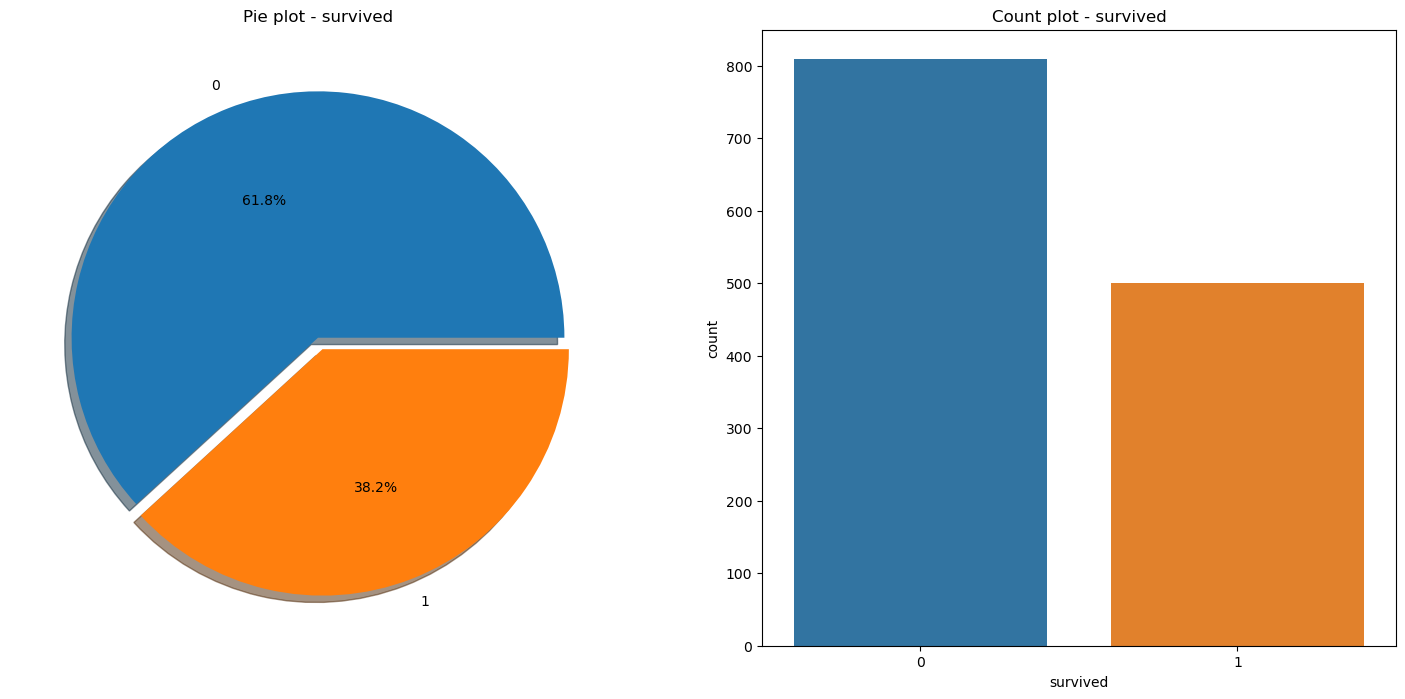
승객 전체 생존률
# 동시의 여러 개의 시각화 데이터를 표시하고 싶은 경우 subplots를 사용
# 두 개의 그림판을 미리 준비해두는 것 (매개변수로 2를 전달)
# ax 0번과 1번을 사용
f, ax = plt.subplots(1, 2, figsize=(18,8))

## 첫 번째 그림판에 타이타닉 생존 비율을 시각화한 도형을 0번(왼쪽)에 표시

# autopct : 퍼센티지 기재 방식
# explode : 각 파이를 떨어뜨리는 정도 지정
titanic['survived'].value_counts().plot.pie(ax=ax[0], autopct='%1.1f%%', shadow=True, explode=[0, 0.05])

# 첫 번째 그림판 타이틀 및 라벨 설정
ax[0].set_title('Pie plot - survived')
ax[0].set_ylabel('')

## 두 번째 그림판에 countplot을 이용한 시각화 데이터 표시

sns.countplot(data=titanic, x='survived', ax=ax[1])
ax[1].set_title('Count plot - survived')

plt.show()
승객 성별에 따른 생존률
# 승객 성별 분포 및 그에 따른 생존률 시각화

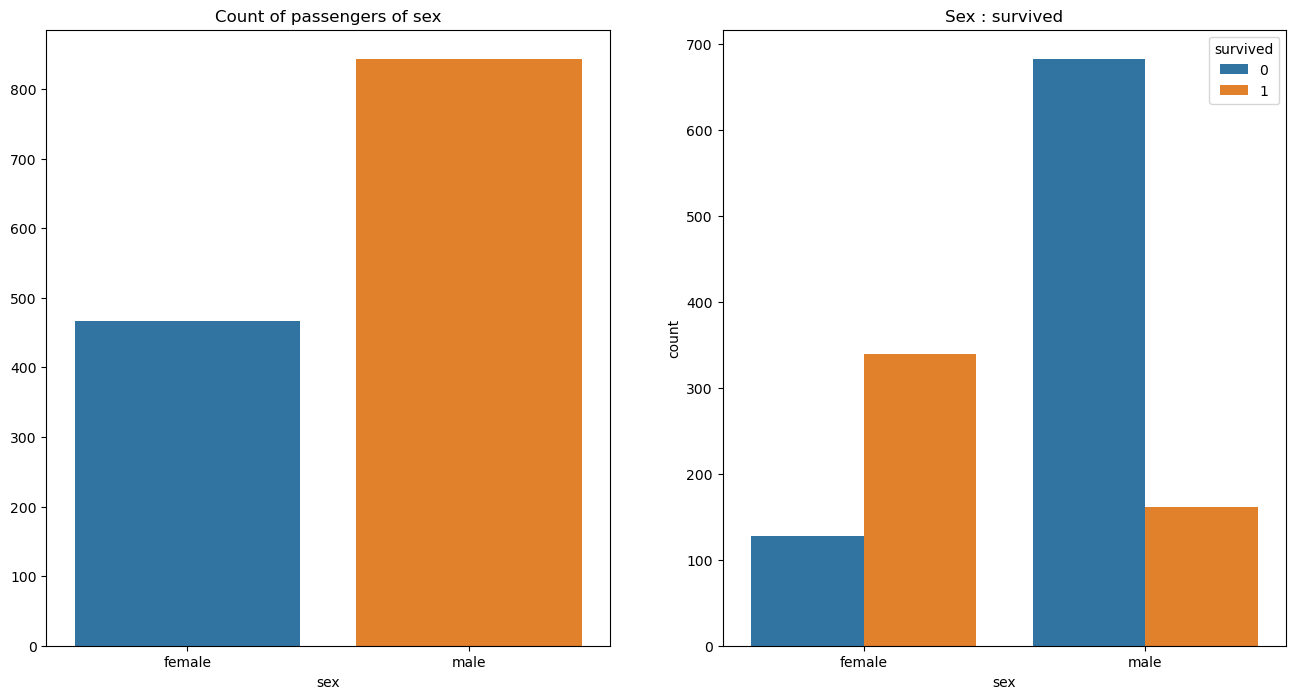
f, ax = plt.subplots(1, 2, figsize=(16,8))

# 첫 번째 그림판 - 승객 성별 분포

sns.countplot(x='sex', data=titanic, ax=ax[0])
ax[0].set_title('Count of passengers of sex')
ax[0].set_ylabel('')

## 두 번째 그림판에 countplot을 이용한 시각화 데이터 표시

sns.countplot(data=titanic, x='sex', hue='survived', ax=ax[1])
ax[1].set_title('Sex : survived')

plt.show()
선실 등급에 따른 생존률
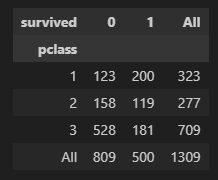
# 승객 선실 등급과 생존률 간의 관계 확인

# crosstab : 2번째 입력한 컬럼을 종류별로 구분지어주고 index에 1번째 컬럼을 잡아 DataFrame 생성
pd.crosstab(titanic['pclass'], titanic['survived'], margins=True)

# 1등실의 생존 가능성이 아주 높고, 여성의 생존률도 높다
선실 등급에 따른 성별 분포
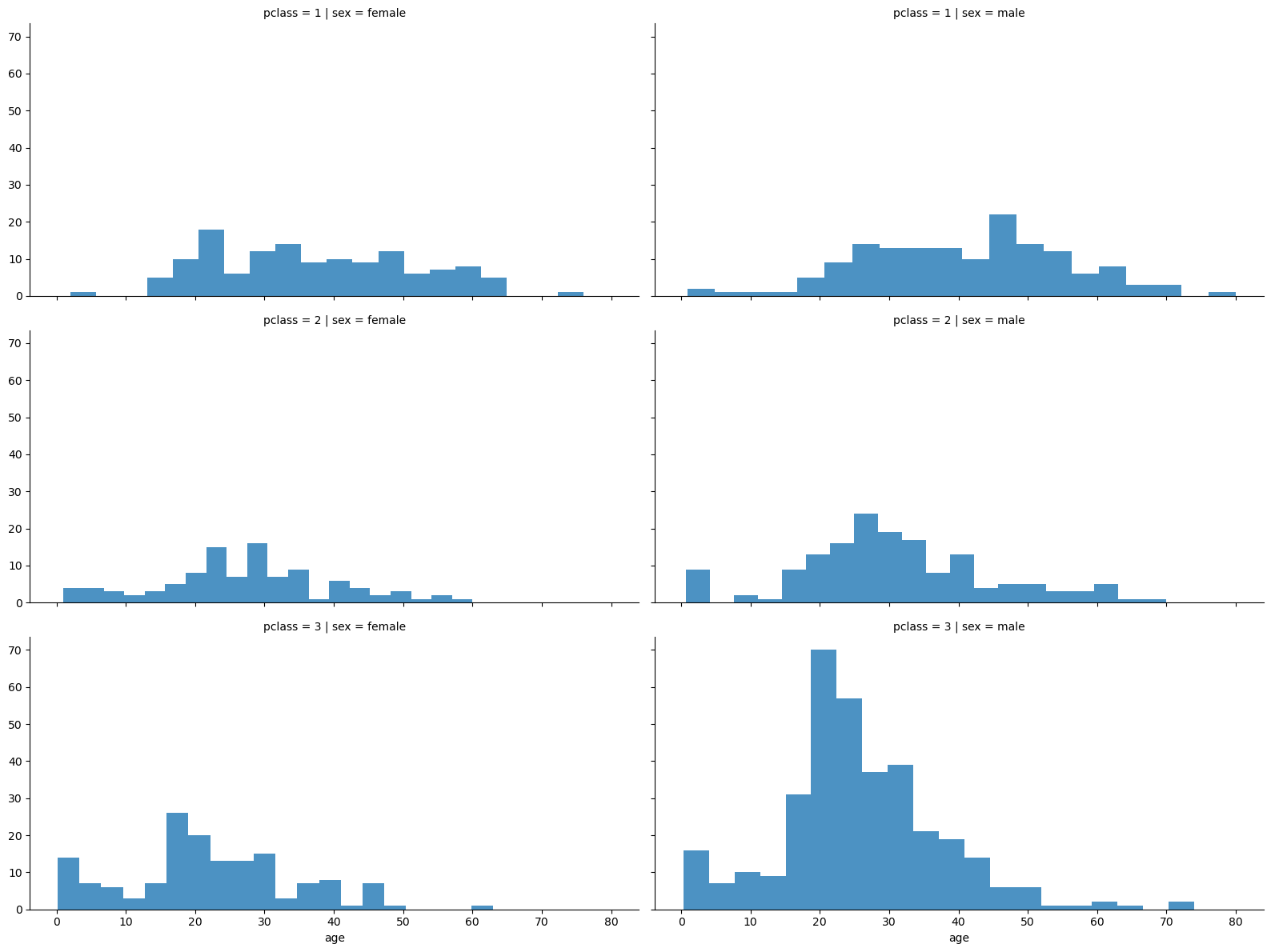
# 선실 등급과 성별 간의 관계 확인

# 선실 등급과 성별을 row와 col에 넣어, 각 종류 간의 관계를 히스토그램으로 표현
grid = sns.FacetGrid(titanic, row='pclass', col='sex', height=4, aspect=2)
grid.map(plt.hist, 'age', alpha=0.8, bins=20)
grid.add_legend()

# 3등실에는 젊은 남성층이 많았던 것을 확인할 수 있음
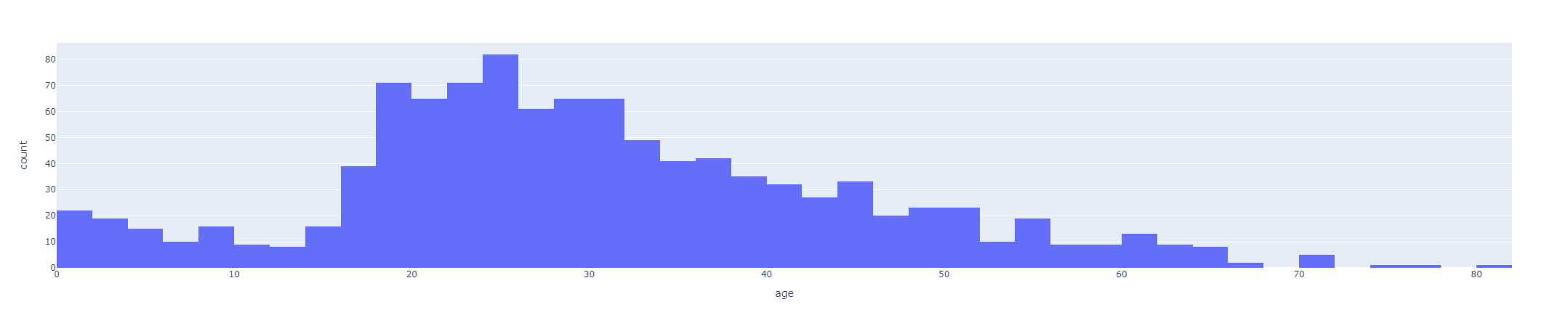
승객 나이 분포
# 승객의 나이 분포 확인 - plotly express을 이용하여 히스토그램으로 시각화

import plotly.express as px

fig = px.histogram(titanic, x='age')
fig.show()
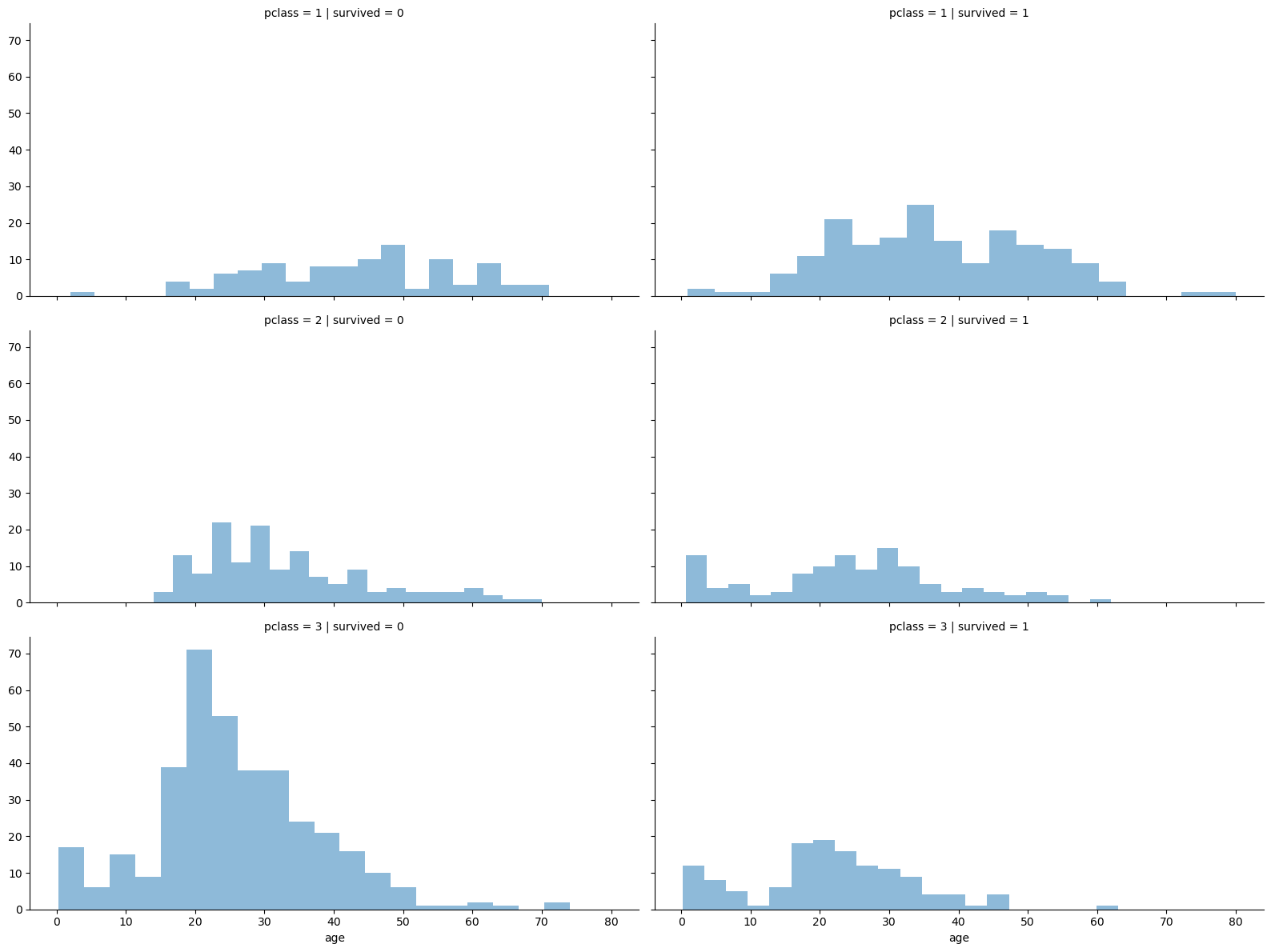
선실 등급에 따른 생존률
# 등실별 생존률 확인

grid = sns.FacetGrid(titanic, row='pclass', col='survived', height=4, aspect=2)
grid.map(plt.hist, 'age', alpha=0.5, bins=20)
grid.add_legend()
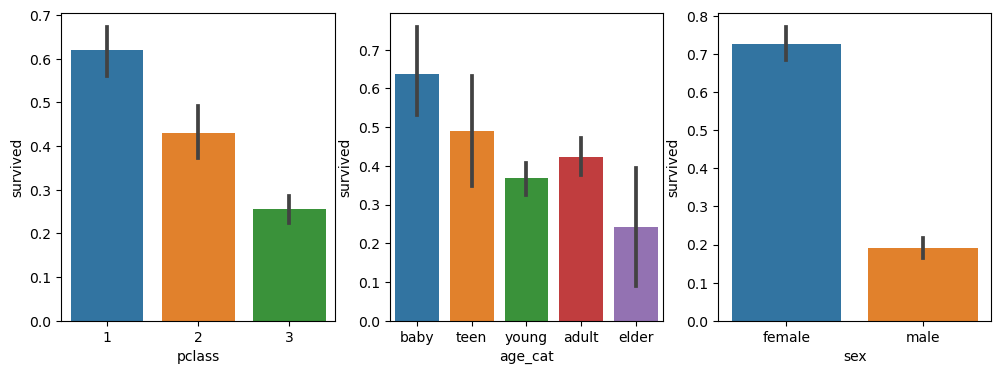
나이에 따른 생존률
# 나이를 구간 별로 정리

# cut : 지정한 숫자를 기준으로 구간을 나누고 각각 라벨을 지정 (가장 작은 값을 포함한 구간 지정)
titanic['age_cat'] = pd.cut(titanic['age'], bins=[0, 7, 15, 30, 60, 100],
       include_lowest=True,
       labels=['baby', 'teen', 'young', 'adult', 'elder'])
titanic.head()

# 나이, 성별, 등급별 생존자 수 확인

plt.figure(figsize=(12,4))

# subplot(131) : 1행 3열 중 1번째, subplot(132) : 1행 3열 중 2번째, subplot(133) : 1행 3열 중 3번째

# 선실 등급 별 생존률
plt.subplot(131)
sns.barplot(x='pclass', y='survived', data=titanic)

# 나이 구간 별 생존률
plt.subplot(132)
sns.barplot(x='age_cat', y='survived', data=titanic)

# 성별 별 생존률
plt.subplot(133)
sns.barplot(x='sex', y='survived', data=titanic)

plt.show()
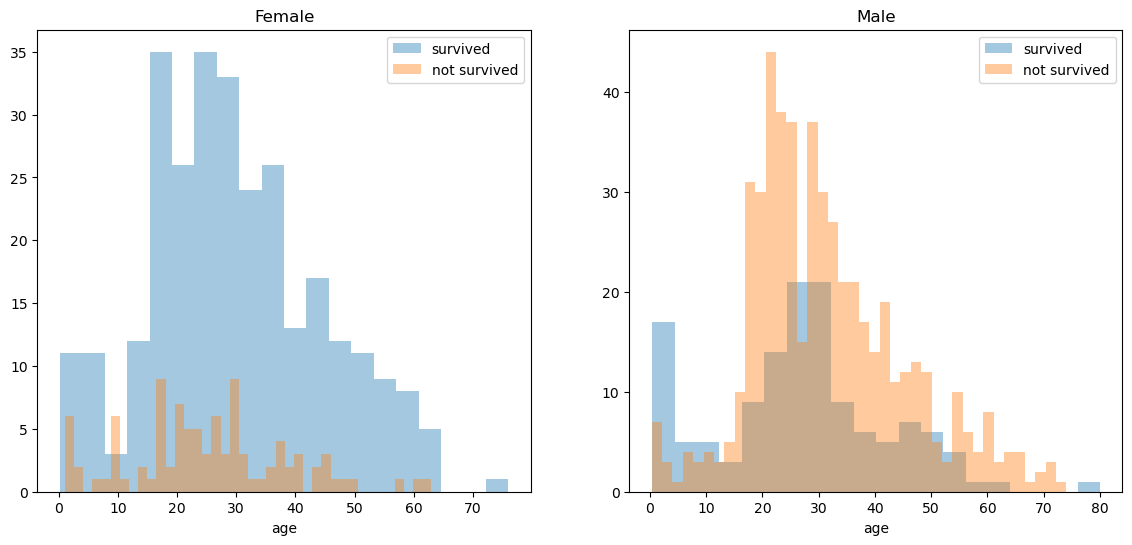
성별에 따른 생존률
fig, axes = plt.subplots(nrows=1, ncols=2, figsize=(14,6))

# 남성과 여성의 데이터 분리
women = titanic[titanic['sex'] == 'female']
men = titanic[titanic['sex'] == 'male']

# 여성의 나이에 따른 생존률 시각화
ax = sns.distplot(women[women['survived'] == 1]['age'], bins=20, label='survived', ax=axes[0], kde=False)
ax = sns.distplot(women[women['survived'] == 0]['age'], bins=40, label='not survived', ax=axes[0], kde=False)
ax.legend(); ax.set_title('Female')

# 남성의 나이에 따른 생존률 시각화
ax = sns.distplot(men[men['survived'] == 1]['age'], bins=20, label='survived', ax=axes[1], kde=False)
ax = sns.distplot(men[men['survived'] == 0]['age'], bins=40, label='not survived', ax=axes[1], kde=False)
ax.legend(); ax.set_title('Male')
사회적 신분에 따른 생존률
# 탑승객의 이름을 통해 사회적 신분을 알 수 있으므로, 이 정보를 추출

import re

title = []

for idx, dataset in titanic.iterrows() :
    tmp = dataset['name']

	# 정규화 표현식을 통해 이름 사이에 The Countess와 같이 신분이 포함된 이름을 검색하기 위해 아래와 같이 추출

	# ','로 시작하고(\), 공란(\s) 이후 문자열이 나오다가 (\w+),
	# 공란 이후 문자열이 나오는 패턴이 나올수도, 안나올수도 있고 (\s\w+)?
	# 마지막에는 마침표로 끝나는 문자열 (\.) 만을 검색하여 리스트로 저장

	# 이 때, 앞의 쉼표와 공란은 제거한 위치부터 마지막의 쉼표를 제외한 부분만 저장

    title.append(re.search('\,\s\w+(\s\w+)?\.', tmp).group()[2:-1])

# Titanic DataFrame에 사회적 신분을 컬럼으로 추가
titanic['title'] = title
titanic.head()

# Miss와 동일한 의미를 가진 단어들을 Miss로 통일
titanic['title'] = titanic['title'].replace('Mlle', 'Miss')
titanic['title'] = titanic['title'].replace('Ms', 'Miss')
titanic['title'] = titanic['title'].replace('Mme', 'Miss')

# 귀족을 구분하기 위한 명칭들을 지정
Rare_f = ['Dona', 'Lady', 'the Countess']
Rare_m = ['Capt', 'Col', 'Don', 'Major', 'Rev', 'Sir', 'Dr', 'Master', 'Jonkheer']

# 신분을 지칭하는 명칭들을 성별로 구분하여 Rare_f, Rare_m으로 통일

for each in Rare_f :
    titanic['title'] = titanic['title'].replace(each, 'Rare_f')

for each in Rare_m :
    titanic['title'] = titanic['title'].replace(each, 'Rare_m')

# 성별 및 신분에 따른 생존률 확인
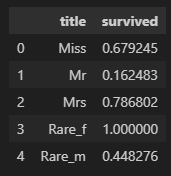
titanic[['title', 'survived']].groupby(['title'], as_index=False).mean()

# 생존률은 평민 남성 < 귀족 남성 < 평민 여성 < 귀족 여성 순임을 확인할 수 있음
머신러닝을 이용한 생존 예측
학습 전 데이터 전처리
### 머신러닝을 이용한 생존자 예측

# 머신러닝은 데이터가 모두 숫자여야 하므로, 데이터를 숫자로 변환처리를 해주어야함

# LabelEncoding : 범주형 데이터를 정수형 숫자로 치환해주는 것
# Ex) 사과 = 0, 바나나 = 1, 키위 = 2, ...

from sklearn.preprocessing import LabelEncoder

# LabelEncoder 모델을 이용해 범주형 데이터를 학습하여 라벨링
le = LabelEncoder()
le.fit(titanic['sex'])

# 성별 컬럼을 이용하여 LabelEncoding한 결과를 gender 컬럼으로 생성
titanic['gender'] = le.transform(titanic['sex'])
titanic.head()

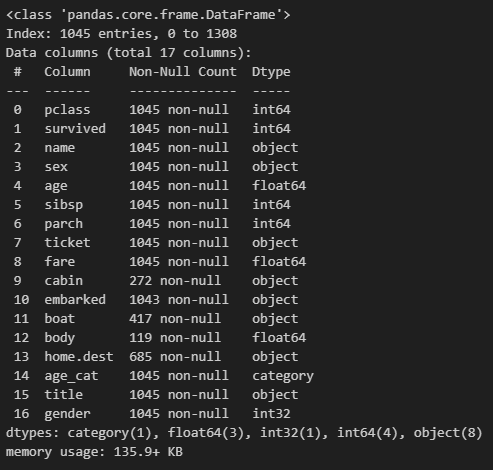
# 결측치를 제외한 데이터만 사용

titanic = titanic[titanic['age'].notnull()]
titanic = titanic[titanic['fare'].notnull()]
titanic.info()
학습용/평가용 데이터 생성
# 학습용/평가용 데이터 생성
from sklearn.model_selection import train_test_split

X = titanic[['pclass', 'age', 'sibsp', 'parch', 'fare', 'gender']]
y = titanic['survived']

X_train, X_test, y_train, y_test = train_test_split(X, y, test_size=0.8, random_state=13)
DecisionTree를 이용한 학습 및 예측
# DecisionTree를 이용한 예측

from sklearn.tree import DecisionTreeClassifier
from sklearn.metrics import accuracy_score

dt = DecisionTreeClassifier(max_depth=4, random_state=13)
dt.fit(X_train, y_train)

pred = dt.predict(X_test)

# 모델 성능 점수 확인
print(accuracy_score(y_test, pred))
[실행 결과] 0.7655502392344498
# 디카프리오의 생존률

import numpy as np

# 3등급 선실을 이용했고, 극중 나이는 18살, 형제 부모 없었고, 5달러로 표를 구매한 남성
dicaprio = np.array([[3, 18, 0, 0, 5, 1]])
print('Dicaprio : ', dt.predict_proba(dicaprio)[0,1])

# 디카프리오의 생존률 예측 결과 : 22%
[실행 결과] Dicaprio : 0.22950819672131148
# 윈슬렛의 생존률

# 1등급 선실을 이용했고, 극중 나이는 16살, 형제 부모 모두 있었고 100달러(추정)으로 표를 구매한 여성
winslet = np.array([[1, 16, 1, 1, 100, 0]])
print('Winslet : ', dt.predict_proba(winslet)[0,1])

# 윈슬렛의 생존률 예측 결과 : 100%
[실행 결과] Winslet : 1.0

:)