Ingress는 외부에서 클러스터 내부에 있는 서비스로 접속하기 위한 오브젝트입니다. 주로 HTTP로 접속합니다
인그레스를 사용하는 이유
Ingress의 주요 기능은 아래와 같습니다.
- 외부 요청의 라우팅
- 가상 호스트 기반의 요청 처리
- SSL/TLS 보안 연결 처리
인그레스의 구조
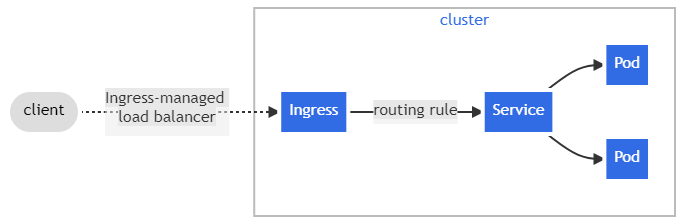
Ingress의 기본적인 구조입니다. 외부에서의 요청을 가장 먼저 받는 일종의 Gateway 역할을 하고 있습니다. Ingress에 접속하면 미리 설정한 routing rule에 따라 작동합니다. 이제 Ingress를 직접 만들어 보겠습니다. 우선 Ingress 파일을 만들고 apply 합니다.
apiVersion: networking.k8s.io/v1
kind: Ingress
metadata:
  name: ingress-example
  annotations:
    nginx.ingress.kubernetes.io/rewrite-target: /
    kubernetes.io/ingress.class: "nginx"
spec:
  rules:
  - host: alicek106.example.com                   # [1]
    http:
      paths:
      - path: /echo-hostname                     # [2]
        pathType: Prefix
        backend:
          service:
            name: hostname-service               # [3]
            port:
              number: 80
위 파일은 alice106.example.com/echo-hostname으로 들어온 요청을 hostname-service라는 서비스 오브젝트의 80번 포트로 전달한다는 의미입니다. 이제 여기서 ingress에 접속하기 위해 ingress-controller를 만들어야 합니다. 여기서는 가장 대표적으로 많이 쓰이는 Nginx ingress controller를 사용하겠습니다.
https://github.com/kubernetes/ingress-nginx/blob/main/deploy/static/provider/aws/1.23/deploy.yaml
위 링크에서 파일을 받아 실행합니다.
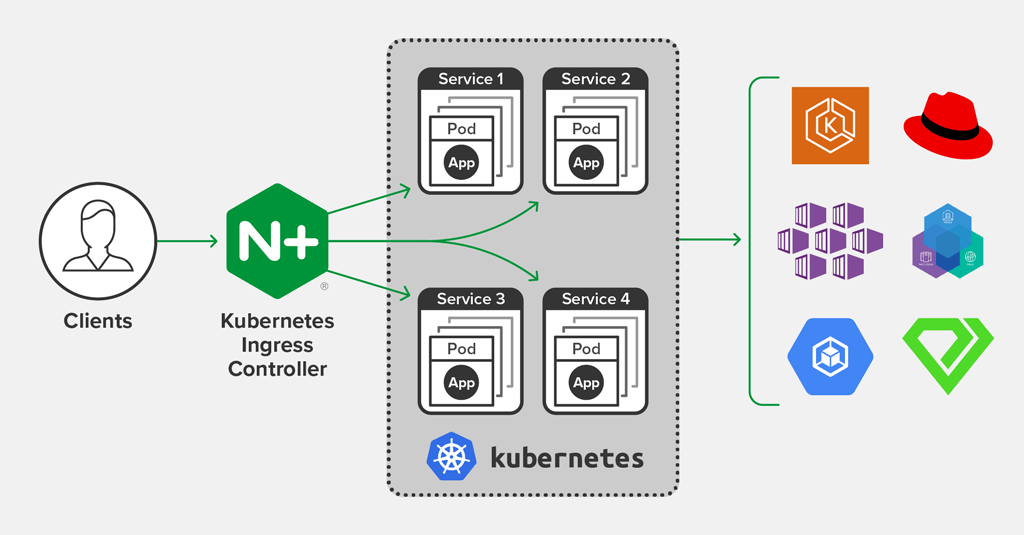
이제 위와 같은 형태의 구조가 되었습니다. 실제 운영 환경에서는 여기서 LoadBalancer 타입에 DNS 이름을 할당하고 접근하는 것이 일반적이지만 로컬환경에서 실행해 보기 위해 Ingress controller 앞 단에 NodePort 타입의 서비스를 만들어 접속하도록 만들어 보겠습니다.
# ingress-example-k8s-latest.yaml
apiVersion: v1
kind: Service
metadata:
  labels:
    app.kubernetes.io/component: controller
    app.kubernetes.io/instance: ingress-nginx
    app.kubernetes.io/managed-by: Helm
    app.kubernetes.io/name: ingress-nginx
  name: ingress-nginx-controller-nodeport
  namespace: ingress-nginx
spec:
  ports:
  - name: http
    nodePort: 31000
    port: 80
    protocol: TCP
    targetPort: http
  - name: https
    nodePort: 32000
    port: 443
    protocol: TCP
    targetPort: https
  selector:
    app.kubernetes.io/component: controller
    app.kubernetes.io/instance: ingress-nginx
    app.kubernetes.io/name: ingress-nginx
  type: NodePort
이제 ingress의 종착점이 될 Deployment와 Service를 만들어 보겠습니다.
# https://github.com/alicek106/start-docker-kubernetes/tree/master/chapter8
kubectl apply -f hostname-deployment.yaml
kubectl apply -f hostname-service.yaml
그런데 우리는 ingress를 만들때 alicek106.example.com으로 접근할 때만 응답을 허용하기 때문에 도메인 이름을 맞추어 주어야 합니다.
curl --resovle alicek106.example.com:31000:<Node 중 하나의 IP> alicek106.example.com:31000/echo-hostname위 연결의 순서는 다음과 같습니다
- NodePort 형태의 Service
- Ingress Controller(Ingress 규칙 적용)
- hostname-service
- hostname-deployment
인그레스의 세부 기능: annotation을 이용한 설정
  annotations:
    nginx.ingress.kubernetes.io/rewrite-target: /
    kubernetes.io/ingress.class: "nginx"
ingress를 만들때 구첵적인 설정을 정할 수 있는 annotation에 대해서 알아보겠습니다. 위의 rewrite-target: / 은 /echo-name으로 들어오는 모든 요청을 hostname-service의 /로 전달하겠다는 의미입니다. 이것을 조금 바꾸어 보겠습니다.
apiVersion: networking.k8s.io/v1
kind: Ingress
metadata:
  name: ingress-example
  annotations:
    nginx.ingress.kubernetes.io/rewrite-target: /$2 # path의 (.*) 에서 획득한 경로로 전달합니다.
    kubernetes.io/ingress.class: "nginx"
spec:
  rules:
  - host: <여러분이 Nginx 컨트롤러에 접근하기 위한 도메인 이름을 입력합니다>
  #- host: a2cbfefcfbcfd48f8b4c15039fbb6d0a-1976179327.ap-northeast-2.elb.amazonaws.com
    http:
      paths:
      - path: /echo-hostname(/|$)(.*)          # (.*) 을 통해 경로를 얻습니다.
        pathType: Prefix
        backend:
          service:
            name: hostname-service
            port:
              number: 80
이제 /echo-hostname 뒤부분만이 rewrite-target에 전달됩니다
/echo-hostname/color/red -> /color/red
/echo-hostname/color -> color
/echo-hostname -> /
annotation 설정의 두번째 줄은 우리가 nginx-ingress-controller를 사용했기 때문에 nginx로 설정되어 있습니다.
Nginx 인그레스 컨트롤러에 SSL/TLS 보안 연결 사용
ingress의 대표 기능 중 하나인 ssl/tls을 실습해 보겠습니다. 우선 인증서와 비밀키를 만듭니다.
openssl req -x509 -nodes -days 365 -newkey rsa:2048 \
-keyout tls.key -out tls.crt -subj "/CN=alicek106.example.com/0=alicek106"

kubectl create secret tls tls-secret --key tls.key --cert tls.crt
이제 tls가 적용된 ingress를 만들어보겠습니다.
apiVersion: networking.k8s.io/v1
kind: Ingress
metadata:
  name: ingress-example
  annotations:
    nginx.ingress.kubernetes.io/rewrite-target: /
    kubernetes.io/ingress.class: "nginx"
spec:
  tls:
  - hosts:
    - alicek106.example.com            # 여러분의 도메인 이름을 입력해야 합니다.
    secretName: tls-secret
  rules:
  - host: alicek106.example.com          # 여러분의 도메인 이름을 입력해야 합니다.
    http:
      paths:
      - path: /echo-hostname
        pathType: Prefix
        backend:
          service:
            name: hostname-service
            port:
              number: 80
alicek106.example.com로 접속할 때 tls-secret을 사용하도록 작성하였습니다. 이제 위 파일을 apply합니다.
# curl의 -k 옵션은 신뢰할 수 없는 인증서로 보안 연결을 하기 위함입니다.
curl https://alicek106.example.com/echo-hostname -k
올바르게 ssl 인증이 된 것을 확인할 수 있습니다.
여러 개의 인그레스 컨트롤러 사용하기
이번에는 nginx-ingress-controller 파일을 약간 수정하여 kubernets.io/ingress.class의 이름을 변경해 보겠습니다.
# https://github.com/kubernetes/ingress-nginx/blob/main/deploy/static/provider/aws/1.23/deploy.yaml
      - args:
        - /nginx-ingress-controller
        - --publish-service=$(POD_NAMESPACE)/ingress-nginx-controller
        - --election-id=ingress-controller-leader
        - --controller-class=k8s.io/ingress-nginx
        - --ingress-class=nginx
        - --configmap=$(POD_NAMESPACE)/ingress-nginx-controller
        - --validating-webhook=:8443
        - --validating-webhook-certificate=/usr/local/certificates/cert
        - --validating-webhook-key=/usr/local/certificates/key
        # class의 이름을 nginx에서 alicek106-nginx로 변경하였습니다
        - --ingress-class=alicek106-nginx
이제 수정된 class의 이름에 맞게 ingress를 만들어 보겠습니다.
apiVersion: networking.k8s.io/v1
kind: Ingress
metadata:
  name: ingress-example
  annotations:
    nginx.ingress.kubernetes.io/rewrite-target: /
    kubernetes.io/ingress.class: "alicek106-nginx"
spec:
  rules:
  - host: alicek106.example.com                   # [1]
    http:
      paths:
      - path: /echo-hostname                     # [2]
        pathType: Prefix
        backend:
          service:
            name: hostname-service               # [3]
            port:
              number: 80