1. 왜 Composite Pattern이 생겨났는가?
문제 상황
// ❌ 나쁜 예: 계층 구조를 다룰 때 타입별로 다른 처리
public void printMenu() {
    // MenuItem과 Menu를 구별해서 처리해야 함
    if (current instanceof MenuItem) {
        MenuItem item = (MenuItem) current;
        System.out.println(item.getName());
    }
    else if (current instanceof Menu) {
        Menu menu = (Menu) current;
        // Menu 안의 모든 항목 처리...
    }
}
문제점:
- 계층 구조(트리 구조)를 표현하기 어려움
- 개별 객체(Leaf)와 복합 객체(Composite)를 다르게 처리해야 함
- 타입 체크와 캐스팅이 필요 → 코드가 복잡해짐
- 새로운 타입 추가 시 모든 조건문 수정 필요
2. Component Interface VS Leaf VS Composite
1. Component Interface
- "모든 객체가 따라야 할 공통 규격"
- 개별 객체와 복합 객체를 동일하게 다루기 위한 인터페이스
- "can-do" 관계 (모든 컴포넌트가 할 수 있는 동작)
public abstract class MenuComponent {
    // 공통 메서드
    public String getName() {
        throw new UnsupportedOperationException();
    }

    public void print() {
        throw new UnsupportedOperationException();
    }

    // 복합 객체 전용 메서드
    public void add(MenuComponent menuComponent) {
        throw new UnsupportedOperationException();
    }

    public void remove(MenuComponent menuComponent) {
        throw new UnsupportedOperationException();
    }

    public MenuComponent getChild(int i) {
        throw new UnsupportedOperationException();
    }
}
왜 Interface가 아닌 Abstract Class인가?
- 기본 구현을 제공할 수 있음 (UnsupportedOperationException 던지기)
- Leaf는 자식 관리 메서드를 구현할 필요 없음
2. Leaf (단일 객체)
- "더 이상 나눌 수 없는 개별 객체"
- 자식을 가질 수 없음
- "terminal node" (트리의 말단 노드)
public class MenuItem extends MenuComponent {
    String name;
    double price;
    boolean vegetarian;

    public MenuItem(String name, double price, boolean vegetarian) {
        this.name = name;
        this.price = price;
        this.vegetarian = vegetarian;
    }

    public String getName() {
        return name;
    }

    public void print() {
        System.out.println("  " + getName() + ", " + getPrice());
    }
}
3. Composite (복합 객체)
- "자식들을 관리하는 컨테이너"
- 다른 Component들을 포함할 수 있음
- "has-a" 관계 (Composite는 Component들을 가짐)
public class Menu extends MenuComponent {
    ArrayList<MenuComponent> menuComponents = new ArrayList<>();
    String name;

    public Menu(String name) {
        this.name = name;
    }

    public void add(MenuComponent menuComponent) {
        menuComponents.add(menuComponent);
    }

    public void remove(MenuComponent menuComponent) {
        menuComponents.remove(menuComponent);
    }

    public MenuComponent getChild(int i) {
        return menuComponents.get(i);
    }

    public void print() {
        System.out.println("\n" + getName());
        System.out.println("---------------------");

        // 재귀적으로 모든 자식 출력
        for (MenuComponent menuComponent : menuComponents) {
            menuComponent.print();
        }
    }
}
3. 왜 두 클래스로 분리하는가?
분리하는 이유
-
단일 책임 원칙
- Leaf: 개별 항목의 데이터만 관리
- Composite: 자식 컬렉션 관리 + 계층 구조 유지
-
투명성 (Transparency)
- 클라이언트는 Leaf인지 Composite인지 신경 쓸 필요 없음
- 모두 같은 Component 타입으로 처리
-
재귀적 구조
- Composite는 또 다른 Composite를 포함 가능
- 무한한 깊이의 트리 구조 구현 가능
4. Composite Pattern 핵심 구조
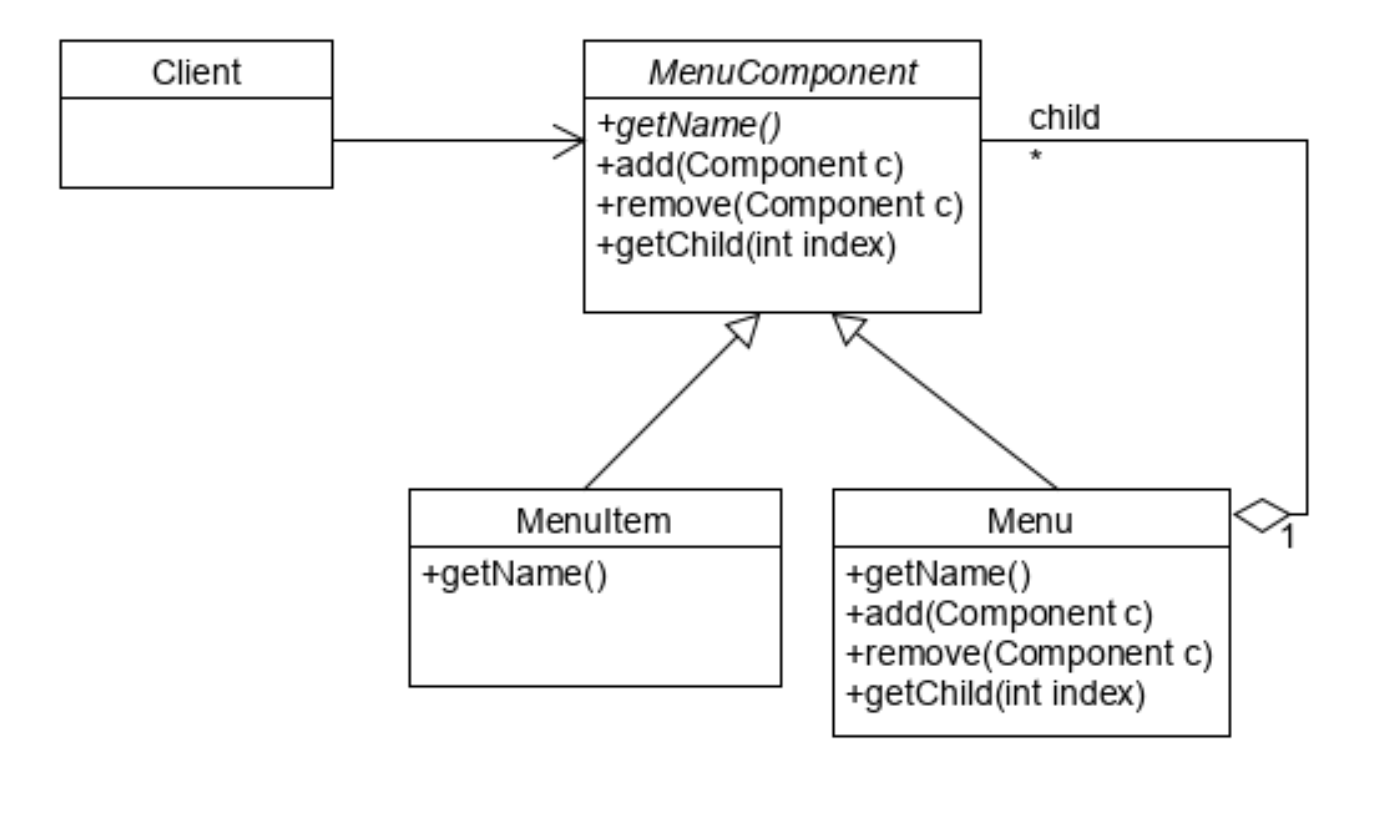
           Component
          (추상 클래스)
                |
        ________|________
       |                 |
     Leaf            Composite
  (개별 객체)      (복합 객체)
                       |
                   children[]
                 (Component들)
핵심 특징:
- 부분-전체 계층구조 표현
- 개별 객체와 복합 객체를 동일하게 처리
- 재귀적 합성 (Composite 안에 Composite)
5. 예시 코드
Step 1: Component 정의
public abstract class MenuComponent {
    // 모든 메서드는 기본적으로 예외를 던짐
    // 필요한 클래스에서만 오버라이드

    public void add(MenuComponent menuComponent) {
        throw new UnsupportedOperationException();
    }

    public void remove(MenuComponent menuComponent) {
        throw new UnsupportedOperationException();
    }

    public MenuComponent getChild(int i) {
        throw new UnsupportedOperationException();
    }

    public String getName() {
        throw new UnsupportedOperationException();
    }

    public double getPrice() {
        throw new UnsupportedOperationException();
    }

    public boolean isVegetarian() {
        throw new UnsupportedOperationException();
    }

    public void print() {
        throw new UnsupportedOperationException();
    }
}
Step 2: Leaf 구현 (MenuItem)
public class MenuItem extends MenuComponent {
    String name;
    String description;
    boolean vegetarian;
    double price;

    public MenuItem(String name, String description,
                    boolean vegetarian, double price) {
        this.name = name;
        this.description = description;
        this.vegetarian = vegetarian;
        this.price = price;
    }

    public String getName() {
        return name;
    }

    public String getDescription() {
        return description;
    }

    public double getPrice() {
        return price;
    }

    public boolean isVegetarian() {
        return vegetarian;
    }

    public void print() {
        System.out.print("  " + getName());
        if (isVegetarian()) {
            System.out.print("(v)");
        }
        System.out.println(", " + getPrice());
        System.out.println("     -- " + getDescription());
    }
}
Step 3: Composite 구현 (Menu)
public class Menu extends MenuComponent {
    ArrayList<MenuComponent> menuComponents = new ArrayList<>();
    String name;
    String description;

    public Menu(String name, String description) {
        this.name = name;
        this.description = description;
    }

    public void add(MenuComponent menuComponent) {
        menuComponents.add(menuComponent);
    }

    public void remove(MenuComponent menuComponent) {
        menuComponents.remove(menuComponent);
    }

    public MenuComponent getChild(int i) {
        return menuComponents.get(i);
    }

    public String getName() {
        return name;
    }

    public String getDescription() {
        return description;
    }

    public void print() {
        System.out.print("\n" + getName());
        System.out.println(", " + getDescription());
        System.out.println("---------------------");

        // 재귀적으로 모든 자식 출력 (핵심!)
        for (MenuComponent menuComponent : menuComponents) {
            menuComponent.print();  // Leaf든 Composite든 상관없이 호출
        }
    }
}
Step 4: 클라이언트 코드
public class MenuTestDrive {
    public static void main(String[] args) {
        // 최상위 메뉴 생성
        MenuComponent allMenus = new Menu("전체 메뉴", "모든 메뉴 통합");

        // 중간 레벨 메뉴들 생성
        MenuComponent pancakeMenu = new Menu("팬케이크 하우스 메뉴", "아침식사");
        MenuComponent dinerMenu = new Menu("다이너 메뉴", "점심식사");
        MenuComponent cafeMenu = new Menu("카페 메뉴", "저녁식사");

        // 최상위 메뉴에 추가
        allMenus.add(pancakeMenu);
        allMenus.add(dinerMenu);
        allMenus.add(cafeMenu);

        // 팬케이크 메뉴에 항목 추가
        pancakeMenu.add(new MenuItem(
            "K&B 팬케이크 세트",
            "스크램블 에그와 토스트 포함",
            true,
            2.99
        ));

        pancakeMenu.add(new MenuItem(
            "레귤러 팬케이크 세트",
            "계란 후라이와 소시지 포함",
            false,
            2.99
        ));

        // 다이너 메뉴에 디저트 서브메뉴 추가
        MenuComponent dessertMenu = new Menu("디저트 메뉴", "디저트를 즐기세요!");

        dessertMenu.add(new MenuItem(
            "애플 파이",
            "바닐라 아이스크림을 곁들인 애플 파이",
            true,
            1.59
        ));

        dinerMenu.add(dessertMenu);  // 메뉴 안에 메뉴!

        // 웨이트리스에게 전체 메뉴 전달
        Waitress waitress = new Waitress(allMenus);

        // 전체 메뉴 출력
        waitress.printMenu();
    }
}
Step 5: Waitress (클라이언트)
public class Waitress {
    MenuComponent allMenus;

    public Waitress(MenuComponent allMenus) {
        this.allMenus = allMenus;
    }

    public void printMenu() {
        allMenus.print();  // 단순! Composite 패턴의 핵심
    }
}
출력 결과
전체 메뉴, 모든 메뉴 통합
---------------------

팬케이크 하우스 메뉴, 아침식사
---------------------
  K&B 팬케이크 세트(v), 2.99
     -- 스크램블 에그와 토스트 포함
  레귤러 팬케이크 세트, 2.99
     -- 계란 후라이와 소시지 포함

다이너 메뉴, 점심식사
---------------------

디저트 메뉴, 디저트를 즐기세요!
---------------------
  애플 파이(v), 1.59
     -- 바닐라 아이스크림을 곁들인 애플 파이

카페 메뉴, 저녁식사
---------------------
6. Iterator와 함께 사용하기
Composite 구조를 순회하려면 CompositeIterator가 필요합니다.
CompositeIterator 구현
public class CompositeIterator implements Iterator {
    Stack<Iterator> stack = new Stack<>();

    public CompositeIterator(Iterator iterator) {
        stack.push(iterator);
    }

    public Object next() {
        if (hasNext()) {
            Iterator iterator = stack.peek();
            MenuComponent component = (MenuComponent) iterator.next();

            // Menu면 그 자식들도 순회해야 함
            if (component instanceof Menu) {
                stack.push(component.createIterator());
            }

            return component;
        }
        return null;
    }

    public boolean hasNext() {
        if (stack.empty()) {
            return false;
        }

        Iterator iterator = stack.peek();
        if (!iterator.hasNext()) {
            stack.pop();  // 현재 레벨 완료
            return hasNext();  // 재귀적으로 상위 레벨 확인
        }

        return true;
    }

    public void remove() {
        throw new UnsupportedOperationException();
    }
}
Menu와 MenuItem에 Iterator 추가
// Menu 클래스에 추가
public Iterator createIterator() {
    return new CompositeIterator(menuComponents.iterator());
}

// MenuItem 클래스에 추가 (NullIterator 사용)
public Iterator createIterator() {
    return new NullIterator();  // Leaf는 자식이 없음
}
채식 메뉴만 출력하기
public class Waitress {
    MenuComponent allMenus;

    public Waitress(MenuComponent allMenus) {
        this.allMenus = allMenus;
    }

    public void printVegetarianMenu() {
        Iterator iterator = allMenus.createIterator();

        System.out.println("\n채식 메뉴");
        System.out.println("-----------");

        while (iterator.hasNext()) {
            MenuComponent menuComponent = (MenuComponent) iterator.next();

            try {
                if (menuComponent.isVegetarian()) {
                    menuComponent.print();
                }
            } catch (UnsupportedOperationException e) {
                // Menu 객체는 isVegetarian() 없음 - 무시
            }
        }
    }
}
7. 투명성 vs 안전성
투명성 (Transparency) 우선
- Component에 모든 메서드 선언
- 장점: 모든 객체를 동일하게 처리 가능
- 단점: Leaf에서 의미 없는 메서드 호출 가능 (런타임 에러)
안전성 (Safety) 우선
- Composite에만 자식 관리 메서드 선언
- 장점: 컴파일 타임에 타입 체크 가능
- 단점: Leaf와 Composite를 다르게 처리해야 함
이 예시는 투명성을 선택 → 클라이언트 코드가 단순해짐
8. 핵심 정리
Composite Pattern의 구성
| 요소 | 역할 | 특징 |
|---|---|---|
| Component | 공통 인터페이스 | Leaf와 Composite의 공통 타입 |
| Leaf | 개별 객체 | 자식을 가질 수 없음 |
| Composite | 복합 객체 | Component들의 컨테이너 |
| Client | 사용자 | Component 타입으로 모든 객체 처리 |
언제 사용하는가?
- ✅ 부분-전체 계층구조를 표현할 때
- ✅ 트리 구조 데이터를 다룰 때
- ✅ 개별 객체와 복합 객체를 동일하게 처리하고 싶을 때
- ✅ 재귀적 합성이 필요할 때
실제 사용 예시
- 파일 시스템 (File/Directory)
- UI 컴포넌트 (Component/Container)
- 조직도 (Employee/Department)
- 수식 트리 (Number/BinaryOperation)
핵심 원칙
- 부분-전체 계층: Composite는 Component들로 구성
- 투명성: 클라이언트는 Leaf와 Composite 구별 불필요
- 재귀적 구조: Composite 안에 Composite 가능
- 단순한 클라이언트: 모든 객체를 동일하게 처리
장점
- 복잡한 트리 구조를 간단하게 표현
- 새로운 Component 추가 용이
- 클라이언트 코드가 단순해짐
단점
- 설계가 지나치게 범용적일 수 있음
- Composite의 자식 타입 제한이 어려움

다들 응원합니다.