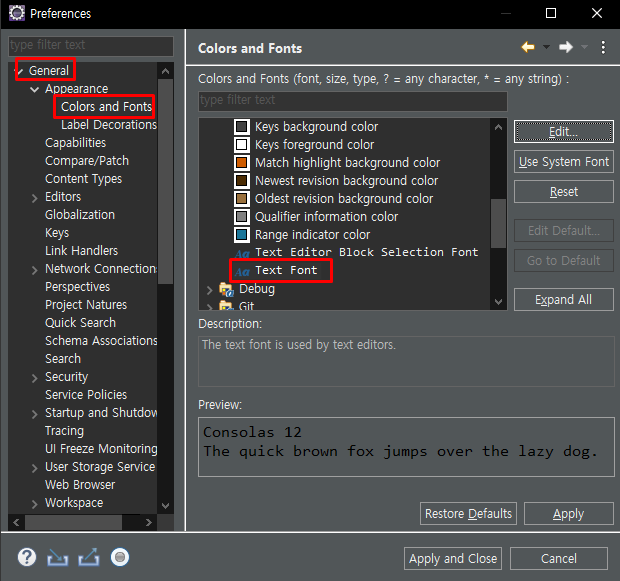
자바 폰트 수정 법
Window -> Preferences -> General -> Appearance -> Colors and Fonts
*폰트: Consolas 12 추천
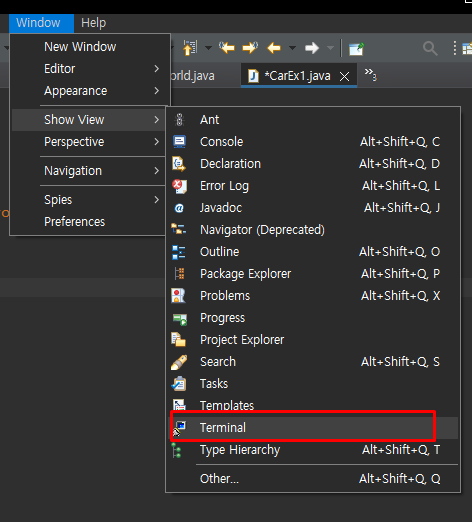
터미널 창 여는법(git 연동)
메소드 위에 ctrl+마우스 클릭을 하면 관련 메소드 코드를 자세히 볼 수 있음.
1/4(자바과정)
-> 클래스, 필드, 메소드, 객체로 진행
자바 Data type
1. 기본형: 8개
2. 참조형: ∞개
필드 : 객체의 속성 <- 무조건 () 는 없다.
메소드 : 객체의 기능 <- 반드시 () 가 있다.
package ch06;

//클래스 선언:ch06.Car1
//클래스: 객체를 만드는 틀(ex-붕어빵 틀)
class Car1/*클래스명*/{
	//필드 : 객체의 속성 <- 무조건 () 는 없다.
	String carName;
	int velocity;
	String carColor;

	//메소드 : 객체의 기능 <- 반드시 () 가 있다.
	void speedUp() {
		velocity++;
	}

	void speedDown() {
		velocity--;
		if(velocity<0)
			velocity=0;
	}

	void stop() {
		velocity=0;
	}


}//--class

//.java로 선언된 클래스만 public 사용가능
public class CarEx1 {
	public static void main(String[] args) {
		int arr[]=new int[3];
		System.out.println(arr.length);
		String str="오늘의 메뉴는 수구레";
		System.out.println(str.length());

		//객체 생성
		Car1 c1= new Car1();
		c1.carName="소나타";
		c1.carColor="은색";
		c1.speedUp();

		System.out.println(c1.carName);
		System.out.println(c1.carColor);
		System.out.println(c1.velocity);
	}
}
package ch06;

//클래스 선언 -> 필드&메소드 -> 객체생성(new, 필드 및 메소드 사용)
class Car2{
	String name;
	int speed;
	int gear;

	void stop() {
		speed=0;
	}
}


public class CarEx2 {
	public static void main(String[] args) {
		int a=10;
		int b=a+10;
		for (int i = 0; i < 100; i++) {
			Car2 c1=new Car2();
			//System.out.println(c1.toString());
		}
		//요청된 소문자 -> 대문자 출력
		String s=new String("adfsfsfas");
		System.out.println(s.toUpperCase());
		//32라는 10진수를 2진수로 출력하세요.
		//Hint: Integer: 정수를 객체화 시킨 클래스
		Integer i=new Integer(32);
		String str=i.toBinaryString(32);
		System.out.println(str);

		int num=32;
		System.out.println(num);
		System.out.println(Integer.toBinaryString(num));
	}
}
10진수를 2진수로 만드는 클래스 toBinaryString();
package ch06;

//클래스 선언:ch06.Car1
//클래스: 객체를 만드는 틀(ex-붕어빵 틀)
class Car3/*클래스명*/{
	//필드 : 객체의 속성 <- 무조건 () 는 없다.
	String carName;
	int velocity;
	String carColor;

	//메소드 : 객체의 기능 <- 반드시 () 가 있다.
	void speedUp() {
		velocity++;
	}

	void speedDown() {
		velocity--;
		if(velocity<0)
			velocity=0;
	}

	void stop() {
		velocity=0;
	}


}//--class

//.java로 선언된 클래스만 public 사용가능
public class CarEx3 {
	public static void main(String[] args) {
		Car3 c1=new Car3();
		Car3 c2=new Car3();
		c1.carName="아반테";
		c2.carName="소나타";
		System.out.println(c1.carName);
		System.out.println(c2.carName);

		//System.out.println(c1.toString());
		//System.out.println(c2.toString());
		c2=c1;//참조형의 "=" 은 call by reference 방식
		//System.out.println(c1.toString());
		//System.out.println(c2.toString());
		System.out.println(c1.carName);
		System.out.println(c2.carName);
		c1.carName="그랜져";

		int a=10;
		int b=a;//자바 기본형: call by value 방식
		a=20;
		System.out.println(a+b);
	}
}
call by value & call by reference 예제
package ch06;

class Method1{
	int abs(int num) {
		if(num<0)
			num=-num;
		return num;
	}

	void prn(int a,int b) {
		int c=a+b;
		System.out.println(a+"+"+b+"="+c);
	}
}

public class MethodEx1 {
	public static void main(String[] args) {
		Method1 m=new Method1();
		int a=m.abs(-10);//return 형이 있는 메소드이라도 값을 반드시 받을 필요는 없다.
		System.out.println(a);
		m.prn(10,20);
	}
}
package ch06;

class Method2{
	/*메소드 오버로딩(Over loading) : 기능은 동일함.
	 * 동일한 메소드명으로 매개변수의 개수와 타입을 다르게 선언,
	 */
	void prn(int a) {
		System.out.println(a);
	}
	void prn(int a, int  b) {
		System.out.println(a+"\t"+b);
	}
	void prn(int a, int b, int c) {
		System.out.println(a+"\t"+b+"\t"+c);
	}
	void prn(int arr[]) {
		for (int i = 0; i < arr.length; i++) {
			System.out.println(arr[i]+"\t");
		}
	}
}
public class MethodEx2 {
	public static void main(String[] args) {
		//Math 클래스에 abs 메소드는 절대값 리턴
		int a = Math.abs(-10);
		double d=Math.abs(3.14);
		Math.abs(a);
		Method2 mt=new Method2();
		mt.prn(10);
		mt.prn(10, 20);
		mt.prn(10, 20, 30);
	}
}
package ch06;

class Method3{
	void prin(int...arr/*배열로 인식*/) {
		for (int i = 0; i < arr.length; i++) {
			System.out.print(arr[i]+"\t");
		}
		System.out.println();
	}
}
public class MethodEx3 {
	public static void main(String[] args) {
		Method3 mt=new Method3();
		mt.prin(1);
		mt.prin(1, 2);
		mt.prin(1, 2, 3);
		mt.prin(1, 2, 3, 4);
		mt.prin(1, 4, 5, 6, 7, 8, 9, 10);
		System.out.printf("%s","하하");
	}
}
메소드 관련 예제
생성자
-상속
-package
-this. super(둘다 예약어)