컨테이너(Container)
package awt;

import java.awt.Button;
import java.awt.FileDialog;
import java.awt.Panel;
import java.awt.event.ActionEvent;
import java.awt.event.ActionListener;

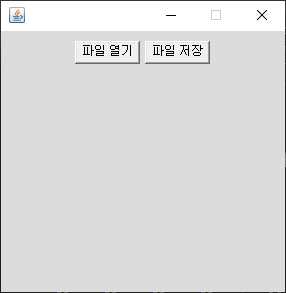
public class FileDialogEx1 extends MFrame implements ActionListener {
	FileDialog openFile, saveFile;
	Button openBtn, saveBtn;

	public FileDialogEx1() {
		openFile = new FileDialog(this, "파일 열기", FileDialog.LOAD);
		saveFile = new FileDialog(this, "파일 저장", FileDialog.SAVE);
		Panel p = new Panel();
		p.add(openBtn = new Button("파일 열기"));
		p.add(saveBtn = new Button("파일 저장"));
		add(p);
		openBtn.addActionListener(this);
		saveBtn.addActionListener(this);
	}

	@Override
	public void actionPerformed(ActionEvent e) {
		if (e.getSource() == openBtn){// 이벤트에서 컴포넌트로 인식
			openFile.setVisible(true);
		}else if(e.getSource() == saveBtn) {
			saveFile.setVisible(true);
		}
	}

	public static void main(String[] args) {
		new FileDialogEx1();
	}
}
package awt;

import java.awt.BorderLayout;
import java.awt.Button;
import java.awt.Color;
import java.awt.event.ActionEvent;
import java.awt.event.ActionListener;
import java.util.Random;

public class BorderLayoutEx1 extends MFrame {
	String str[] = { "첫번째", "두번째", "세번째", "네번째", "다섯번째" };
	Button btn[] = new Button[5];

	public BorderLayoutEx1() {
		setLayout(new BorderLayout());//배치관리자
		for (int i = 0; i < btn.length; i++) {
			btn[i] = new Button(str[i]);
			Color c[] = MColor.rColor2();
			btn[i].setBackground(c[0]);
			btn[i].setForeground(c[1]);
		}
		add(btn[0], "North");
		add(btn[1], BorderLayout.EAST);
		add(BorderLayout.SOUTH, btn[2]);//서로 위치 변경가능
		add(BorderLayout.WEST, btn[3]);
		add(btn[4]);
	}

	public static void main(String[] args) {
		Random r = new Random();
		for (int i = 0; i < 1000; i++) {
			BorderLayoutEx1 bl = new BorderLayoutEx1();
			int x = r.nextInt(2000);
			int y = r.nextInt(1000);
		    bl.setBounds(x, y,200,200);
		}
		new BorderLayoutEx1();
	}
}
package awt;

import java.awt.Button;
import java.awt.GridLayout;
import java.awt.Label;

public class GridLayoutEx1 extends MFrame{
	public GridLayoutEx1() {
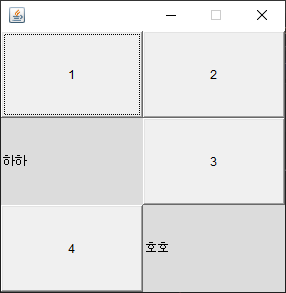
		setLayout(new GridLayout(3, 2));//rows,cols
		add(new Button("1"));
		add(new Button("2"));
		add(new Label("하하"));
		add(new Button("3"));
		add(new Button("4"));
		add(new Label("호호"));
		validate();
	}
	public static void main(String[] args) {
		new GridLayoutEx1();
	}
}
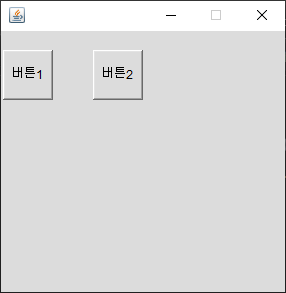
package awt;

import java.awt.Button;

public class NullLayoutEx1 extends MFrame{
	Button btn1,btn2;

	public NullLayoutEx1() {
		setLayout(null);
		btn1 =new Button("버튼1");
		btn2 =new Button("버튼2");
		btn1.setBounds(10, 50, 50 ,50);
		btn2.setBounds(100, 50, 50 ,50);
		add(btn1);
		add(btn2);
	}

	public static void main(String[] args) {
		new NullLayoutEx1();
	}
}
package awt;

import java.awt.BorderLayout;
import java.awt.Button;
import java.awt.Checkbox;
import java.awt.CheckboxGroup;
import java.awt.Color;
import java.awt.Label;
import java.awt.Panel;
import java.awt.event.ActionEvent;
import java.awt.event.ActionListener;

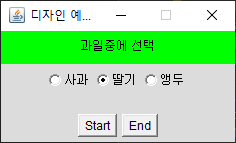
public class DesignEx1 extends MFrame2 implements ActionListener {

	Label label;
	Checkbox cb1, cb2, cb3;
	CheckboxGroup cbg;
	Button btn1, btn2;

	public DesignEx1() {
		super(250,150);
		setTitle("디자인 예제1");
		setLocationRelativeTo(null);
		String str = "과일중에 선택";
		Panel p1,p2,p3;

		p1 = new Panel();
		p1.setBackground(Color.GREEN);
		p1.add(label = new Label(str,Label.CENTER));
		add(p1,BorderLayout.NORTH);

		cbg= new CheckboxGroup();

		p2= new Panel();
		p2.add(cb1 = new Checkbox("사과",cbg, false));
		p2.add(cb2 = new Checkbox("딸기",cbg, true));
		p2.add(cb3 = new Checkbox("앵두",cbg, false));
		add(p2);

		p3= new Panel();
		p3.add(btn1 = new Button("Start"));
		p3.add(btn2 = new Button("End"));
		add(p3,BorderLayout.SOUTH);

		validate();
	}

	@Override
	public void actionPerformed(ActionEvent e) {
	}

	public static void main(String[] args) {
		new DesignEx1();
	}
}
package awt;

import java.awt.BorderLayout;
import java.awt.Button;
import java.awt.Panel;
import java.awt.TextArea;
import java.awt.TextField;
import java.awt.event.ActionEvent;
import java.awt.event.ActionListener;

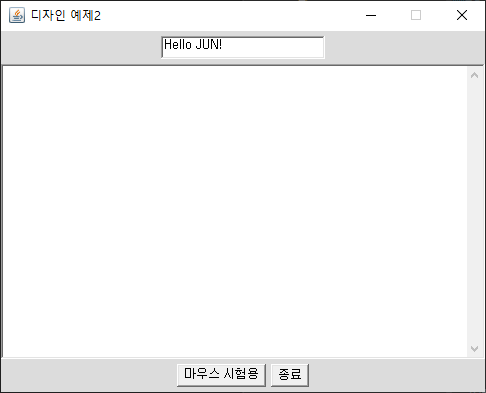
public class DesignEx2 extends MFrame2 implements ActionListener{
	TextField tf;
	TextArea ta;
	Button btn1, btn2;
	Panel p1, p2;

	public DesignEx2() {
		super(500,400);
		setTitle("디자인 예제2");
		setLocationRelativeTo(null);

		p1 = new Panel();
		p1.add(tf = new TextField("Hello JUN!",20));
		add(p1,BorderLayout.NORTH);
		add(ta = new TextArea(10,50));
		ta.setEditable(true);

		p2 = new Panel();
		p2.add(btn1 = new Button("마우스 시험용"));
		p2.add(btn2 = new Button("종료"));
		add(p2,BorderLayout.SOUTH);

		btn1.addActionListener(this);
		btn2.addActionListener(this);

		validate();
	}

	@Override
	public void actionPerformed(ActionEvent e) {
		if(e.getSource()==btn2)
			setVisible(false);
	}

	public static void main(String[] args) {
		new DesignEx2();
	}
}
package awt;

import java.awt.BorderLayout;
import java.awt.Button;
import java.awt.GridLayout;
import java.awt.List;
import java.awt.Panel;
import java.awt.TextField;
import java.awt.event.ActionEvent;
import java.awt.event.ActionListener;

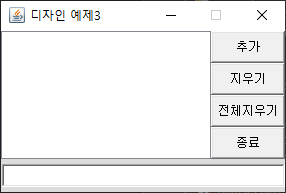
public class DesignEx3 extends MFrame2 implements ActionListener{

	List list;
	Button b[] = new Button[4];
	String lab[] = {"추가","지우기","전체지우기","종료"};
	TextField tf;
	String food[] ={"짜장면","짬뽕","우동"};

	public DesignEx3() {
		super(300,200);
		setTitle("디자인 예제3");
		setLocationRelativeTo(null);

		Panel p1 = new Panel();
		Panel p2 = new Panel();

		add(list = new List(), "Center");

		p1.add(tf = new TextField(37));
		add(p1,"South");
		tf.requestFocus();
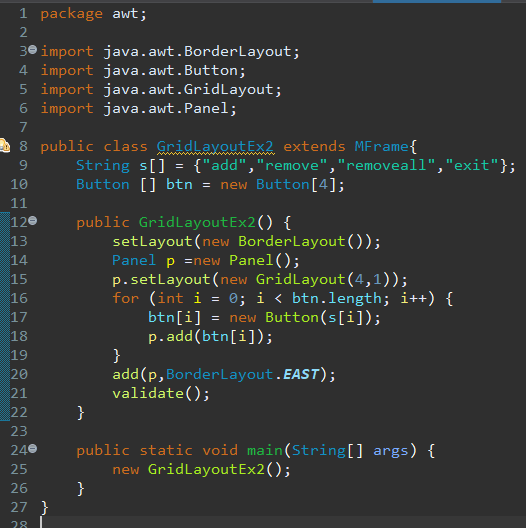
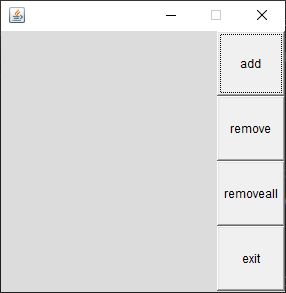
		p2.setLayout(new GridLayout(4,1));
		for (int i = 0; i < b.length; i++) {
			b[i] = new Button(lab[i]);
			p2.add(b[i]);
		}

		tf.addActionListener(this);
		for (int i = 0; i < b.length; i++) {
			b[i].addActionListener(this);
		}

		add(p2,BorderLayout.EAST);
		validate();
	}

	@Override
	public void actionPerformed(ActionEvent e) {
		String str = tf.getText().trim();
		int index = list.getSelectedIndex();

		if(e.getSource()==b[0]) {
			list.add(str);
		}else if(e.getSource()==b[1]) {
			list.remove(index);
		}else if(e.getSource()==b[2]) {
			list.removeAll();
		}else if(e.getSource()==b[3]) {
			setVisible(false);
		}
		tf.setText("");
		tf.requestFocus();
	}

	public static void main(String[] args) {
		new DesignEx3();
	}
}
이벤트
package event;

import java.awt.BorderLayout;
import java.awt.Button;
import java.awt.event.ActionEvent;
import java.awt.event.ActionListener;

import awt.MColor;

/* 2. 버튼을 클릭하면 ActionEvent 이벤트 객체가 발생되어서
 * 이벤트 소스랑 ActionEvent 객체를 연결하기 위한
 * ActionoListener 를 구현한다. */
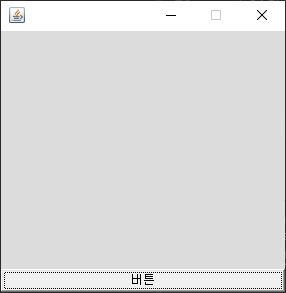
public class EventEx1 extends MFrame implements ActionListener
/* 이벤트 리스너"*/{
	//1. 이벤트 소스를 생성
	Button btn;

	public EventEx1() {
		add(btn = new Button("버튼"),BorderLayout.SOUTH);
		//4. 이벤트소스랑 이벤트 핸들러 연결(addXxxListener)
		btn.addActionListener(this);
		validate();
	}

	//3. 이벤트리스너의 메소드(이벤트 핸들러) 구현
	@Override
	public void actionPerformed(ActionEvent e) {
		setBackground(MColor.rColor());
	}

	public static void main(String[] args) {
		new EventEx1();
	}
}
package event;

import java.awt.BorderLayout;
import java.awt.Button;
import java.awt.event.ActionEvent;
import java.awt.event.ActionListener;

import awt.MColor;

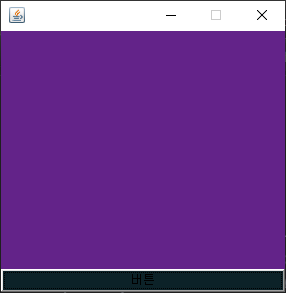
class MyAction implements ActionListener {
	EventEx2 f;

	public MyAction(EventEx2 f) {
		this.f = f;
	}

	@Override
	public void actionPerformed(ActionEvent e) {
		f.setBackground(MColor.rColor());
		f.btn.setBackground(MColor.rColor());
	}

}

public class EventEx2 extends MFrame {
	Button btn;

	public EventEx2() {
		add(btn = new Button("버튼"),BorderLayout.SOUTH);
		MyAction ma = new MyAction(this);
		btn.addActionListener(ma);
	}

	public static void main(String[] args) {
		new EventEx2();
	}
}
package event;

import java.awt.BorderLayout;
import java.awt.Button;
import java.awt.event.ActionEvent;
import java.awt.event.ActionListener;

import awt.MColor;


public class EventEx3 extends MFrame {//내부클래스 버튼 선언
	Button btn;

	public EventEx3() {
		add(btn = new Button("버튼"),BorderLayout.SOUTH);
		MyAction ma = new MyAction();
		btn.addActionListener(ma);
	}

	class MyAction implements ActionListener {
		@Override
		public void actionPerformed(ActionEvent e) {
			setBackground(MColor.rColor());
			btn.setBackground(MColor.rColor());
		}
	}

	public static void main(String[] args) {
		new EventEx3();
	}
}
package event;

import java.awt.BorderLayout;
import java.awt.Button;
import java.awt.Panel;
import java.awt.event.ActionEvent;
import java.awt.event.ActionListener;

import awt.MColor;

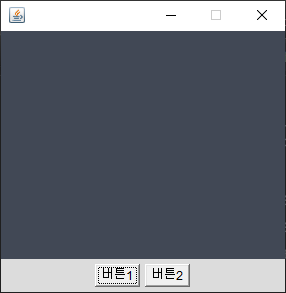
public class EventEx4 extends MFrame {
	Button btn1, btn2;

	public EventEx4() {
		Panel p = new Panel();

		p.add(btn1 = new Button("버튼1"));
		p.add(btn2 = new Button("버튼2"));
		add(p, BorderLayout.SOUTH);

		btn1.addActionListener(new ActionListener() {// 익명클래스

			@Override
			public void actionPerformed(ActionEvent e) {
				setBackground(MColor.rColor());
			}
		});
		btn2.addActionListener(new ActionListener() {// 익명클래스

			@Override
			public void actionPerformed(ActionEvent e) {
				System.exit(0);
			}
		});
	}

	public static void main(String[] args) {
		new EventEx4();
	}

}
package event;

import java.awt.BorderLayout;
import java.awt.Button;
import java.awt.Checkbox;
import java.awt.CheckboxGroup;
import java.awt.Color;
import java.awt.Panel;
import java.awt.TextField;
import java.awt.event.ActionEvent;
import java.awt.event.ActionListener;

import javax.rmi.ssl.SslRMIClientSocketFactory;

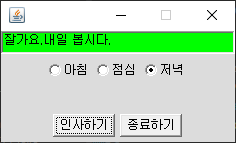
public class ActionEventEx1 extends MFrame
implements ActionListener{

	TextField tf;
	Checkbox cb1, cb2, cb3;
	CheckboxGroup cbg;
	Button btn1, btn2;
	String str[] = {"좋은 아침입니다.",
			             "식사 맛있게 하세요.",
			             "잘가요.내일 봅시다."};

	public ActionEventEx1() {
		super(250,150);
		//////////////////////////////////////////////////////////
		tf = new TextField("인사하기 버튼을 눌러주세요.");
		tf.setBackground(Color.GREEN);
		//////////////////////////////////////////////////////////
		cbg = new CheckboxGroup();
		Panel p1 = new Panel();
		p1.add(cb1=new Checkbox("아침",cbg,false));
		p1.add(cb2=new Checkbox("점심",cbg,true));
		p1.add(cb3=new Checkbox("저녁",cbg,false));
		//////////////////////////////////////////////////////////
		Panel p2 = new Panel();
		p2.add(btn1=new Button("인사하기"));
		p2.add(btn2=new Button("종료하기"));
		btn1.addActionListener(this);
		btn2.addActionListener(this);
		//////////////////////////////////////////////////////////
		add(tf, BorderLayout.NORTH);
		add(p1);
		add(p2,BorderLayout.SOUTH);
	}

	@Override
	public void actionPerformed(ActionEvent e) {
		Object obj = e.getSource();
		if(obj == btn1) {
			Checkbox cb = cbg.getSelectedCheckbox();
			if(cb==cb1) {
				tf.setText(str[0]);
			}else if(cb==cb2) {
				tf.setText(str[1]);
			}else if(cb==cb3) {
				tf.setText(str[2]);
			}
		}else if(obj == btn2) {
			System.exit(0);
		}
	}

	public static void main(String[] args) {
		new ActionEventEx1();
	}

}
package event;

import java.awt.Checkbox;
import java.awt.FlowLayout;
import java.awt.Label;
import java.awt.event.ItemEvent;
import java.awt.event.ItemListener;

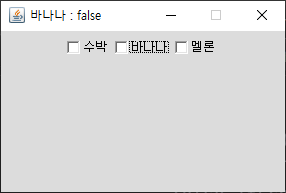
public class ItemEventEx1 extends MFrame
implements ItemListener{

	Label label;
	Checkbox cb1, cb2, cb3;

	public ItemEventEx1() {
		super(300, 200);
		setLayout(new FlowLayout());
		add(cb1=new Checkbox("수박"));
		add(cb2=new Checkbox("바나나"));
		add(cb3=new Checkbox("멜론"));
		add(label = new Label("현재 상태 :                    "));
		cb1.addItemListener(this);
		cb2.addItemListener(this);
		cb3.addItemListener(this);
	}

	@Override
	public void itemStateChanged(ItemEvent e) {
		Checkbox cb =(Checkbox)e.getSource();
		String str= cb.getLabel()+" : "+cb.getState();
		label.setText(str);
		setTitle(str);
	}

	public static void main(String[] args) {
		new ItemEventEx1();
	}
}
package event;

import java.awt.Checkbox;
import java.awt.FlowLayout;
import java.awt.Label;
import java.awt.event.ItemEvent;
import java.awt.event.ItemListener;

public class ItemEventEx2 extends MFrame {
	Label label;
	Checkbox cb1, cb2, cb3;

	public ItemEventEx2() {
		super(300, 200);
		setLayout(new FlowLayout());
		add(cb1 = new Checkbox("수박"));
		add(cb2 = new Checkbox("바나나"));
		add(cb3 = new Checkbox("멜론"));
		add(label = new Label("현재 상태 :                    "));
		MyItem mi = new MyItem(this);
		cb1.addItemListener(mi);
		cb2.addItemListener(mi);
		cb3.addItemListener(mi);
	}

	public static void main(String[] args) {
		new ItemEventEx2();
	}
}

//외부 클래스에서 필요한 이벤트 리스너 구현(Event2.java 참고)
class MyItem implements ItemListener {
	ItemEventEx2 f;

	public MyItem(ItemEventEx2 f) {
		this.f = f;
	}

	@Override
	public void itemStateChanged(ItemEvent e) {
		Checkbox cb = (Checkbox) e.getSource();
		String str = cb.getLabel() + " : " + cb.getState();
		f.label.setText(str);
		f.setTitle(str);
	}
}
package event;

import java.awt.BorderLayout;
import java.awt.Button;
import java.awt.TextArea;
import java.awt.TextField;
import java.awt.event.ActionEvent;
import java.awt.event.ActionListener;
import java.awt.event.KeyEvent;
import java.awt.event.KeyListener;

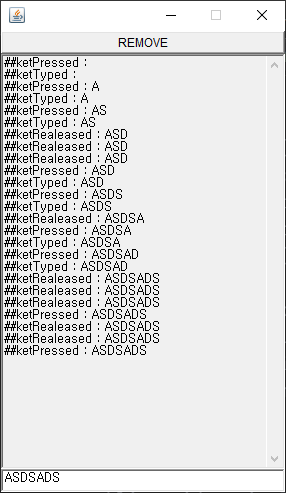
public class KeyEventEx1 extends MFrame implements ActionListener, KeyListener {
	TextField tf;
	TextArea ta;
	Button btn;

	public KeyEventEx1() {
		super(300,500);
		add(tf=new TextField(),BorderLayout.SOUTH);
		add(ta=new TextArea());
		ta.setEditable(false);

		btn = new Button("REMOVE");
		add(btn,BorderLayout.NORTH);
		btn.addActionListener(this);
		tf.addKeyListener(this);
		validate();
	}
	@Override
	public void actionPerformed(ActionEvent e) {
		ta.setText("");
		tf.setText("");
		tf.requestFocus();
	}

	@Override
	public void keyTyped(KeyEvent e) {
		ta.append("##ketTyped : " + tf.getText()+"\n");
	}

	@Override
	public void keyPressed(KeyEvent e) {
		ta.append("##ketPressed : " + tf.getText()+"\n");
	}

	@Override
	public void keyReleased(KeyEvent e) {
		ta.append("##ketRealeased : " + tf.getText()+"\n");
	}


	public static void main(String[] args) {
		new KeyEventEx1();
	}
}
package event;

import java.awt.Button;
import java.awt.Color;
import java.awt.Font;
import java.awt.Graphics;
import java.awt.event.KeyEvent;
import java.awt.event.KeyListener;

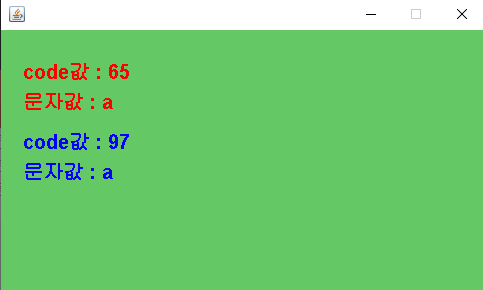
public class KeyEventEx3 extends MFrame implements KeyListener{
	Button move;

	public KeyEventEx3() {
		super(500,300,new Color(100,200,100));
		this.addKeyListener(this);
	}
	@Override
	public void keyPressed(KeyEvent e) {
		Graphics g = getGraphics();
		g.setFont(new Font("Dialog",Font.BOLD,20));
		///출력된 글씨 지우기///
		g.setColor(Color.white);
		g.clearRect(0, 0, getWidth(), getHeight());
		//////////////////////////////////////////////
		g.setColor(Color.RED);
		g.drawString("code값 : "+e.getKeyCode(), 30,80);
		g.drawString("문자값 : "+e.getKeyChar(), 30,110);

	}
	@Override
	public void keyTyped(KeyEvent e) {
		Graphics g = getGraphics();
		g.setFont(new Font("Dialog",Font.BOLD,20));
		g.setColor(Color.BLUE);
		g.drawString("code값 : "+(int)e.getKeyChar(), 30,150);
		g.drawString("문자값 : "+e.getKeyChar(), 30,180);
	}
	@Override
	public void keyReleased(KeyEvent e) {
	}

	public static void main(String[] args) {
		new KeyEventEx3();
	}
}
package event;

import java.awt.BorderLayout;
import java.awt.Button;
import java.awt.event.MouseAdapter;
import java.awt.event.MouseEvent;

import awt.MColor;

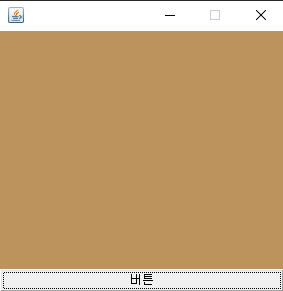
public class MouseEventEx2 extends MFrame{
	Button btn;

	public MouseEventEx2() {
		add(btn = new Button("버튼"), BorderLayout.SOUTH);
		btn.addMouseListener(new MouseAdapter() {
			@Override
			public void mouseEntered(MouseEvent e) {
				setBackground(MColor.rColor());
			}
			@Override
			public void mouseExited(MouseEvent e) {
				setBackground(MColor.rColor());
			}
		});
	}
	public static void main(String[] args) {
		new MouseEventEx2();
	}

}
package event;

import java.awt.BorderLayout;
import java.awt.Button;
import java.awt.event.MouseAdapter;
import java.awt.event.MouseEvent;

import awt.MColor;

public class MouseEventEx3 extends MFrame {
	Button btn;
	public MouseEventEx3() {
		add(btn = new Button("버튼"), BorderLayout.SOUTH);
		btn.addMouseListener(new MyMouseAdapter());
	}
	class MyMouseAdapter extends MouseAdapter{
 	    //Adapter : 필요한 메소드만 override 하면 된다.
		@Override
		public void mouseEntered(MouseEvent e) {
			setBackground(MColor.rColor());
		}
		@Override
		public void mouseExited(MouseEvent e) {
			setBackground(MColor.rColor());
		}
	}
	public static void main(String[] args) {
		new MouseEventEx3();
	}
}
package event;

import java.awt.Color;
import java.awt.Label;
import java.awt.Point;
import java.awt.event.MouseEvent;
import java.awt.event.MouseMotionListener;

import awt.MColor;

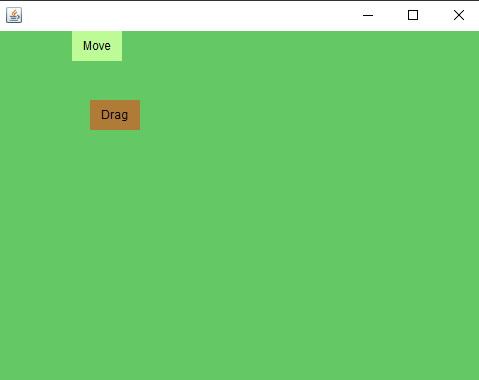
public class MouseMotionEx1 extends MFrame implements MouseMotionListener {
	Label lDrag, lMove;

	public MouseMotionEx1() {
		super(500, 390, new Color(100, 200, 100), true);
		setLayout(null);
		lDrag = new Label("Drag", Label.CENTER);
		lMove = new Label("Move", Label.CENTER);
		lDrag.setBounds(100, 100, 50, 30);
		lMove.setBounds(100, 150, 50, 30);
		lDrag.setBackground(MColor.rColor());
		lMove.setBackground(MColor.rColor());
		add(lDrag);
		add(lMove);
		addMouseMotionListener(this);
	}

	@Override
	public void mouseDragged(MouseEvent e) {
		Point p = e.getPoint();
		lDrag.setLocation(p);
	}

	@Override
	public void mouseMoved(MouseEvent e) {
		Point p = e.getPoint();
		lMove.setLocation(p);
	}

	public static void main(String[] args) {
		new MouseMotionEx1();
	}

}
package event;

import java.awt.Menu;
import java.awt.MenuBar;
import java.awt.PopupMenu;
import java.awt.TextArea;
import java.awt.event.ActionEvent;
import java.awt.event.ActionListener;
import java.awt.event.MouseAdapter;
import java.awt.event.MouseEvent;
import java.awt.event.MouseListener;

public class MenuEx1 extends MFrame {
	TextArea ta;
	MenuBar mb;
	Menu file, edit;
	PopupMenu pm;

	public MenuEx1() {
		super(300, 300);
		setTitle("MyEdit1.0");
		mb = new MenuBar();
		file = new Menu("파일");
		edit = new Menu("편집");

		file.add("새파일");
		file.add("열기");
		file.addSeparator();
		file.add("저장");
		file.add("새이름으로 저장");
		file.addSeparator();
		file.add("인쇄");
		file.add("종료");

		edit.add("취소");
		edit.add("복사");
		edit.add("잘라내기");
		edit.add("붙여넣기");
		mb.add(file);
		mb.add(edit);
		add(ta= new TextArea());
		setMenuBar(mb);
		popupMenu();
		validate();
	}
	public void popupMenu() {
		pm = new PopupMenu();
		pm.add("실행취소");
		pm.add("되돌리기");
		pm.addSeparator();
		pm.add("복사");
		pm.add("잘라내기");
		pm.add("붙여넣기");
		pm.addSeparator();
		pm.add("모두선택");
		pm.add("속성");
		pm.add("종료");
		pm.addActionListener(new ActionListener() {
			@Override
			public void actionPerformed(ActionEvent e) {
				String cmd = e.getActionCommand();
				if(cmd.equals("종료")) {
					System.exit(0);
				}else if(cmd.equals("복사")) {
					ta.append("MyEdit1.0");
				}
			}
		});
		add(pm);
		ta.addMouseListener(new MouseAdapter() {
			@Override
			public void mousePressed(MouseEvent e) {
				if(e.getButton()==3) {
					pm.show(e.getComponent(),e.getX(),e.getY());
				}
			}
		});
	}

	public static void main(String[] args) {
		new MenuEx1();
	}

}
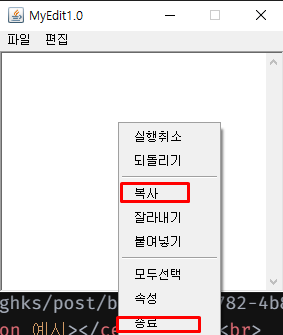
마우스 우클릭시 이벤트 발생(복사 및 종료 기능만 활성)