flutter_http_2
main.dart
import 'package:flutter/material.dart';
import 'package:flutter_http_2/list_page.dart';
void main() {
runApp(MyApp());
}
class MyApp extends StatelessWidget {
const MyApp({Key? key}) : super(key: key);
Widget build(BuildContext context) {
return MaterialApp(
home: ListPage(),
);
}
}
post_dto.dart
// post_dto.dart

// 테이블 용
class PostDTOTable {
  int id;
  String name;
  String email;

  PostDTOTable({required this.id, required this.name, required this.email});

  factory PostDTOTable.fromJson(dynamic json) =>
      PostDTOTable(
        id: json["id"],
        name: json["name"],
        email: json["email"],
      );
}

// 상세 페이지 용
class PostDTODetail {
  int id;
  String name;
  String email;

  PostDTODetail({required this.id,
    required this.name,
    required this.email,
  });
}
list_page.dart
// list_page.dart
import 'dart:convert';
import 'package:flutter/material.dart';
import 'package:flutter_hooks/flutter_hooks.dart';
import 'package:flutter_http_2/post_dto.dart';
import 'package:http/http.dart' as http;
class ListPage extends HookWidget {
const ListPage({Key? key}) : super(key: key);
Widget build(BuildContext context) {
// 더미데이터
// PostDTOTable postDTOTable = PostDTOTable(userId: 0, id: 0, title: "테스트 제목");
// 실제 데이터
// 통신은 실패할 수 있다 = nullable
final listState = useState<List<PostDTOTable>?>(null);
// final jsonState = useState<String?>(null);
// useEffect(작동함수, 관찰할 상태 리스트);
// 빌드가 완료되면 작동한다
// 관찰하는 상태가 변경되면 작동한다
// 관찰하는 상태가 없으면 빌드 시 1번 작동한다.
useEffect(() {
String url = "https://jsonplaceholder.typicode.com/users";
http.get(Uri.parse(url)).then((response) {
// 정상적으로 받아왔는지 체크
// 200은 정상 응답
if (response.statusCode == 200) {
// string을 json형식으로 파싱
dynamic decodedBody = jsonDecode(response.body);
// json을 Map List로 캐스팅
List jsonList = decodedBody as List;
// List를 map 함수로 풀어서
// 요소를 PostDTOTable로 변경
// state에 입력
listState.value = jsonList.map((data) {
//return PostDTOTable(
// id: data["id"], name: data["name"], email: data["email"]);
return PostDTOTable.fromJson(data);
}).toList();
}
// jsonState.value = response.body;
});
}, []);
return Scaffold(
body: SafeArea(
child: ListView(
children: listState.value?.map((e) => ListItem(postDTOTable: e)).toList() ?? [],
),
),
);
}
}
class ListItem extends StatelessWidget {
PostDTOTable postDTOTable;
ListItem({Key? key, required this.postDTOTable}) : super(key: key);
Widget build(BuildContext context) {
return Container(
padding: EdgeInsets.all(10),
decoration: BoxDecoration(
border: Border.all(width: 2, color: Colors.black),
),
child: Column(
children: [
Text("아이디 : ${postDTOTable.id}"),
Divider(),
Text("이름 : ${postDTOTable.name}"),
Divider(),
Text("이메일 : ${postDTOTable.email}"),
],
),
);
}
}post_dto.dart 파일에 존재하는 PostDTOTable 클래스안에
  factory PostDTOTable.fromJson(dynamic json) =>
      PostDTOTable(
        id: json["id"],
        name: json["name"],
        email: json["email"],
      );
factory 함수를 fromJson 형식으로 만들고나서
list_page.dart 파일에
listState.value = jsonList.map((data) {
     return PostDTOTable.fromJson(data);
}).toList();
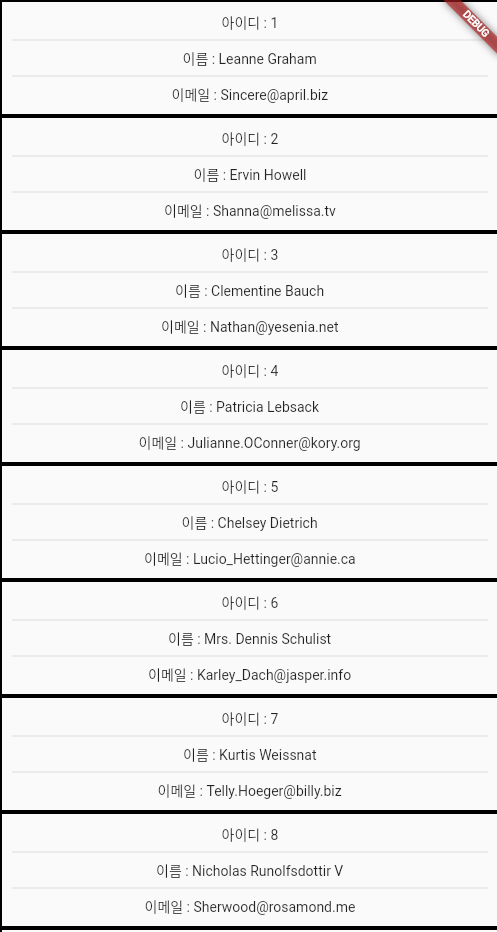
위와같이 아까전에 작성한 함수를 선언하면 다음과 같은 출력결과를 도출할 수 있음.
결과 화면
통신
통신을 할 경우 날라온 문자열을 파싱함 (내가 필요한 타입으로)
-> jsonDecode, dynamic 형식으로
dynamic : 모든 타입을 받을 수 있음.
: 모든 타입으로 변할 수 있음.
-> 리스트로 캐스팅 (형변환)
-> DTO 객체 생성할 때 json 형식으로 데이터의 값을 넣어줌
-> DTO 를 편하기 쓰기위해 factory를 씀.
팩토리를 이용함 함수
post_dto.dart
// post_dto.dart

// 테이블 용
class PostDTOTable {
  int userId; // 유저 번호
  int id; // 글 번호
  String title;
  // 생성자
  PostDTOTable({required this.userId, required this.id, required this.title});
  // 생성자를 이용한 팩토리 함수
  factory PostDTOTable.fromJson(dynamic json) => PostDTOTable(
      userId: json["userId"],
      id: json["id"],
      title: json["title"],
  );

  // 팩토리를 이용한 함수
 static List<PostDTOTable> fromJsonList(List jsonList){
   return jsonList.map((json) => PostDTOTable.fromJson(json)).toList();
 }
}

// 상세 페이지 용
class PostDTODetail {
  int userId;
  int id;
  String title;
  String body;

  PostDTODetail(
      {required this.userId,
        required this.id,
        required this.title,
        required this.body});
}
list_page.dart
// list_page.dart
import 'dart:convert';
import 'package:flutter/material.dart';
import 'package:flutter_hooks/flutter_hooks.dart';
import 'package:flutter_http_1/post_dto.dart';
import 'package:http/http.dart' as http;
class ListPage extends HookWidget {
const ListPage({Key? key}) : super(key: key);
Widget build(BuildContext context) {
// 더미데이터
// PostDTOTable postDTOTable = PostDTOTable(userId: 0, id: 0, title: "테스트 제목");
// 실제 데이터
// 통신은 실패할 수 있다 = nullable
final listState = useState<List<PostDTOTable>?>(null);
// final jsonState = useState<String?>(null);
// useEffect(작동함수, 관찰할 상태 리스트);
// 빌드가 완료되면 작동한다
// 관찰하는 상태가 변경되면 작동한다
// 관찰하는 상태가 없으면 빌드 시 1번 작동한다.
useEffect(() {
String url = "https://jsonplaceholder.typicode.com/posts";
http.get(Uri.parse(url)).then((response) {
// 정상적으로 받아왔는지 체크
// 200은 정상 응답
if (response.statusCode == 200) {
listState.value = PostDTOTable.fromJsonList(jsonDecode(response.body));
}
});
}, []);
return Scaffold(
body: SafeArea(
child: ListView(
children: listState.value?.map((e) => ListItem(postDTOTable: e)).toList() ?? [],
),
),
);
}
}
class ListItem extends StatelessWidget {
PostDTOTable postDTOTable;
ListItem({Key? key, required this.postDTOTable}) : super(key: key);
Widget build(BuildContext context) {
return Container(
padding: EdgeInsets.all(10),
decoration: BoxDecoration(
border: Border.all(width: 2, color: Colors.black),
),
child: Column(
children: [
Text("유저번호 : ${postDTOTable.userId}"),
Divider(),
Text("글 번호 : ${postDTOTable.id}"),
Divider(),
Text("글 제목 : ${postDTOTable.title}"),
],
),
);
}
}결과 화면
함수의 간결함과 동시에 이전과 같은 결과화면이 출력됨
Provider
hook -> provider 변경
변경하는 이유
1. 화면에 로직이 들어가면 관리가 어렵다
(화면은 화면을 구성하는 데에만 집중)
2. 한 종류의 통신을 여러 위젯에서 쓸 경우
변수 ?? 대체값
-> 변수가 null 일 경우 대체값을 리턴한다
String str = [null일수도 있는 String] ?? "값이 없습니다.";
String str = "값이 없습니다.";
변수 ??= 대입값
-> 변수가 null 일 경우 변수에 대입값을 넣고 리턴한다
String str = [null일수도 있는 String] ??= "값이 없습니다";
String str = ["값이 없습니다"라는 값이 들어간 null일수도 있는 String];
// post_repository.dart
import 'package:http/http.dart' as http;
class PostRepository{
  // 싱글톤 - 해당 타입의 객체가 프로그램에서 단 1개
  // static 변수 선언
  static PostRepository? _instance;

  // 퍼블릭 생성자 제거
  // dart에서 private은 맨 앞에 언더바를 붙인다
  PostRepository._(){
    count++;
    print(count);
  }

  static int count = 0;

  // 싱글톤 객체 getter
  static PostRepository get instance => _instance ??= PostRepository._();
}

void main(){
  PostRepository.instance;
  PostRepository.instance;
  PostRepository.instance;
}
결과 : 0
// post_repository.dart
import 'package:http/http.dart' as http;
class PostRepository{
  // 싱글톤 - 해당 타입의 객체가 프로그램에서 단 1개
  // static 변수 선언
  static PostRepository? _instance;

  // 퍼블릭 생성자 제거
  // dart에서 private은 맨 앞에 언더바를 붙인다
  PostRepository._(){
    count++;
    print(count);
  }

  static int count = 0;

  // 싱글톤 객체 getter
  static PostRepository get instance => _instance ?? PostRepository._();
}

void main(){
  PostRepository.instance;
  PostRepository.instance;
  PostRepository.instance;
}
결과 : 1
2
3
싱글톤 패턴
post_repository.dart
import 'dart:convert';

import 'package:flutter_http_2/post_dto.dart';
import 'package:http/http.dart' as http;

class PostRepository{
  static PostRepository? _instance;

  PostRepository._();

  static PostRepository get instance => _instance ??= PostRepository._();

  Future<List<PostDTOTable>?> getDTOList () async{
    String url = "https://jsonplaceholder.typicode.com/posts";

    http.Response response = await http.get(Uri.parse(url));

    if(response.statusCode == 200){
      return PostDTOTable.fromJsonList(jsonDecode(response.body));
    } else {
      return null;
    }
  }
}
// list_page.dart
import 'dart:convert';
import 'package:flutter/material.dart';
import 'package:flutter_hooks/flutter_hooks.dart';
import 'package:flutter_http_2/post_dto.dart';
import 'package:flutter_http_2/post_repository.dart';
import 'package:http/http.dart' as http;
class ListPage extends HookWidget {
const ListPage({Key? key}) : super(key: key);
Widget build(BuildContext context) {
// 더미데이터
// PostDTOTable postDTOTable = PostDTOTable(userId: 0, id: 0, title: "테스트 제목");
// 실제 데이터
// 통신은 실패할 수 있다 = nullable
final listState = useState<List<PostDTOTable>?>(null);
// final jsonState = useState<String?>(null);
// useEffect(작동함수, 관찰할 상태 리스트);
// 빌드가 완료되면 작동한다
// 관찰하는 상태가 변경되면 작동한다
// 관찰하는 상태가 없으면 빌드 시 1번 작동한다.
useEffect(() {
PostRepository.instance.getDTOList().then((value){
listState.value = value;
});
}, []);
return Scaffold(
body: SafeArea(
child: ListView(
children: listState.value?.map((e) => ListItem(postDTOTable: e)).toList() ?? [],
),
),
);
}
}
class ListItem extends StatelessWidget {
PostDTOTable postDTOTable;
ListItem({Key? key, required this.postDTOTable}) : super(key: key);
Widget build(BuildContext context) {
return Container(
padding: EdgeInsets.all(10),
decoration: BoxDecoration(
border: Border.all(width: 2, color: Colors.black),
),
child: Column(
children: [
Text("아이디 : ${postDTOTable.id}"),
Divider(),
Text("이름 : ${postDTOTable.name}"),
Divider(),
Text("이메일 : ${postDTOTable.email}"),
],
),
);
}
}