Elements란?
- Elements are the smallest building blocks of React apps
- 리액트 앱을 구성하는 가장 작은 블록들
⭐ Elements는 컴포넌트 유형과 속성 및 내부의 모든 자식에 대한 정보를 포함하고 있는 일반적인 JavaScript 객체
👉 Elements의 type에 HTML 태그가 들어간 경우
{
  type: 'button', // HTML button 태그
  props: {
  	  className: 'bg-green',
      children: {
          type: 'b', // HTML b 태그
          props: {
          	  children: 'Hello, element!'
          }
      }
  }
}
위의 Elements가 실제로 렌더링된다면 아래와 같은 DOM Elements가 됨
<button class='bg-green'>
  <b>
  	Hello, element!
  </b>
</button>
👉 type에 React Component가 들어간 경우
** 모든 React Component는 최종적으론 HTML 태그를 사용하게 됨
** 하나의 Component는 여러 개의 자식 Component를 포함할 수 있고 그걸 분해해 보면 결국 HTML 태그가 나옴
function Button(props) {
return (
<button className={`bg-${props.color}`}>
<b>
{props.children}
</b>
</button>
)
}
function ConfirmDialog(props) {
return (
<div>
<p>내용을 확인했으면 확인 버튼을 눌러주세요.</p>
<Button color='green'>확인</Button>
</div>
)
}👆 ConfirmDialog 컴포넌트의 형태 (createElement 함수가 동작하는 과정)
{
  type: 'div',
  props: {
      children: [
          {
            type: 'p',
            props: {
                children: '내용을 확인했으면 확인 버튼을 눌러주세요.'
          },
          {
            type: Button, // 이처럼 React Component가 들어간 경우
            props: {
            	color: 'green',
                children: '확인'
          }
       ]
  }
}
✌ ConfirmDialog 컴포넌트의 최종 Elements 형태 (createElement 함수가 동작하는 과정)
{
  type: 'div',
  props: {
      children: [
          {
            type: 'p',
            props: {
                children: '내용을 확인했으면 확인 버튼을 눌러주세요.'
          },
          {
            type: 'button',
            props: {
            	className: 'bg-green',
            	children: {
                    type: 'b',
            		props: {
                    	children: '확인'
          			}
          		}
          }
       ]
  }
}
⭐ 컴포넌트 렌더링을 위해서 모든 컴포넌트가 createElement 함수를 통해 Elements로 변환됨React Elements VS DOM Elements
-
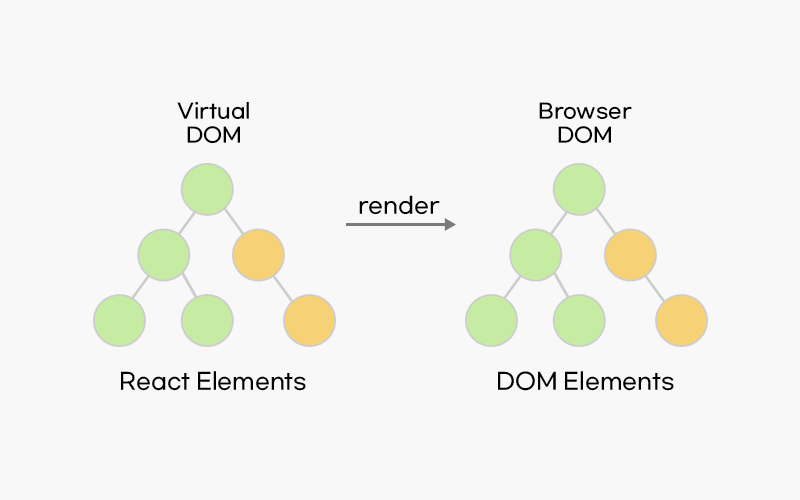
원래 Elements는 웹사이트에 대한 모든 정보를 담고 있는 객체인 DOM 에서 사용하는 용어
-
DOM Elements : 실제 화면에서 볼 수 있는 html 요소를 나타냄(div, ...등)
-
React Elements는 DOM Elements의 가상 표현
-
React Elements는 JavaScript 객체 형태로 존재함
- 이 객체를 만드는 역할을 하는 것이 바로 createElement 함수
- createElement 함수
React.createElement( type, [props], [...children] )- 컴포넌트 렌더링을 위해서 모든 컴포넌트가 createElement 함수를 통해 Elements로 변환됨
-
React Elements가 화면에서 보이는 것을 기술한 것을 토대로 실제 화면에서 보게 되는 DOM Elements를 생성함
-
Virtual DOM은 가상의 DOM으로 JavaScript 객체
- 메모리에 가상으로 존재하는 DOM으로, 리액트 상태가 업데이트 되면, 업데이트가 필요한 곳의 UI를 Virtual DOM을 통해 렌더링 함
- 실제 브라우저의 DOM과 비교한 후 차이가 있는 곳을 감지해 실제 DOM에 패치시킴
Elements의 특징
👆 불변성(immutable)
- Elements 생성 후에는 children이나 attributes를 바꿀 수 없음
Elements 렌더링하기
// Root DOM Node
<div id="root"></div>
배움의 기록을 차곡차곡