🕷️ 웹 크롤링(Web Crawling)
✅ 개념
웹사이트의 HTML 데이터를 파싱해서 정보를 추출하는 작업이다.
예를 들어, 네이버 뉴스 페이지에서 기사 제목들만 싹 모아서 가져오는 것이 웹 크롤링이다.
🧰 대표 도구: requests + BeautifulSoup
✔ 필요한 라이브러리 설치
pip install requests beautifulsoup4✔ 예제 코드
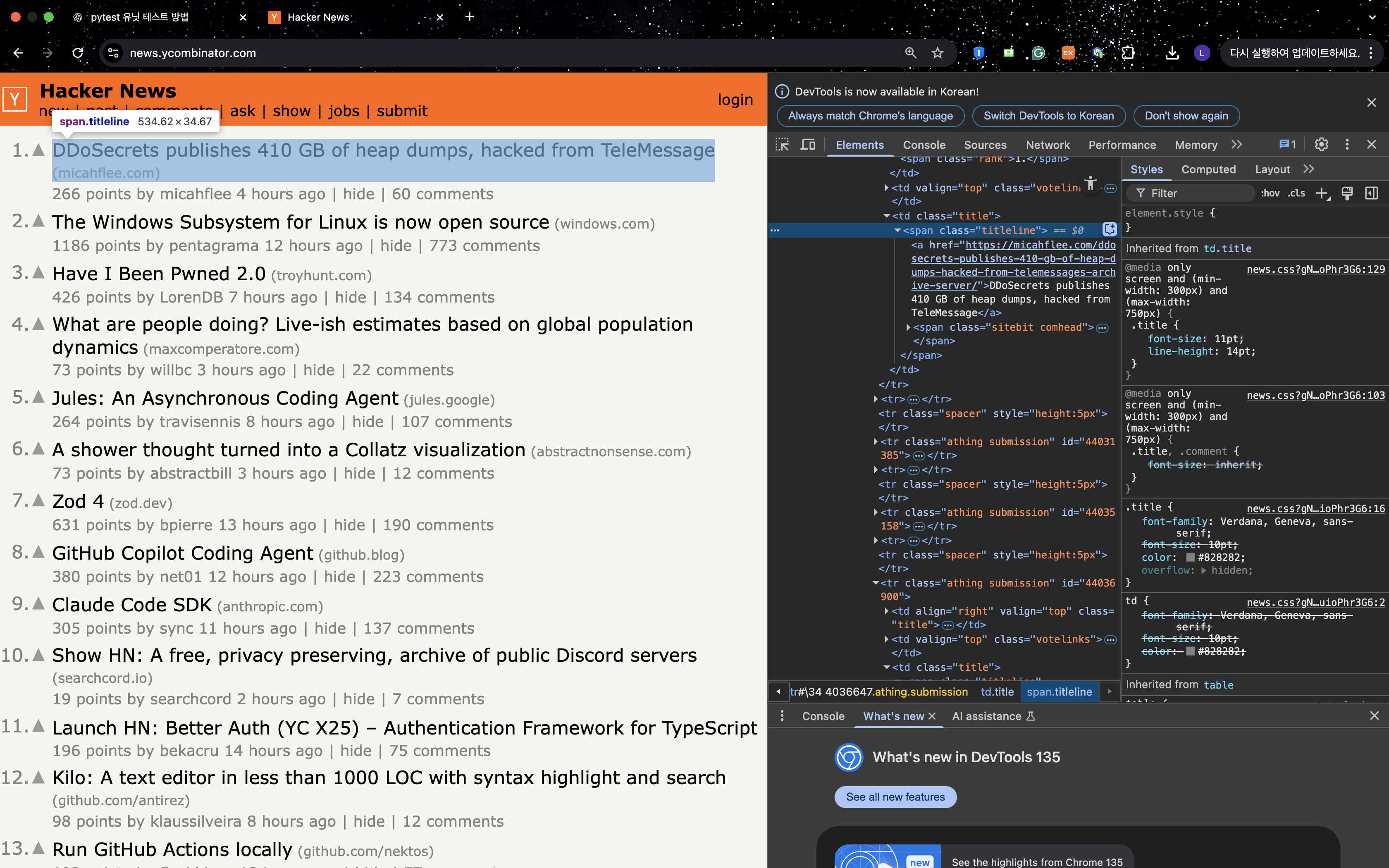
import requests
from bs4 import BeautifulSoup
from pprint import pprint

url = 'https://news.ycombinator.com/'
res = requests.get(url)
soup = BeautifulSoup(res.text, 'html.parser')

'''
titles = soup.select('.titleline')

for i in range(10):
    print(f'{i+1}. {titles[i].text}')
'''

data1 = soup.findAll('tr', {'class':'athing submission'})

for data in data1:
    title = data.find('span',{'class':'titleline'}).find('a').text
    pprint(title)
💡 requests는 웹페이지를 가져오고,
BeautifulSoup은 HTML을 구조적으로 파싱해서 원하는 요소를 추출합니다.
📌 언제 사용하나?
- 뉴스 기사 제목, 주가 정보, 쇼핑몰 가격 등 데이터 수집
- HTML 구조가 정적(Static)일 때
🤖 웹 자동화(Web Automation)
✅ 개념
마치 사람이 브라우저를 조작하듯 로그인, 클릭, 입력, 파일 다운로드 등을 자동으로 실행하는 작업이다.
예를 들어, 자동으로 로그인해서 포트폴리오 파일을 다운로드하거나, 게시글을 올리는 것 등이 이에 해당한다.
🧰 대표 도구: Selenium
✔ 설치
pip install selenium그리고 Chrome 브라우저용 드라이버(ChromeDriver) 설치 필요:
https://sites.google.com/chromium.org/driver/
✔ 예제 코드
from selenium import webdriver
from selenium.webdriver.common.by import By
import time

driver = webdriver.Chrome()  # 크롬 드라이버 실행
driver.get('https://www.google.com')

search_box = driver.find_element(By.NAME, 'q')
search_box.send_keys('Python web automation')
search_box.submit()

time.sleep(3)
driver.quit()
💡 selenium은 진짜 브라우저를 띄워서 사람처럼 마우스, 키보드 조작을 흉내낸다.
📌 언제 사용하나?
- 로그인, 버튼 클릭 등 인터랙션이 필요한 사이트
- JavaScript로 동적으로 바뀌는 페이지
- 인간 행동을 흉내내야 하는 자동화 업무
🧠 크롤링 vs 자동화 비교 요약
| 항목 | 웹 크롤링 | 웹 자동화 |
|---|---|---|
| 도구 | requests, BeautifulSoup | selenium |
| 목적 | 데이터 추출 | 실제 조작 시뮬레이션 |
| 속도 | 빠름 | 느림 |
| 대상 | 정적 HTML | 로그인, 동적 페이지 등 |
| 브라우저 실행 | ❌ 없음 | ✅ 있음 (실제 창 뜸) |
🚀 정리하자면
단순 정보 추출이면 → 크롤링
로그인/입력/클릭이 필요하면 → 자동화

개발자