Spring Boot JPA 스케쥴러 N+1 문제
프로젝트를 진행하고 있는 도중
스케쥴러를 이용해서 데이터를 30초마다 갱신하는 작업을 하고 있는데
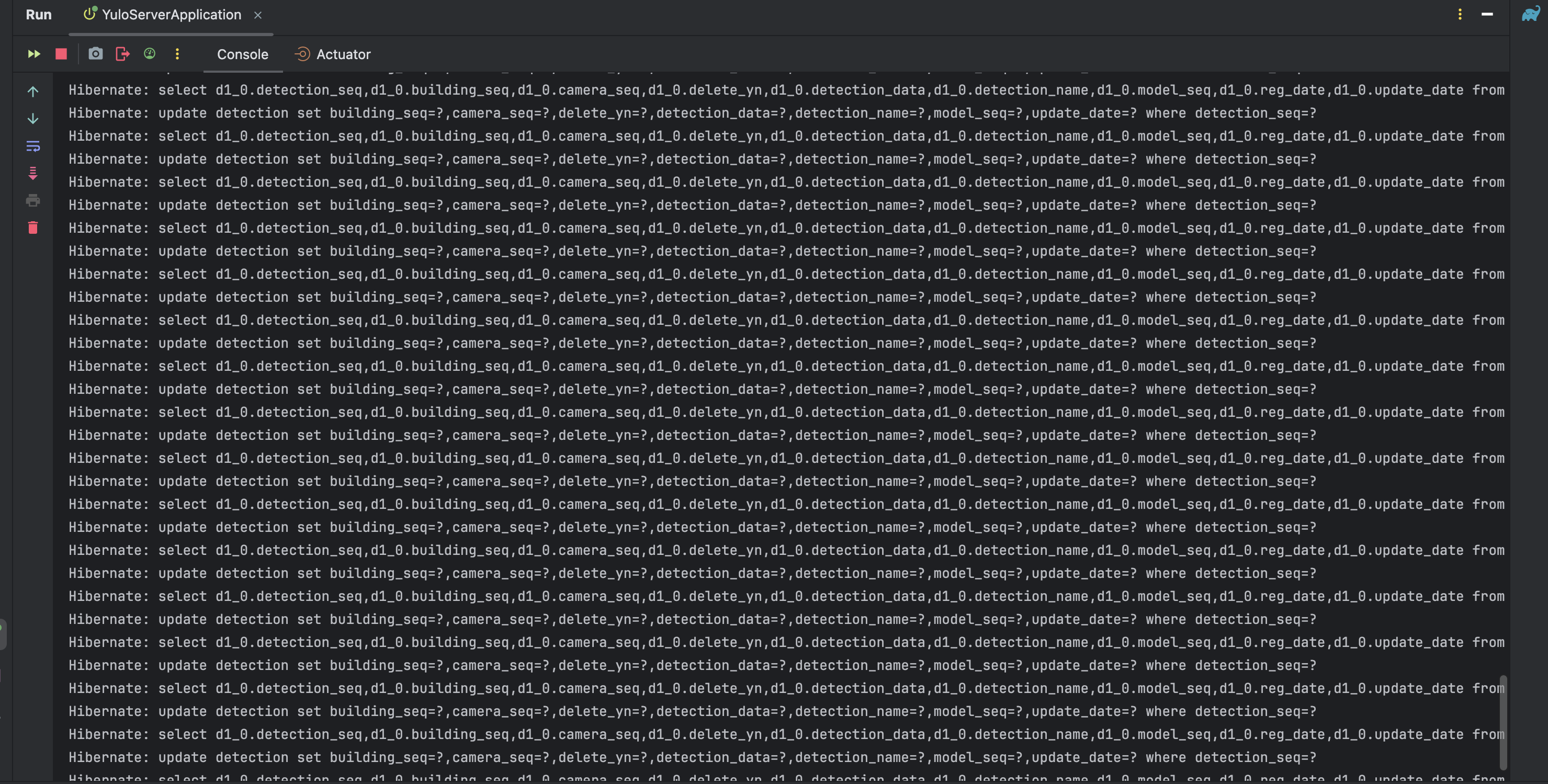
N+1 문제가 발생을 하였다.
package inhatc.yulo.server.detection.entity;

import inhatc.yulo.server.building.entity.Building;
import inhatc.yulo.server.camera.entity.Camera;
import inhatc.yulo.server.common.BaseTimeEntity;
import inhatc.yulo.server.model.entity.Model;
import jakarta.persistence.*;
import lombok.*;

@Entity
@Getter
@Setter
@ToString
@NoArgsConstructor
@AllArgsConstructor
@Builder
public class Detection extends BaseTimeEntity {

    @Id
    @GeneratedValue(strategy = GenerationType.IDENTITY)
    @Column(name = "detection_seq")
    private Long id;    // 감지내역 시퀀스

    private int detectionData;  // 검출내역 (임시)

    private String deleteYn;    // 삭제 여부(for 메인화면 감지내역)

    private String detectionName;

    @ManyToOne(fetch = FetchType.LAZY)
    @JoinColumn(name = "building_seq")
    private Building building;  // 호관 join

    @ManyToOne(fetch = FetchType.LAZY)
    @JoinColumn(name = "model_seq")
    private Model model;    // 모델 join

    @ManyToOne(fetch = FetchType.LAZY)
    @JoinColumn(name = "camera_seq")
    private Camera camera;  // 카메라 join
}
감지entity는 호관, 모델, 카메라 entity와 join을 한 상태이다.
처음에 원인은 repository에 너무 많은 쿼리를 선언해서 서버를 실행할 때 스케쥴러가 이를 다 불러오는걸로 착각했는데.........원인은 이게 아니였다.
[문제가 발생한] 스케쥴러 기존 코드
기존 코드에서 발생한 N+1 문제의 원인을 분석해본다.
DetectionUpdateScheduler.java
List<Detection> detections = detectionRepository.findAll();
detections.forEach(detection -> {
    detection.setDetectionData(detection.getDetectionData() + 1);
    detectionRepository.save(detection);
});-
findAll(): DetectionRepository에서 모든 Detection 엔티티를 조회한다. 이 조회는 한 번의 쿼리로 수행된다. -
forEach 루프에서
save()반복 호출: 각 Detection 엔티티에 대해detectionRepository.save(detection)가 호출되며, 이 때 매번 별도의 UPDATE 쿼리가 실행된다.
- 예를 들어, 100개의 Detection 행이 있을 경우:
- 1개의 SELECT 쿼리 + 100개의 UPDATE 쿼리가 발생한다.
이런 반복적인 쿼리 호출이 바로 N+1 문제이다.
-> 1개의 조회 + N개의 수정 쿼리가 발생하기 때문에 성능에 큰 영향을 준다.
[리팩토링 된] 스케쥴러 코드
DetectionRepositoryImpl.java
@Override
@Transactional
public void incrementDetectionDataForAll() {
    entityManager.createQuery("UPDATE Detection d SET d.detectionData = d.detectionData + 1")
            .executeUpdate();
}- JPQL 대량 업데이트 사용:
- EntityManager를 통해 하나의 쿼리로 모든 Detection 엔티티의 데이터를 업데이트한다.
- 예를 들어, 100개의 Detection 행이 있더라도, 단 하나의 Update 쿼리만 발생한다.
DetectionUpdateScheduler.java
@Scheduled(fixedRate = 30000)
public void updateDetections() {
    detectionListService.updateAllDetections();
    System.out.println("Detection table updated successfully");
}- Scheduler에서 서비스 호출:
- 이제 Scheduler는 서비스(DetectionService)를 통해 업데이트를 수행하고, 내부적으로 incrementDetectionDataForAll()이 호출된다.
- 단일 쿼리로 처리하므로 N+1 문제가 발생하지 않는다.
N+1 문제 해결 방법의 차이점
| 기존 코드 | 리팩토링된 코드 |
|---|---|
| findAll()로 전체 조회 후 루프에서 save()를 반복 실행 | JPQL로 하나의 쿼리로 모든 데이터를 업데이트 |
| N개의 엔티티에 대해 N개의 UPDATE로 쿼리 발생 | 1개의 쿼리로 모든 데이터 업데이트 |
| N+1 문제 발생 | N+1 문제 해결 |
전체 코드 설명
1.Repository 레벨
DetectionCustomRepositoryImpl.java
@Override
@Transactional
public void incrementDetectionDataForAll() {
    entityManager.createQuery("UPDATE Detection d SET d.detectionData = d.detectionData + 1")
            .executeUpdate();
}- DetectionCustomRepositoryImpl에서 EntityManager를 이용해 JPQL로 업데이트를 수행한다.
- 이 방식은 메모리로 데이터를 가져오지 않고 SQL UPDATE 쿼리를 직접 실행하여 모든 데이터를 한 번에 수정한다.
2. Service 레벨
DetectionListService.java
public void updateAllDetections() {
    detectionRepository.incrementDetectionDataForAll();
}- DetectionUpdateScheduler에서 Repository의 incrementDetectionDateForAll()를 호출한다.
3. Scheduler 레벨
DetectionUpdateScheduler.java
@Scheduled(fixedRate = 30000)
public void updateDetections() {
    detectionListService.updateAllDetections();
    System.out.println("Detection table updated successfully");
}- DetectionUpdateScheduler에서 30초마다 DetectionListService를 통해 업데이트를 수행한다.
4. html 레벨
DetectionList.html
setInterval(function () {
    location.reload();
}, 30000);- 프론트엔드에서 30초마다 페이지를 새로고침하여 최신 데이터를 표시한다.
결론
기존 코드에서 각 엔티티를 수정할 때마다 별도의 UPDATE 쿼리를 실행해 N+1 문제가 발생했다.
여러가지 해결방법을 시도했지만..(entityGraph, fatch join, Batch size 등등.. ) 해결하지 못했다.
리팩토링된 코드에서는 JPQL 대량 업데이트를 사용하여 하나의 쿼리로 모든 데이터를 수정했기 때문에 문제가 발생하지 않는다.