저자: 라울-게이브리얼 우르마 , 마리오 푸스코 , 앨런 마이크로프트
도서명: 모던 자바 인 액션
출판사: 한빛미디어
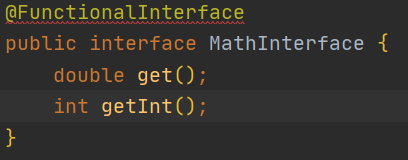
@FunctionalInterface
@FunctionalInterface 붙으면 인터페이스는 오직 하나의 메서드만 가질 수 있다.
Function Descriptor
함수형 인터페이스의 추상 메서드 시그니처를 함수 디스크립터라고 한다.
Supplier       ()    -> x
Consumer       x     -> ()
BiConsumer     x, y  -> ()
Callable       ()    -> x throws ex
Runnable       ()    -> ()
Function       x     -> y
BiFunction     x,y   -> z
Predicate      x     -> boolean
UnaryOperator  x1    -> x2
BinaryOperator x1,x2 -> x3
실행 어라운드 패턴
어떤한 작업을 할 때 준비 -> 실행 -> 정리의 역할이 구분되어 있는 코드들이 있습니다. 준비와 정리는 틀처럼 정해져 있고 실행부분만 바뀌는 코드의 형태들을 실행 어라운드 패턴이라고 합니다
https://tourspace.tistory.com/68
형식 추론, 제약
형식 추론
자바 컴파일러는 람다 표현식이 사용된 콘텍스트를 이용해서 람다 표현식과 관련된 함수형 인터페이스를 추론한다.
즉, 대상 형식을 이용해서 함수 디스크립터를 알 수 있으므로 람다의 시그니처도 추론 가능하다.
Comparator<Apple> c = (Apple a1, Apple a2) -> a1.getWeight().compareTo(a2.getWeight()); //형식을 추론하지 않음
Comparator<Apple> c = (a1, a2) -> a1.getWeight().compareTo(a2.getWeight()); //형식을 추론함
지역 변수 사용
람다 표현식에서는 익명함수처럼 자유변수(파라미터로 넘겨진 변수가 아닌 외부에서 정의된 변수)를 활용할 수 있다.
이와 같은 동작을 람다 캡처링이라 부른다.
int portNumber = 1337;
Runnable r = () -> System.out.println(portNumber);
람다에서 자유변수로 사용하기 위해서는 해당 지역변수가 final로 선언되어 있거나 실직적으로 final로 선언된 변수와 똑같이 사용되어야한다.
메서드 참조
메서드 참조를 만드는 방법
- 정적 메서드 참조
Integer의 parseInte 메서드 -> Integer::parseInt - 다양한 형식의 인스턴스 메서드 참조
String의 length 메서드 -> String::lenght - 기존 객체의 인스턴스 메서드 참조
Transaction 객체에 getValue 메서드가 있고, 이 객체를 할당받은 expensiveTransaction 지역 변수가 있다면
expensiveTransaction::getValue로 표현 가능
생성자 참조
ClassName::new 처럼 클래스명과 new 키워드를 이용해서 기존 생성자의 참조를 만들 수 있다.
Supplier<Apple> c1 = () -> new Apple();
Supplier<Apple> c2 = Apple::new;

Apple a1 = c1.get();
Apple a2 = c2.get();
Color(int, int, int) 처럼 인수가 세 개인 생성자를 사용하려면 직접 함수형 인터페이스를 생성해야 한다.
public interface TriFunction<T, U, V, R> {
  R apply (T t, U u, V v);
}

TriFunction<Integer, Integer, Integer, Color> colorFactory = Color::new;
람다, 메서드 참조 활용하기
자바 8의 List API에서 제공하는 sort 메소드
void sort(Comparator<? super E> c)

public class AppleComparator implements Comparator<Apple> {
  public int compare(Apple a1, Apple a2) {
    return a1.getWeight().compareTo(a2.getWeight());
  }
}

inventory.sort(new AppleComparator());
익명 클래스 사용
inventory.sort(new Comparator<Apple>() {
  public int compare(Apple a1, Apple a2) {
    return a1.getWeight().compareTo(a2.getWeight());
  }
}
람다 표현식 사용
Comparator의 함수 디스크립터(T, T) -> int를 사용해 람다 표현식으로 작성할 수 있다.
inventory.sort((Apple a1, Apple a2) -> a1.getWeight().compareTo(a2.getWeight()));

inventory.sort((a1, a2) -> a1.getWeight().compareTo(a2.getWeight()));
Comparator는 Comparable 키를 추출해서 Comparator 객체로 만드는 Function 함수를 인수로 받는 정적 메서드 comparing을 포함한다.
Comparator<Apple> c = Comparator.comparing((apple a) -> a.getWeight());

import static java.util.Compartor.comparing;
inventory.sort(comparing(apple -> apple.getWeight());
메서드 참조
import static java.util.Compartor.comparing;
inventory.sort(comparing(Apple::getWeight));
람다 표현식을 조합할 수 있는 유용한 메서드
Comparator
inventory.sort(comparing(Apple::getWeight)
  .reversed()
  .thenComparing(Apple::getCountry));
Predicate
Predicate 인터페이스는 복잡한 프레디케이트를 만들 수 있도록 negate, and, or 세가지 메서드를 제공한다.
예를 들어 '빨간 색이 아닌 사과'처럼 특정 프레디케이트를 반전시킬 때 negate 메서드를 사용할 수 있다.
Predicate<Apple> notRedApple = redApple.negate();and 메서드를 이용해 빨간색이면서 무거운 사과를 선택하도록 람다를 조합할 수도 있다.
Predicate<Apple> RedHeavyApple = redApple.and(apple -> apple.getWeight > 150);or 메서드를 이용해서 '빨간색이면서 무거운 사과 또는 그냥 녹색사과' 등의 조건을 만들 수 있다.
Predicate<Apple> RedHeavyOrGreenApple =
  redApple.and(apple -> apple.getWeight > 150)
          .or(apple -> GREEN.equals(a.getColor()));
Function
Function 인터페이스는 Function 인터페이스를 반환하는 andThen, compose 두 가지 디폴트 메서드를 제공한다.
andThen 메서드는 주어진 함수를 먼저 적용한 결과를 다른 함수의 입력으로 전달하는 함수를 반환한다.
Function<Integer, Integer> f = x -> x + 1;
Function<Integer, Integer> g = x -> x * 2;
Function<Integer, Integer> h = f.andThen(g); //g(f(x))
int result = h.apply(1); // 4를 반환
compose 메서드는 인수로 주어진 함수를 먼저 실행한 다음 그 결과를 외부 함수의 인수로 제공한다.
즉 f.andThen(g) 대신 compose를 사용하면 g(f(x))가 아니라 f(g(x))가 된다.
Function<Integer, Integer> f = x -> x + 1;
Function<Integer, Integer> g = x -> x * 2;
Function<Integer, Integer> h = f.compose(g); //f(g(x))
int result = h.apply(1); // 4를 반환
여러 유틸리티 메서드를 조합해서 다양한 변환 파이프라인을 만들수 있다.
헤더를 추가(addHeader)한 다음에, 철자 검사(checkSpelling)를 하고, 마지막에 푸터를 추가(addFooter) 할 수도 있다.
Function<String, String> addHeader = Letter::addHeader;
Function<String, String> transFormationPipeline =
  addHeader
    .andThen(Letter::checkSpelling)
    .andThen(Letter::addFooter);
https://way-be-developer.tistory.com/184
https://highlighter9.tistory.com/41