id
문서에서 고유한 식별자(identifier) 정의
- document.getElementById('아이디').innerHTML = '';
- document.getElementById('아이디').style.display = '';
- 모든 HTML CSS 요소 조작 가능
<div id="section"></div>
const sectionId = document.getElementById('section');


<div class="alert-box" id="alert">
  <h1> alert </h1>
  <button onclick="openAlert('none')"> close </button>
</div>

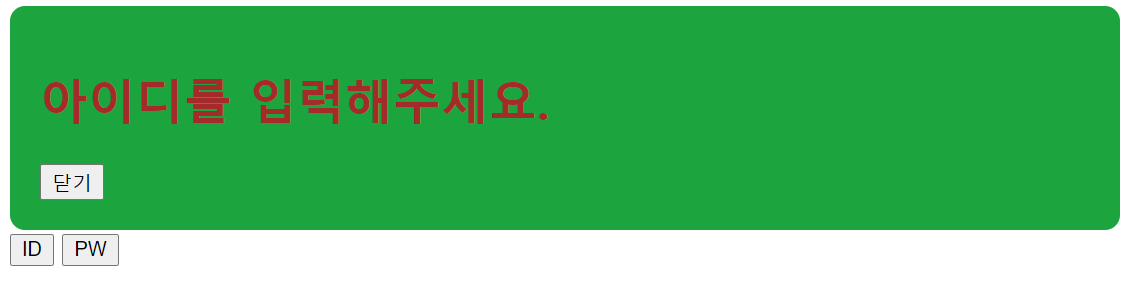
<button onclick="openAlert('아이디를 입력해주세요.')"> ID </button>
<button onclick="openAlert('비밀번호를 입력해주세요.')"> PW </button>
function closeAlert(hole) {
document.getElementById('alert').style.display = hole;
}
function openAlert(hole) {
document.getElementById('title').innerHTML = hole;
document.getElementById('alert').style.display = 'block';
}
class
HTML 요소에서 공통적으로 사용 가능한 속성 공백으로 구분된 요소의 별칭을 지정
- document.getElementsByClassName('클래스')[0].style.display = none;
- class는 여러 개 생성 가능하므로 getElements 복수 사용
<div class="alert-box" id="alert">
  <h1 id="title"> alert </h1>
  <button onclick="closeAlert('none')"> close </button>
</div><div class="section"></div>
const section = document.querySelector('.section');
function closeAlert(hole) {
document.getElementsByClassName('alert-box')[0].style.display = hole;
}addEventListener
- HTML에 직접 코드 작성할 필요 없음
// 기존 코드
<div class="alert-box" id="alert">
  <h1> alert </h1>
  <button onclick="openAlert('none')"> close </button>
</div>
function closeAlert(hole) {
document.getElementById('alert').style.display = hole;
}// addEventListener 활용
<div class="alert-box" id="alert">
<h1> alert </h1>
<button id=closeAlert> close </button>
</div>document.getElementById('closeAlert').addEventListener('click', function() {
document.getElementById('alert').style.display = 'none';
});