원리
- input타입 체크박스를 보이지않게 하고
- 체크박스를 label과 연결한다.
- label을 꾸며준다.
개념
속성선택자+상태선택자+인접선택자
속성선택자input[type=checkbox]:상태선택자checked + 인접선택자 label예제
📝HTML
  <div class="checkbox_wrapper">
    <fieldset>
      <div>
        <input type="checkbox" id="agree" checked="checked" />
        <span class="on"></span>
      </div>
      <label for="agree" class="chk_box">이용약관에 동의합니다.</label>
    </fieldset>
    <fieldset>
      <div class="checkbox_wrap">
        <input type="checkbox" id="agree1" class="chk_box1" checked="checked"/>
        <span class="on"></span>
      </div>
      <label for="agree1" class="chk_box1">이용약관에 동의합니다.</label>
    </fieldset>
  </div>
🌈CSS
.checkbox_wrap{
  position: relative;
  width: 16px;
  height: 16px;
}
label.chk_box1{
  margin-left: 4px;
}

/* 기본체크박스 숨기기 */
input[type="checkbox"].chk_box1 {
  display: none;
}

/* 체크되지 않은 체크박스 */
.checkbox_wrap span.on{
  width: 100%;
  height: 100%;
  border: 1px solid #734685;
  position: absolute;
  top: 0;
  left: 0;
  border-radius: 50%;
}

/* 체크된 체크박스 */
input[type="checkbox"]:checked.chk_box1 + .on {
  background-color: #734685;
}
.checkbox_wrap span.on::after {
  content: "";
  position: absolute;
  display: none;
  width: 6px;
  height: 10px;
  border: solid #fff;
  border-width: 0 2px 2px 0;
  -webkit-transform: rotate(45deg);
  -ms-transform: rotate(45deg);
  transform: rotate(45deg);
  position: absolute;
  left: 5px;
  top: 0;
}
input[type="checkbox"]:checked.chk_box1 + .on::after {
  display: block;
}
🐔결과
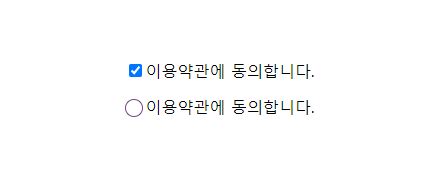
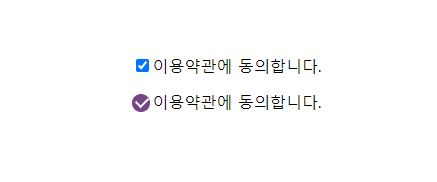
느낀점
프레임워크에 익숙해져있어서 스타일을 커스텀하는 것은 오랜만이라 시간이 좀 소요되었다. syntax도 많이 잊어버린 듯 하다. 그래도 조금씩 기억이 나기 시작하는 것을 보니 나쁘진 않은 것 같다. 더이상 잊어먹지 않도록 기록하기...

일단 해볼게요!✍🏻