정의
2차원 배열이란, 담는 원소의 자료형이 1차원 배열인 또다른 배열이다.
특징
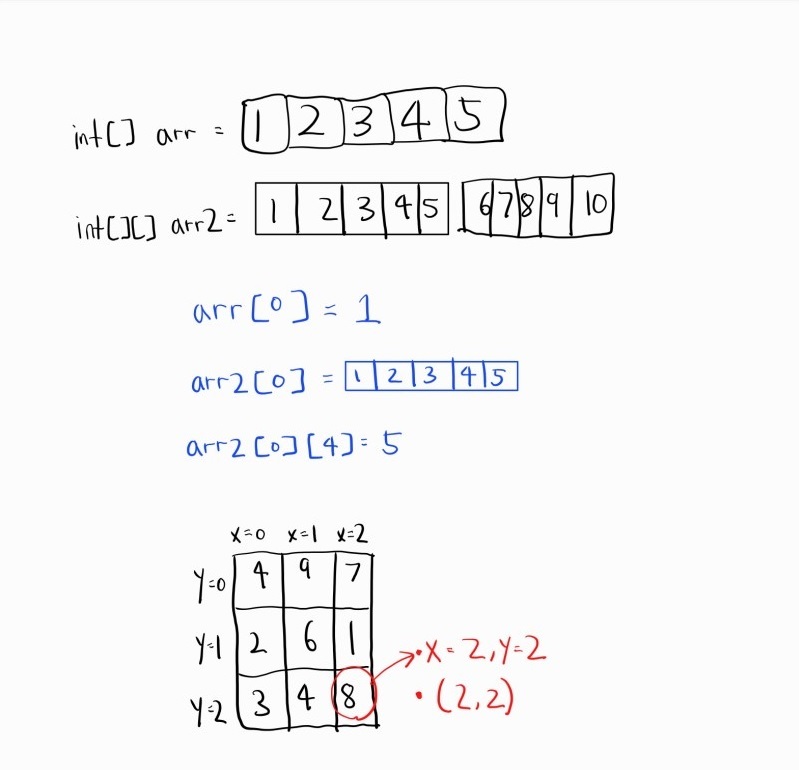
- 1차원 배열과 마찬가지로, 한가지 자료형만 들어갈 수 있다.
- 2차원 배열의 각 요소에 접근하려면 arr2[0][4] 와 같은 형태로 접근하면 된다.
ex)
int element = arr2[3][2];
return element;- 2차원 배열은 주로 그림과 같이 행과 열로 구성된 사각형으로 표현한다.
일반적으로 x,y 좌표를 이용해서 나타낸다.
ex) x=2,y=3 또는 (2,3)
선언 방법
- 크기만 선언하는 방법
    public static int[][] create2DArray() {
        int[][] array = new int[1][5];
        return array;
    }
위 코드는 1행 5열의 2차원 배열을 만드는 것이다.
타입은 int[][], String[][] 등과 같이 선언하다.
하지만 안에 들어갈 요소는 넣을 수 없으므로 기본값인 0이 들어간다.
- 값을 하드코딩하는 방법
    public static int[][] create2DArray() {
        int[][] array = {{1, 2, 3}, {4, 5, 6}};
        return array;
    }
이 함수는 2행 3열의 2차원 배열을 생성한다.
- 둘 다 하기
public static int[][] create2DArray() {
    int[][] array = new int[1][5];

    // 1행 5열의 값 초기화
    for (int j = 0; j < 5; j++) {
        array[0][j] = (j + 1) * 10;
    }

    return array;
}
크기로 선언하여 array를 만든 후, 값을 넣어서 리턴할 수도 있다.
출력하기
1차원 배열을 출력할 때는 Arrays.toString() 메서드를 사용할 수 있다.
하지만 2차원 배열을 출력할 때는 그 메서드를 사용할 수가 없다.
왜냐면 2차원 배열은 배열 안에 배열이 있는 형태이기 때문이다.
따라서 별도로 출력문을 구현해야한다.
쉽게하려면 아래처럼 loop를 한번 돌리면서 출력을 할 수 있다.
public class Main {
    public static void main(String[] args) {
        // 3행 4열의 2차원 배열 생성
        int[][] twoDArray = {
                {1, 2, 3, 4},
                {5, 6, 7, 8},
                {9, 10, 11, 12}
        };

        // 2차원 배열 출력
        for (int i = 0; i < twoDArray.length; i++) {
            for (int j = 0; j < twoDArray[i].length; j++) {
                System.out.print(twoDArray[i][j] + " ");
            }
            System.out.println();  // 다음 행으로 넘어갈 때 줄바꿈
        }
    }
}
출력 결과)
1 2 3 4
5 6 7 8
9 10 11 12
2차원 List
public class Main {
    public static void main(String[] args) {
        // 2차원 List 생성
        List<List<Integer>> twoDimensionalList = new ArrayList<>();

        // 각 행에 해당하는 List 추가
        twoDimensionalList.add(new ArrayList<>());
        twoDimensionalList.add(new ArrayList<>());

        // 각 행에 원소 추가
        twoDimensionalList.get(0).add(1);
        twoDimensionalList.get(0).add(2);
        twoDimensionalList.get(1).add(3);
        twoDimensionalList.get(1).add(4);

        // 출력
        for (List<Integer> row : twoDimensionalList) {
            for (int element : row) {
                System.out.print(element + " ");
            }
            System.out.println();
        }
    }
}
위처럼 List도 2차원 배열 List<List<Integer>> 와 같은 형태로 출력할 수 있다.
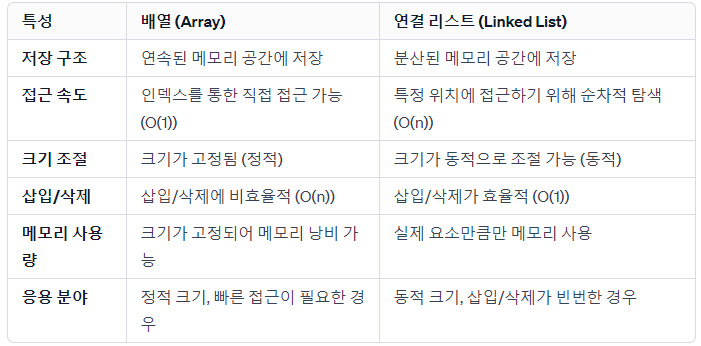
Array vs List

화려한 외면이 아닌 단단한 내면