GPU Server AI Model Serving
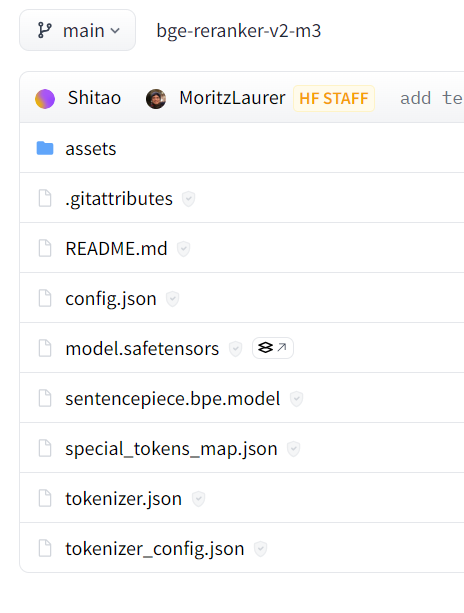
1. GPU 서버 모델 저장소 구성
Triton 서버는 특정 디렉토리 구조를 따라야 함
/models
├── model1
│ └── config.pbtxt
│ └── 1
│ └── model.onnx
├── model2
│ └── config.pbtxt
│ └── 1
│ └── model.pb
- model1과 model2는 모델 이름
- 1은 모델의 버전, Triton은 여러 버전의 모델을 동시에 관리
- model.onnx, model.pb 등은 모델 파일, 모델 파일 외에도 모델을 사용하는 데에 필요한 다양한 파일이 들어갈 수 있음
2. config.pbtxt (in GPU server)
NVIDIA Triton Inference Server에서 모델의 메타데이터와 구성을 정의하는 설정 파일
이 파일은 각 모델의 동작을 제어하고, 입력 및 출력 형식, 배칭, 리소스 사용 등 다양한 설정을 지정
-
예시
name: "model_name"
platform: "tensorflow_graphdef"  # 모델의 프레임워크 종류 (예: tensorflow_savedmodel, onnxruntime, tensorrt_plan 등)
max_batch_size: 8  # 배칭을 사용할 경우 최대 배치 크기

input [
  {
    name: "input_tensor"
    data_type: TYPE_FP32  # 입력 데이터 타입 (예: TYPE_INT32, TYPE_FP32 등)
    dims: [ 28, 28, 1 ]  # 입력 텐서의 형태 (batch 제외)
  }
]

output [
  {
    name: "output_tensor"
    data_type: TYPE_FP32
    dims: [ 10 ]
  }
]

# 추론 파이프라인에 대한 리소스 제한
instance_group [
  {
    count: 1  # 모델 인스턴스의 수 (GPU 개수와 독립적)
    kind: KIND_GPU  # 인스턴스를 할당할 장치 종류 (KIND_GPU 또는 KIND_CPU)
  }
]

# 배칭 설정
dynamic_batching {
  preferred_batch_size: [ 4, 8 ]  # 선호하는 배치 크기
  max_queue_delay_microseconds: 100  # 최대 큐 대기 시간 (마이크로초)
}

# 입력 텐서가 고정된 형태가 아닌 경우, 텐서의 크기를 자동으로 조절하는 설정
reshape {
  shape: [ -1, 28, 28, 1 ]  # 첫 번째 차원 (배치 크기)만 가변
}
3. tritonclient 라이브러리 (in Client)
triton 서버에 올라간 모델을 쓰기 위해 사용하는 라이브러리
import tritonclient.grpc.aio as agrpcclient
import tritonclient.grpc as grpcclient-
triton 서버 클라이언트 생성
grpcclient.InferenceServerClient-
infer 함수
서버 요청 및 모델 result 를 생성result = await self.aclient.infer(model_name, inputs, outputs=outputs)-
요청 객체 생성
InferenceRequest 생성

-
후처리
all_embeddings.extend(result.as_numpy("OUTPUT").tolist())as_numpy 등을 이용해 후처리
-
-
-
입력, 출력 형식 지정
-
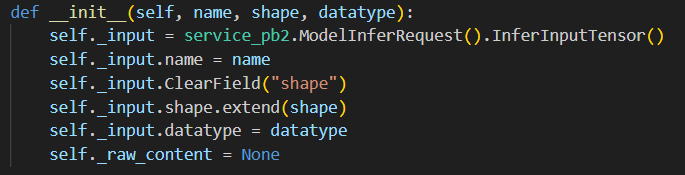
agrpcclient.InferInput("TEXT", input_data.shape, "BYTES")
name, shape, datatype 을 인자로 받음
-
agrpcclient.InferRequestedOutput("OUTPUT")
name, class_count 를 인자로 받음

-
4. model.py (in GPU server)
모델 폴더 내부에 있는 파일로 모델을 사용하는 로직
-
python Backend
triton 서버 내부에 파이썬 백엔드를 구성해야 함
https://docs.nvidia.com/deeplearning/triton-inference-server/user-guide/docs/python_backend/README.html
대략 다음과 같은 구조를 따른다.class TritonPythonModel: @staticmethod def auto_complete_config(auto_complete_model_config): def initialize(self, args): def execute(self, requests): return responses def finalize(self):- class TritonPythonModel
모든 파이썬 모델이 이 이름을 가져야 함- def auto_complte_config
모델이 서버에 로딩될 때 한번만 실행됨 (모델이--disable-auto-complete-config라는 명령 없이 로딩될 때)
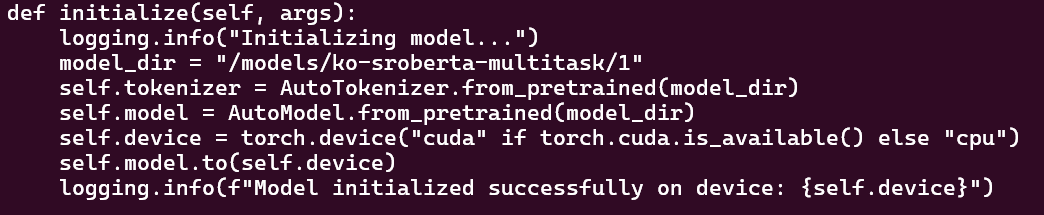
config.pbtxt 와 같은 내용을 설정해주는 함수 - def initialize
모델 로딩 시 한번만 실행
model_dir, tokenizer, model 등등을 설정해 줌
- def execute
사용자에게서 온 InferenceRequest 객체를 받아 처리함
- def auto_complte_config
- class TritonPythonModel
- triton_python_backend_utils as pb_utils
triton 서버로 전송되는 input, triton 서버에서 사용자에게 전송되는 output 을 다루는 라이브러리- input
input_tensor = pb_utils.get_input_tensor_by_name(request, "TEXT") - output
inference_response = pb_utils.InferenceResponse(output_tensors=[pb_utils.Tensor("OUTPUT", sentence_embeddings)])
- input
4. 연결해서 이해하기
- config.pbtxt
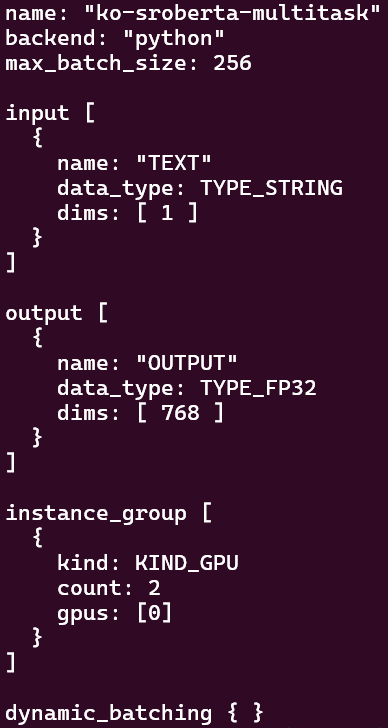
- InferInput

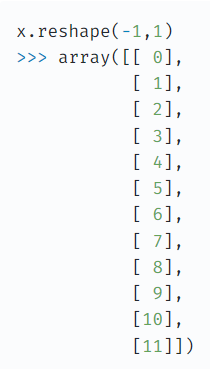
reshape(-1, 1) -> input dims 1 로 가는듯 - output dims 768 -> ko-sroberta-multitask 의 임베딩 차원이 768 임
