⭐️Context API
Context API는 리액트 프로젝트에서 전역적으로 사용할 데이터가 있을 때 유용한 기능입니다.
이를테면 사용자 로그인 정보, 애플리케이션 환경 설정, 테마 등 여러 종류가 있겠지요. Context API는 리액트 v16.3 부터 사용하기 쉽게 많이 개선되었습니다.
이 기능은 리액트 관련 라이브러리에서도 많이 사용되고, 리덕스, 리액트 라우터, styled-components 등의 라이브러리는 Context API를 기반으로 구현되어 있습니다.
⭐️Context API를 사용한 전역 상태 관리 흐름 이해하기
프로젝트 내에서 환경 설정, 사용자 정보와 같은 전역적으로 필요한 상태를 관리해야 할 때는 어떻게 해야 할까요?
리액트 애플리케이션은 컴포넌트 간에 데이터를 props로 전달하기 때문에 컴포넌트 여기저기서 필요한 데이터가 있을 때는 주로 최상위 컴포넌트인 APP의 state에 넣어서 관리합니다.
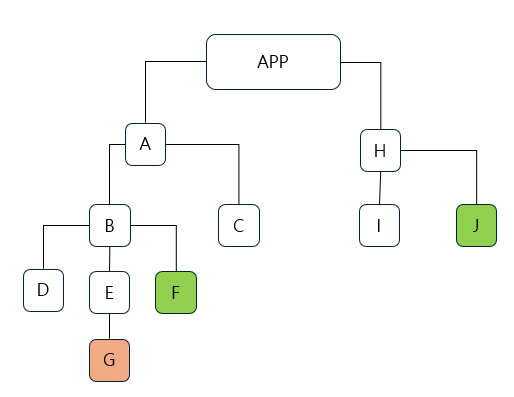
일반적인 전역 상태 관리 흐름
위와 같은 전역 상태 관리 흐름은 최상위 컴포넌트인 APP이 지니고 있는 value 값을 F 컴포넌트와 J 컴포넌트에 전달하려면 여러 컴포넌트를 거쳐야 합니다. F의 경우 App → A → B → F 의 흐름이고, J의 경우 App → H → J 의 흐름입니다. 이러한 방식은 유지 보수성이 낮아질 가능성이 있습니다.
이제 그러면 Context API 를 사용한다면 어떤 식으로 바뀌는지 확인해 보겠습니다.
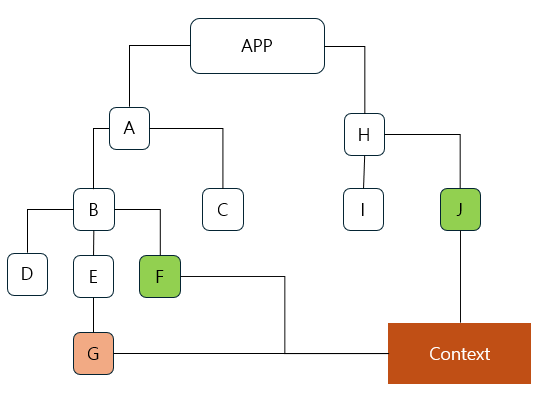
Context API를 사용한 전역 상태 관리 흐름
Context API를 사용하면 Context를 만들어 단 한 번에 원하는 값을 받아 와서 사용할 수 있습니다.
⭐️Context API 사용법 익히기
Context 생성해봅시다.
import React, { createContext, useState } from 'react';

// Context 생성
const MyContext = createContext();

// Context Provider 컴포넌트
const MyProvider = ({ children }) => {
  const [value, setValue] = useState('Hello, World!');

  return (
    <MyContext.Provider value={{ value, setValue }}>
      {children}
    </MyContext.Provider>
  );
};

export { MyContext, MyProvider };
Consumer란?
Consumer는 Context API에서 제공하는 데이터를 사용하기 위한 방법 중 하나입니다.
Consumer를 사용하면 함수형 컴포넌트나 클래스형 컴포넌트에서도 Context 데이터를 접근할 수 있습니다. useContext 훅을 사용하여 Consumer를 더 간단하게 사용할 수 있습니다.
import React from 'react';
import { MyContext } from './MyContext';

const MyComponent = () => {
  return (
    <MyContext.Consumer>
      {({ value, setValue }) => (
        <div>
          <p>{value}</p>
          <button onClick={() => setValue('Hello, React Context!')}>Change Value</button>
        </div>
      )}
    </MyContext.Consumer>
  );
};

export default MyComponent;
⭐️ 동적 Context 사용하기
- Context 생성 및 Provider 설정
- Consumer 컴포넌트에서 Context 사용
- 동적으로 Context 업데이트
1. Context 생성 및 Provider 설정
먼저, ThemeContext를 생성하고, ThemeProvider를 설정합니다.
import React, { createContext, useState } from 'react';

// 테마 Context 생성
const ThemeContext = createContext();

// ThemeProvider 컴포넌트
const ThemeProvider = ({ children }) => {
  const [theme, setTheme] = useState('light');

  const toggleTheme = () => {
    setTheme((prevTheme) => (prevTheme === 'light' ? 'dark' : 'light'));
  };

  return (
    <ThemeContext.Provider value={{ theme, toggleTheme }}>
      {children}
    </ThemeContext.Provider>
  );
};

export { ThemeContext, ThemeProvider };
2. Provider로 감싸기
애플리케이션의 루트 컴포넌트를 ThemeProvider로 감쌉니다.
import React from 'react';
import ReactDOM from 'react-dom';
import App from './App';
import { ThemeProvider } from './ThemeContext';

ReactDOM.render(
  <ThemeProvider>
    <App />
  </ThemeProvider>,
  document.getElementById('root')
);
3. Consumer 컴포넌트에서 Context 사용
useContext 훅을 사용하여 ThemeContext의 데이터를 접근하고 테마를 변경할 수 있는 컴포넌트를 작성합니다.
import React, { useContext } from 'react';
import { ThemeContext } from './ThemeContext';

const ThemeToggler = () => {
  const { theme, toggleTheme } = useContext(ThemeContext);

  return (
    <div style={{ background: theme === 'light' ? '#fff' : '#333', color: theme === 'light' ? '#000' : '#fff', padding: '20px' }}>
      <p>Current Theme: {theme}</p>
      <button onClick={toggleTheme}>Toggle Theme</button>
    </div>
  );
};

export default ThemeToggler;
4. App 컴포넌트에서 ThemeToggler 사용
App 컴포넌트에서 ThemeToggler 컴포넌트를 사용하여 테마를 변경할 수 있는 인터페이스를 제공합니다
import React from 'react';
import ThemeToggler from './ThemeToggler';

const App = () => {
  return (
    <div>
      <h1>Dynamic Context Example</h1>
      <ThemeToggler />
    </div>
  );
};

export default App;
동적 Context의 동작
ThemeContext는 현재 테마와 테마를 변경하는 함수를 포함합니다.ThemeProvider는useState훅을 사용하여 현재 테마 상태를 관리하고,toggleTheme함수를 통해 테마를 변경할 수 있습니다.ThemeToggler컴포넌트는useContext훅을 사용하여ThemeContext의 데이터를 접근하고, 테마 변경 버튼을 통해toggleTheme함수를 호출합니다.
⭐️ useContext, static contextType
React에서 Context API를 사용할 때, Consumer 대신 useContext 훅 또는 static contextType을 사용할 수 있습니다. 두 가지 방법 모두 Context의 데이터를 쉽게 접근하고 사용할 수 있도록 도와줍니다. 여기서는 테마 변경 예제를 이용해 각각의 방법을 설명하겠습니다.
useContext 훅 사용
바뀌는 부분: ThemeToggler 컴포넌트
// 기존 코드 (Consumer 사용)
/*
<MyContext.Consumer>
  {({ value, setValue }) => (
    <div>
      <p>{value}</p>
      <button onClick={() => setValue('Hello, React Context!')}>Change Value</button>
    </div>
  )}
</MyContext.Consumer>
*/
import React, { useContext } from 'react';
import { ThemeContext } from './ThemeContext';

const ThemeToggler = () => {
  const { theme, toggleTheme } = useContext(ThemeContext);

  return (
    <div style={{ background: theme === 'light' ? '#fff' : '#333', color: theme === 'light' ? '#000' : '#fff', padding: '20px' }}>
      <p>Current Theme: {theme}</p>
      <button onClick={toggleTheme}>Toggle Theme</button>
    </div>
  );
};

export default ThemeToggler;
static contextType 사용
바뀌는 부분: ThemeToggler 컴포넌트
// 기존 코드 (Consumer 사용)
/*
<MyContext.Consumer>
  {({ value, setValue }) => (
    <div>
      <p>{value}</p>
      <button onClick={() => setValue('Hello, React Context!')}>Change Value</button>
    </div>
  )}
</MyContext.Consumer>
*/

import React, { Component } from 'react';
import { ThemeContext } from './ThemeContext';

class ThemeToggler extends Component {
  static contextType = ThemeContext;

  render() {
    const { theme, toggleTheme } = this.context;

    return (
      <div style={{ background: theme === 'light' ? '#fff' : '#333', color: theme === 'light' ? '#000' : '#fff', padding: '20px' }}>
        <p>Current Theme: {theme}</p>
        <button onClick={toggleTheme}>Toggle Theme</button>
      </div>
    );
  }
}

export default ThemeToggler;
useContext 훅은 함수형 컴포넌트에서, static contextType은 클래스형 컴포넌트에서 사용됩니다.