
1. 클래스
반복되는 변수 또는 메서드(함수)를 미리 정해놓은 틀
맨 앞 글자를 대문자로 쓰는 것이 정석
💡 example
class Calculator:
	def __init__(self):
    	self.result = 0
    def add(self, num):
    	self.result += num
        return self.result

cal1 = Calculator()
cal2 = Calculator()

print(cal1.add(3))	#3 출력
print(cal1.add(4))	#7 출력
print(cal2.add(3))	#3 출력
print(cal2.add(7))	#10 출력
1. init
클래스를 시작할 때 가장 처음 실행되는 함수로
생성자로도 부름
(언더바2)init(언더바2)으로 시작하는 함수를 쓰게되면 클래스를 선언할 때 이 함수가 무조건 맨 처음 실행됨
class FourCal:
	def __init__(self, first, second):
    	self.first = first
        self.second = second
    def setdata(self, first, second):
    	self.first = first
        self.second = second
    def add(self):
    	result = self.first+self.second
        return result
a = FourCal(1,2)	#단순히 a=FourCal()이 아니라 생성자를 만들어야하기 때문에 인자를 써줘야함
2. 메소드
클래스 내에 존재하는 함수
메소드의 처음 인자는 self 존재
이 때 self는 객체를 의미
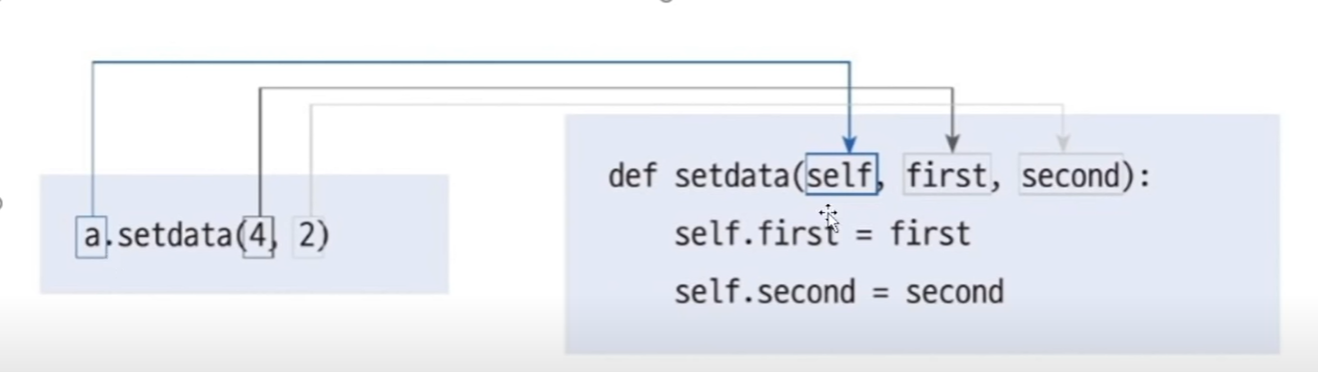
class FoulCal:
	def setdata(self, first, second):
    	self.first = first
        self.second = second
    def add(self):
    	result = self.first + self.second
        return result

a = FoulCal()
a.setdata(1,2)
print(a.first)	#1 출력
print(a.second)	#2 출력
print(a.add())	#3 출력
3. 상속
이미 만들어둔 부모 클래스를 이용해 더 많은 기능의 자식 클래스를 만듬
클래스 선언시 괄호내에 부모클래스 작성
기존의 class를 그대로 활용하기 위해 상속 사용
💡 example
부모클래스: FourCal
자식클래스: MoreFourCal
class FourCal:
	def __init__(self, first, second):	#자식에게도 init함수가 동일하게 동작
    	self.first = first
        self.second = second
    def setdata(self, first, second):
    	self.first = first
        self.second = second
    def add(self):
    	result = self.first+self.second
        return result

class MoreFourCal1(FourCal):
	pass	#추가된 내용 없이 오로지 FourCal만 상속

class MoreFourCal2(FourCal):
	def pow(self):
    	result = self.first ** self.second
        return result

a = MoreFourCal1(4,2)
print(a.add())	#6 출력, 상속완료

b = MoreFourCal2(4,2)
print(b.pow())	#16 출력
4. 메서드 오버라이딩
같은 이름의 메서드 존재시
자식클래스의 메서드가 우선시됨
class FourCal:
	def __init__(self, first, second):	#자식에게도 init함수가 동일하게 동작
    	self.first = first
        self.second = second
    def setdata(self, first, second):
    	self.first = first
        self.second = second
    def add(self):
    	result = self.first+self.second
        return result
    def mul(self):
    	result = self.first * self.second
        return result
    def sub(self):
    	result = self.first - self.second
        return result
    def div(self):
    	result = self.first / self.second
        return result

class SafeFourCal(FourCal):
	def div(self):
    	if self.second == 0:
        	return 0
        else:
        	return self.first / self.second

a = SafeFourCal(4,2)
print(a.div())
5. 클래스 변수와 객체 변수
1) 클래스 변수
클래스에 미리 선언해둔 변수
class FourCal:
	first = 2
    second = 3
a = FourCal()
print(a.first)	#2 출력
b = FourCal()
print(b.first)	#2 출력
<클래스 변수 변경>
class Family:
	lastname = "김"
Family.lastname = "박"
print(Family.lastname)

a = Family()
b = Family()
print(a.lastname)	#박 출력
print(b.lastname)	#박 출력
2) 객체 변수
class FourCal:
	def __init__(self, first, second):
    	self.first = first
        self.second = second
따라서 모든 객체가 공통된 변수를 사용해야할 경우에는 클래스 변수,
객체마다 다른 변수를 사용해야할 경우에는 객체 변수 사용
2. 모듈
파이썬 파일 하나에 함수, 변수, 클래스를 미리 정의해 후에 가져다 씀
1. import 모듈이름
모듈 내의 모든 함수를 가져옴
<mod1.py>
def add(a,b):
	return a+b
<hello.py>
import mod1
print(mod1.add(1,2))	#3 출력, mod1.add()와 같이 사용
2. from 모듈이름 import 모듈함수
함수 하나만 가져옴
<mod1.py>
def add(a,b):
	return a+b
<hello.py>
from mod1 import add
print(add(1,2))		#3 출력, mod1.add()가 아닌 오직 add만 사용
3. if (언더바2)name(언더바2) == "(언더바2)main(언더바2)"
현재 실행하려는 파일이 코드가 직접 작성된 파일일 경우 name이 main으로 설정,
가져다 쓸 때에는 name이 파일명으로 되어 if 내의 문장 실행 안 됨
<mod1.py>
def add(a,b):
	return a+b
def sub(a,b):
	return a-b
if __name__ == "__main__":	#mod1 파일에 들어와서 실행시에만 실행됨
	print(add(1,4))
    print(add(4,2))
<hello.py>
import mod1	#__name__이 main이 아니라 파일명이므로 위의 if문 실행 안 됨
4. 경로 설정
기본적으로 같은 경로에 존재하는 파일을 import 할 수 있음
기본 경로에 존재하지 않을 경우 경로 추가해야함
import sys
sys.path.append("C:\\jocoding\\subFolder")
import mod1
print(mod1.add(3,4))
3. 패키지
라이브러리의 개념으로 모듈 여러개를 모아둔 것
0. 패키지 파일 구조
game
-> init
-> sound/ init, cho
-> graphic/ init, render
game/
	__init__.py
    sound/
    	__init__.py
        echo.py
    graphic/
    	__init__.py
        render.py
1. init
패키지를 표현하는 파이썬 파일로, 패키지 관련 설정하는 곳
python 3.3v 이후로는 굳이 안 써도 됨
2. 실행
<echo.py>
def echo_test():
	print("echo")
<render.py>
def render_test():
	print("render")
1) import
import game.sound.echo
game.sound.echo.echo_test()
2) from 패키지(폴더)명 import 모듈
from game.sound import echo
echo.echo_test()
3) from 패키지(폴더)명 import 함수명
from game.sound.echo import echo_test
echo_test()
4) as
from game.sound.echo import echo_test as e
e()
5) all *
init 내에 존재하는 all을 변경하여
<__init__.py>
__all__ = ['echo','echo2']	#파일이 추가되면 이에 추가해 사용
<hello.py>
from game.sound import *
echo.echo_test()
6) relative 패키지
다른 폴더의 모듈을 가져올 때 이전 폴더로 되돌아가도록하는 역할
..은 부모 디렉토리이고 .은 현재 디렉토리를 의미
<render.py>
from ..sound.echo import echo_test	#이전 폴더(game) 내의 sound.echo에 있는 echo_test 함수 가져오기
def render_test():
	print("render")
    echo_test()
4. 예외처리
오류가 발생했을 때 어떻게 처리할지 정하는 것
기본구조
try:
	#오류가 발생할 수 있는 구문
except Exception as e:
	#오류 발생
else:
	#오류 발생하지 않음
finally:
	#무조건 마지막에 발생
1. try-except문
오류가 발생할 경우 except 실행
try:
	#문장
except 발생오류(전체 오류 원할 경우 Exception) as 오류메시지변수:
	#처리
💡 example
try:
	4/0
except ZeroDivisionError as e:
	print(e)	#ZeroDivisionError 출력
print("hi")	#hi 출력
2. try-else
오류가 발생하지 않을 경우 else 실행
💡 example
try:
	f = open('foo.txt', 'r')
exceopt FileNotFoundError as e:
	print(str(e))
else:
	data = f.read()
    print(data)
    f.close()
3. try-finally
마지막에 반드시 실행되어야 하는 문장을 finally에 작성
보통 파일 open할 경우 반드시 닫아줘야하므로 close해야함
💡 example
f = open('foo.txt', 'w')
try:
	#무언가 수행
    data = f.read()
    print(data)
except Exception as e:
	print(e)
finally:
	f.close()
4. 여러 개 오류 처리
if-else문처럼 여러 개 처리 가능
💡 example
try:
	a = [1,2]
    print(a[3])
    4/0
except ZeroDivisionError:
	print("0으로 나눌 수 없습니다")
except IndexError:
	print("인덱싱할 수 없습니다")
5. 오류 회피
except 구문에 pass를 넣을 경우, 오류가 발생했을 때 지나가도록 함
💡 example
try:
	f = open("없는파일", 'r')
except FileNotFoundError:
	pass
6. 오류 일부러 발생시키기
raise사용해 오류 발생시킴
그대로 사용할 경우 오류가 발생하도록해 오버라이딩해 변형하여 사용하도록 함
💡 example
class Bird:
	def fly(self):
    	raise NotImplementedError
class Eagle(Bird):
	def fly(self):
    	print("very fast")
eagle = Eagle()
eagle.fly()
5. 내장함수
파이썬에 기본적으로 포함하고 있는 함수
ex) print(), type(), abs()
| 함수 | 괄호 내 조건 | 의미 |
|---|---|---|
| print() | "" 또는 '' | 출력 |
| type() | 변수 또는 값 | 타입 출력 |
| abs() | 숫자 | 절댓값 |
| all() | 리스트 | 모두 참인지 검사, 0은 거짓으로 간주 |
| any() | 리스트 | 하나라도 참이 있는가 |
| chr() | 0~127 사이의 수 | ASCII 코드를 입력받아 문자 출력 |
| dir() | 변수 또는 값 | 명령어 모음 |
| divmod() | 튜플형태 | 몫과 나머지를 튜플 형태로 돌려줌 |
| enumerate() | 리스트 | 리스트를 딕셔너리처럼 사용 |
| eval() | 연산 | 실행 후 결과값을 돌려줌 |
| filter() | 함수+리스트 | 함수를 통과하여 참인 것만 돌려줌 |
| id() | 숫자 또는 변수 | 주소값 |
| input() | 입력받을문구 | 사용자 입력 받는 함수 |
| int() | 숫자 또는 문자열 | 10진수 정수 형태로 변환 |
| len() | 글자 또는 리스트 또는 튜플 | 길이 |
| list() | 문자 또는 튜플 | 리스트로 변환 |
| map() | 함수+리스트 | 각 요소가 수행한 결과를 돌려줌 |
| max() | 리스트 또는 문자열 | 최대값 |
| min() | 리스트 또는 문자열 | 최소값 |
| open() -mode 'w','r','a','b' | 파일 열기 모드(쓰기, 읽기, 추가모드,바이너리 모드) | |
| pow() | 수2개, a의 b제곱 | 제곱한 결과값 반환 |
| range() | 숫자 또는 범위의 앞뒤 수 | 범위 |
| round() | 반올림 | |
| sorted() | 정렬 | |
| str() | 문자열 반환 | |
| tuple() | 튜플형 변환 | |
| zip() | 리스트 여러개 | 자료형 묶어주는 역할 |
💡 example
#filter
def positive(x):
	return x>0
a = list(filter(positive, [1,-3,2,0,-5,6]))
print(a)

#map_1
def two_times(x): return x*2
a = list(map(two_times, [1,2,3,4]))
print(a)
#map_2
a = list(map(lambda a: a*2, [1,2,3,4]))
print(a)
6. 외장함수
라이브러리에서 가져와 사용하는 함수
import 사용
1. sys.argv
시스템의 argument 출력
import sys
print(sys.argv)
2. pickle
딕셔너리 등의 형태를 파일 형태로 저장해 언제든 본래 형태로 꺼내옴
import pickle
f = open("test.txt", 'wb')
data = {1: 'python', 2:'you need'}
pickle.dump(data, f)
f.close()
3. time
import time
print(time.time())
4. time.sleep
import time
for i in range(5):
	print(i)
    time.sleep(1)
5. random
import random
print(random.random())
print(random.randint())
6. webbrowser
import webbrowser
webbrowser.open("http://google.com")