서버와의 데이터 전달 , REST API를 이용한 통신을 말함
대표적으로 3가지를 이용하여 네트워크 통신 가능
-
URLSession : Apple의 Foundation프레임워크에서 제공하는 클래스로 네트워크 통신
→ 이 글에서는 URLSession에 대한 공부 및 정리
-
RxSwift : ReactiveX(Reactive Extensions) 라이브러리의 Swift 버전
→ 나중에 다룰 예정
-
Combine : iOS 13부터 도입한 공식적인 리액티브 프로그래밍 프레임워크
→ 나중에 다룰 예정
URL 구성 요소
API 엔드 포인터와 함께 특정 자원에 대한 요청 식별 및 전달 → 즉 데이터 통신을 위해 필요한 자원

프로토콜(Protocol)
통신 클라이언트와 서버간의 통신규약
- http : 보안 없는 통신
- https: 암호화 된 통신
도메인(Domain)
서버가 이름을 가진다면 해당요소가 이름을 의미한다고 생각하면 된다
- API서버가 호스팅되는 서버의 주소를 나타냄
포트(Port)
API 요청을 수신하는데 사용되는 포트
- http의 기본 포트는 80
- https의 기본포트는 443
- 생략 가능
경로(Path)
원하는 데이터 자원 및 서비스의 위치를 나타냄
- 엔드포인트와 연관되어 특정 자원이나 서비스를 식별
ex) /auth/signup → 유저의 회원가입을 의미
쿼리 매개변수(Query Parameters, 옵션)
서버에서 데이터를 어떻게 전달할지 어떻게 받을지에 대한 옵션을 생각하면 된다
- URL에 추가 정보를 전달할때 사용
REST API
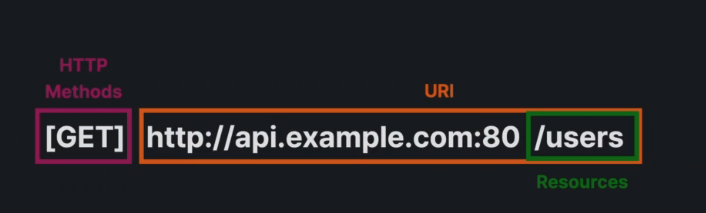
HTTP 프로토콜 기반으로 클라이언트와 서버간의 통신 규약의미
데이터베이스의 CRUD를 안다면 이해가 쉬움HTTP 메서드
GET
Read, 말그대로 데이터를 읽는다
ex) 유저의 이름을 조회한다
POST
Create, 데이터를 생성
ex) 회원가입
PUT
Update : 기존 데이터를 수정
ex) 유저의 닉네임을 변경
DELETE
Delete : 데이터 삭제
URI
자원을 찾을수 있는 주소를 나타낸다.
- 리소스를 식별하기 위한 일반적인 식별자
- URL과 URN의 상위 개념
- 특정 리소스를 식별하기 위한 문자열의 일반적인 형식
URL과 URI의 차이
- URL
- 리소스의 위치를 나타내는 구체적인 형태의 URI라는점
- 주로 웹에서 사용되며,특정한 리소스 위치를 나타내는 주소
- 모든 URL은 URI이지만, 모든 URI가 URL은 X
- URI는 식별자 자체를 의미 ↔ URL는 식별자가 리소스 위치를 나타내는것
자원(Resources)
REST API에서는 모든 데이터가 자원으로 표현
- JSON 형식 사용
ex) 사용자 이름, 나이, 성별, 프로필 이미지 드등
연결
- 클라이언트와 서버간의 통신을 위해 연결 유지 X
- 요청시 통신
URLSession
네트워크 데이터를 가져오거나 보내는 작업 수행
특징
비동기적 네트워킹
- 비동기적을 네트워크 요청을 처리함으로 백그라운드에서 네트워크 작업 수행 가능
- 동기로 이루어질때의 문제점
-
UI 블로킹 : UI는 메인스레드에서 작업을 수행하는데 네트워크 호출이 완료될때까지 App이 작동을안하고 멈추게됨
→ 쉽게 설명하자면 데이터를 다전달받기전까지 앱의 화면이 나오지않는다는 말, 경험상으로 제대로 처리 하지 못하면 앱이 멈추거나 종료된다
-
성능저하
- 작업을 동시에 처리하지 못해 하나의 작업이 완료될때까지 기다려야됨으로 더많은 시간소요
-
데드락 위험
- 데드락 : 두개 이상의 프로세스나 스레드가 서로자원을 얻지 못해 다음처리를 하지 못하는상태

→ 위의 사진을 보면 쉽게 이해가능 : 도로는 하나인데 두개의 차가 서로 직진하기위해서 기다리는 상태를 데드락 이라고 생각하면 된다!!
→ 메인스레드에서 만약 네트워크 작업시 UI와 네트워크 모두 같은 자원을 사용하기위해 무한정 기다릴수 있다
- 데드락 : 두개 이상의 프로세스나 스레드가 서로자원을 얻지 못해 다음처리를 하지 못하는상태
-
다양한 데이터 전송 방식 지원
- 데이터 업로드/다운로드 가능
- JSON, 이미지, 파일 등 다양한 데이터 형식 처리 가능
- 보통 JSON 활용
캐시와 쿠키 관리
- 네트워크 응답을 캐싱하고 쿠키를 관리할수 있는 기능제공
예시
GET예시
private func fetchRemoteProduct(){
        let productID = Int.random(in: 1 ... 100)
        if let url = URL(string: "https://dummyjson.com/products/\(productID)"){
            let task = URLSession.shared.dataTask(with: url) { data, response, err in
                if let err = err{
                    print("Error:\(err)")
                }else if let data = data{
                    do{
                        let product = try JSONDecoder().decode(RemoteProduct.self, from: data)
                        self.currentProduct = product
                        print(self.currentProduct)(1)
                    }catch{
                        print("Decode Error:\(String(describing: err))")
                    }
                }
            }
            task.resume()
        }
    }
(1) 불러온 데이터
**Optional(URLSessionStudy.RemoteProduct(id: 17, title: "Tree Oil 30ml",
 description: "Tea tree oil contains a number of compounds,
 including terpinen-4-ol, that have been shown to kill certain bacteria,",
 price: 12.0, thumbnail: https://i.dummyjson.com/data/products/17/thumbnail.jpg))**
POST 예시
import Foundation

// URLSession 인스턴스 생성
let session = URLSession.shared

// URL 생성
if let url = URL(string: "https://api.example.com/data") {
  // URLSessionDataTask를 사용하여 비동기적으로 데이터 요청

  // URLRequest 생성
  var request = URLRequest(url: url)

  // HTTP 메서드 설정 (POST)
  request.httpMethod = "POST" // GET / PUT / DELETE 사용 가능

  // HTTP 헤더 설정
  request.addValue("application/json", forHTTPHeaderField: "Content-Type")

  // HTTP Body에 보낼 데이터 설정 (JSON 형식)
  let parameters: [String: String] = [
    "value1": "example value",
    "value2": "example value"
    // 추가적인 필요한 데이터 추가 가능
  ]

  // HTTP Body에 JSON 데이터 설정
  request.httpBody = try? JSONEncoder().encode(parameters)

  let task = session.dataTask(with: request) { (data, response, error) in
    if let error = error {
      print("Error: \(error)")
    } else if let data = data {
      // 데이터를 받아온 후 처리하는 로직을 작성
      print("Received data: \(data)")
    }
  }

  // 네트워크 요청 시작
  task.resume()
}
Decodabe, Encodable, Codable
Decodabe
데이터를 객체로 디코딩할때 사용
- 서버에서 데이터를 불러와 데이터 모델로 변경하는데 필요한 프로토콜
- 해당 프로토콜을 준수하는 객체는 외부 데이터를 해석하고 그데이터를 객체의 프로퍼티로 매핑할 수 있어야한다
Decodabe & **CodingKeys** 예시
struct User: Decodable {
    let id: Int // 디코딩할 프로퍼티
    let name: String // 디코딩할 프로퍼티
   ~

		public enum CodingKeys: String, CodingKey {
      case id = "key"
      case name
    }

    // Decoding - 디코딩
    init(from decoder: Decoder) throws {
        let container = try decoder.container(keyedBy: CodingKeys.self)
        id = try container.decode(Int.self, forKey: .id)
        name = try container.decode(String.self, forKey: .name)
    }
}
!! 디코딩할 프로퍼티의 데이터 타입/이름은 서버에서 불러온 데이터의 타입/이름과 같아야한다 !!
- 같지 않으면 디코딩 실패, 이름/타입 모두 같아야한다
- JSON 파일에서 데이터 타입과 이름 잘 확인하여 프로퍼티 작성
CodingKeys
- 프로퍼티들에 대한 매핑을 제공하는 역할
서버에서 불러온 데이터 이름을 내가 원하는 이름으로 변경하고 싶을때
CodingKeys를 사용하면 된다
Encodable 프로토콜
객체를 데이터로 인코딩할 때사용
- 서버에 데이터를 보내기위해 Swift의 데이터 모델을 외부 데이터(JSON)로 변환하는데 필요한 프로토콜
- 해당 프로토콜을 준수하는 객체는 객체의 프로퍼티를 외부 데이터 형식(JSON)으로 인코딩할 수 있어야 합니다.
struct User: Encodable {
    let id: Int
    let name: String
    // 다른 프로퍼티들...

		public enum CodingKeys: String, CodingKey {
      case id = "key"
      case name
    }

    // Encodable 프로토콜을 준수하기 위한 커스텀 인코딩 로직
    func encode(to encoder: Encoder) throws {
        var container = encoder.container(keyedBy: CodingKeys.self)
        try container.encode(id, forKey: .id)
        try container.encode(name, forKey: .name)
        // 다른 프로퍼티들도 인코딩 가능
    }
}- 위의 Decodabe과 반대로 생각하면 된다.
- CodingKeys : 위에서 설명한것과 동일
CodingKeys 사용
- 경험상 잘 사용하지 않았음 : 서버에서 받아온 데이터의 종류가 많을 경우 CodingKeys 사용시 헷갈리는 경우 발생
Codable 프로토콜
두 가지 하위 프로토콜
**Encodable**과Decodable을 결합
-
외부 데이터(JSON)를 Swift의 데이터 모델로 변환,Swift의 데이터 모델을 외부 데이터로 변환을 모두 수행해야 할때 사용가능
→ 쉽게 설명하면 서버에서 데이터 불러오고 보내는것을 둘다 할경우에 사용한다고 생각하면 된다.
struct User: Codable {
    let id: Int
    let name: String
    // 다른 프로퍼티들...

		public enum CodingKeys: String, CodingKey {
      case id = "key"
      case name
    }

    // Encodable 프로토콜을 준수하기 위한 커스텀 인코딩 로직
    func encode(to encoder: Encoder) throws {
        var container = encoder.container(keyedBy: CodingKeys.self)
        try container.encode(id, forKey: .id)
        try container.encode(name, forKey: .name)
        // 다른 프로퍼티들도 인코딩 가능
    }

    // Decoding - 디코딩
    init(from decoder: Decoder) throws {
        let container = try decoder.container(keyedBy: CodingKeys.self)
        id = try container.decode(Int.self, forKey: .id)
        name = try container.decode(String.self, forKey: .name)
    }
}
Codable 만 사용하면 되지 않나 왜 Encodable 와 Decodabe 나눠쓸까 ?
- 당연한 이야기지만 다른 동작이기 때문
- 코드를 분리하여 사용시 코드가 더 깔끔하고 관리하기 쉽기 때문
- 한눈에 디코딩할 데이터인지 인코딩할데이터인지 파악가능
- 특정 요구사항이나 복잡한 시나리오에서는 나눠서 써야되는 경우가 있기 때문